惯性聚合 高效追踪和阅读你感兴趣的博客、新闻、科技资讯
阅读原文 在惯性聚合中打开

推荐订阅源

Threat Intelligence Blog | Flashpoint
WordPress大学
WordPress大学
Google DeepMind News
T
The Exploit Database - CXSecurity.com
阮一峰的网络日志
阮一峰的网络日志
F
Fox-IT International blog
The GitHub Blog
The GitHub Blog
Engineering at Meta
Engineering at Meta
I
Intezer
P
Privacy & Cybersecurity Law Blog
B
Blog RSS Feed
Latest news
Latest news
小众软件
小众软件
A
Arctic Wolf
Attack and Defense Labs
L
LINUX DO - 热门话题
博客园 - 聂微东
B
Blog
T
Troy Hunt's Blog
IntelliJ IDEA : IntelliJ IDEA – the Leading IDE for Professional Development in Java and Kotlin | The JetBrains Blog
Malwarebytes
Malwarebytes
爱范儿
爱范儿
Recorded Future
Recorded Future
Apple Machine Learning Research
人人都是产品经理
人人都是产品经理
D
Docker
T
Threat Research - Cisco Blogs
MyScale Blog
MyScale Blog
Martin Fowler
Martin Fowler
E
Exploit-DB.com RSS Feed
F
Fortinet All Blogs
freeCodeCamp Programming Tutorials: Python, JavaScript, Git & More
PCI Perspectives
PCI Perspectives
Scott Helme
Scott Helme
N
Netflix TechBlog - Medium
博客园 - 三生石上(FineUI控件)
T
True Tiger Recordings
C
Check Point Blog
Microsoft Azure Blog
D
Darknet – Hacking Tools, Hacker News & Cyber Security
K
Kaspersky official blog
Security Latest
Security Latest
The Hacker News
The Hacker News
Microsoft Security Blog
Hacker News - Newest:
Hacker News - Newest: "LLM"
Stack Overflow Blog
Stack Overflow Blog
S
Security @ Cisco Blogs
C
CXSECURITY Database RSS Feed - CXSecurity.com
OSCHINA 社区最新新闻
OSCHINA 社区最新新闻
M
Microsoft Research Blog - Microsoft Research

阿豪运维笔记

Win7系统如何通过CMD命令行窗口批量关闭相同进程 Win10系统中Windows 资源管理器是什么进程为啥重启下这个进程界面就正常了 Win7系统中explorer.exe是什么进程为啥重启下这个进程桌面显示就正常了 解决普通用户使用su命令切换root用户时提示su Authentication failure图文教程 轻松搞定Windows系统自定义安装日期图文教程 Windows2025系统如何设置指定时间定时自动重启系统图文教程 Windows2022系统如何设置指定时间定时自动重启系统图文教程 Windows2019系统如何设置指定时间定时自动重启系统图文教程 Windows2016系统如何设置指定时间定时自动重启系统图文教程 OpenSUSE 16如何安装Linux Web可视化管理工具Cockpit Fedora 41如何安装Linux Web可视化管理工具Cockpit Fedora 40如何安装Linux Web可视化管理工具Cockpit Debian13如何安装Linux Web可视化管理工具Cockpit Debian12如何安装Linux Web可视化管理工具Cockpit Ubuntu24如何安装Linux Web可视化管理工具Cockpit Ubuntu22如何安装Linux Web可视化管理工具Cockpit Alibaba Cloud Linux 4如何安装Linux Web可视化管理工具Cockpit Alibaba Cloud Linux 3如何安装Linux Web可视化管理工具Cockpit Rocky Linux 10如何安装Linux Web可视化管理工具Cockpit
Windows2012系统如何设置指定时间定时自动重启系统图文教程
2026-04-28 · via 阿豪运维笔记

Windows2012系统怎么设置指定时间定时自动重启系统呢?我们可以通过系统自带的任务计划程序来设置指定时间重启,写个教程记录下Windows2012系统如何设置指定时间定时自动重启系统,同时也给有需要的同学提供一丢丢帮助。

操作步骤

打开任务计划程序

选择左下角的开始菜单打开 >> 找到管理工具点击进入,在管理工具界面找到任务计划程序点击打开
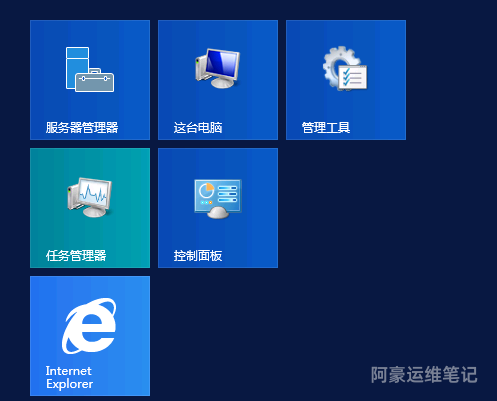
image.png

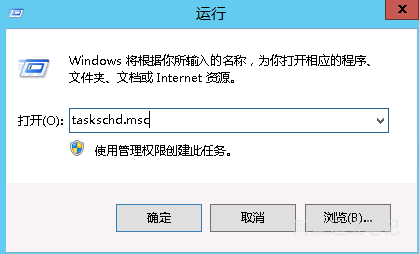
或者在运行窗口下输入如下taskschd.msc命令打开任务计划程序

image.png

创建任务计划

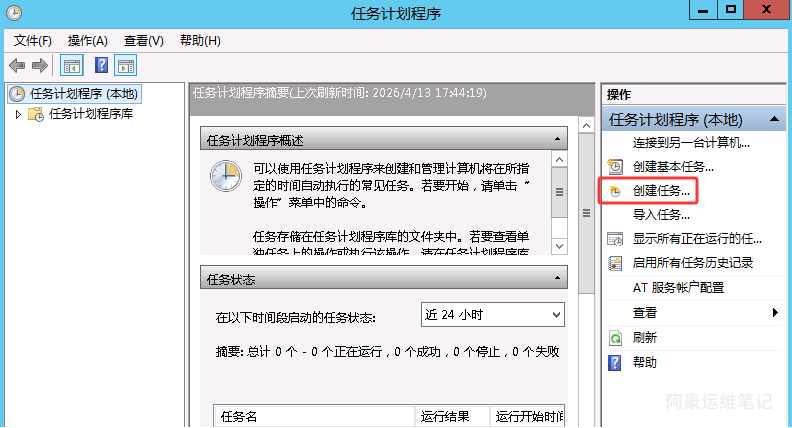
在任务计划程序弹框中,选择创建任务 

image.png

在创建任务弹框中,在常规设置界面中,名称设置为定时重启,选中不管用户是否登录都要运行 ,选中不存储密码 ,选中使用最高权限运行 
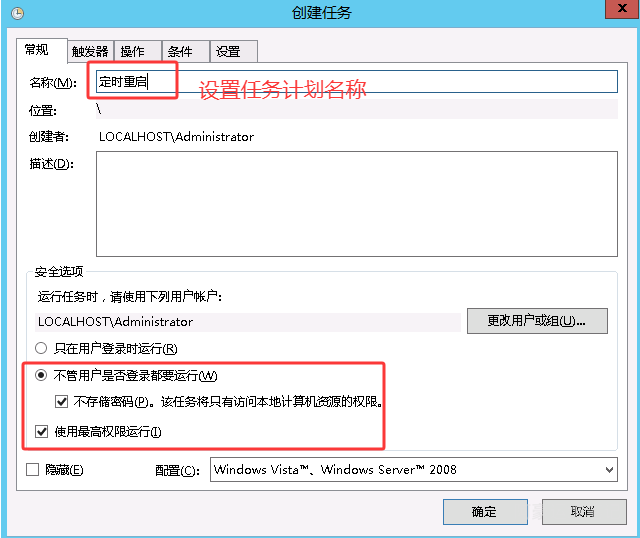
image.png

在触发器中,选择新建触发器,相关设置如图

说明:可以设置每天(每隔几天)/每周/每月时间重启。步骤3设置什么时间重启,时间可以自定义,默认显示的时间是添加触发器的时间

如图设置的是开始时间2026年4月13号17点51分05秒,设置选择每天,就是2026年4月13号之后每天17点51分05秒执行一次任务计划重启系统,也可以设置每隔几天执行一次任务计划
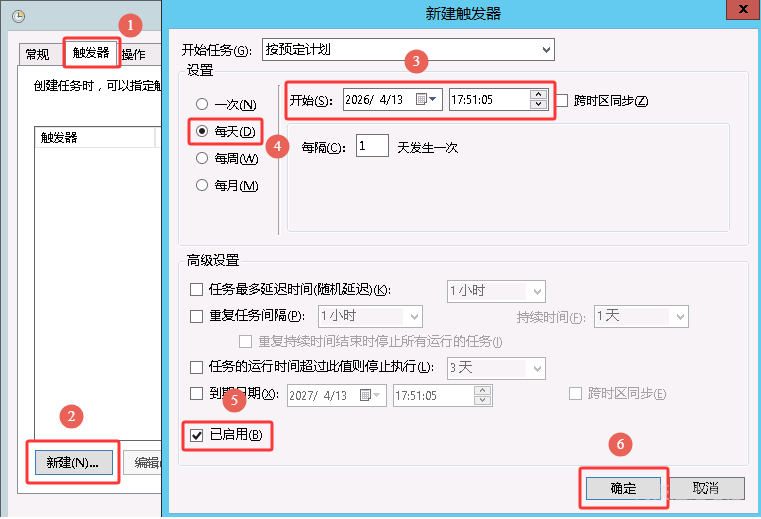
image.png

在操作中,选择新建操作,相关设置如图

说明:C:\Windows\System32\shutdown.exe 为系统自带程序可用于关机/重启

/r  为重启参数
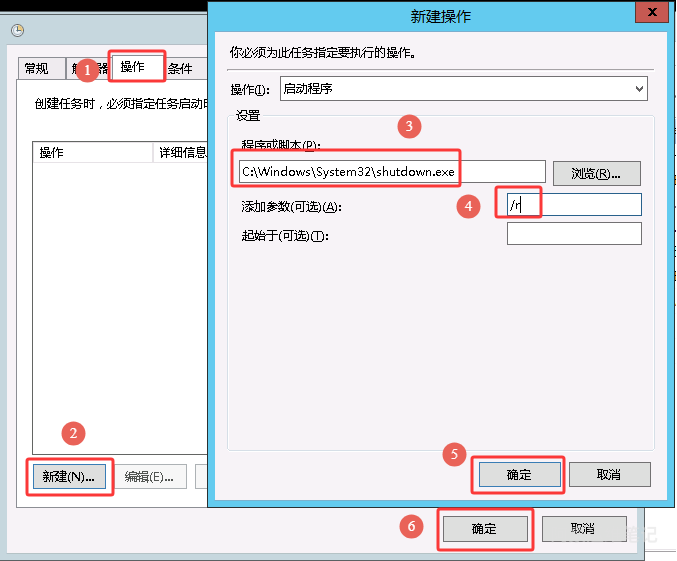
image.png

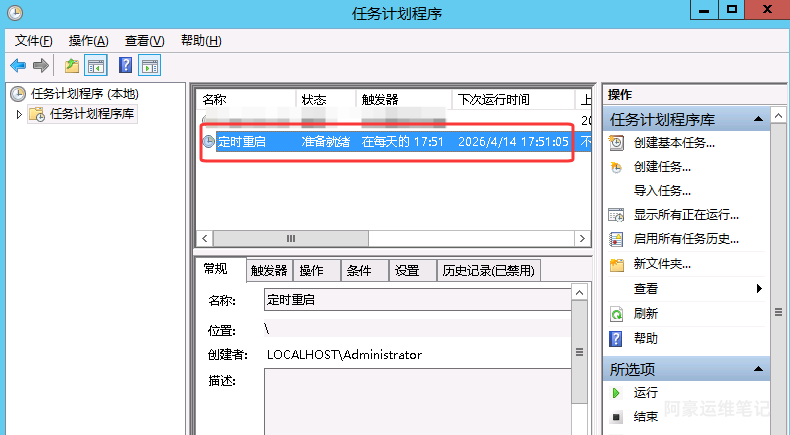
设置完后查看任务计划程序库是否有刚刚添加的任务计划

image.png

右键刚刚添加的任务计划选择运行,测试下是否正常,正常则会提示如下一分钟后关闭重启
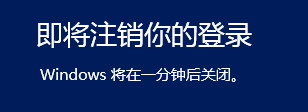
image.png