








查看中文版:
Please note that using crack software to activate JetBrains products is illegal and violates the software license agreement and laws and regulations. The methods provided in this article are for learning purposes only and should not be used for any other purposes. As a well-known software company, JetBrains offers legitimate license purchase options to support the legal use of its software.
JetBrains is a renowned company in the field of software development and project management, with products including integrated development environments (IDEs) for various languages such as Java, Groovy, Kotlin, Ruby, Python, PHP, C, Objective-C, C++, C#, Go, JavaScript, and SQL, etc. Its software is widely used in Android application development and has achieved significant achievements in development, design, and language.
Supported products (including activation codes and crack files):
IntelliJ IDEA
AppCode
CLion
DataGrip
GoLand
PhpStorm
PyCharm
Rider
RubyMine
WebStorm
In this article, we will use PyCharm as an example, and the activation methods for other products are similar.
The latest version of PyCharm on JetBrains is currently version v2013.1, so we will provide a crack activation method for this version.
Note: If you are already logged into your JB account, please log out first!
Note: If you have installed the "IDE Eval Reset" plugin, please uninstall it first!
蓝奏云网盘
夸克网盘
123云盘
Copy the ja-netfilter-all folder from the crack patch folder to the root directory of drive C.
Find the corresponding installation file in the ja-netfilter-all - scripts folder for the software.
For Windows System :
install-all-users.vbs (Install for all users)
install-current-user.vbs (Install for the current user)
For Other Systems :
install.sh
Find the *.exe.vmoptions file in the installation directory of the software, for example, mine is "D:\Program Files\PyCharm\bin\pycharm64.exe.vmoptions". Open it with a text editor and add the following code at the end:
-javaagent:C:\ja-netfilter-all\ja-netfilter.jar=jetbrains
--add-opens=java.base/jdk.internal.org.objectweb.asm=ALL-UNNAMED
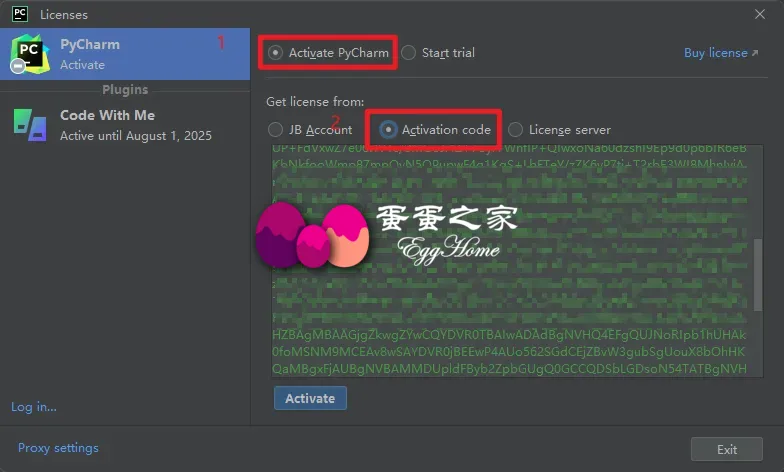
--add-opens=java.base/jdk.internal.org.objectweb.asm.tree=ALL-UNNAMEDFind the corresponding software activation code file in the Activation Codes folder, run the software, choose Activate PhpStorm - Activation code, enter the registration code provided in the compressed file, and then click the Activate button.
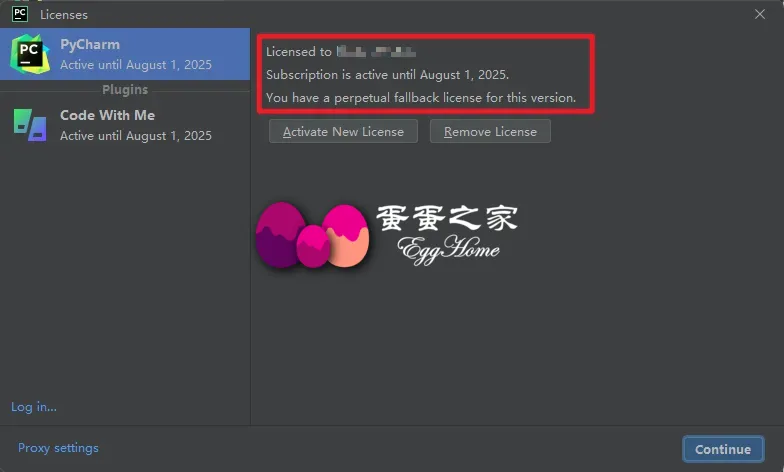
Congratulations, you're done!
此内容由惯性聚合(RSS阅读器)自动聚合整理,仅供阅读参考。 原文来自 — 版权归原作者所有。