







用于记录一些 Typecho 及 handsome 主题的修改,随时更新!
目前升级 Typecho 1.2.1 解决无法解析 webp 格式问题,同时添加 avif 格式解析支持。
Typecho 原生不支持解析 Webp 图片,Typecho 1.2.0 依然默认不支持.webp 格式图片。在附件插入 webp 文件会被当做文件解析。
找到 Typecho 网站所在文件夹内的以下文件:
var/Widget/Themes/Rows.php定位到大约第 48 行的位置,将以下代码:
return preg_match("/screenshot.(jpg|png|gif|bmp|jpeg)/i",path);修改为:
return preg_match("/screenshot.(jpg|png|gif|bmp|jpeg|webp)/i",path);保存修改后,找到 Typecho 网站所在文件夹下的以下文件:
var/Widget/Base/Contents.php定位到大概第 557 行,将以下代码:
$value['attachment']->isImage = in_array($content['type'], ['jpg', 'jpeg', 'gif', 'png', 'tiff', 'bmp']);修改为:
$value['attachment']->isImage = in_array($content['type'], ['jpg', 'jpeg', 'gif', 'png', 'tiff', 'bmp', 'webp']);保存修改后,再找到 Typecho 网站所在文件夹下的以下文件:
var/Typecho/Common.php找到图片格式所在的行,大约是在 1259 行后的位置添加下面这一行代码:
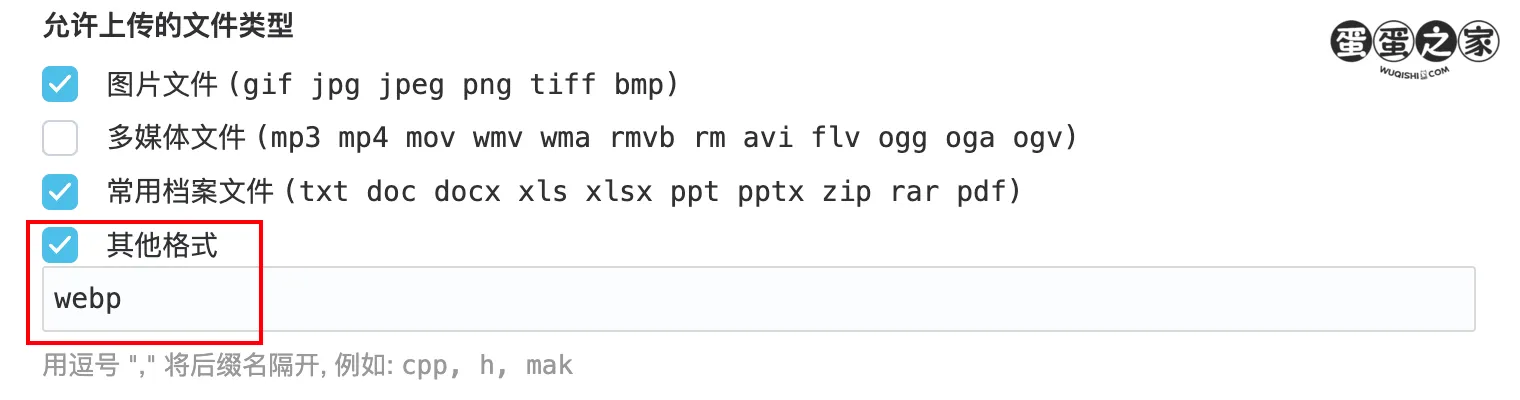
'webp' => 'image/webp',保存修改后,最后进入 Typecho 网站后台,前往 设置 > 基本,在允许上传的文件类型部分,勾选其他格式,并添加 webp,然后点击保存设置。
在根目录下的config.inc.php中添加以下代码:
/** 开启gzip压缩 */
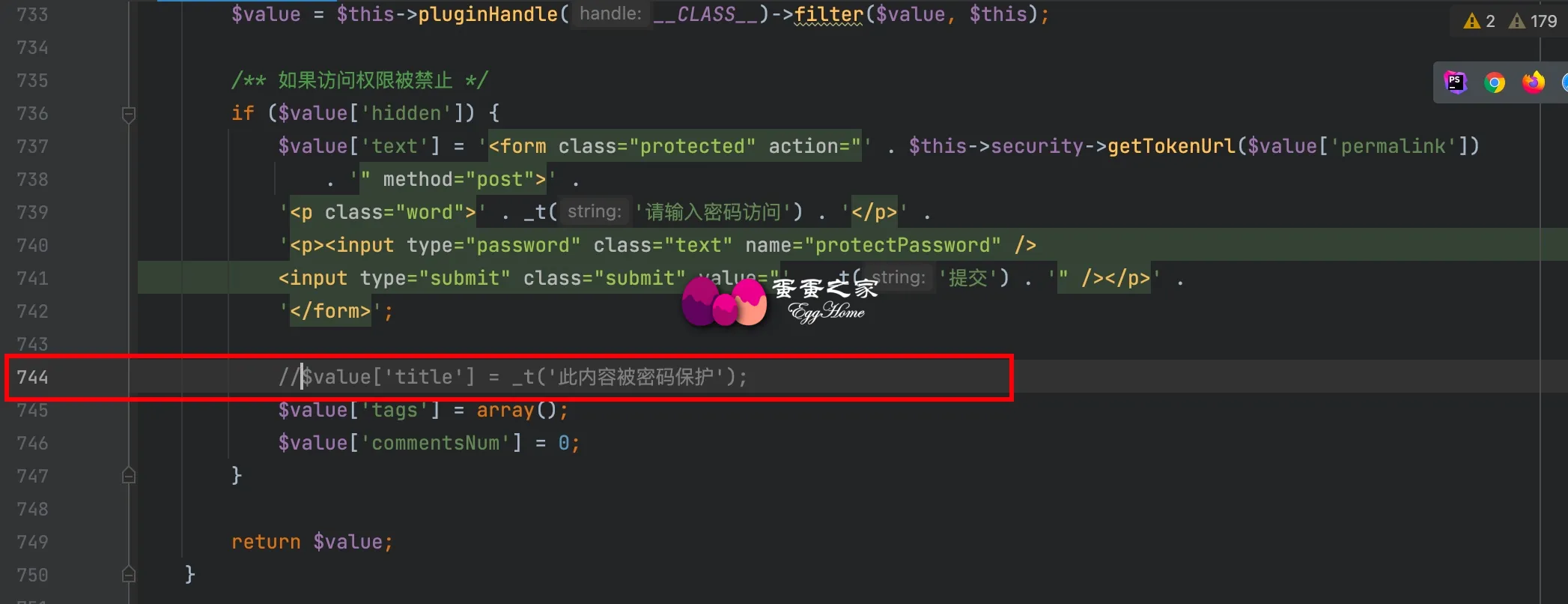
ob_start('ob_gzhandler');需要修改 typecho 的源代码,在 typecho 目录下的 var/Widget/Base/Contents.php 文件中,搜索此内容被密码保护 找到对应行,在该行的开头添加两个斜杆,注释掉该行代码即可。
后台 设置——评论——允许使用的HTML标签和属性 里面添加 html 标签,自行去掉img前的/。
</img src="">
<audio class="" src="" preload>
<video src=""></video>UPDATE tc_contents SET text = REPLACE(text,'https://wuqishi.com/usr/uploads/','https://cdn.ssslove.com/files/');本项修改的是首页文章版式,包括图片使其四个角由方形变成圆角形状。将以下代码添加至后台主题设置 自定义 CSS。
将以下代码添加至后台主题设置 自定义 JavaScript。
var a_idx = 0;
jQuery(document).ready(function($) {
    $("body").click(function(e) {
        var a = new Array("林蛋蛋最美", "吴蛋蛋最帅", "富强", "民主", "文明", "和谐", "自由", "平等", "公正" ,"法治", "爱国", "敬业", "诚信", "友善");
        var $i = $("<span/>").text(a[a_idx]);
        a_idx = (a_idx + 1) % a.length;
        var x = e.pageX,
        y = e.pageY;
        $i.css({
            "z-index": 999999999999999999999999999999999999999999999999999999999999999999999,
            "top": y - 20,
            "left": x,
            "position": "absolute",
            "font-weight": "bold",
            "color": "#ff6651"
        });
        $("body").append($i);
        $i.animate({
            "top": y - 180,
            "opacity": 0
        },
        1500,
        function() {
            $i.remove();
        });
    });
});/*多彩标签云*/
var tags = document.querySelectorAll("#tag_cloud-2 a");
var colorArr = ["#428BCA", "#AEDCAE", "#ECA9A7", "#DA99FF", "#FFB380", "#D9B999", "#3bca6e", "#f23232", "#834e75", "#23b7e5", "#f60"];
tags.forEach(tag => {
tagsColor = colorArr[Math.floor(Math.random() * colorArr.length)];
tag.style.backgroundColor = tagsColor;
});/*多彩博客信息*/
let info = document.getElementById('blog_info').querySelectorAll('.pull-right')
let colorArray = ["#428BCA", "#AEDCAE", "#ECA9A7", "#DA99FF", "#FFB380", "#D9B999", "#3bca6e", "#f23232", "#834e75", "#23b7e5", "#f60"];
info.forEach(tag => {
tagsColor = colorArr[Math.floor(Math.random() * colorArr.length)];
tag.style.backgroundColor = tagsColor;
});/*赞赏图标跳动*/
.btn-pay {
animation: star 0.5s ease-in-out infinite alternate;
}
@keyframes star {
from {
transform: scale(1);
}
to {
transform: scale(1.1);
}
}/*文章内图片悬停放大并将超出范围隐藏*/
.entry-thumbnail {
overflow: hidden;
}
.entry-thumbnail .item-thumb {
transition: 0.5s;
}
#post-content img {
border-radius: 10px;
transition: 0.5s;
}
.entry-thumbnail .item-thumb:hover,
#post-content img:hover {
transform: scale(1.05);
cursor: pointer;
}/*鼠标经过头像旋转和放大*/
.img-circle{border-radius:50%;animation:light 4s ease-in-out infinite;transition:all .5s}.img-circle:hover{transform:scale(1.15) rotate(720deg)}@keyframes light{0%{box-shadow:0 0 4px #f00}25%{box-shadow:0 0 16px #0f0}50%{box-shadow:0 0 4px #00f}75%{box-shadow:0 0 16px #0f0}100%{box-shadow:0 0 4px #f00}}/*文章标题居中*/
header.bg-light.lter.wrapper-md{text-align:center}/*左侧导航多彩图标*/
let leftHeader=document.querySelectorAll("span.nav-icon>svg,span.nav-icon>i");let leftHeaderColorArr=["#FF69B4","#58c7ea","#E066FF","#FF69B4","#FFA54F","#90EE90","#0043ff","#cc00ff","#8e7cc3","#A0522D","#FF7256","#FFA500","#8B0000","#7CFC00","#4EEE94","#00FFFF","#EE0000"];leftHeader.forEach(tag=>{tagsColor=leftHeaderColorArr[Math.floor(Math.random()*leftHeaderColorArr.length)];tag.style.color=tagsColor});/*右侧导航栏*/
.sidebar-icon svg.feather.feather-thumbs-up{color: #ff0000;}
.sidebar-icon svg.feather.feather-message-square{color:#495dc3;}
.sidebar-icon svg.feather.feather-gift{color:#52DE97;}/*自定义字体*/
@font-face{font-family:HarmonyOS_Sans_SC_Medium;font-style:normal;font-display:swap;
src:url(https://cdn.ssslove.com/ziti/HarmonyOS.woff2) format('woff2')} *{font-family:HarmonyOS_Sans_SC_Medium} body {font-family: HarmonyOS!important;}修改表:typecho_fields
修改字段:outdatedNotice
默认为 no 表示不显示提示
批量修改为 yes 超过 60 天的文章在打开时文章顶部会出现提示!
复制下面代码直接在数据库中执行:
UPDATE `typecho_fields`SET`str_value`= 'yes' WHERE`typecho_fields`.`cid`>= 1 AND`typecho_fields`.`name` = 'outdatedNotice'在后台 开发者设置 - 自定义输出 body 尾部的 HTML 代码 中输入以下代码:
<script>
/*五颜六色字体*/
function sjcolor(){
    var colorArr = ["#428BCA", "#AEDCAE", "#ECA9A7", "#DA99FF", "#FFB380", "#D9B999", "#3bca6e", "#f23232", "#834e75", "#23b7e5", "#f60"];
    /*设置颜色*/
    document.querySelectorAll("#aside > div > div.navi-wrap.scroll-y.scroll-hide > nav > ul > li > a > span").forEach(e => {
        e.style.color = colorArr[Math.floor(Math.random() * colorArr.length)];
    });
    document.querySelectorAll("#aside > div > div.navi-wrap.scroll-y.scroll-hide > nav > ul > li > ul > li > a > span").forEach(e => {
        e.style.color = colorArr[Math.floor(Math.random() * colorArr.length)];
    });
    document.querySelectorAll("#aside > div > div.navi-wrap.scroll-y.scroll-hide > nav > ul > li > ul > li > a").forEach(e => {
        e.style.color = colorArr[Math.floor(Math.random() * colorArr.length)];
    });
    document.querySelectorAll("#aside > div > div.navi-wrap.scroll-y.scroll-hide > nav > ul > li > ul > li > a > b").forEach(e => {
        e.style.backgroundColor = colorArr[Math.floor(Math.random() * colorArr.length)];
    });
    /*左侧导航字体颜色*/
    document.querySelectorAll("#post-panel > div > div > div > div.panel-body > div.nav-tabs-alt > ul > li > a").forEach(e => {
        e.style.color = colorArr[Math.floor(Math.random() * colorArr.length)];
    });
    document.querySelectorAll("#post-panel > div > div > div > div").forEach(e => {
        e.style.color = colorArr[Math.floor(Math.random() * colorArr.length)];
    });
    document.querySelectorAll("#post-panel > div.blog-post > div > div.post-meta.wrapper-lg > h2 > a").forEach(e => {
        e.style.color = colorArr[Math.floor(Math.random() * colorArr.length)];
    });
    /*首页面板*/
    document.querySelectorAll("#small_widgets > h1").forEach(e => {
        e.style.color = colorArr[Math.floor(Math.random() * colorArr.length)];
    });
    document.querySelectorAll("#small_widgets > ul").forEach(e => {
        e.style.color = colorArr[Math.floor(Math.random() * colorArr.length)];
    });
    document.querySelectorAll("#content > main > div > div > div > h1").forEach(e => {
        e.style.color = colorArr[Math.floor(Math.random() * colorArr.length)];
    });
    /*博客名称*/
    document.querySelectorAll(".m-l-xs").forEach(e => {
        e.style.color = colorArr[Math.floor(Math.random() * colorArr.length)];
    });
    /*文章标题*/
    document.querySelectorAll("#search_input").forEach(e => {
        e.style.color = colorArr[Math.floor(Math.random() * colorArr.length)];
    });
    /*搜索框*/
    document.querySelectorAll("#content > main > div > div > h1").forEach(e => {
        e.style.color = colorArr[Math.floor(Math.random() * colorArr.length)];
    });
    document.querySelectorAll("#content > main > div > div > div > div a >span").forEach(e => {
        e.style.color = colorArr[Math.floor(Math.random() * colorArr.length)];
    });
    /*友情链接*/
    document.querySelectorAll("#header > div > ul > li > div > div > div > div > div > div > a > span > span").forEach(e => {
        e.style.color = colorArr[Math.floor(Math.random() * colorArr.length)];
    });
    /*工具导航*/
    document.querySelectorAll("#tag_toc > h5").forEach(e => {
        e.style.color = colorArr[Math.floor(Math.random() * colorArr.length)];
    });
    /*文章目录*/
    document.querySelectorAll("#content > main > div > div > header > h1").forEach(e => {
        e.style.color = colorArr[Math.floor(Math.random() * colorArr.length)];
    });
    document.querySelectorAll("#typedWord").forEach(e => {
        e.style.color = colorArr[Math.floor(Math.random() * colorArr.length)];
    });
    /*签名标题*/
    document.querySelectorAll("#tag_cloud-2 h5").forEach(e => {
        e.style.color = colorArr[Math.floor(Math.random() * colorArr.length)];
    });
    document.querySelectorAll("#tag_cloud-2 a").forEach(e => {
        e.style.backgroundColor = colorArr[Math.floor(Math.random() * colorArr.length)];
    });
    /*标签颜色*/
    document.querySelectorAll("#blog_info > ul > li > span.badge.pull-right").forEach(e => {
        e.style.backgroundColor = colorArr[Math.floor(Math.random() * colorArr.length)];
    });
    /*博客信息*/
    document.querySelectorAll("#blog_info > h5").forEach(e => {
        e.style.color = colorArr[Math.floor(Math.random() * colorArr.length)];
    });
    document.querySelectorAll("#widget-tabs-4-hots > h5").forEach(e => {
        e.style.color = colorArr[Math.floor(Math.random() * colorArr.length)];
    });
    document.querySelectorAll("#widget-tabs-4-hots > ul > li > div > h4 > a").forEach(e => {
        e.style.color = colorArr[Math.floor(Math.random() * colorArr.length)];
    });
    document.querySelectorAll("#widget-tabs-4-hots > ul > li > div > small > span > span.meta-value").forEach(e => {
        e.style.color = colorArr[Math.floor(Math.random() * colorArr.length)];
    });
    /*热门文章颜色*/
    document.querySelectorAll("#widget-tabs-4-comments > h5").forEach(e => {
        e.style.color = colorArr[Math.floor(Math.random() * colorArr.length)];
    });
    document.querySelectorAll("#widget-tabs-4-comments > ul > li > div > div > a").forEach(e => {
        e.style.color = colorArr[Math.floor(Math.random() * colorArr.length)];
    });
    document.querySelectorAll("#widget-tabs-4-comments > ul > li > div > small > span").forEach(e => {
        e.style.color = colorArr[Math.floor(Math.random() * colorArr.length)];
    });
    /*最新评论颜色*/
    document.querySelectorAll("#widget-tabs-4-random > h5").forEach(e => {
        e.style.color = colorArr[Math.floor(Math.random() * colorArr.length)];
    });
    document.querySelectorAll("#widget-tabs-4-random > ul > li > div > h4 > a").forEach(e => {
        e.style.color = colorArr[Math.floor(Math.random() * colorArr.length)];
    });
    document.querySelectorAll("#widget-tabs-4-random > ul > li > div > small > span > span.meta-value").forEach(e => {
        e.style.color = colorArr[Math.floor(Math.random() * colorArr.length)];
    });
    /*随机文章颜色*/
    document.querySelectorAll("#sidebar > section.widget.widget_categories.wrapper-md.clear.visible-lg.visible-md > h5").forEach(e => {
        e.style.color = colorArr[Math.floor(Math.random() * colorArr.length)];
    });
    /*手机阅读标题*/
}sjcolor();
</script>
在后台 - PJAX- PJAX 回调函数中输入以下代码。这样打开其他网页时,不需要重新加载就能生效了:
/*全局彩色*/
sjcolor();找到/usr/themes/handsome文件夹内的404.php文件并打开。
在h1 class="text-shadow text-white">404这一行下面加入以下代码:
<br>
<small class="text-muted letterspacing">
<b id="sp">5</b>秒后自动返回···<br>
<a class="text-muted letterspacing" href="#" onclick="javascript:history.go(-1);">立刻返回</a>再把下面的代码加入404.php文件内最底下的</body>前面:
<script type="text/javascript">
onload = function(){setInterval(go, 1000);};var x=5;
function go() {x--;if(x>0) {document.getElementById("sp").innerHTML = x;}else{history.go(-1);}}
</script><script type="text/javascript">
onload = function(){setInterval(go, 1000);};var x=5;
function go() {x--;if(x>0) {document.getElementById("sp").innerHTML = x;}else{window.location.href = 'https://wuqishi.com';}}
</script>/*词云等距美化*/
#tag_cloud-2 a {
border-radius: 5px;
width: 35%;
}
修改Handsome主题,component目录下的comments.php代码文件Handsome:9.0.2 版本大概第 81 行左右开始:
<span class="comment-author vcard">
<b class="fn"><?php echo $author; ?></b>
<?php if (!($GLOBALS["off_star_comment"] == "true" || Utils::getExpertValue("off_star_comment"))):?>
<a data-coid="<?php echo $comments->coid; ?>" class="post-comment-star text-muted star_talk"><i class="glyphicon <?php
$stars = Typecho_Cookie::get('extend_say_stars');
if (empty($stars)) {
$stars = array();
} else {
$stars = explode(',', $stars);
}
if (!in_array($comments->coid, $stars)) {
echo 'glyphicon-heart-empty';
} else {
echo 'glyphicon-heart';
}
?>"></i> <span class="star_count"><?php
$stars = $comments->stars;
echo ($stars) ? $stars : "";
?></span></a>
<?php endif; ?>
</span>在<?php endif; ?>后添加代码:
<?php UserAgent_Plugin::get_useragent($comments->agent,$comments->ip); ?>Typecho 开启 CDN 后,可能无法获取访客真实 IP,只能取得 CDN 节点 IP,为此可以在 Typecho 博客网站的根目录的config.inc.php插入下面的代码:
//** 防止CDN造成无法获取客户真实IP地址 */
if(isset($_SERVER['HTTP_X_FORWARDED_FOR']))
{
$list = explode(',',$_SERVER['HTTP_X_FORWARDED_FOR']);
$_SERVER['REMOTE_ADDR'] = $list[0];
}/*定义滚动条高宽及背景 高宽分别对应横竖滚动条的尺寸*/
::-webkit-scrollbar {
width:9px;
height:8px;
}
/*定义滚动条轨道*/
::-webkit-scrollbar-track {
background-color:white;
-webkit-border-radius: 0em;
-moz-border-radius: 0em;
border-radius: 0em;
}
/*定义滑块 内阴影+圆角*/
::-webkit-scrollbar-thumb {
background-color: #ff676c;
background-image: -webkit-linear-gradient(45deg,rgba(255,255,255,.4) 25%,transparent 25%,transparent 50%,rgba(255,255,255,.4) 50%,rgba(255,255,255,.4) 75%,transparent 75%,transparent);
-webkit-border-radius: 2em;
-moz-border-radius: 2em;
border-radius: 2em;
cursor: pointer;
}
此内容由惯性聚合(RSS阅读器)自动聚合整理,仅供阅读参考。 原文来自 — 版权归原作者所有。