






用 VBA 编一个自定义函数进行处理。
1、打开 Excel 文件,按“Alt F11”打开 VBA 编辑窗口,然后在左侧空白处点击右键,“插入”,“模块”。
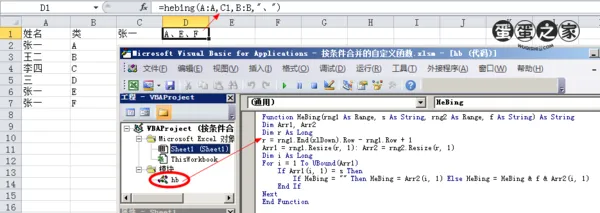
2、右侧空白处粘贴下面的代码:
Function HeBing(rng1 As Range, s As String, rng2 As Range, f As String) As String
Dim Arr1, Arr2
Dim r As Long
r = rng1.End(xlDown).Row - rng1.Row + 1
Arr1 = rng1.Resize(r, 1): Arr2 = rng2.Resize(r, 1)
Dim i As Long
For i = 1 To UBound(Arr1)
If Arr1(i, 1) = s Then
If HeBing = "" Then HeBing = Arr2(i, 1) Else HeBing = HeBing & f & Arr2(i, 1)
End If
Next
End Function
3、用法:
=HEBING(在哪里查找,查找什么,返回对应的什么数据,在单元格内用什么隔开)
eg:=hebing(A:A,C1,B:B,",")
This content is automatically aggregated by InertiaRSS (RSS Reader) for reading reference only. Original from — Copyright belongs to the original author.