惯性聚合 高效追踪和阅读你感兴趣的博客、新闻、科技资讯
阅读原文 在惯性聚合中打开

推荐订阅源

P
Privacy & Cybersecurity Law Blog
OSCHINA 社区最新新闻
OSCHINA 社区最新新闻
D
Docker
V
V2EX
GbyAI
GbyAI
Apple Machine Learning Research
博客园 - Franky
Jina AI
Jina AI
奇客Solidot–传递最新科技情报
奇客Solidot–传递最新科技情报
I
InfoQ
博客园 - 司徒正美
雷峰网
雷峰网
F
Full Disclosure
S
SegmentFault 最新的问题
大猫的无限游戏
大猫的无限游戏
博客园 - 叶小钗
让小产品的独立变现更简单 - ezindie.com
IT之家
IT之家
MongoDB | Blog
MongoDB | Blog
D
DataBreaches.Net
M
MIT News - Artificial intelligence
V
Visual Studio Blog
H
Help Net Security
月光博客
月光博客
博客园 - 三生石上(FineUI控件)
博客园_首页
O
OpenAI News
人人都是产品经理
人人都是产品经理
freeCodeCamp Programming Tutorials: Python, JavaScript, Git & More
Attack and Defense Labs
Blog — PlanetScale
Blog — PlanetScale
爱范儿
爱范儿
罗磊的独立博客
P
Palo Alto Networks Blog
Application and Cybersecurity Blog
博客园 - 聂微东
Last Week in AI
Last Week in AI
Threat Intelligence Blog | Flashpoint
L
Lohrmann on Cybersecurity
N
News and Events Feed by Topic
有赞技术团队
有赞技术团队
The Register - Security
S
Security @ Cisco Blogs
cs.AI updates on arXiv.org
酷 壳 – CoolShell
酷 壳 – CoolShell
AWS News Blog
AWS News Blog
D
Darknet – Hacking Tools, Hacker News & Cyber Security
L
LINUX DO - 最新话题
Hacker News - Newest:
Hacker News - Newest: "LLM"
T
Threat Research - Cisco Blogs

Ye Olde Blogroll — Firehose

kottke.org Outside My Window | A Blog of Birds & Nature with Kate St. John Via Negativa The Wallflower Digest baty.net Miskatonic University Press | William Denton Transactions with Beauty Britney Winthrope — Personal blog Z1NZ0L1N Amerpie by Lou Plummer 75CentralPhotography Home :: Sacha Chua Blog – Harold Jarche Doug Jones Tom Van Winkle's Return to Gaming Adactio: Jeremy Keith ooh.directory: a place to find good blogs that interest you Sal's whygodwhy – idk! fine! whatever! who cares! shut up! uncountable thoughts Murmurs Dr Robert N. Winter Who's the Real Loser? Shady Characters Ludicity Notes Without a Thesis Robin Monks - Technologist, AI/ML, Healthtech David Smith, Independent iOS Developer Homepage - blakewatson.com Ploum.net Oatmeal Midnight Reading oh, hey Brian | Brian Bennett blog 2026 | baccyflap.com - a delicate blend of bakelite and fear Our Adventures in Japan Jack's Space | Everything happens for the best Matt Lakeman jzhao.xyz Home - Stephanie Stimac's Blog マリウス Gingerly thoughts on ecology, culture, travel, photography, walking and other ephemera blast-o-rama. Quiet System - sink on uwu SchwarzTech Home ophanim's chariot Navendu Pottekkat - The Open Source Absolutist …time is what you make of it… Ron Seems Sentient Stuffed Crocodile Notes Sympolymathesy, by Chris Krycho Hosentaschenblog Charlie's Diary meyerweb.com Paul Johnson Refugio Norte linkedlist → bits and bytes about the Web New Ideas Blog - Gustavo Ribeiro Marius Masalar Mi blog Domain registered at WHC.ca Tyler Hellard - Pop Loser cedmax Jean Kapsa https://www.feadin.eu/en/ Garbage Collector Brian DeVries Grant Petersen's Blog The Artist’s Notebook Dan Cohen – Vice Provost, Dean, and Professor at Northeastern University 12XU | Verspannungsmusik! denisdefreyne.com Welcome | Chris Smaje Alex – Le site Internet d'Alex Sirac. cultural snow fLaMEd fury homepage A Shroud of Thoughts Ryan Reid Illustration + Design Don't Worry About the Vase Amy Goodchild Songs on the Security of Networks Protesilaos, also known as “Prot” GitHub - uxai/non-profit-bloggers: A repository of blogs by bloggers who blog for the joy of writing. 👋 Hi! Joe Van Cleave's Blog Amit Gawande Paul's Beer & Travel Blog Steve Best West Coast Stat Views (on Observational Epidemiology and more) Darknet Diaries – True stories from the dark side of the Internet. SEAN BONNER Artist, Instructor, using only Free/Libre and Open-Source software since 2009. Along the Ray Chris Aldrich | BoffoSocko 印记 | Live a life you will remember. Herman's blog
The Newsprint
hello@manuel · 2022-02-13 · via Ye Olde Blogroll — Firehose

Fresh Links

Happy Sunday friends! I’m back! Who knows for how long, but I’m back. It’s been great to let go of The Sunday Edition for an extended period of time. Though I don’t connect much with others who blog, I imagine it’s common occasionally to hit a roadblock in your head. Burnout. Boredom. Take your pick. Like any fun hobby, a guy has to take a break from time to time.

This extended “sabbatical” provided some time to ponder what The Sunday Edition has become and where I think it properly fits. Sunday Editions have a precise 24-hour lifespan. They are time-specific, context-specific, and can rarely capture a larger thought process. They are a fair bit easier to produce, mind you, and the barrier to entry (the barrier being my energy) is a fair bit lower than a longer, dedicated blog post.

I’ll probably need more than a few weeks to ponder this. Even after 12+ years of writing this blog, I still don’t know what I want it to be. I hope, above all else, this is a sign of maturity and changes in the seasons of life, and not an overall poor author.

The Idol of the Bucket List

I once attended a funeral for a well-known businessman. He was well-known for a reason — if you ventured through his store, you always left knowing you were taken care of, that you were served, and that you could return someday for your next need. In so many ways, this gentleman embodied small-town grace — always connecting and working through his customers into the greater community and beyond.

With each story told at his funeral, however, an over-arching theme emerged: Once those doors closed at the end of the workday, this business owner hit the road in the pursuit of making memories.

Few people would say this with a negative connotation. On its face, making memories and living a full, well-lived life paints a beautiful picture. Modern society tells us memories are the ultimate currency. We’re supposed to purchase flights, not things; to collect moments, not possessions; to live now, not tomorrow. That collection of memories wraps itself around the very fabric of our modern lives, and will be fiercely protected as unique and worth every investment.

You’ve likely heard “You don’t take your bank account with you” when you pass away. You know what else you don’t take with you? Your memories.

As soon as you take that last breath, that vast archive you’ve spent a lifetime building — major investments in time and money — vanish. Your memories cease, and at best live on in the lives of those you’ve invested in. Once they’ve passed on, your memories— their memories — are no more. In 100 years, effectively nobody will remember you.

The only thing you take across that final destination is your faith. You develop that faith here, through things seen and unseen, and you use that faith there when you stand before your Father in heaven.

There’s a trap here, to be sure. Where the last 20 years have produced this anti-possession, pro-minimalist approach to building a full life, we’ve converted our love of possessions into a love of experiences. Minimalism, meet experientialism. Making memories can become an idol just as easily as any individual possession or hoarding wealth. Our bucket lists become our own personal creeds, our own personal doctrines that we live by, swear by, and will die by.

In reality, experiences — just like possessions — make terrible gods. The high of a new experience is extraordinarily fleeting and leave you more hungry for an even better trip, an even better ride, and an even better high. These things cannot be the foundation of our lives; we cannot have goals to maximize our personal good vibes archive. This misses the point of why we were created. Our purpose is far greater: to serve He who created us and who created this Earth.

Quote of the Week

“When you sprint, you sprint hard. When you rest, you rest hard. The most successful people apply this same approach to life. They aren't grazing for hours. They sprint, then rest.”

— Sahil Bloom

In line with my current modus operanda, if I do say so myself.

Other Thoughts

I’ve been posting a few other pieces here and there, under their own dedicated titles so they are easier to find in the future (not just for SEO, to be clear; I’m having a hard time finding all the things I’ve written about on The Sunday Edition and need a better system.)

Bauhaus Clock for iPhone and iPad

The Bauhaus Clock app for iPhone and iPad is a beautifully crafted, premium time-telling tool that delights users with its meticulous attention to visual, haptic, and audio details.

Rules and Standards

Reflecting on a quote by baseball coach Tim Corbin, I’d argue that striving for higher standards and living by the spirit of a rule is far more valuable than rigidly obsessing over technicalities.

Use a Scaled Virtual Machine Resolution in Parallels and Enjoy the Speed

In which I explain that switching a Parallels virtual machine to a "Scaled" resolution drastically improves system performance and software usability.

The Google FitBit Air is My First-Ever Google Product

This is my first experience with a Google product. In this, I note that despite an enthusiastic pre-order, the unboxing, setup, and syncing experiences felt cheaper, more rigid, and less seamless than what I’m accustomed to in the Apple ecosystem.

Here were a few things I shared from the past few weeks (months!, yeesh, it’s been awhile). If you want to stay on top of the list throughout the week, don’t be afraid to subscribe via RSS.

  • Oliur's iPhone ProRAW Neutral Collection Presets
  • Fun Illustration of MLB's Lack of Salary Cap
  • Star Fox for Switch 2 Trailer
  • Leveraging My Second Brain to Build a Chief of Staff (and Secretary)
  • Bubbles Briefing

Happy Sunday. I hope you have a wonderful week ahead.

P.S. — If you’d like to see this in your email inbox, please subscribe below. If you have trouble subscribing, shoot me an email, and I’ll get you on the list. Thanks for the consideration!
Subscribe to The Newsprint

Enjoy these posts? Subscribe to get more, delivered right to your inbox.

Supported By

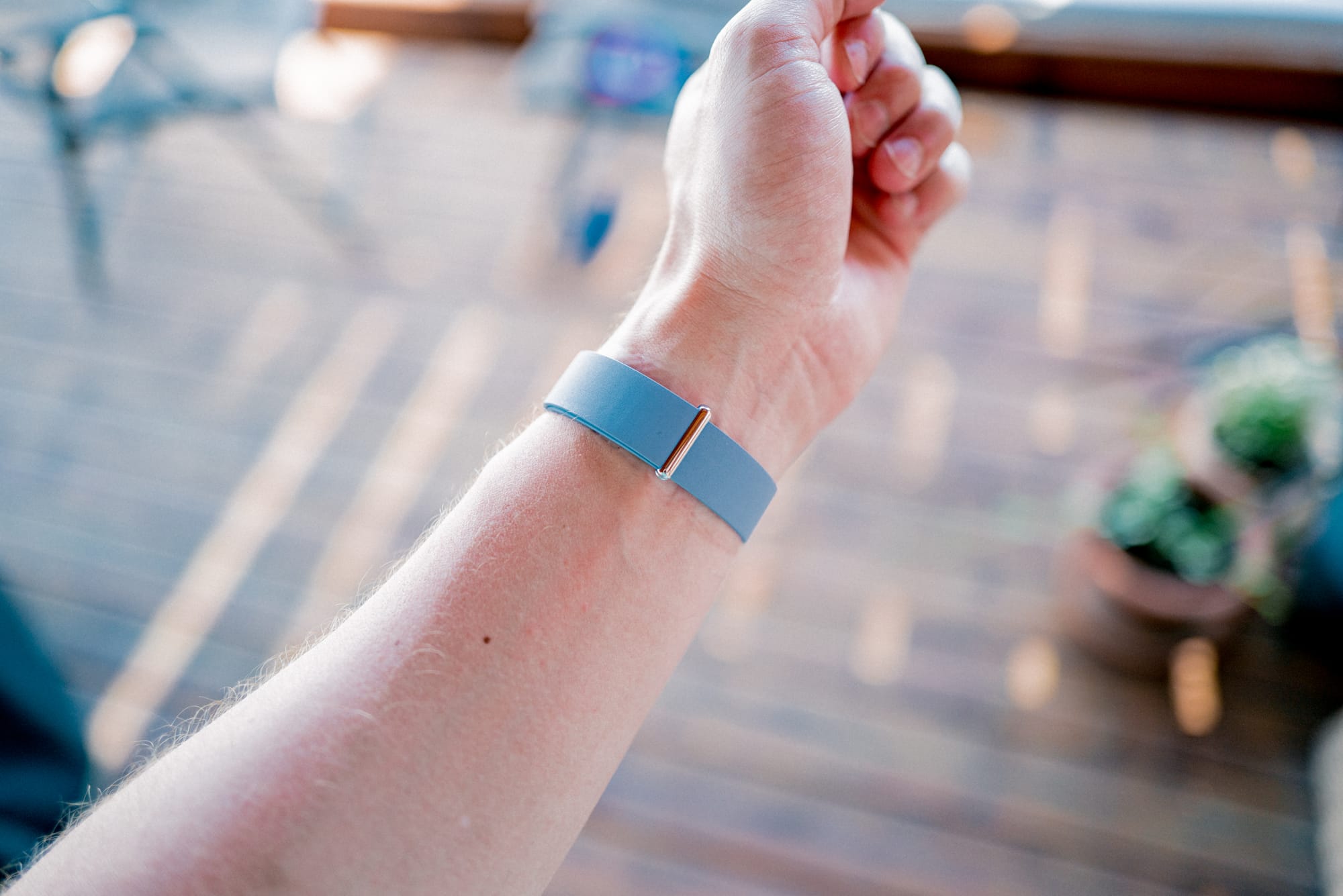
The Google FitBit Air is the first Google product I’ve ever purchased. Above: The Google FitBit Air with Fog band.

I have never pre-ordered a product as fast as I pre-ordered the Google FitBit Air. No Apple product. No Bellroy product. No Harry Rosen product. I didn’t do any research. I saw the header image, noted it was a Whoop-competitor, and ordered. The fastest and most alluring pre-ordered product in my life is a Google product, and it happened to be the first Google product I’ve ever owned.

As a very heavily invested Apple customer, I quickly treasured the opportunity to compare the two tech behemoths. Each of these companies produce more than a product — they produce an experience, from the packaging and unboxing experience, through to the setup experience and the usage experience.

The Google FitBit Air is my first chance to compare this set of experiences. Its simple purpose (health and fitness tracking) combined with its accessible price tag (only $100 USD/$130 CAD) made for a perfect opportunity to dip my toe in the ocean.

I have some thoughts.

On Unboxing Experiences

My experience with Apple product unboxings ranges from those years of plastic shrink-wrapped boxes through to the current system with a pull tab or two. Familiarity helps to ensure I know what I’m looking for in a new Apple box, so I’m always looking for those pull tabs from the start.

I didn’t know how to handle a Google box. The FitBit Air comes in a tiny box. I flipped it around and over a few times looking for the pull tab but, oddly, didn’t find anything immediately obvious. After a few moments, I decided I’d try to tear the box gently open. I haven’t torn an Apple box in years. (I did ultimately find the tab and kind of slapped my head for missing it.)

Inside, the FitBit Air wristband was wrapped around a kraft coloured holder in the box. Various parts of the FitBit were wrapped in a translucent wrapping, very akin to the wrapping around chargers and cables inside Apple boxes.

Documentation was in the box as well — a thick notebook, which seemed to amount to warranty information and various QR codes to scan. It’s thick! I haven’t seen a little notebook like this from Apple ever.

This unboxing experience — probably my fault to an extent, due to unfamiliarity — set me on the wrong path, in my opinion. From the onset, I felt the experience was cheaper than Apple’s; less attention has been given to details, and this box is far, far easier to chuck in the garbage.

On First Wear and Setup Experiences

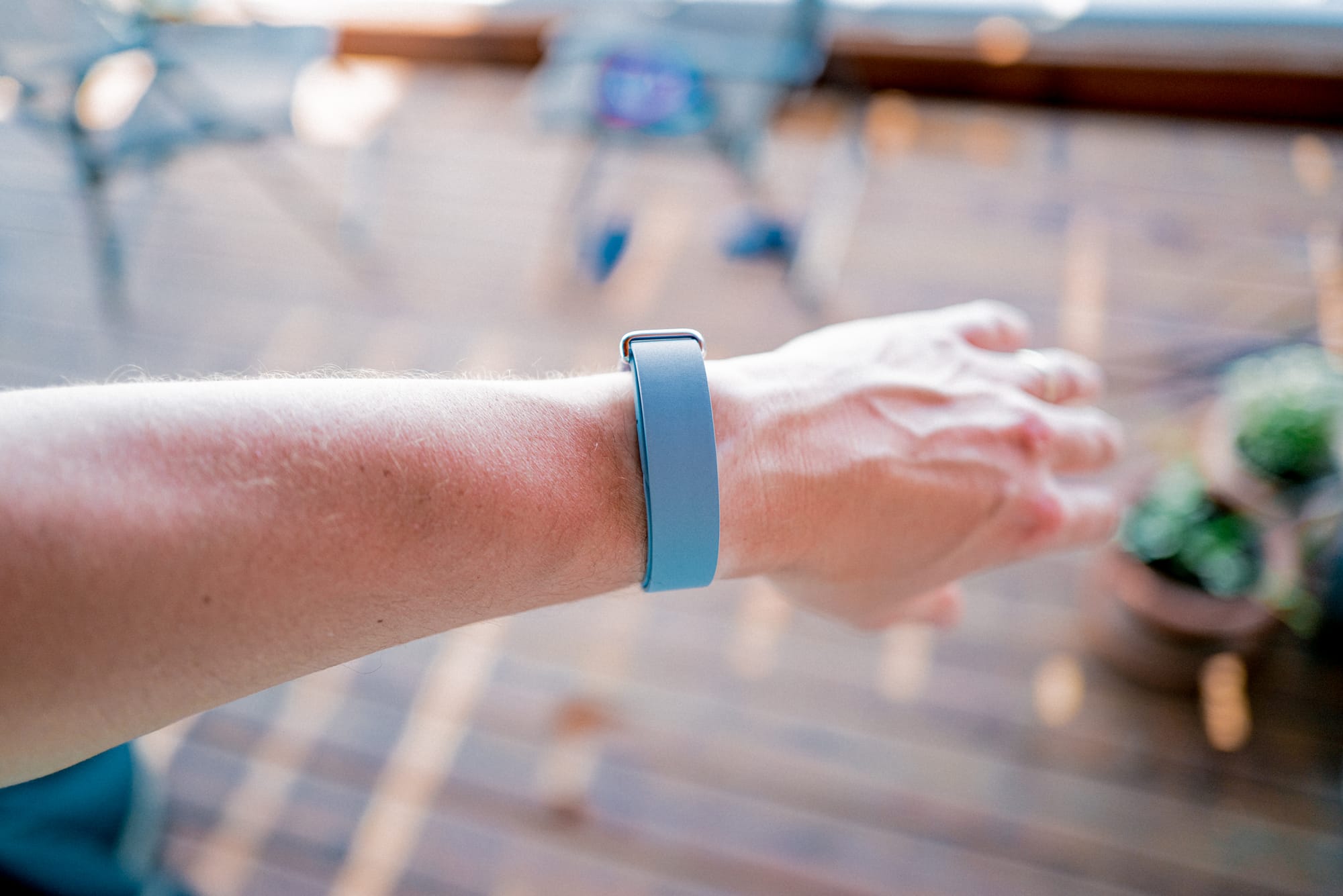
Above: The Modern Elevated Band. It is a polyurethane finish, so I feel it can pull double duty between modern polished and fitness.

I’m going by memory here, but the initial FitBit Air setup also had some differences from my experiences with Apple products. I had zero issue with Bluetooth connection to my iPhone, though this was just a “simple connection” — there weren’t any specific custom popover views like you would get with a pair of AirPods or the Apple Pencil on iPad (I’m well aware this is a Google product connecting to an Apple product; those first-party experiences shouldn’t be expected when going cross-platform).

Where things really differed was in the dreaded “update before you use experience”. After downloading the Google Health app and initially connecting, I had to hold the FitBit Air close to my iPhone while a mandatory update hit the FitBit Air before I could use it. I’ve grown so used to not having to update a device the moment I unbox it.

Shades of updates-past. I thought we had grown past this insanity.

On Syncing Data Experiences

Though I’ll talk more in depth at some point about the FitBit Air’s syncing differences (I won’t call them “shortcomings”, as I expect my issues are cross-platform based and not limitations), I’ve been surprised at the FitBit Air’s lack of integration into third-party apps and accessories. The FitBit Air is supposed to be a health and fitness tracker, but I can’t have it properly connect to any app or service or accessory outside the Google Health app itself.

Take the Peloton Bike for example. Am I crazy to think the Peloton Bike would be a perfect accessory for the FitBit Air to feed data into and receive data from? I have been able to see the FitBit Air and connect (I think it was connected, at least), but heart rate data doesn’t feed into the Bike, and no data apart from “Workout” ended up inside Google Health. No cardio load, no cardio zone information — nothing. Just “Workout”.

I have done some — borderline a lot — of research as to how the FitBit Air syncs to various services. Early on, I read there should be no issue connecting to the Peloton. I also read how you can transfer data through Apple Health into Google Health, and then use Google Health Premium’s AI features to act as a proper coach for you. What I’ve experienced are poor to no data sync, limited data transfer, and a Google Health Premium AI coach that says I worked out strenuously during my Wednesday evening round of golf.

Ha! “Strenuously.”


Overall, my first experiences with a Google product have been, well, different. So far, my experiences remind me more of those early years of trying to connect various accessories and softwares to a Windows computer, wherein you’d have to update and duct tape your way to a result. In Apple land — yes, I recognize there are some hiccups — things just tend to work. Seamlessly. Without thinking.

The promise of the wide world outside Apple’s cemented garden of Eden has always been one of flexibility, functionality, and customizability. Perhaps this is the case. The FitBit Air, though? Yeah, no. My experiences have been torn, intermittent, and rigid.

I don’t expect the FitBit Air to fit. If you know what I mean.

This is a terrible solution for running Windows software on your Mac through Parallels: Lowering the resolution of the virtual machine seems to speed up every element of the virtual machine itself, from opening files, to improving button and window layouts, to interaction as simple as pointing and clicking the mouse. Even Coherence Mode works better with a scaled resolution. Every single interaction with my Parallels virtual machine has improved since I decreased the VM’s resolution.

Changing the resolution is pretty easy:

  1. Shut down your virtual machine (don't just suspend it; fully shut it down).
  2. Open the VM's Configuration window:
  3. Click the Gear icon in the Parallels Control Center, or go to the Mac menu bar and select Actions > Configure.
  4. Click on the Hardware tab at the top, then select Video (or Display) from the left sidebar.
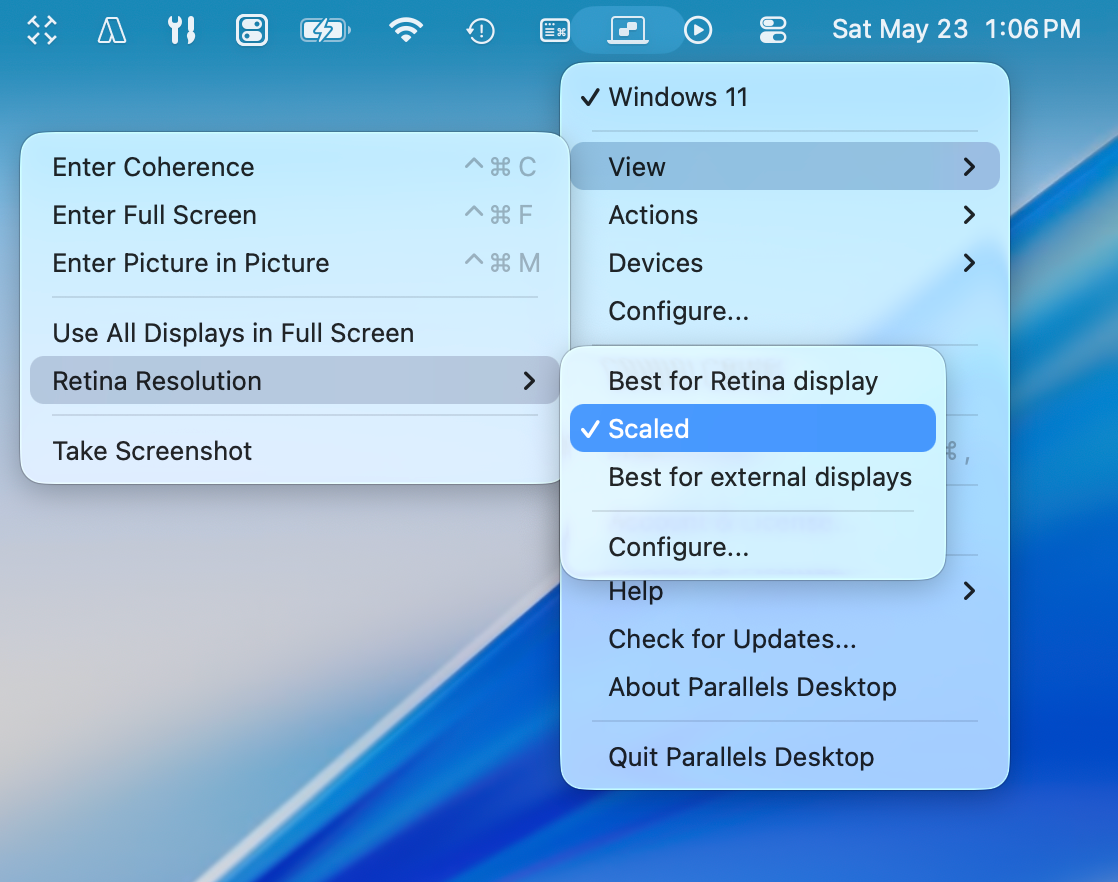
  5. Look for the Resolution dropdown menu. You will generally see three options:
    1. Best for Retina2. Scaled3. Best for external displays

Best for Retina is where I’ve always lived. This option utilizes the full high-DPI capabilities of your Mac. Text is razor-sharp, but elements often look tiny or require OS-level scaling.

Out of bad luck, when resizing the VM window, the scaling of the window dropped haphazardly on me, and I instantly noticed performance improvements across the board. I moved through the settings and found the scaling had flipped to “Scaled”, and I haven’t gone back since. Text is indeed softer, but every piece of software works as intended and as designed.

I’ve been a proponent of using Windows software on a Mac for a long, long time. Some pieces of software still sit exclusively inside Windows. Rather than fighting this reality, I recommend exploring the efficiencies Parallels provides. Too many people opt to run two computers — a Mac for personal use which syncs to their iPhone and iPad, and their work-issued Windows laptop — which causes distraction, syncing issues, and poor flow. Parallels fixes this in a nearly perfect way.

Indeed, some things don’t look perfectly sharp all the time. But they work — without distraction and hiccup — and this is all that counts.