









本文要点:
Sidecar 模式将横切关注点从业务逻辑组件中解耦出来,从而提升可维护性并降低复杂度。
Sidecar 可以与微服务一同构建,但也可以使用与微服务本身不同的技术栈来实现。
Sidecar 可以在多个服务之间复用,为配置、日志、追踪以及发布-订阅消息传递提供开箱即用的支持。
Sidecar 模式能够在不增加复杂性的前提下,降低组件之间的耦合度,并提升基于微服务应用的可扩展性、可维护性和效率。
虽然 Sidecar 非常适合为实现横切能力提供开箱即用的支持,但对于极度延迟敏感的工作负载,你通常可能不会选择使用它,以避免额外的网络跳转和资源开销。
如今的应用程序需要监控、日志记录、配置管理等能力。这些关注点中的每一个都可以实现为组件或服务。这些横切关注点也可以与应用程序紧密集成。虽然这种紧耦合能够确保共享资源被高效利用,但其中任何一个组件发生故障,都可能导致整个应用程序宕机。这时,Sidecar 设计模式便派上了用场。
Sidecar 设计模式能够帮助动态服务(即微服务)持续获得其所需的资源和数据,同时保持轻量化,避免背负大量内部逻辑带来的负担。在本文中,我们将探讨 Sidecar 设计模式、它的优势,以及如何在基于微服务的应用程序中实现它。我们还将讨论在使用 Sidecar 时通常会遇到的常见问题,以及如何缓解这些问题。
要运行本文讨论的代码示例,你的系统中应安装 Visual Studio、ASP.NET Core 和 Docker。请注意,当你在计算机上安装 Visual Studio 时,也可以通过 Visual Studio Installer 同时安装 ASP.NET Core。
下载 Visual Studio 和 Docker Desktop。你还需要 Elastic Search,我们将通过 NuGet 来安装它。
微服务架构由一组使用不同语言和技术构建的服务组成。管理这些特定语言接口的依赖关系,通常会增加大量复杂性。此外,由于其分布式特性,微服务架构还会带来多种挑战。
在构建基于分布式微服务的应用程序时,处理日志记录、身份认证和授权等横切关注点可能会非常困难。而这正是 Sidecar 模式能够发挥作用的地方。
Sidecar 模式通过将应用程序组件部署到独立的进程或容器中,帮助实现组件的隔离与封装。之所以称为 “Sidecar(边车)”,是因为这种设计模式类似于连接在摩托车旁边的边车。从本质上来说,Sidecar 设计模式能够帮助你构建由不同组件和技术组成的应用程序。
Sidecar 设计模式通常通过容器来实现,其中被称为 “Sidecar” 的辅助容器会与主应用程序一同运行。
这些 Sidecar 容器为应用程序提供额外功能,并负责那些不需要包含在主应用中的任务,例如日志记录、监控、配置和安全等。
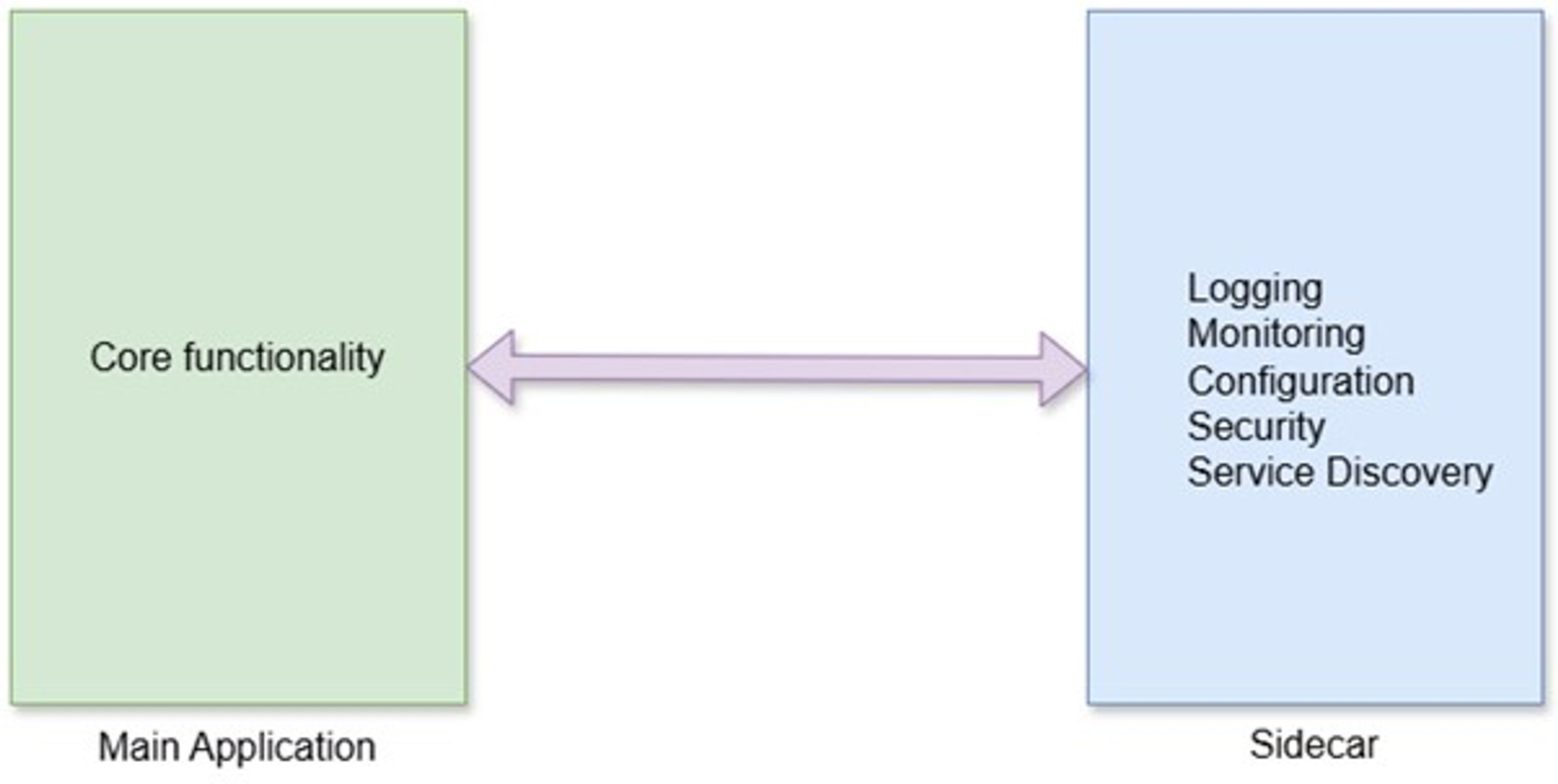
图 1. Sidecar 示意图
Sidecar 与父应用程序紧密关联,其生命周期与父应用类似,并会与父应用一起构建和销毁。如果你在承载 ASP.NET Core 微服务的主容器旁边使用 Sidecar 容器,那么主容器将负责应用程序的核心业务功能,而 Sidecar 容器则负责辅助性职责,例如:
日志记录
监控
分布式追踪
安全策略执行
服务发现
流量路由
通信
下面快速概览一下 Sidecar 设计模式的优势:
通过将横切关注点隔离到独立组件中,并使其独立于主应用运行,从而降低复杂性。
与语言无关,因此你可以使用多种不同的编程语言来构建它
通过包含所有必要模块并与微服务一同运行,减少代码冗余。
通过使用 localhost/共享网络降低延迟(尽管与进程内方案相比,Sidecar 仍可能引入一定延迟)。
通过将 Sidecar 作为独立进程附加到同一主机或子容器中,增强扩展性,使应用能够按需扩展。
在本节中,我们将探讨分布式应用在日志记录方面面临的挑战,并理解 Sidecar 设计模式如何在这里发挥作用。
日志记录是一种横切关注点,通常用于在应用程序运行期间捕获并存储事件记录。在分布式应用中,日志更常用于监控应用运行时行为、采集与性能相关的元数据,以及定位问题。
然而,在典型的基于微服务的应用程序中,日志可能会带来显著开销。例如,由于分布式服务中的日志数据量巨大,以及日志收集、聚合和传输到后端组件时对 CPU、内存和网络等资源的额外消耗。
结果就是,应用延迟增加,同时吞吐量下降。此外,由于微服务具有短暂性(ephemeral),在动态环境中聚合日志也会更加困难。你需要使用关联 ID(Correlation ID)来关联分布式微服务,但这又会带来额外的处理开销。
Sidecar 设计模式可以帮助缓解上述挑战。它能够实现关注点隔离,按照应用需求格式化数据,并降低复杂性和代码冗余。你可以利用 Sidecar 设计模式,在不修改主应用代码库的情况下,统一应用中的日志记录方式、收集指标数据并监控应用健康状态。
在本节中,我们将探讨如何在基于微服务的应用程序中实现分布式日志,以及 Sidecar 容器如何帮助为每个微服务收集并整合日志。为了构建这个应用程序,我们将使用以下技术和工具:
Visual Studio(IDE)
ASP.NET Core(Web 应用开发框架)
C#(编程语言)
Docker Desktop for Windows(容器化工具)
Elasticsearch(通过 NuGet 安装)
这个应用程序模拟了一个典型的库存管理系统,由两个微服务组成(即 Transactions API 和 Sidecar API)。前者作为生产者发送日志消息,而后者负责消费这些消息并将其发送到 Elasticsearch。
需要注意的是,Transactions API 并不会直接调用 Sidecar API。相反,Transactions 控制器中的 Create 操作方法会将日志消息发送到一个并发队列中,该队列随后会将消息存储到本地文件系统共享目录中的文本文件里。Sidecar API 会从共享目录中读取这些存储的消息,对其进行处理,然后再发送到 Elasticsearch。
下面是该应用程序的完整流程概览:
客户端调用 TransactionsController 中由 Create 操作方法表示的 HTTP Post 端点。
Create 操作方法不会直接写入磁盘或直接发送消息到 Elasticsearch,而是将消息添加到一个自定义并发队列中。
控制器立即返回 HTTP 响应;日志持久化被卸载到后台服务中处理。
TransactionsAPI 中的后台服务使用线程安全的文件日志记录器,将这些消息持久化到共享目录中的文本文件。
在 SidecarAPI 中,另一个后台服务从本地文件系统读取这些日志消息。
最后,SidecarAPI 的后台服务将日志消息发送到 Elasticsearch。
在这个应用程序中,我们将创建以下类型:
TransactionsAPI
TransactionRequest record
LogLevels enum
TransactionType enum
TransactionsController class
ISidecarMessageQueue interface
SidecarMessageQueue class
ThreadSafeFileLogger class
IThreadSafeFileLogger interface
TransactionsBackgroundService class
SidecarAPI
LogMessage record
LogsController class
IElasticSearchClientService interface
ElasticSearchClientService class
SidecarBackgroundService class
SidecarSettings class
一个典型的库存管理系统通常包含以下实体:Product、Stock、Transactions、Supplier、Customer 和 Orders。为了简化示例并保持篇幅简洁,本例中我们只使用 Transaction 实体。为了实现这个应用程序,我们将按照以下步骤进行:
在 Visual Studio 中创建一个空白解决方案
创建 TransactionsAPI ASP.NET Core Web API 项目并将其添加到解决方案中
创建 SidecarAPI ASP.NET Core Web API 项目并将其添加到解决方案中
为两个微服务创建 Dockerfile
创建用于运行微服务的 Docker Compose 文件
构建并运行 Docker Compose Stack
启动 Visual Studio IDE,并选择 “Blank Solution” 作为项目模板,以创建一个不包含任何项目的新空白解决方案。你可以将该空白解决方案命名为 “InventoryManagementSystem”。
由于本示例会使用两个微服务(TransactionsAPI 和 SidecarAPI),因此你应该为每个微服务分别创建独立项目。现在,请按照以下步骤,在解决方案中创建与这两个微服务对应的新项目:
在 Solution Explorer 窗口中右键点击解决方案,并选择 Add -> New project…。
在 Add a new project 窗口中,选择 ASP.NET Core Web API 作为项目模板。
点击 Next 在 Configure your new project 窗口中,将项目名称指定为 TransactionsAPI,并指定项目在本地计算机中的保存路径。
点击 Next 在 Additional Information 对话框中,指定要使用的框架版本。
勾选 Enable container support 复选框,并将 Container OS 指定为 Linux。 最后,点击 Create
重复相同步骤,再创建 SidecarAPI 微服务。图 2 展示了 Solution Explorer 的最终效果:
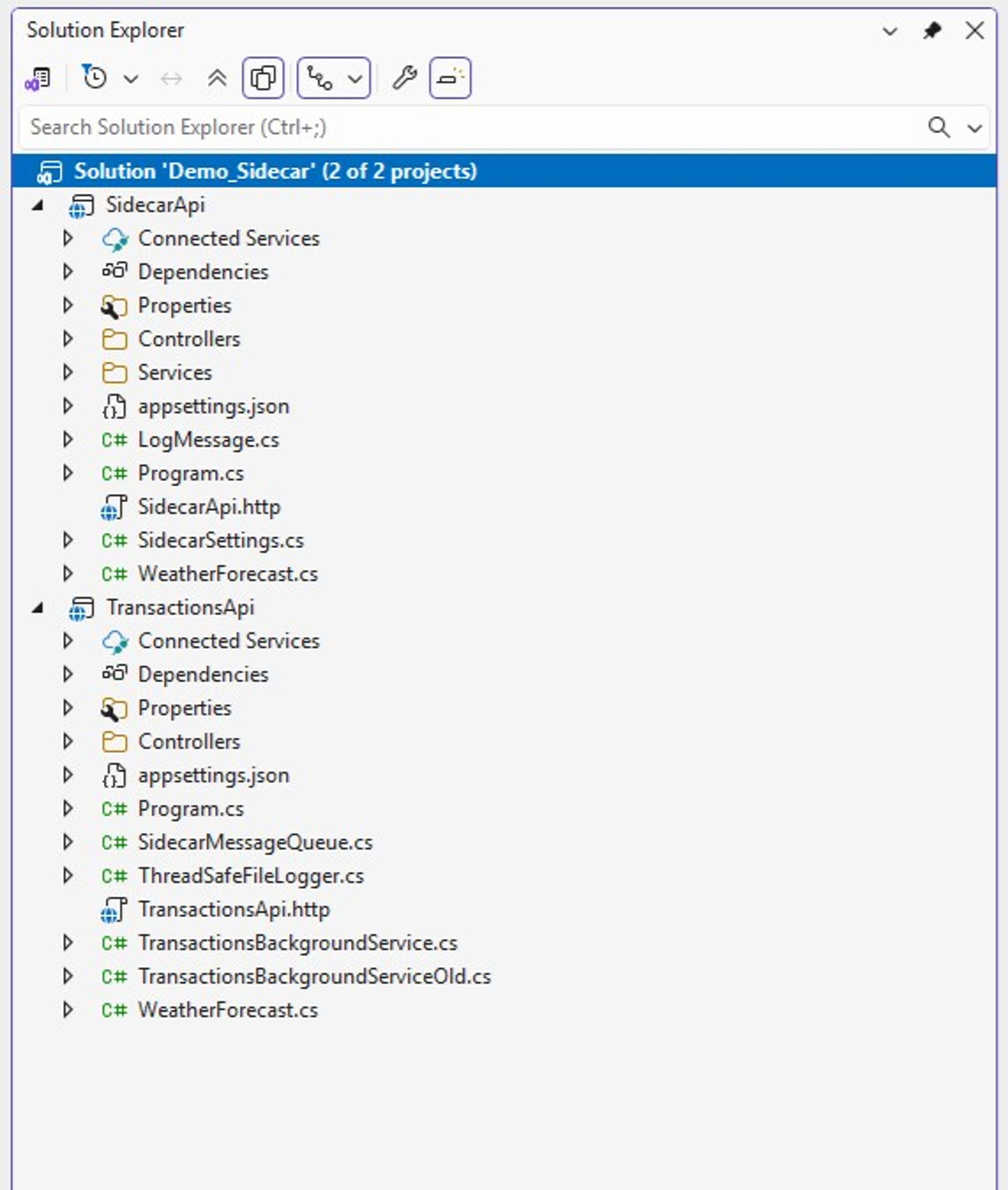
图 2:显示两个项目的 Solution Explorer
在 TransactionsAPI 项目中创建一个名为 TransactionRequest.cs 的文件,并在其中创建一个名为 TransactionRequest 的 record 类型。该类型将用于在内存中存储事务数据。使用以下代码替换默认生成的代码:
public record TransactionRequest{ public required int TransactionId { get; init; } [JsonConverter(typeof(JsonStringEnumConverter))] public required TransactionType TransactionType { get; init; } public required DateTime TransactionDate { get; init; } public required int TransactionQuantity { get; init; }}复制代码
public enum TransactionType{ Pending, Dispatched, Shipped, Delivered, Cancelled}复制代码
TransactionsAPI 对应的是处理业务事务并生成日志的微服务。为了简化示例,这里并未提供业务处理逻辑。
TransactionsAPI 的工作流程如下:
客户端调用 HTTP POST /api/transactions 端点,并传入所需的事务数据。
与该端点对应的 action method 会将事务消息发送或添加到内存队列中。
TransactionBackgroundService 会按照固定时间间隔运行,从队列中取出这些消息,并将其存储到共享目录中的文本文件。
在 TransactionsAPI 微服务中,我们将创建一个文件日志记录器,用于将消息存储到文本文件中。为此,我们需要创建两个类型:一个名为 IThreadSafeFileLogger 的接口,以及一个名为 ThreadSafeLogger 的类来实现该接口的方法。
下面的代码展示了 IThreadSafeFileLogger 接口:
public interface IThreadSafeFileLogger{ Task SendMessageAsync(string message); Task SendMessageAsync(string level, string message);} 复制代码
下面的代码展示了 ThreadSafeFileLogger 类如何利用 semaphore 来确保文件写入操作是线程安全的,也就是说,不会有两个线程同时访问 SendMessageAsync 方法中的临界区。
public class ThreadSafeFileLogger: IThreadSafeFileLogger{ private static readonly SemaphoreSlim _semaphore = new(1, 1); private readonly IConfiguration _configuration; private readonly string _filePath; public ThreadSafeFileLogger(IConfiguration configuration) { _configuration = configuration; _filePath = _configuration["ApiKeys:FilePath"] ?? throw new InvalidOperationException("Path to file missing ..."); } public async Task SendMessageAsync(string message) { await _semaphore.WaitAsync(); try { await File.AppendAllTextAsync(_filePath, $"{Guid.NewGuid().ToString()} | {message}{Environment.NewLine}"); } finally { _semaphore.Release(); } } public async Task SendMessageAsync(string level, string message) { await _semaphore.WaitAsync(); try { await File.AppendAllTextAsync(_filePath, $"{Guid.NewGuid().ToString()} | {level} | {message}{Environment.NewLine}"); } finally { _semaphore.Release(); } }} 复制代码
在 TransactionsAPI 微服务中,TransactionBackgroundService 类继承自 BackgroundService 类,并实现了 ExecuteAsync 方法。该方法会按照固定时间间隔被调用,如下所示
public class TransactionsBackgroundService : BackgroundService { private readonly TimeSpan _period = TimeSpan.FromSeconds(5); private readonly ILogger<TransactionsBackgroundService> _logger; private readonly IServiceProvider _serviceProvider; public TransactionsBackgroundService(ILogger<TransactionsBackgroundService> logger, IServiceProvider serviceProvider) { _logger = logger; _serviceProvider = serviceProvider; } protected override async Task ExecuteAsync(CancellationToken stoppingToken) { using PeriodicTimer timer = new PeriodicTimer(_period); using IServiceScope scope = _serviceProvider.CreateScope(); var _transactionsMessageQueue = scope.ServiceProvider.GetRequiredService<ISidecarMessageQueue>(); var threadSafeFileLogger = scope.ServiceProvider.GetRequiredService<IThreadSafeFileLogger>(); while (!stoppingToken.IsCancellationRequested && await timer.WaitForNextTickAsync(stoppingToken)) { _logger.LogInformation("Executing PeriodicBackgroundTask"); while (_transactionsMessageQueue.Count > 0) { string message = await _transactionsMessageQueue.Dequeue(); await threadSafeFileLogger.SendMessageAsync(message); } } } }复制代码
我们还将在 TransactionsAPI 微服务项目中创建一个自定义消息队列,用于存储 Transactions Controller 生成的日志消息。下面的代码展示了 ISidecarMessageQueue 接口,其中包含 Enqueue 和 Dequeue 方法的声明。
public interface ISidecarMessageQueue{ int Count { get; } Task Enqueue(string level, string message); Task<string> Dequeue(); Task ClearAsync();}复制代码
SidecarMessageQueue 类实现了该接口,如下所示:
public sealed class SidecarMessageQueue: ISidecarMessageQueue{ private readonly ConcurrentQueue<string> queue = new ConcurrentQueue<string>(); public async Task Enqueue(string level, string message) { string str = await BuildMessage(level, message); queue.Enqueue(str); } public async Task<string> Dequeue() { if(queue.TryDequeue(out string? message)) { return message; } return string.Empty;}private async Task<string> BuildMessage(string level, string message){ return $"{level} | {message}{Environment.NewLine}";} public int Count => queue.Count; public async Task ClearAsync() { while (queue.TryDequeue(out _)) { } } }复制代码
请注意,在前面的代码中,尽管 BuildMessage 方法并未执行任何异步操作,但这里仍然故意使用了 async 关键字,以便未来扩展。
接下来,新增一个名为 TransactionsController 的 API Controller,并使用以下代码替换自动生成的代码:
[ApiController] [Route("api/[controller]")] public class TransactionsController : ControllerBase { private readonly ISidecarMessageQueue _transactionsMessageQueue; public TransactionsController(ISidecarMessageQueue transactionsMessageQueue) { _transactionsMessageQueue = transactionsMessageQueue; } [HttpPost] public async Task<ActionResult> Create([FromBody] TransactionRequest transactionRequest) { if (transactionRequest.TransactionId <= 0) { await _transactionsMessageQueue.Enqueue(LogLevel.Error.ToString(), "Transaction Id must be > 0."); return BadRequest(); } if (transactionRequest.TransactionQuantity <= 0) { await _transactionsMessageQueue.Enqueue(LogLevel.Error.ToString(), "Transaction Quantity must be > 0."); return BadRequest(); } bool isTransactionTypeValid = Enum.IsDefined(typeof(TransactionType), transactionRequest.TransactionType); if (!isTransactionTypeValid) { await _transactionsMessageQueue.Enqueue(LogLevel.Error.ToString(), $"{transactionRequest.TransactionType} " + $"is an invalid transaction type"); return BadRequest(); } await _transactionsMessageQueue.Enqueue(LogLevel.Information.ToString(), $"Created a new transaction record having transaction Id: " + $"{transactionRequest.TransactionId}"); return Ok(new { success = true, data = transactionRequest, id = transactionRequest.TransactionId }); } }复制代码
如前面的代码片段所示,TransactionsController 类包含一个 HttpPost action method。该 HttpPost action method 从请求体中接收一个 TransactionRequest record 类型实例的引用参数,并用于创建新的事务记录。该方法还会验证传入数据,并将日志消息发送到消息队列。
TransactionsController 类的完整源代码可在源码仓库中获取。
SidecarAPI 微服务会读取共享目录中存储的应用日志,并将其转发到 Elasticsearch。同时,SidecarAPI 还提供一个 HTTP GET 端点,用于查询存储在 Elasticsearch 中的日志。
SidecarAPI 的工作流程如下:
SidecarBackgroundService 会按照固定时间间隔轮询日志文件(在本示例中配置为每五秒一次)。
SidecarBackgroundService 会逐行解析日志文本。
SidecarBackgroundService 使用 ElasticSearchClientService 将这些日志发送到 Elasticsearch。
除了这种 Sidecar 模式实现方式之外,你也可以使用 Distributed Application Runtime(Dapr)来处理横切关注点。Dapr 是一个开源、事件驱动的运行时,可用于在任何语言和运行时环境下,为分布式云原生应用实现 Sidecar 模式。
在 SidecarAPI 项目中创建一个名为 LogMessage.cs 的文件,并在其中创建一个名为 LogMessage 的 record 类型,用于存储日志元数据,例如日志消息、日志级别和时间戳,如下所示:
public record LogMessage{ public required string Id { get; init; } public required DateTime Timestamp { get; init; } public required string Message { get; init; }}复制代码
接下来,创建一个名为 LogsController 的 API Controller,并使用以下代码替换自动生成的代码:
using Microsoft.AspNetCore.Mvc;using SidecarApi.Services;[ApiController][Route("api/[controller]")]public class LogsController : ControllerBase{ private readonly IElasticSearchClientService _elasticSearchClientService; private readonly ILogger<LogsController> _logger; public LogsController(IElasticSearchClientService elasticSearchClientService, ILogger<LogsController> logger) { _elasticSearchClientService = elasticSearchClientService; _logger = logger; } [HttpGet] public async Task<ActionResult<List<LogMessage>>> Get() { try { var logs = await _elasticSearchClientService.GetAllLogsAsync(); return Ok(logs.ToList()); } catch (Exception ex) { _logger.LogError(ex, "Failed to fetch logs from Elasticsearch"); return StatusCode(500); } }}复制代码
在本示例中,我们使用了一个自定义文件日志记录器,将数据记录到文本文件中。更好的替代方案是使用 Serilog——一个用于实现结构化日志的开源框架。通过在该应用程序中实现结构化日志,可以简化数据查询过程。你还可以结合 OpenTelemetry 来实现可观测性,通过输出 traces 和 metrics,并借助 collector 将它们发送到 Elasticsearch。
LogsController 仅包含一个 HTTP GET action method。该 action method 可用于检索存储在 Elasticsearch 中的所有日志记录。LogsController 类的完整源代码可在源码仓库中获取。
在 SidecarAPI 微服务中,我们将消费存储在共享目录中的消息。下面的代码展示了 SidecarBackgroundService 类,该类继承自 BackgroundService 类,并实现了 ExecuteAsync 方法。该方法会按照预定义的时间间隔执行(本示例中为每五秒一次)。
下面的代码展示了 SidecarBackgroundService 类:
public class SidecarBackgroundService : BackgroundService { private readonly TimeSpan _period = TimeSpan.FromSeconds(5); private readonly IServiceProvider _serviceProvider; private readonly ILogger<SidecarBackgroundService> _logger; private readonly IOptions<SidecarSettings> _settings; private readonly ConcurrentQueue<string> logs = new ConcurrentQueue<string>(); private readonly int _maxBatchSize; private readonly int _maxCacheDurationInMinutes; private readonly IMemoryCache _cache; public SidecarBackgroundService( ILogger<SidecarBackgroundService> logger, IServiceProvider serviceProvider, IOptions<SidecarSettings> settings, IMemoryCache cache) { _logger = logger; _serviceProvider = serviceProvider; _settings = settings; _maxBatchSize = settings.Value.MaxBatchSize; _maxCacheDurationInMinutes = settings.Value.MaxCacheDurationInMinutes; _cache = cache; } protected override async Task ExecuteAsync(CancellationToken stoppingToken) { using var timer = new PeriodicTimer(_period); _logger.LogInformation($"LogShipper started. Monitoring {_settings.Value.LogDirectory}"); while (!stoppingToken.IsCancellationRequested && await timer.WaitForNextTickAsync(stoppingToken)) { await SendMessagesToElasticAsync(stoppingToken); } } private async Task SendMessagesToElasticAsync(CancellationToken cancellationToken) { var directory = _settings.Value.LogDirectory; var logFilePattern = _settings.Value.LogFilePattern; if (string.IsNullOrWhiteSpace(directory) || string.IsNullOrWhiteSpace(logFilePattern)) return; if (!Directory.Exists(directory)) return; var files = Directory.GetFiles(directory, logFilePattern); foreach (var fileName in files) { await using var stream = new FileStream(fileName, FileMode.Open, FileAccess.Read, FileShare.ReadWrite); using var reader = new StreamReader(stream); string? text; using IServiceScope scope = _serviceProvider.CreateScope(); var _elasticSearchClient = scope.ServiceProvider.GetRequiredService<IElasticSearchClientService>(); while ((text = await reader.ReadLineAsync(cancellationToken)) != null) { if (string.IsNullOrWhiteSpace(text)) continue; string[] message = text.Split('|'); string messageKey = message[0].Trim();if (!_cache.TryGetValue(messageKey, out _)) { logs.Enqueue(text); if (logs.Count > _maxBatchSize) { while (logs.TryDequeue(out string? str)) { string[] data = str.Split('|'); string key = data[0].Trim(); LogMessage logMessage = new LogMessage() { Id = data[0].Trim(), Timestamp = DateTime.UtcNow, Message = str.Substring(data[0].Length + 1).Trim() }; await _elasticSearchClient.IndexAsync (logMessage, cancellationToken);var cacheEntryOptions = new MemoryCacheEntryOptions() .SetSlidingExpiration(TimeSpan.FromMinutes(_maxCacheDurationInMinutes));_cache.Set(messageKey, true, cacheEntryOptions); } } } } } } }复制代码
为了在 SidecarAPI 中启用内存缓存支持,请在 Program.cs 文件中添加以下代码:
builder.Services.AddMemoryCache(); 复制代码
在 SidecarAPI 项目中,IElasticSearchClientService 接口为所有与 Elasticsearch 相关的操作(例如索引和查询文档)定义了清晰的抽象。ElasticSearchClientService 类实现了该接口,并封装了应用程序与 Elasticsearch 的交互方式。
创建一个名为 IElasticSearchClientService 的新接口,并放置在同名文件中,然后使用以下代码替换默认生成的代码:
public interface IElasticSearchClientService{ Task IndexAsync(LogMessage logMessage, CancellationToken ct); Task IndexBatchAsync(List<LogMessage> entries, CancellationToken ct); Task<List<LogMessage>> GetAllLogsAsync(); Task DeleteAsyncRequest();}复制代码
接下来,创建一个名为 ElasticSearchClientService 的新类,并实现 IElasticSearchClientService 接口,如下面的代码所示:
public class ElasticSearchClientService: IElasticSearchClientService{ private readonly ILogger<ElasticSearchClientService> _logger; private readonly ElasticsearchClient _elasticSearchClient; private readonly ElasticsearchClientSettings _elasticSearchClientSettings; public ElasticSearchClientService( ILogger<ElasticSearchClientService> logger, IOptions<SidecarSettings> settings) { _logger = logger; _elasticSearchClientSettings = new ElasticsearchClientSettings( new Uri(settings.Value.Elasticsearch.Url)) .Authentication( new BasicAuthentication( settings.Value.Elasticsearch.Username, settings.Value.Elasticsearch.Password)); _elasticSearchClient = new ElasticsearchClient(_elasticSearchClientSettings); } public async Task DeleteAsyncRequest() { var today = DateTime.UtcNow.ToString("yyyy.MM.dd"); var indexName = $"application-logs-{today}"; var response = await _elasticSearchClient.Indices.DeleteAsync(indexName); } public async Task<List<LogMessage>> GetAllLogsAsync() { var today = DateTime.UtcNow.ToString("yyyy.MM.dd"); var indexName = $"application-logs-{today}"; var searchResponse = await _elasticSearchClient.SearchAsync<LogMessage>( s => s.Indices(indexName).Query(q => q.MatchAll())); return searchResponse.IsValidResponse ? searchResponse.Documents?.ToList() ?? new List<LogMessage>() : new List<LogMessage>(); } public async Task IndexAsync(LogMessage logMessage, CancellationToken ct) { var today = DateTime.UtcNow.ToString("yyyy.MM.dd"); var indexName = $"application-logs-{today}"; var existsResponse = await _elasticSearchClient.Indices.ExistsAsync(indexName, ct); if (!existsResponse.Exists) { var createResponse = await _elasticSearchClient.Indices.CreateAsync(indexName); if (!createResponse.IsValidResponse) { _logger.LogError("Failed to create index: {Error}", createResponse.DebugInformation); throw new Exception(createResponse.DebugInformation); } } var indexResponse = await _elasticSearchClient.IndexAsync(logMessage, idx => idx.Index(indexName)); if (!indexResponse.IsValidResponse) { throw new Exception(indexResponse.DebugInformation); } } public async Task IndexBatchAsync(List<LogMessage> entries, CancellationToken ct) { if (entries.Count == 0) return; var today = DateTime.UtcNow.ToString("yyyy.MM.dd"); var indexName = $"application-logs-{today}"; var bulkRequest = new BulkRequest(indexName) { Operations = new List<IBulkOperation>() }; foreach (var entry in entries) { bulkRequest.Operations.Add(new BulkIndexOperation<LogMessage>(entry)); } var response = await _elasticSearchClient.BulkAsync(bulkRequest, ct); if (!response.IsValidResponse) { _logger.LogError("Failed to index logs: {Error}", response.DebugInformation); throw new Exception($"Elasticsearch error: {response.DebugInformation}"); } _logger.LogInformation("Indexed {Count} logs to {Index}", entries.Count, indexName); }}复制代码
你应该在 Program.cs 文件中注册 TransactionsAPI 的依赖项,如下面的代码片段所示:
using System.Text.Json.Serialization;using TransactionsAPI;var builder = WebApplication.CreateBuilder(args);builder.Services.AddSingleton<IThreadSafeFileLogger, ThreadSafeFileLogger>();builder.Services.AddSingleton<ISidecarMessageQueue, SidecarMessageQueue>();builder.Services.AddHostedService<TransactionsBackgroundService>();builder.Services.AddControllers().AddJsonOptions(options =>{ options.JsonSerializerOptions.Converters.Add(new JsonStringEnumConverter());});var app = builder.Build();app.MapControllers();app.Run();复制代码
下面的代码片段展示了如何在 SidecarAPI 项目的 appsettings.json 文件中指定 Sidecar 配置元数据:
"Sidecar": {"LogDirectory": "/app/logs","LogFilePattern": "xapi.log","MaxBatchSize": 5,"MaxCacheEntries": 5,"Elasticsearch": { "Url": "http://elasticsearch:9200", "Username": "elastic", "Password": "changeme" } }复制代码
下面给出了 SidecarAPI 的 Program.cs 文件完整源代码:
using SidecarApi;using SidecarApi.Services;var builder = WebApplication.CreateBuilder(args);builder.Services.AddMemoryCache(); builder.Services.Configure<SidecarSettings>( builder.Configuration.GetSection("Sidecar"));builder.Services.AddScoped <IElasticSearchClientService, ElasticSearchClientService>();builder.Services.AddHostedService<SidecarBackgroundService>();builder.Services.AddControllers();var app = builder.Build();app.MapControllers();app.Run();复制代码
在实现 Sidecar 设计时,你应该充分利用容器,以获得更好的隔离性、模块化能力和可复用性。虽然应用容器与 Sidecar 容器彼此隔离,但它们共享相同的生命周期、网络,通常还会共享同一份存储。
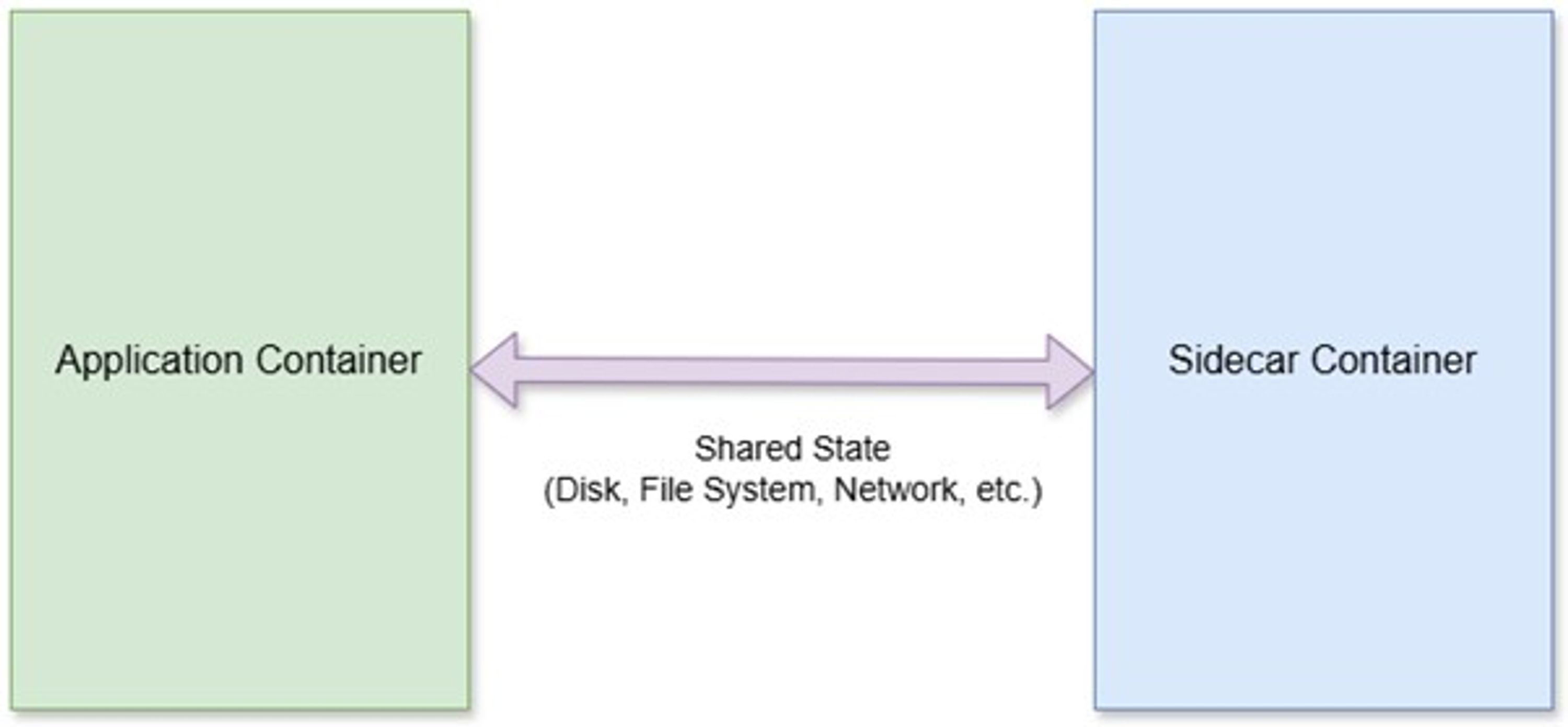
图 3:应用容器与 Sidecar 容器运行示意图
你应该通过在之前创建的两个项目(即 TransactionsAPI 和 SidecarAPI)中分别创建 Dockerfile,来将这两个服务 Docker 化。由于你在创建这两个项目时已经启用了容器支持,因此系统默认会在每个项目中自动生成 Dockerfile。
下面是 SidecarAPI 服务(即 Sidecar)的 Dockerfile 源代码。
FROM mcr.microsoft.com/dotnet/aspnet:10.0 AS baseRUN mkdir -p /app/logs && chmod 750 /app/logsUSER $APP_UIDWORKDIR /appEXPOSE 8081# This stage is used to build the service projectFROM mcr.microsoft.com/dotnet/sdk:10.0 AS buildARG BUILD_CONFIGURATION=ReleaseWORKDIR /srcCOPY ["SidecarApi/SidecarApi.csproj", "SidecarApi/"]RUN dotnet restore "./SidecarApi/SidecarApi.csproj"COPY . .WORKDIR "/src/SidecarApi"RUN dotnet build "./SidecarApi.csproj" -c $BUILD_CONFIGURATION -o /app/build# This stage is used to publish the service project to be copied to the final stageFROM build AS publishARG BUILD_CONFIGURATION=ReleaseRUN dotnet publish "./SidecarApi.csproj" -c $BUILD_CONFIGURATION -o /app/publish /p:UseAppHost=false# This stage is used in production or when running from VS in regular mode (Default when not using the Debug configuration)FROM base AS finalWORKDIR /appCOPY --from=publish /app/publish .ENTRYPOINT ["dotnet", "SidecarApi.dll"]复制代码
Transactions 微服务的 Dockerfile 应包含以下代码:
FROM mcr.microsoft.com/dotnet/aspnet:10.0 AS baseRUN mkdir -p /app/logs && chmod 750 /app/logs # Linux permissionUSER $APP_UIDWORKDIR /appEXPOSE 8080# This stage is used to build the service projectFROM mcr.microsoft.com/dotnet/sdk:10.0 AS buildRUN mkdir -p /app/logs && chmod 750 /app/logsARG BUILD_CONFIGURATION=ReleaseWORKDIR /srcCOPY ["TransactionsApi/TransactionsApi.csproj", "TransactionsApi/"]RUN dotnet restore "./TransactionsApi/TransactionsApi.csproj"COPY . .WORKDIR "/src/TransactionsApi"RUN dotnet build "./TransactionsApi.csproj" -c $BUILD_CONFIGURATION -o /app/build# This stage is used to publish the service project to be copied to the final stageFROM build AS publishARG BUILD_CONFIGURATION=ReleaseRUN dotnet publish "./TransactionsApi.csproj" -c $BUILD_CONFIGURATION -o /app/publish /p:UseAppHost=false# This stage is used in production or when running from VS in regular mode (Default when not using the Debug configuration)FROM base AS finalWORKDIR /appCOPY --from=publish /app/publish .ENTRYPOINT ["dotnet", "TransactionsApi.dll"]复制代码
Docker Compose 文件是一种基于 YAML 的配置文件,可让你以声明式方式定义如何协同运行多个容器。你可以使用它在单个文件中配置所有服务、网络和卷,而无需通过多条 Docker 命令分别运行各个容器。
Docker File 用于配置并构建应用中的单个镜像,而 Docker Compose 文件则定义了多个镜像如何作为服务协同运行,组成一个多容器应用。Docker Compose 能够帮助简化容器化应用的管理。它不仅可以让你以更细粒度、更简单的方式控制容器,还能提升协作与开发效率,并让应用能够轻松运行在你所需的任何环境中。本质上,Docker Compose 是一种非常适合统一配置应用所依赖服务(如数据库、消息队列、缓存、Web Service API 等)的方式。随后,你只需使用 Docker Compose 命令行工具执行一条命令,即可启动一个或多个容器。
为了同时部署这两个容器,你应该创建一个 docker-compose.yml 文件,并写入以下内容:
services: elasticsearch: image: docker.elastic.co/elasticsearch/elasticsearch:8.15.1 container_name: elasticsearch environment: - discovery.type=single-node - xpack.security.enabled=false - "ES_JAVA_OPTS=-Xms1g -Xmx1g" ports: - "9200:9200" volumes: - esdata:/usr/share/elasticsearch/data networks: - app-network healthcheck: test: ["CMD-SHELL", "curl -f http://localhost:9200/_cluster/health || exit 1"] interval: 30s timeout: 10s retries: 5 start_period: 40s transactions-api: build: context: . dockerfile: TransactionsApi/Dockerfile container_name: transactions-api ports: - "8080:8080" environment: - ASPNETCORE_ENVIRONMENT=Development - ASPNETCORE_URLS=http://+:8080 volumes: - ./logs:/app/logs networks: - app-network depends_on: elasticsearch: condition: service_healthy sidecar-api: build: context: . dockerfile: SidecarApi/Dockerfile container_name: sidecar-api ports: - "8081:8081" environment: - ASPNETCORE_ENVIRONMENT=Development - ASPNETCORE_URLS=http://+:8081 volumes: - ./logs:/app/logs networks: - app-network depends_on: elasticsearch: condition: service_healthynetworks: app-network: driver: bridgevolumes: esdata:复制代码
下面的代码片段展示了如何在 Program.cs 文件中为 Elasticsearch 添加健康检查:
builder.Services.AddHealthChecks() .AddCheck<ElasticHealthCheck>("elasticsearch");You can also use the authentication and authorization provided by the ASP.NET Core to secure the endpoints, as shown below. [Authorize(Policy = "ReadOnly")][HttpGet]public async Task<ActionResult<List<LogMessage>>> Get() { //Code omitted for brevity}[Authorize(Policy = "CanDelete")][HttpDelete]public async Task Delete() { //Code omitted for brevity}复制代码
由于篇幅和简化示例的考虑,我们在本文中跳过了这些内容。
最后,使用以下代码运行 Docker Compose 文件:
docker-compose up --build复制代码
图 4 展示了 Docker Compose 命令运行时的效果。
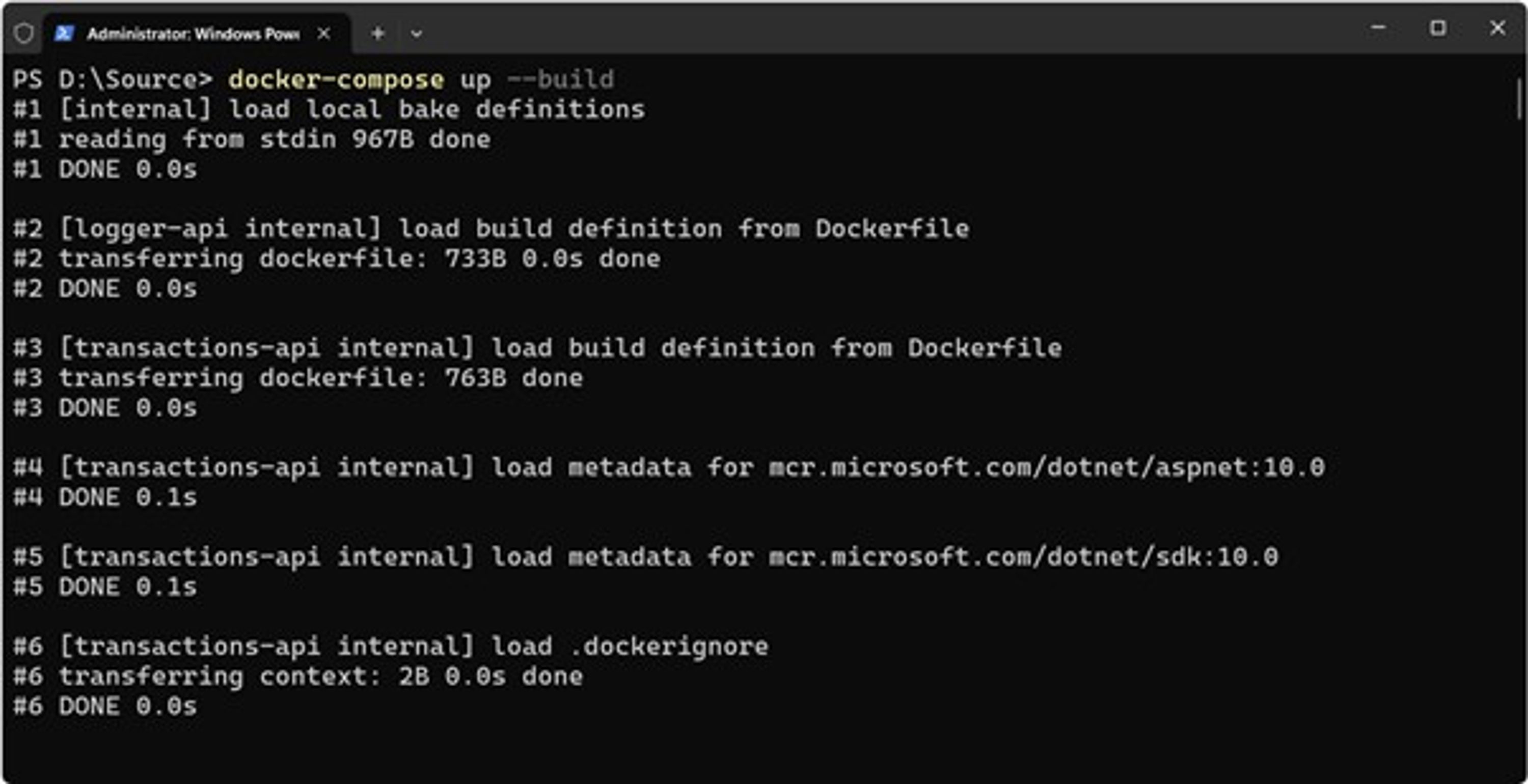
图 4:Docker Compose 命令执行过程
当 TransactionsAPI 微服务运行时,它会生成日志消息并将其发送到内存集合中。随后,后台服务会将这些消息存储到共享文件夹中的文本文件中。图 5 展示了如何使用 Postman 调用 Transactions 微服务。
顺带一提,Postman 是一个非常流行的 API 平台,用于构建、测试和管理 API。
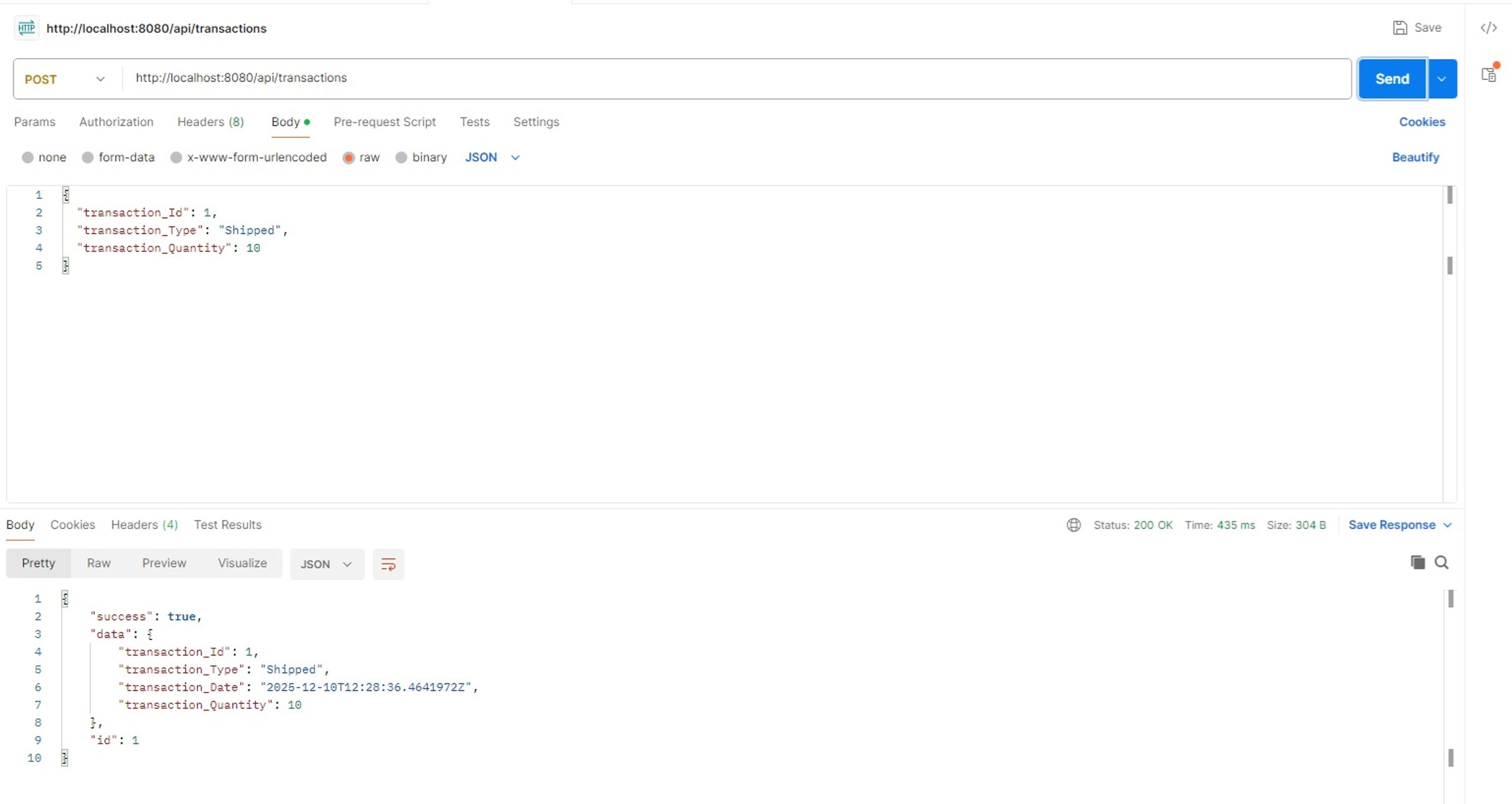
图 5:使用 Postman 调用 Transactions 微服务的 Create 端点
随后,Sidecar 微服务会从共享文件夹中的文本文件读取日志消息,并将其发送到 Elasticsearch。
你可以通过调用 Sidecar 微服务中 Logs 控制器的 HTTP GET 端点来获取存储在 Elasticsearch 中的日志,如图 6 所示。
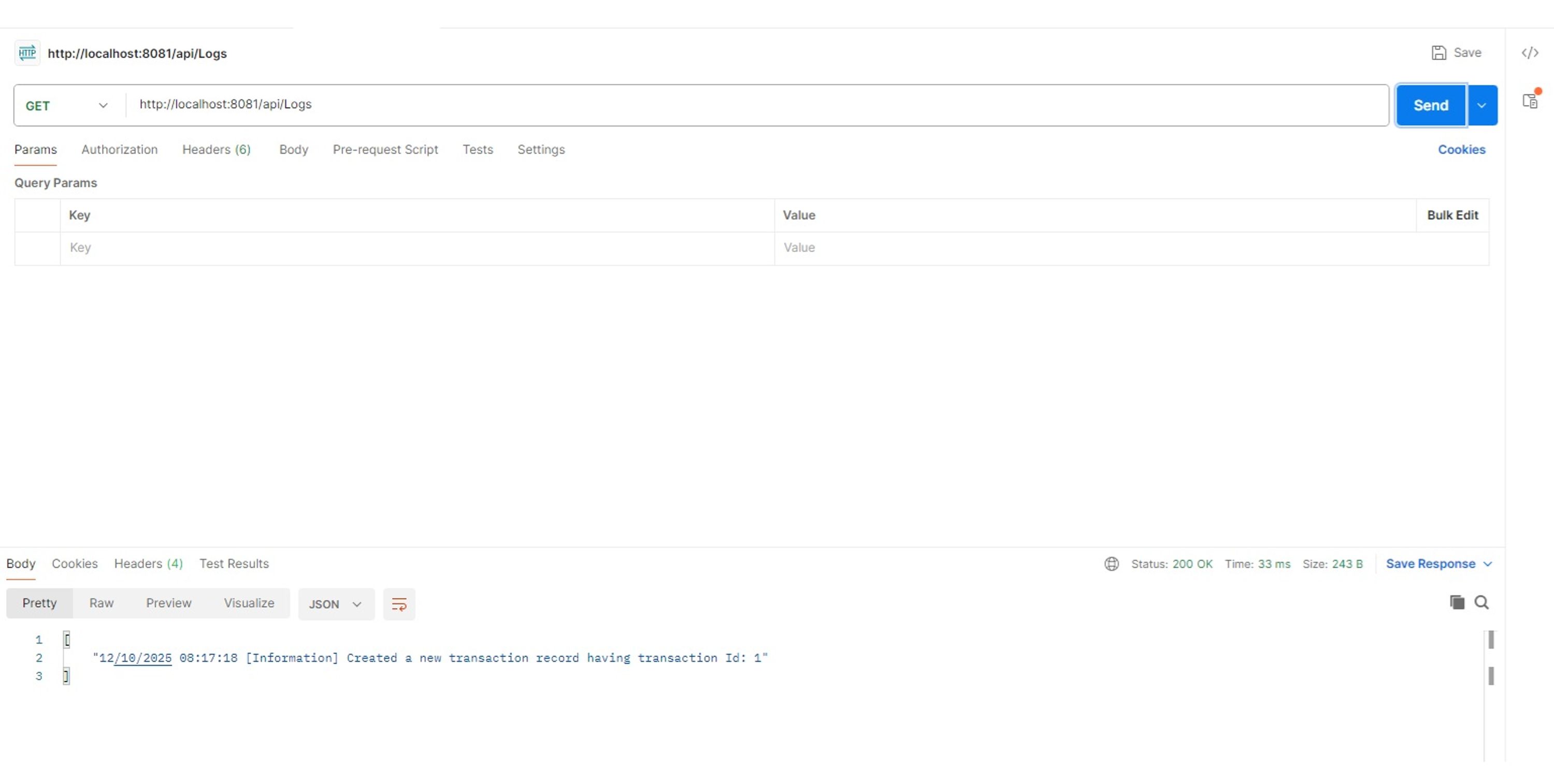
图 6:在 Elasticsearch 中展示已保存的消息
你可以通过使用 Kubernetes 来改进这一实现。Kubernetes 可以作为一种“运行时基础设施”,使分布式云原生应用具备可扩展性、弹性和生产级可运维能力。在这种实现方式中,TransactionsAPI 和 SidecarAPI 两个微服务会运行在同一网络中的不同容器上。它们通过网络地址进行通信,并通过 bind mount 共享卷。
虽然这种方式可以工作,但更理想的方案是使用 Kubernetes Pod 来实现 Sidecar 模式。需要注意的是,真正的 Sidecar 模式通常运行在 Kubernetes Pod 中,在同一个 Pod 内的容器共享 localhost 网络和存储卷。
需要注意的是,这种实现方式会带来一定的性能和延迟开销。例如,TransactionsAPI 服务中的文件 I/O 操作会因为磁盘读写而增加额外开销。你还应该避免每次都重新创建索引。
相反,可以在启动时一次性创建索引。你也可以通过使用 IndexBatchAsync 批量发送消息到 Elasticsearch,从而以批处理方式写入日志,提高整体性能。最后,你还可以在该应用中使用 OpenTelemetry 来更积极地收集指标,并在后续进行分析。
你可以通过多种方式实现 Sidecar 模式:
自定义(Custom)
当你希望采用一种简单方案,同时对 Sidecar 的实现拥有完全控制权和灵活性,并且不依赖任何外部组件时,自定义 Sidecar 是一个不错的选择。
Dapr
Distributed Application Runtime(Dapr)可以帮助你实现 Sidecar 模式,并提供服务间通信、状态管理以及分布式应用中的事件处理等能力。这种方式可以减少你编写自定义代码的需求,使你能够将精力集中在业务价值交付上,而不是编写重复的基础设施代码。
Serilog + Elasticsearch sink
如果你的应用基于 .NET,并且希望直接控制日志结构与格式,同时将日志直接写入 Elasticsearch,而不依赖中间日志聚合代理,那么这是一个不错的选择。
stdout + Kubernetes DaemonSet
你也可以通过 stdout 与 Kubernetes DaemonSet 来实现 Sidecar 模式。这在中小型集群环境中是一种简单且资源高效的方案。DaemonSet 能够确保某个 Pod 在 Kubernetes 集群的每个节点上运行。
Sidecar 模式本质上是 Kubernetes 原生的概念,其中容器共享同一个 Pod、localhost 以及生命周期。Docker Compose 示例只是本地开发中的一种近似实现,而 Kubernetes 才是 Sidecar 模式的标准实现方式;Docker Compose 仅用于本地开发场景。
尽管 Sidecar 设计模式具有诸多优势,但和所有软件模式一样,只有在正确实现时才真正有价值。你可以扩展本文中的应用示例,使 Sidecar 容器能够为每个微服务收集并整合日志与监控指标,从而提升微服务系统的可维护性、可用性、性能和功能,并更有效地定位与排查运行时问题。
原文链接:
This content is automatically aggregated by InertiaRSS (RSS Reader) for reading reference only. Original from — Copyright belongs to the original author.