


DebugBrief

Record what you do while debugging and turn it into an evidence-backed Markdown report for a pull request, a handoff, or an incident note.
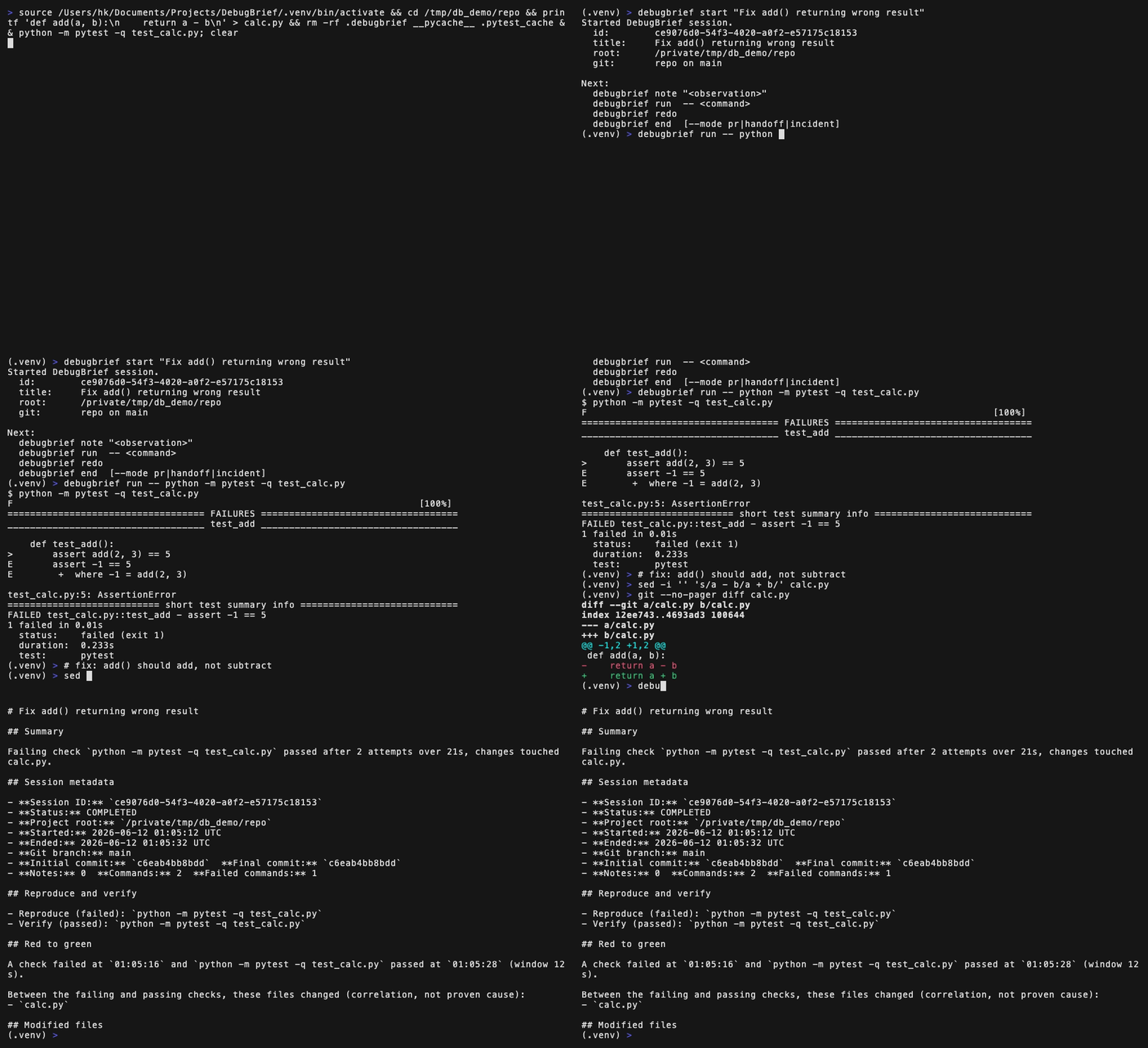
DebugBrief captures the notes you write and the commands you run, then builds a report from what actually happened: what you tried, what failed, what passed, and which files changed in between. It does not use AI and does not infer a root cause or report a test result you did not get.
Install
pipx install debugbrief
# or
uv tool install debugbrief
Plain pip install debugbrief works too. DebugBrief needs Python 3.9 or newer. Native Git is used when available to capture repository metadata and changed files. The project you debug does not need to be Python; only DebugBrief runs on Python.
Quickstart
debugbrief start "Fix add() returning wrong result"
debugbrief note "add() subtracts instead of adds; the test expects 5."
debugbrief run -- python -m pytest -q test_calc.py   # fails
# make your fix
debugbrief redo                                      # same test, now passes
debugbrief end                                       # writes the PR report
Everything after -- runs exactly as you typed it, with its output streaming live to your terminal. DebugBrief flags (--timeout, --shell, --no-redact, --verify) go before the --. redo re-runs the last captured command, and end defaults to the pr report mode.
Tip: a one-line alias makes the capture prefix disappear in daily use.
alias db="debugbrief run --"
db pytest -q
What you get
A report built only from recorded evidence. A short excerpt from a real run:
## Summary

Failing check `python -m pytest -q test_calc.py` passed after 2 attempts over 2s, changes touched calc.py.

## Red to green

A check failed at 12:02:09 and `python -m pytest -q test_calc.py` passed at 12:02:10 (window 1s).

Between the failing and passing checks, these files changed (correlation, not proven cause):
- `calc.py`
Full samples: PR, handoff, incident.
How it works
runexecutes a command under a pseudo-terminal so its output streams live, then records the real exit code, a bounded output preview, the duration, and a per-commandgitsnapshot.- Pass or fail comes only from the exit code. A command counts as verified only when a recognized test, build, lint, or typecheck runner actually exits 0.
- It works with any language. A recognized runner (pytest, jest, vitest, go test, cargo test, dotnet test, make check, and more) is classified automatically. Any other command is still captured, and you mark it a check with
--verify. endderives the report from those events: the red-to-green window, the reproduce and verify commands, a timeline, the observed error, and the failed attempts. Empty sections are omitted.- Secrets are redacted before anything is written to disk. Redaction is best effort;
--no-redactopts out for a single command.
Full command reference and the complete recognized-runner list: docs/COMMANDS.md. Security model and redaction details: SECURITY.md.
Post a report straight to a pull request (GitHub CLI optional):
debugbrief end --stdout | gh pr comment --body-file -Commands
The five you use most:
| Command | What it does |
|---|---|
start "<title>" |
Start a session |
note <text> |
Record an observation |
run -- <command> |
Run and capture a command |
redo |
Re-run the last captured command |
end [--mode pr|handoff|incident] |
Finalize and write a report (default pr) |
The rest:
| Command | What it does |
|---|---|
init |
Set up the project and show the workflow |
status |
Show the active session |
preview [--mode ...] |
Print the report without ending the session |
cancel [--yes] |
Discard the active session, no report |
doctor [--fix] |
Health-check the project and state |
recover |
Repair a broken session pointer after a crash |
last |
Show the most recent report path |
open |
Open the most recent report |
list |
List recorded sessions |
show <id> |
Show a recorded session |
Full flags and behavior for each: docs/COMMANDS.md.
Dependencies
DebugBrief uses the Python standard library and native git. On Python 3.11 and newer it needs nothing else. On Python 3.9 and 3.10 it uses the small tomli package to read an optional .debugbrief.toml. DebugBrief itself makes no network requests, uses no AI, and collects no telemetry.
Supported platforms
Linux and macOS are tested in CI across Python 3.9 through 3.14. Other Unix-like systems may work but are not currently tested. Native Windows and PowerShell are not supported.
Limitations
- Capture is explicit through
debugbrief run. Output streams live while a bounded preview is stored for the report, so there is no full transcript. - Full-screen TUIs (a
vimsession,htop) are not meaningfully captured. Run those directly and record the outcome withnote. - Redaction is conservative and best effort; it does not catch every secret.
- Git sections need native
git; outside a repository they are omitted.
Development
pip install -e ".[dev]"
pytest
See CONTRIBUTING.md for the full setup and contribution guidelines.
License
MIT. See LICENSE.