







Kapa builds AI assistants that answer questions from technical documentation. The knowledge bases we process hold millions of images: screenshots, architecture diagrams, circuit schematics, annotated UI walkthroughs. We spent several months working out how to make them useful in our RAG pipeline.
The short version: we don't send images to the model at query time. We describe each image once, at indexing time, with a cheap vision model, store the descriptions as text, and retrieve them alongside ordinary text chunks. Indexing is a one-time cost; after that, per-query overhead is 1% to 6% over text-only, and answers are measurably, statistically significantly better. This post explains how we got there.
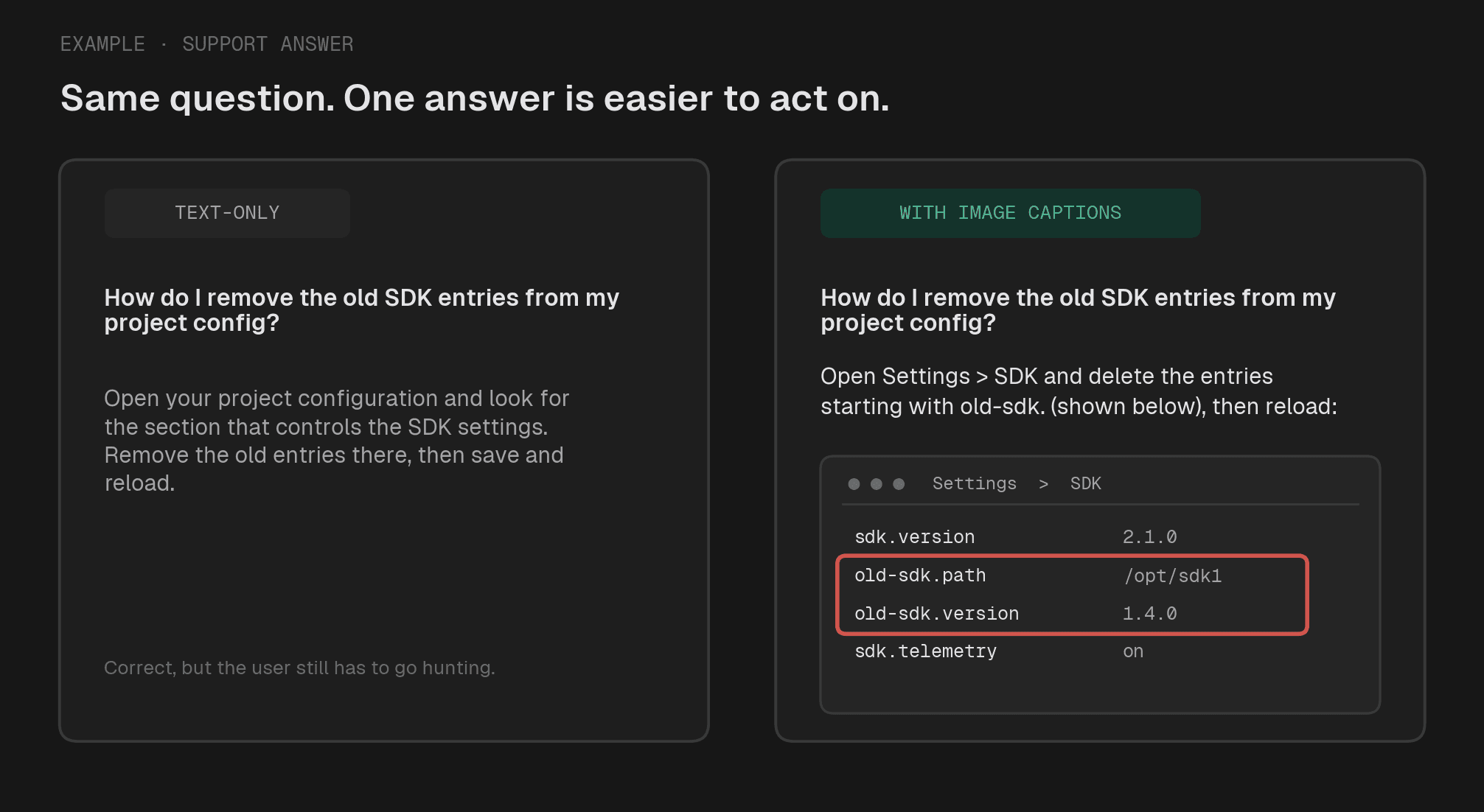
Both answers are correct. The one that shows the screenshot is the one a user can act on without hunting for the setting.
We went through thousands of real customer questions across hardware, semiconductor, and developer-tooling accounts to see how images earn their place in an answer. They split into two kinds.
Most are illustrative. They show what the text already says, only more clearly: a guide says "click the settings icon," and the screenshot beside it shows which icon, where, and what it looks like. The words carry the fact; the picture makes it easy to act on.
Some are load-bearing. A wiring diagram, a spec table, a certification or color-availability matrix can hold a value that lives in the figure and essentially nowhere else. There the picture is not a convenience, it is the source of the answer.
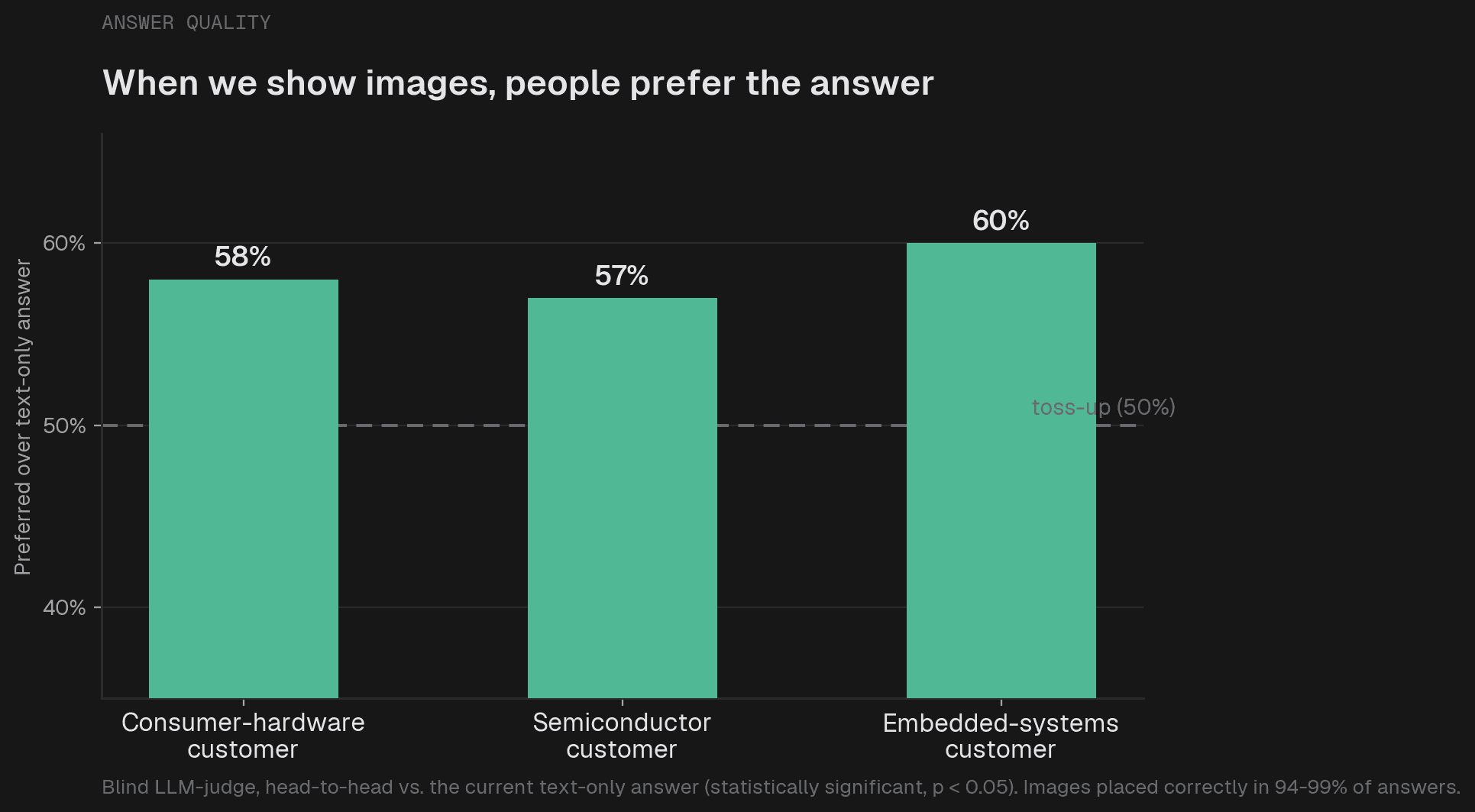
We confirmed the lift either way: with image context available, an LLM judge preferred the answers across three customer projects and two models, by a statistically significant margin (McNemar's test, p < 0.05).
The improvement is the kind a user feels. Instead of "look for the configuration section that controls the setting," you get the specific path plus a screenshot showing exactly where to click. Same facts, far easier to act on. For a support assistant, that is the difference between a user who self-serves and one who opens a ticket.
Either way, images make answers materially better. The engineering question is the one the rest of this post is about: how to use them without paying a vision bill on every query.
The approach most people reach for first: retrieve the relevant chunks, collect the images they reference, and pass everything to a vision-capable model.
We tested it with GPT 5.1 and Claude 4.6 Sonnet across hundreds of production questions. The problems are structural, not engineering details to tune away.
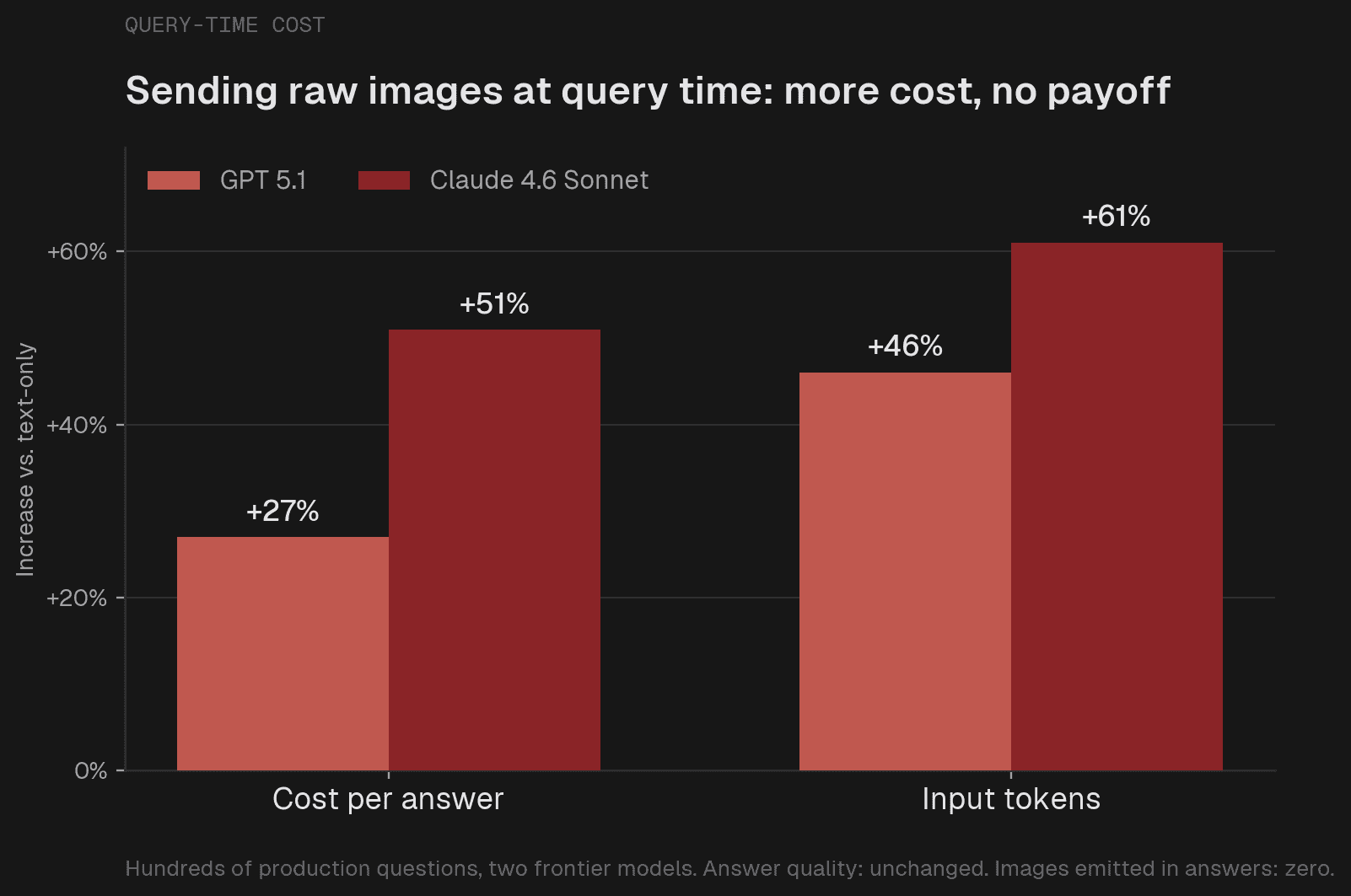
The economics do not work. Raw images added 27% to per-query cost on GPT and 51% on Claude (Claude tokenizes an image at roughly 975 tokens to GPT's 716). We serve millions of queries; paying that much more on all of them, when most answers do not need a fresh look at the pixels, is not a trade we can make.
The images do not physically fit. A typical question retrieves 10-30 chunks referencing 20-30 images on average, with a long tail past 130. Claude's payload limit is 30 MB and OpenAI's 50 MB; around 25 images already approaches Claude's ceiling. You would have to cap images aggressively, which defeats the point.
Multimodal retrieval does not suit this domain. CLIP-style embeddings wash out exactly the fine detail that matters in charts, tables, and annotated screenshots, and short technical queries ("how do I configure X") give too little signal to match against image vectors.
These are properties of today's ecosystem, not bugs to fix. They pointed us away from query-time vision entirely.
The approach that works inverts the economics. Instead of paying to process images on every query, you pay once, at indexing time, to turn each image into a text description. After that, retrieval and generation run entirely in text.
At indexing time, a vision language model writes a caption for each image. The captions are stored and retrieved alongside ordinary text chunks. At query time, if a caption is relevant, the retriever pulls it in; the model sees the caption, never the raw image, and cites the image by its original URL.
This works because the heavy lifting, actually looking at the image, happens once, at ingestion, instead of on every query. For an illustrative screenshot the caption is a description; for a load-bearing figure it is a transcription of what the figure holds, the values in the table, the labels on the diagram. Either way the content becomes text, and the rest of the pipeline never has to see a pixel. Microsoft's research team also reached the same conclusion: describe at ingestion, store as separate chunks.
This is what makes the load-bearing case work, and it is where a lot of assistants quietly fail. A color-availability matrix is a wall of check marks; a fire-resistance table is a grid of ratings. Flatten one into plain text with a generic extractor and the structure dissolves, which is how an assistant ends up confidently telling a customer a panel comes in a color it does not. Transcribed at ingestion, the same matrix becomes retrievable text, and the answer stays grounded in what the figure actually shows.
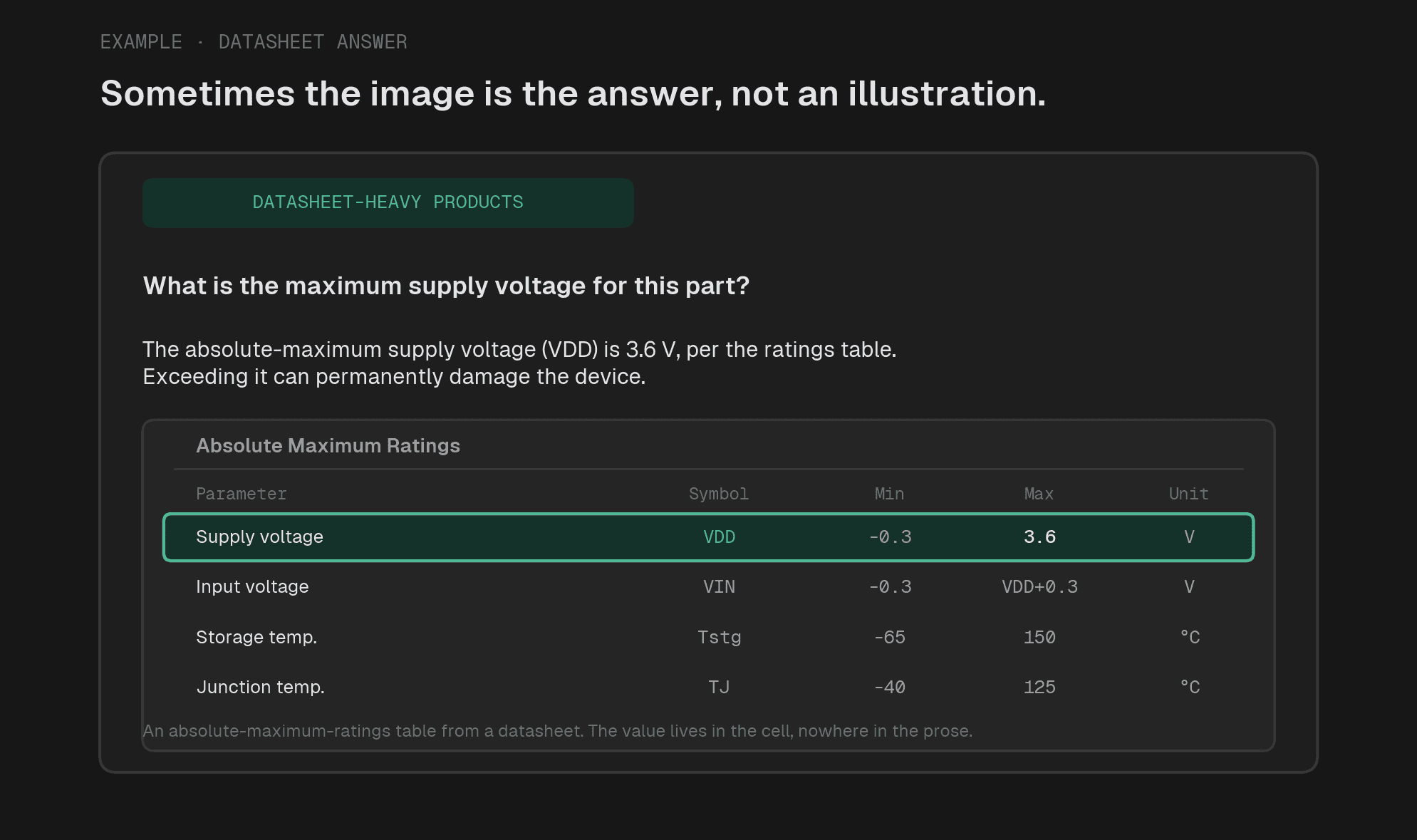
For datasheet-heavy products, the figure can sometimes be the answer. Though, this is rarely found based on real user questions in production.
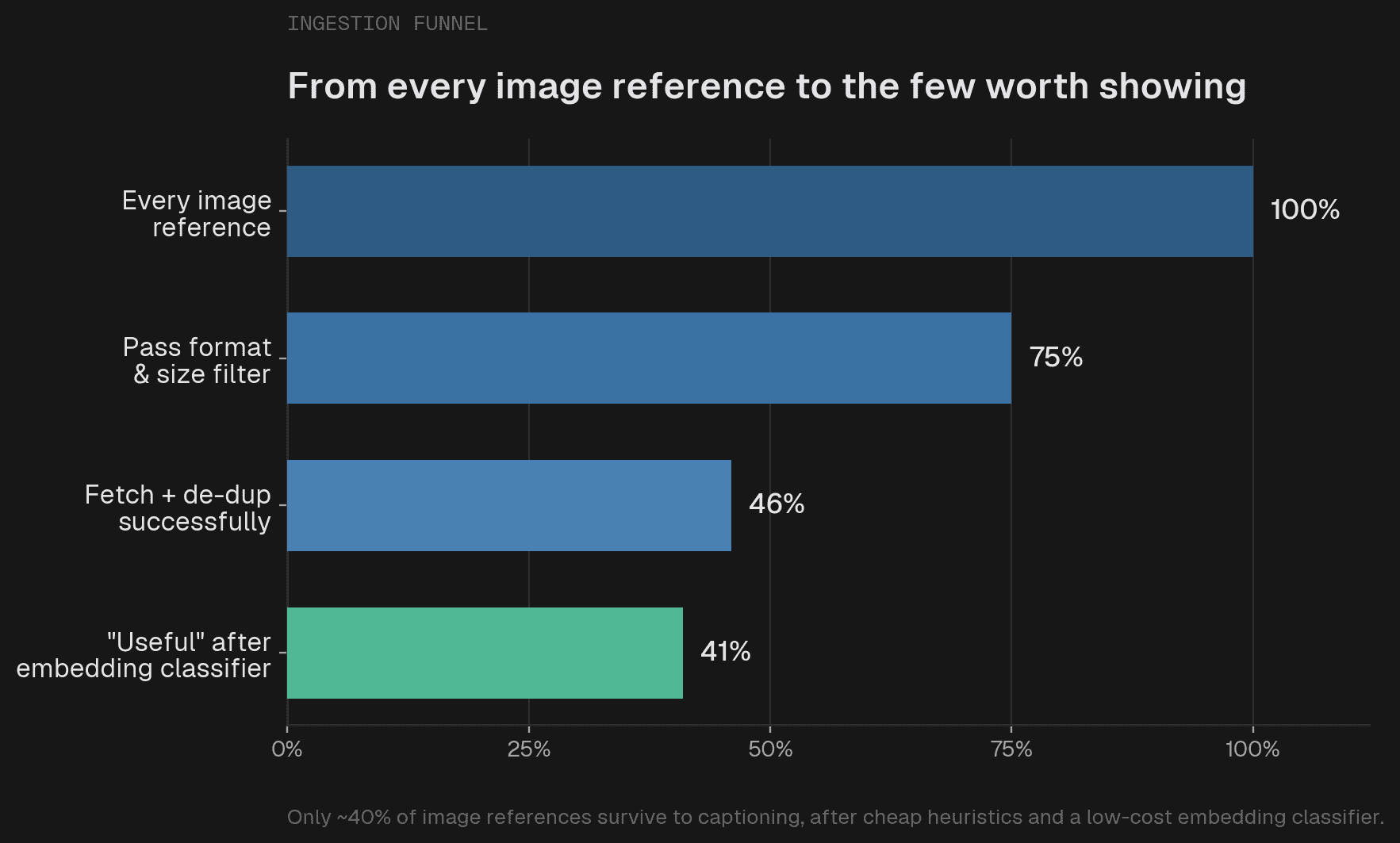
You cannot caption millions of images indiscriminately. Most are noise: logos, avatars, social preview cards, decorative banners. Heuristics handle the first pass (drop unsupported formats, tiny images, extreme aspect ratios). For the rest, we built a zero-shot classifier on multimodal embeddings. It is cheap enough to run across the whole corpus.
On clear-cut images it hits 96.8% accuracy (F1 0.974). On ambiguous ones, accuracy collapses to 59.8%, and the reason is fundamental. A screenshot of a countdown timer could be a decorative banner or step 3 of a tutorial about timers. The pixels are identical; without the surrounding text there is not enough information to decide, and no embedding model can fix that. So we accept it: the classifier removes the clear junk (about 13% of what survives heuristics) and we tolerate the ambiguous edge. Context-aware classification is the obvious next step.
Two things drive caption quality. First, surrounding text: feed the model the paragraphs before and after the image and quality jumps. Without context, a file-upload dialog is "a web page with a file upload form"; with it, the caption is grounded in the specific product, workflow, and step, which is what makes it useful for retrieval.
Second, expensive models buy little. We compared five, from Claude 4.6 Sonnet down to GPT 5.4 nano. A small model (GPT 5.4 mini) produced captions almost indistinguishable from models four times its price; only nano dropped off. At our scale, a small model is the obvious choice.
Two ways to integrate a caption. Inline: replace the image's alt text in the document, so some chunks carry both text and description. Separate: store each caption as its own chunk, leaving the document untouched.
We expected inline to win, since the caption sits next to its text. Separate won, on both cost and image usage. Inline captions inflate every chunk they live in, and those chunks ship on every query whether the images are relevant or not. Separate chunks only enter the context when the retriever judges them relevant, so you pay for an image only when it matters. On one image-heavy project, inline raised per-query cost 19% with GPT; separate, 6%. With Claude, separate captions slightly lowered cost versus text-only. And they earn their place: the re-ranker promoted them into the top 15 on 51% of queries, while overall ranking held steady (Spearman ρ = 0.905).
End to end across three customer projects with GPT 5.1 and Claude 4.6 Sonnet:
Text-only baseline | With image captions | |
|---|---|---|
Images cited in answers | 0% | 10% to 64% |
Answer quality (LLM judge) | baseline | significantly better (p < 0.05) |
Per-query cost | baseline | +1% to 6% |
Latency (time to first token) | baseline | sub-second increase |
Model uncertainty | baseline | unchanged or slightly lower |
Indexing cost | n/a | one-time, then no recurring image cost |
Across every experiment, images were placed correctly 94% to 99% of the time.
This is a less flashy answer than "use a multimodal model," and that is the point. It works because it puts the vision where it belongs: once, at ingestion, turning whatever an image holds into text, instead of paying to re-examine pixels on every query. Whether an image clarifies the words or carries the answer outright, reading it once is cheaper and a better fit for how the rest of the pipeline works. The constraints we hit were not obstacles to engineer around; they were pointing at the architecture.
Rolling out in preview now.
此内容由惯性聚合(RSS阅读器)自动聚合整理,仅供阅读参考。 原文来自 — 版权归原作者所有。