



惯性聚合 高效追踪和阅读你感兴趣的博客、新闻、科技资讯
阅读原文 在惯性聚合中打开

推荐订阅源

T
Tor Project blog
博客园 - 聂微东
Microsoft Azure Blog
博客园 - 【当耐特】
G
Google Developers Blog
J
Java Code Geeks
The Cloudflare Blog
Attack and Defense Labs
宝玉的分享
宝玉的分享
Last Week in AI
Last Week in AI
Cisco Talos Blog
Cisco Talos Blog
酷 壳 – CoolShell
酷 壳 – CoolShell
I
Intezer
Jina AI
Jina AI
T
Tenable Blog
P
Palo Alto Networks Blog
Project Zero
Project Zero
D
DataBreaches.Net
Hugging Face - Blog
Hugging Face - Blog
The Hacker News
The Hacker News
F
Full Disclosure
Cloudbric
Cloudbric
量子位
H
Heimdal Security Blog
K
Kaspersky official blog
有赞技术团队
有赞技术团队
罗磊的独立博客
V
Vulnerabilities – Threatpost
cs.AI updates on arXiv.org
阮一峰的网络日志
阮一峰的网络日志
Vercel News
Vercel News
Recent Announcements
WordPress大学
WordPress大学
GbyAI
GbyAI
S
SegmentFault 最新的问题
M
MIT News - Artificial intelligence
OSCHINA 社区最新新闻
OSCHINA 社区最新新闻
I
InfoQ
Recorded Future
Recorded Future
Security Archives - TechRepublic
AI
AI
Webroot Blog
Webroot Blog
C
CXSECURITY Database RSS Feed - CXSecurity.com
爱范儿
爱范儿
freeCodeCamp Programming Tutorials: Python, JavaScript, Git & More
T
The Exploit Database - CXSecurity.com
Apple Machine Learning Research
C
Cybersecurity and Infrastructure Security Agency CISA
H
Hacker News: Front Page
Latest news
Latest news

BMPI

构建自己的信息简报 2.0 我的退休计划:把无期变成有期 从情绪化交易到系统化投资 策引2025 实盘大考:当算法跑赢人性 三十五 我的AI投资助手 我的投资之路 BMPI周记008:设止损而勇试错 BMPI周记007:经济下行 BMPI周记006:时光机 BMPI周记005:直播小完结 BMPI周记004:不要做空 BMPI周记003:十年前的今天 BMPI周记002:交易之难 BMPI周记001:开始直播 对交易的思考 AI驱动开发:从Prompt到Product(直播) 策引全球投资组合:A股1号 策引全球投资组合:A股2号 策引全球投资组合:A股3号 策引全球投资组合:A股全球 策引全球投资组合:加密币1号 策引全球投资组合:加密币2号 策引全球投资组合:美股1号 策引全球投资组合:美股2号 策引全球投资组合:美股3号 策引全球投资组合:美股4号 策引全球投资组合:美股全球 全球投资开户完全指南:A股与美股篇 我的2023 全球经济中的隐形巨人 海外银行证券开户薅羊毛小记 我与ChatGPT结对编程的体验 ChatGPT背后的语言模型简史 ChatGPT应用开发小记 我的AI阅读助手 SQLite的文艺复兴 2022亏了多少 # 组合季报(2022Q4) AI降临 构建自己的信息简报 善用GitHub Real-time Web应用开发新体验 我的巨亏经历 # 组合季报(2022Q3) Google软件工程之工具篇 构建自己的杠杆 我的投资助手 Google软件工程之过程篇 Google软件工程之文化篇 交易之难 # 组合季报(2022Q2) 从技术难题中学习 编程语言是如何实现并发的之并发模型篇 疫情与战争 # 组合季报(2022Q1) 编程语言是如何实现并发的之操作系统篇 编程语言是如何实现泛型的 写在第二十五万字 走进 Web3 财富常识 复盘2021 # 组合季报(2021Q4) 分布式系统中的时间 分布式系统下的认证与授权 如何学习一门技术 K8S 云原生应用开发小记 使用 Beancount 管理家庭财务 三周年小记 # 组合月报(202109) 仓位管理是核心 # 组合月报(202108) 云端 IDE 护城河还在但城没了 # 组合月报(202107) 构建高质量的信息输入渠道 最牛指数 # 组合月报(202106) 国际化与本地化 慢慢变富 # 组合月报(202105) 失败驱动开发 加密币挖矿小记 家庭资产配置的阶段 # 组合月报(202104) OKR + GTD + Note => Logseq 我的个人项目技术栈 长期投资之难 # 组合月报(202103) 我的人生管理系统 当别人的股票基金上涨时 # 组合月报(202101) 基于Serverless实现静态博客访问统计功能 构建终身学习体系进行自我提升 我的家庭理财规划 投资的秘密 # 组合月报(202012) 零成本搭建现代博客之优化国内访问速度 我的绘图工具箱 关于银行分期贷款的坑 # 组合月报(202011) 投资交易的心理建设 # 组合月报(202010) 大跌时我们能做什么 # 组合月报(202009) 双均线交易策略 # 组合月报(202008) Serverless应用开发小记 投资理财书籍推荐 # 组合月报(202007) 200万小目标 # 组合月报(202006) 零成本搭建现代博客之加载速度优化篇 零成本搭建现代博客之订阅推送篇 我常用的浏览器插件 零成本搭建现代博客之SEO优化篇 什么是SEO 零成本搭建现代博客之搭建篇 用Markdown可以做什么 什么是互联网广告
Cloud IDE
Dawei Ma · 2021-08-23 · via BMPI

A while back, the GitHub Twitter posted the following Tweet.

If you press . on any GitHub Repo page, you will automatically be redirected to the github.dev which is a web version of VSCode and will automatically clone the code of the repo. In this web VSCode you can even install some specific plugins (you can’t install plugins that require external dependencies) to make it easier to read the code. Because this site is official, VSCode is automatically bound to your GitHub account, so developers can read, edit, and commit code in it without having to open a local IDE. github1s), an open source project with similar functionality.

VSCode’s team leader Erich Gamma (one of the authors of JUnit, one of the authors of Design Patterns, and an Eclipse architect) joined Microsoft in 2011 with the following job description.

Envision new paradigms for online developer tooling that will be as successful as the IDE has been for the desktop.

Then came the birth of VSCode. We can say that VSCode is designed to be a cloud-based IDE from its inception.

Why use a cloud IDE, it is due to some problems in local development environment, such as

  • Environment differences: There are some differences between Mac and Linux, especially when using popular Linux kernel-based technologies like Docker on Mac, which can make the whole experience worse.
  • Performance issues: Local development machines generally need to run a lot of software, such as some office and communication app, so the performance is not high enough to stretch.
  • Stability problem: The local development machine takes a long time to restart, and it takes a lot of time to set up the development environment after each restart, which wastes a lot of time.
  • Dependency issues: If the development environment relies on some specific cloud infrastructure, network communication can be troublesome. Whereas on cloud hosting, it is naturally in a network environment with other cloud infrastructures and the environment is simple to set up.
  • Network issues: Modern software development is standing on the shoulders of giants, and a lot of software relies on a large number of libraries, frameworks, and runtime, and these dependencies require fast network speeds to download. Generally cloud hosting has better network performance than a home or office network.
  • Security issues: There is a risk of leakage of code or keys placed in the local development environment, such as the loss of code or keys when a developer’s development machine is stolen.
  • Storage issues: Local development machines have limited disk storage and do not scale well. And the cloud host’s disks are easily expandable.

The ultimate solution to these problems is to move the development environment to the cloud, and the most important thing to develop in the cloud is the need for a good IDE support, which has led to a strong demand for cloud IDEs in the industry.

Cloud IDE

Before we talk about the cloud IDE let’s understand some of the main functional points of the IDE, as shown in the following figure.

A good IDE should of course let the programmer write the code to write the cool, see the code to see the smooth. And to achieve this purpose, it is essential to support the following feature points.

  • Excellent text editing features, supporting keyboard custom layout.
  • Code hint functions, such as syntax highlighting, code jumping, error hints, etc..
  • Debugging features.
  • Multi-programming language support.
  • Code completion function.
  • Code refactoring capabilities.
  • Extension capabilities, support for user-defined or provided plug-ins.
  • Good ecology.

In desktop IDEs, these features are not a problem, and there are many IDEs that support them, such as Visual Studio, Eclipse, IntelliJ IDEA, NetBeans and Xcode. But in the dimension of online support, none of these older IDEs can.

The requirements for cloud IDEs in the early industry were also not high, so there were about three broad categories of cloud IDEs, as follows.

  • Online editors. Web online editors, mainly CodePen and JSFiddle, make it easy to do online development of front-end pages. But this is far from the desktop IDE experience.
  • Repl.it and Jupyter are the main online REPL. REPL is at most one of the many features supported by desktop IDEs, and its usage scenario is suitable for writing some validation type There is still a long way to go before an engineered code development experience.
  • Cloud IDEs with limited functionality, mainly AWS Cloud9, are already very good for code development, even seamlessly using cloud infrastructure, and are suitable for collaborative code development at scale. However, these cloud IDEs are generally not scalable, for example, some plugins cannot be installed.

For example, Github Codespaces uses VSCode combined with Azure cloud servers to give developers a desktop IDE experience and the ability to install plugins. Also, in a 2021 Developer Survey questionnaire from StackOverflow, the most popular developer community, the Integrated development environment (IDE) section of a StackOverflow 2021 Developer Survey survey (with more than 80,000 developer survey responses), VSCode was voted the most popular IDE with 71% of the votes (up to 50% in 2019).

It seems that VSCode achieves the ultimate goal that cloud IDEs are trying to achieve: the same development experience as desktop IDEs. The question here is why VSCode?

Why VSCode

Good Design

The VSCode remote development model is shown in the following figure.
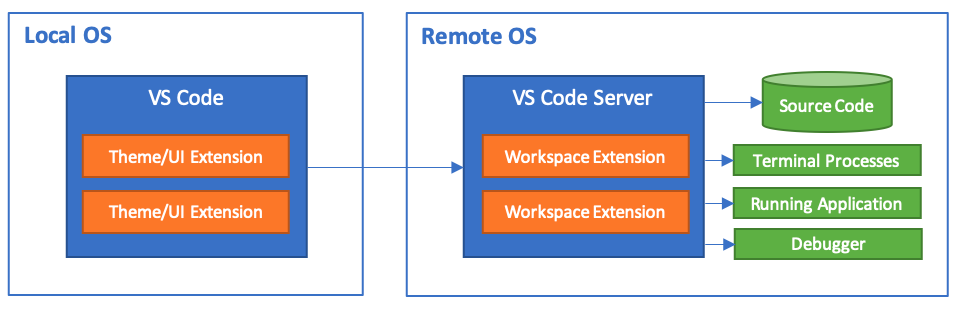
The CS architecture is designed to give VSCode the ability to use remote servers or containers. The local VSCode is only responsible for the UI interface and theme display, while other things such as plug-ins, program runs, terminal processes and debuggers are run on the remote server. The separation of interface display and computation is a very important point for implementing a cloud IDE.

The CS architecture design is also reflected in the code prompting. By developing the Language Server Protocol standard protocol, the VSCode core does not need to parse ASTs of multiple programming languages or implement multiple programming language parsers, but delegates these functions to the plug-ins of each language, ensuring that the core is very small and stable.

The same design is also reflected in the Debugger and the Debug Adaptor Protocol standard protocol.

More analysis of the architecture can be found in my article VSCode Plugin Development Notes.

Cross Platform

VSCode was formerly known as monaco-editor online editor. As a web software, it need to use Electron technology to achieve cross-platform functionality. So the desktop VSCode and the server-side Web version of VSCode are actually one code base.

Because it is a web software, there is a third-party Repo code-server and a VSCode running in the browser.

Open source

VSCode Without open source, it could have ended very differently. It was Microsoft’s gorgeous turnaround and enthusiastic embrace of open source that opened the door for VSCode to go global, or it could have ended up as one of Microsoft’s many internal projects.

Build Cloud IDE based on AWS with Pulumi

Thanks to VSCode’s open source and web features, we can quickly build a VSCode-based personal cloud IDE that is comparable to Github Codespaces, but much cheaper.

My implementation can be found in this Repo. The architecture is as follows.

Prerequisites.

  1. An AWS account with the AWS CLI installed and AWS Credentials configured locally. The AWS account needs to have rights to access to EC2.
  2. A Pulumi account and create a project; (if you are not familiar with Pulumi, you can refer to this article Implementing static blog access statistics based on Serverless)

Very simple to use (thanks to the power of Pulumi and AWS CLI).

git clone https://github.com/bmpi-dev/code.bmpi.dev.git
cd code.bmpi.dev/server
pulumi up # Set up AWS EC2 with Pulumi
./run work # Open remote VSCode
./run rest # Shut down the remote VSCode

If ./run open_tunnel cannot connect to the tunnel while the server is still up, you can run it again after the server is up to establish the tunnel connection.

You need to enter the VSCode login password for the first time access, by executing sh connect-server.sh and then execute cat ~/.config/code-server/config.yaml | grep password: to get the login password.

You can start using the remote VSCode by accessing http://localhost:8888/ through your browser.

If you don’t need this environment for a while, remember to hibernate it via ./run rest to hibernate the cloud server. After the server is shut down, AWS does not bill the EC2 instance, but only the storage volumes for a very cheap fee.

If you don’t need the environment at all and want to destroy all resources so that AWS doesn’t continue to charge, just run pulumi destroy to delete all AWS resources.

About fees

Take an AWS EC2 T2.Medium instance (2 cores 4GB RAM + 50GB storage) as an example. For 5 hours of development per day and 100 hours per month for 20 days, the total cost is $0.0464 * 100 + $0.1 * 50 = $9.64. The same server configuration with Github Codespaces costs $21.50, 2.23 times bigger than our.

The future of Cloud IDE

Cloud IDE represents the future of an R&D model. The possible development trends of this R&D model are as follows.

  • Standardized development environment. A set of cloud IDE development environment can be standardized for batch configuration and used out of the box, significantly reducing the time consumption of developers in configuring the development environment.
  • Customized development environment. The development environment can be customized to meet the needs of different types of projects.
  • Elastic development environment. The configuration of the development environment relies on the automatic elastic expansion of the cloud service, and the configuration can be dynamically adjusted to meet the dynamic needs of the development environment for resource allocation.
  • Intelligent development environment. Relying on the cloud server’s machine learning analysis of specific code repositories, it can better achieve intelligent tips to assist development, similar to GitHub Copilot.
  • Secure development environment. The code and infrastructure configuration are stored on the cloud server, which can greatly reduce the risk of code or environment key leakage caused by developer negligence. With a good system security configuration of the cloud server, the security risk of the development environment can be reduced.
  • Ready-to-use development environment. No need for a specific development machine, just a computer with a browser to access the cloud IDE to start development.

In a nutshell.

Cloud IDE, Coding Anytime Anywhere.

Reference

  1. Large-scale IDE technology architecture from VSCode
  2. Implementing VSCode-based (Code-Server) on Cloud with AWS CDK