
惯性聚合 高效追踪和阅读你感兴趣的博客、新闻、科技资讯
阅读原文 在惯性聚合中打开

推荐订阅源

H
Hackread – Cybersecurity News, Data Breaches, AI and More
C
Check Point Blog
Hacker News: Ask HN
Hacker News: Ask HN
cs.CL updates on arXiv.org
WordPress大学
WordPress大学
P
Proofpoint News Feed
V
Visual Studio Blog
C
Cyber Attacks, Cyber Crime and Cyber Security
N
Netflix TechBlog - Medium
C
CXSECURITY Database RSS Feed - CXSecurity.com
博客园 - 聂微东
Threat Intelligence Blog | Flashpoint
博客园 - 叶小钗
Cisco Talos Blog
Cisco Talos Blog
S
Schneier on Security
T
Threat Research - Cisco Blogs
腾讯CDC
cs.AI updates on arXiv.org
The Hacker News
The Hacker News
Google DeepMind News
Microsoft Security Blog
奇客Solidot–传递最新科技情报
奇客Solidot–传递最新科技情报
GbyAI
GbyAI
N
News | PayPal Newsroom
L
LINUX DO - 最新话题
酷 壳 – CoolShell
酷 壳 – CoolShell
P
Palo Alto Networks Blog
T
Tenable Blog
S
Secure Thoughts
T
Threatpost
V2EX - 技术
V2EX - 技术
大猫的无限游戏
大猫的无限游戏
Martin Fowler
Martin Fowler
freeCodeCamp Programming Tutorials: Python, JavaScript, Git & More
Vercel News
Vercel News
罗磊的独立博客
P
Privacy & Cybersecurity Law Blog
Engineering at Meta
Engineering at Meta
小众软件
小众软件
Google DeepMind News
N
News and Events Feed by Topic
Y
Y Combinator Blog
CTFtime.org: upcoming CTF events
C
Cybersecurity and Infrastructure Security Agency CISA
P
Proofpoint News Feed
L
Lohrmann on Cybersecurity
P
Privacy International News Feed
H
Heimdal Security Blog
量子位
B
Blog

BMPI

构建自己的信息简报 2.0 我的退休计划:把无期变成有期 从情绪化交易到系统化投资 策引2025 实盘大考:当算法跑赢人性 三十五 我的AI投资助手 我的投资之路 BMPI周记008:设止损而勇试错 BMPI周记007:经济下行 BMPI周记006:时光机 BMPI周记005:直播小完结 BMPI周记004:不要做空 BMPI周记003:十年前的今天 BMPI周记002:交易之难 BMPI周记001:开始直播 对交易的思考 AI驱动开发:从Prompt到Product(直播) 策引全球投资组合:A股1号 策引全球投资组合:A股2号 策引全球投资组合:A股3号 策引全球投资组合:A股全球 策引全球投资组合:加密币1号 策引全球投资组合:加密币2号 策引全球投资组合:美股1号 策引全球投资组合:美股2号 策引全球投资组合:美股3号 策引全球投资组合:美股4号 策引全球投资组合:美股全球 全球投资开户完全指南:A股与美股篇 我的2023 全球经济中的隐形巨人 海外银行证券开户薅羊毛小记 我与ChatGPT结对编程的体验 ChatGPT背后的语言模型简史 ChatGPT应用开发小记 我的AI阅读助手 SQLite的文艺复兴 2022亏了多少 # 组合季报(2022Q4) AI降临 构建自己的信息简报 善用GitHub Real-time Web应用开发新体验 我的巨亏经历 # 组合季报(2022Q3) Google软件工程之工具篇 构建自己的杠杆 我的投资助手 Google软件工程之过程篇 Google软件工程之文化篇 交易之难 # 组合季报(2022Q2) 从技术难题中学习 编程语言是如何实现并发的之并发模型篇 疫情与战争 # 组合季报(2022Q1) 编程语言是如何实现并发的之操作系统篇 编程语言是如何实现泛型的 写在第二十五万字 走进 Web3 财富常识 复盘2021 # 组合季报(2021Q4) 分布式系统中的时间 分布式系统下的认证与授权 如何学习一门技术 K8S 云原生应用开发小记 使用 Beancount 管理家庭财务 三周年小记 # 组合月报(202109) 仓位管理是核心 # 组合月报(202108) 云端 IDE 护城河还在但城没了 # 组合月报(202107) 构建高质量的信息输入渠道 最牛指数 # 组合月报(202106) 国际化与本地化 慢慢变富 # 组合月报(202105) 失败驱动开发 加密币挖矿小记 家庭资产配置的阶段 # 组合月报(202104) OKR + GTD + Note => Logseq 我的个人项目技术栈 长期投资之难 # 组合月报(202103) 我的人生管理系统 当别人的股票基金上涨时 # 组合月报(202101) 基于Serverless实现静态博客访问统计功能 构建终身学习体系进行自我提升 我的家庭理财规划 投资的秘密 # 组合月报(202012) 零成本搭建现代博客之优化国内访问速度 我的绘图工具箱 关于银行分期贷款的坑 # 组合月报(202011) 投资交易的心理建设 # 组合月报(202010) 大跌时我们能做什么 # 组合月报(202009) 双均线交易策略 # 组合月报(202008) Serverless应用开发小记 投资理财书籍推荐 # 组合月报(202007) 200万小目标 # 组合月报(202006) 零成本搭建现代博客之加载速度优化篇 零成本搭建现代博客之订阅推送篇 我常用的浏览器插件 零成本搭建现代博客之SEO优化篇 什么是SEO 零成本搭建现代博客之搭建篇 用Markdown可以做什么 什么是互联网广告
My Note System
Dawei Ma · 2020-01-15 · via BMPI

A good note-taking system should connect any information you learn to form a knowledge system, when you need them, you can easily find them, and then form their own new knowledge.

In the article “Manage your knowledge with OneNote”, I was introduced to manage my data with OneNote. Although OneNote has done a very good job, it cannot meet my requirements due to the following problems:

  1. Syntax highlighting is not supported in typesetting. As someone who writes a lot of code, this is intolerable.
  2. No Tag system. Unable to flexibly insert various tags into the page, resulting in the lack of effective interconnection of data, forming an island of knowledge, and finally become a data backup tool.
  3. Proprietary data format. You can only open a laptop with OneNote, which would be awkward if Microsoft suddenly dropped the tool.
  4. Bulky. After nearly 5 years of use, my OneNote has been a few GB size, every time to change the computer synchronization is always very slow, this may have something to do with my use habits, encounter good data is copied in.
  5. Poor ability to expand. You can’t install plugins, you don’t have the ability to customize, you can’t publish your notes on the web, and it’s hard to share your knowledge.

Because of these problems, I began to seek for a new solution, which should meet the following needs:

  1. Strong capture ability. OneNote is a good example of this. You can easily save external articles to the OneNote partition via the OneNote browser plugin, or you can send WeChat public accounts to the OneNote public accounts to save them.
  2. Good Tag system. Scattered knowledge can be linked together. Although OneNote organizes relevant knowledge through pagination as a tree, it is really inconvenient to paginate when there is too much data. It can make searching for data very painful.
  3. Can easily update tag/link/text. If you rename the associated data name or Tag, it should be easy to automatically rename the associated link.
  4. The file format should be plain text. If not plain text, at least the format is not proprietary.
  5. Strong ability to expand. Can be extended through plug-ins to customize.
  6. Open source. This allows us to release it for use and is unlikely to be unmaintained.

After some searching, I finally found two tools that met my needs, Emacs orgmode and Tiddlywiki. While there are many wiki tools, such as mediawiki, used by Wikipedia, such systems are large and cumbersome to run.

Emacs orgmode

When it comes to note systems, Emacs’s orgmode can’t get around. When you want to find a personal note system, it’s easy to see everyone’s praise for orgmode on the Internet. Even many people spend long time learning Emacs to use orgmode .

The magic of orgmode is reflected in this article: “Org Mode-Organize Your Life In Plain Text!". In simple terms, the author uses orgmode to manage every aspect of his life, such as a writing system, to-do reminders, note-taking system, and so on. Thanks to the powerful custom development capabilities of Emacs, almost all your needs can be extended by writing some functions. This expansion capability is much more powerful than the plug-in system of VSCode / Vim / Sublime Text. It can be said that apart from the difficulty of learning, there are almost no shortcomings. It has the following characteristics:

  1. 17 years old. Over time, orgmode has proven itself.
  2. Powerful customization. Development through elisp is almost omnipotent.
  3. Plain text. It can automatically generate files in multiple formats and easily publish them to web pages.
  4. The threshold for use is high. It takes a lot of time to learn to adapt, and this may take more time than you think.
  5. Poor ecology. Due to the high threshold, there are fewer users and the ecology is worse. Of course you have the ability to use it for various functions, but it’s tiring.
  6. Poor technology migration. elisp is too old and emacs is too unique. This ancient technology is like a peerless sword. Few people are destined to use it well. This means that many people can’t understand what you write, and of course, they can’t perform technical communication and interaction.

Tiddlywiki

Tiddlywiki is a unique non-linear notebook for capturing, organizing and sharing complex information. His design idea is to divide the information through a unit called Tiddler and use the rich relationship model between them to maximize the reusability of the information. Aggregates and ideas are then used to arrange the pieces together to present a narrative story.

It has the following characteristics:

  1. 15 years old. This history is long enough, time has proven its stability and sustainability, and it is open source.
  2. Tag system is powerful. What impresses me most is its tag system, which is easy to organize different information together through tags.
  3. Single HTML file structure. All the information is stored in a HTML, you can download it and run it in the browser, it is very simple. The default empty system is about 2MB in the latest version 5, and generally stores thousands of entries (Tiddler). It can grow by a few MB. Because it is a single file architecture, in order not to affect performance, you should use external references to pictures as much as possible Reduce total volume.
  4. Many plugins. It’s easy to give it extensions via JavaScript.
  5. Unable to collaborate with multiple people. But it can be used as a simple wiki system for team knowledge sharing.

orgmode VS Tiddlywiki

Here you can see some people’s comparative evaluation of these two tools 1. After spending a few days learning orgmode, I was dismissed by its complexity and power, so I chose Tiddlywiki.

Tiddlywiki User’s Guide

Tiddlywiki is extremely simple to use and run. This is the point where orgmode is killed. In this Learning article, you can spend more than ten minutes to understand its basic knowledge.
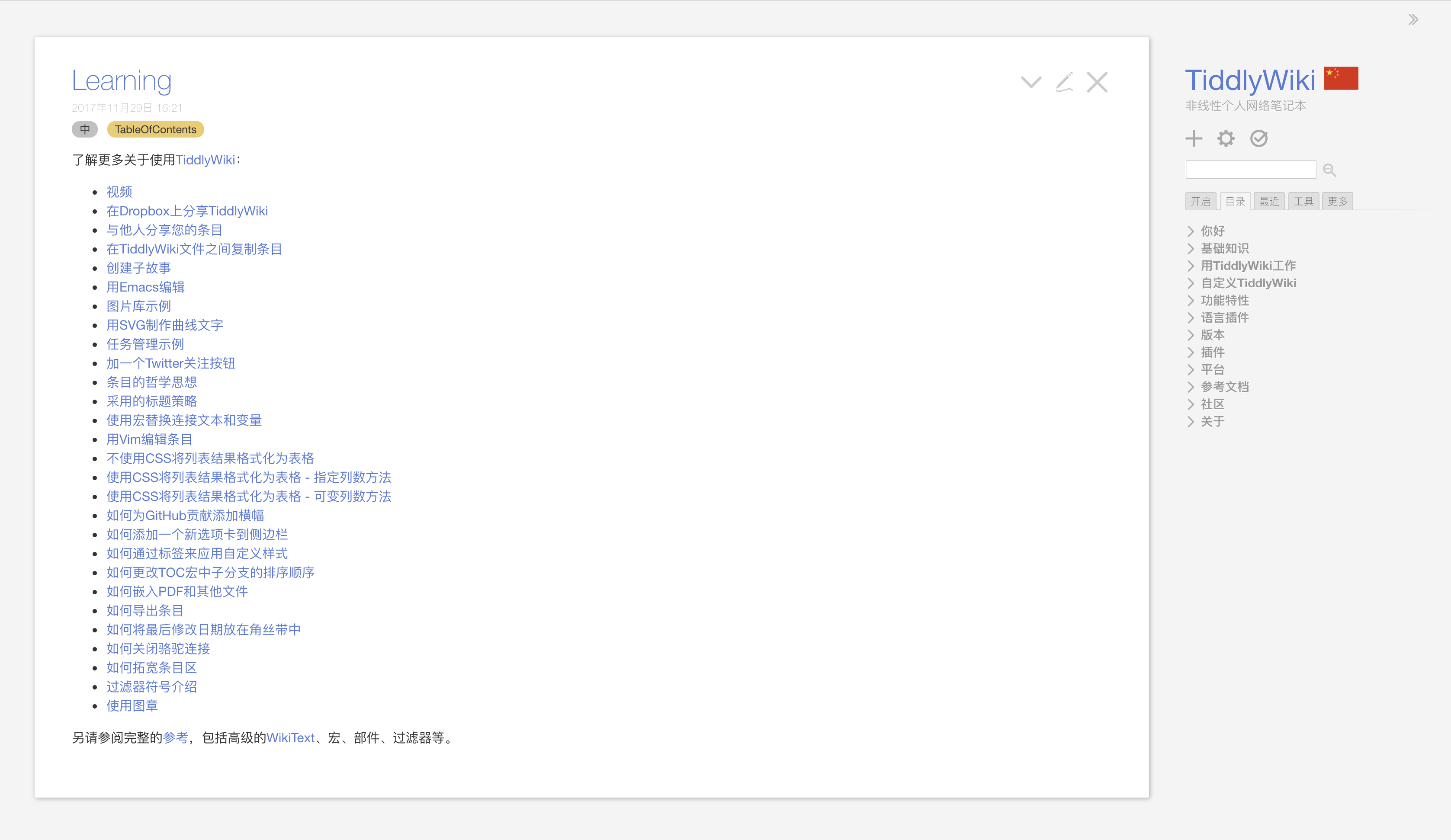
After clicking the + sign on the right side of the figure to add an entry:

After clicking the red save button on the right, you will find that a file named tiddlywiki.html was downloaded directly. After opening it with a browser, you will find that it is exactly the same as the tiddlywiki on the Internet. When you save this local tiddlywiki again and find that it downloads a tiddlywiki.html again, that is to say, whenever you save, it will be saved by downloading a copy, because it is in the browser It does not have the ability to update itself. This can be solved by a chrome app. Download tiddly-chrome-app, and then use This chrome app can be automatically updated by loading tiddlywiki.html. Of course, you can also set up a Nodejs environment to achieve automatic saving.

Note the following:

  1. Back up. Because it is a single file structure, all data is stored in a Html, so it is important to protect this file. You can back it up through Git. For example, my tiddlywiki is backed up 2 in GitHub.
  2. Performance. Resources such as pictures and files are best stored in a third-party cloud disk, and then introduced by means of reference links.
  3. Relink. When you rename an entry or tag, you can solve it by installing this tw5-relink plugin.

Capture

Capture is an important ability of a note taking system. OneNote does a good job in this respect, but tiddlywiki does not do well, but there are some ways to solve it. Let’s rethink the process of taking the next note:

  1. You see a good article and want to save it. This article may be a web page, or it may be an email or a file.
  2. You throw this article all directly into your notebook and save it. Imagine you will use it some day, or you will save a chapter and a picture in it separately.

When I was using OneNote, I generally saved the articles in WeChat directly by sending them to the public account, and then forgot about this. As for some information seen on the computer, I will directly copy it to OneNote. At some point I sort out some of these materials, but most of them are forgotten, and even when I need them, I don’t remember that I saved them before.

In this scenario, the following issues are exposed:

  1. The data is stored without being processed.
  2. Most of the information is stored in OneNote.

Because tiddlywiki is essentially a webpage, you cannot copy an article directly into it like OneNote, and this copying method will cause your notes to grow larger and larger, and it will become more and more difficult to find valid information. So this is essentially a habitual problem. The data must be processed twice before it can be entered into the note-taking system, otherwise this storage is meaningless and only a link needs to be stored.

After some thinking, I developed a way to archive my data for a long time:

  1. The cited article can be saved in Wayback Machine;
  2. Files can be saved to GitHub private libraries and web disks (including professional cloud storage such as s3, as well as web disks of major Internet companies);
  3. Back up Capture data through a third party. Only links are stored in the notes.

In my Capture solution, for some materials read online, considering the speed of Internet information loss, most articles have a short life span 3. In order to save them for a long time, I will use Wayback Machine to back up these pages. This will never be lost again, I just need to store its link, and for the materials that need to be stored separately can be stored in the note system. For images that need to be stored, I will store them in AWS S3 4, and then refer to their links. Of course, there are many types of cloud storage solutions. You can also choose the domestic Seven Cow Cloud (requires domain name registration), etc.

Wayback Machine

20 years of history, Internet memories, digital libraries, website time machines. This is a non-commercial project. The purpose of its creation is to make non-stop backups of the entire Internet website. At present, there are more than 450 billion 5 cached pages. On this website you can see the history of many websites, like The time machine also travels through different historical versions of the website.

It has the following capabilities:

  1. Crawl webpage HTML and its external links.
  2. Can generate webpage snapshot pictures.
  3. You can store web pages in your Wayback Machine account.
  4. You can use the API to request web caching 6.

VSCode plug-in stores pictures to S3 in one click

In a Markdown document, when you want to paste a picture of a web page into the past, it is very troublesome. First you have to download the picture locally (refer to the picture address of the web page is not good, the picture may disappear mysteriously), and then use The relative path refers to this picture. When there are many pictures, this is a very painful process.

Is it possible to automatically insert an S3 link into a Markdown document after pasting a web page image after pasting it in VSCode? I found a plugin that can upload Qiniu / GitHub / sm.ms etc. in one click, but it does not provide S3 support, so I added this feature after the fork. If you also need this feature, you can here Download and install: markdown image paste

With this plugin, write wiki / md files and paste them into the S3 link after copying the pictures. This way the pictures will always be stored in your S3 account. It also comes with global CDN acceleration.

Netlify Publish Website

The public wiki is a reorganized collection of knowledge materials. Non-text resources such as pictures, PDFs, Office files, and Keynote are stored on cloud services such as Amazon S3 / Aliyun OSS. Snapshots of web pages and other content can be backed up using Wayback Machine, and then Save these links to the wiki system.

The wiki materials are hosted through a GitHub public repository, and static websites are generated through netlify.

My wiki website is automatically published through netlify. After each update of the wiki, push to GitHub and netlify is automatically published. This process takes less than ten seconds.

Private Note

A collection of private, non-public data related to private notes and work. Non-text resources such as pictures, PDFs, Office files, Keynote, etc. are stored on Google Drive / Microsoft OneDrive. These links are then stored in private Markdown files and hosted through a private GitHub repository.

Important Note

Keys and other information are hosted by 1Password. Important materials are made into md files and then hosted by Google Drive / Microsoft OneDrive. Important information that is often needed can be encrypted and stored by mobile memo.

References


  1. https://www.slant.co/versus/5116/8769/~tiddlywiki_vs_org-mode ↩︎

  2. https://github.com/bmpi-dev/wiki.bmpi.dev ↩︎

  3. https://web.archive.org/web/20191230143823/https://gigaom.com/2012/09/19/the-disappearing-web-information-decay-is-eating-away-our-history/ ↩︎

  4. https://aws.amazon.com/cn/s3/ ↩︎

  5. https://en.wikipedia.org/wiki/Wayback_Machine ↩︎

  6. https://wiki.bmpi.dev/#wayback%20machine ↩︎