


“One inch of time, one inch of gold, it is difficult to buy an inch of gold,” 1, “Time Is Money” 2, these two well-known sayings, tell everyone a truth: poor does not matter, as long as you have time. Although everyone ’s time is the same from the unit, the efficiency of unit time is very different. Ignore the factors of intelligence and external resources. Each person manages time in different ways. It is an important factor in determining time utilization.
Archimedes said, “Give me a fulcrum, I can lift the entire planet.” This is physical leverage; in futures investments, the leverage can be up to 20 times, winning the club’s tender model, and losing to the sea to work; since leverage So beautiful, is there a way to improve my time utilization and indirectly achieve the effect of time leverage? Of course, this is GTD.

GTD (Getting Things Done) 3 is a time management method, which can help you systematically formulate random transactions in life into planned tasks, liberate your brain, and help you work more effectively Achieve the goals of life. Let’s first review the process of the brain in everyday work and life: “A very important thing, such as exercising requires you to choose a few days a week to exercise, which is a long-term return goal. Today was originally You need to move according to plan. Suddenly, a more urgent but insignificant event prompts you to abandon your plan and resolve it, and then there is a high probability that your plan is ruined by many urgent and unimportant things. Will this happen? Because our brains are more inclined to deal with urgent matters rather than important and non-urgent ones in evolution. This is determined by survival priority, because urgent matters may have a greater impact on life in the short term. But this has prevented many important, but urgent, long-term planning goals from being achieved. Long-term goals need to be advanced step by step according to the plan, such as reading habits, writing habits, bookkeeping habits, and acquisition of many important skills.

Several important components can be seen from the workflow diagram of GTD:
“Get everything out of your head. Make a series of decisions about actions when things happen, not when they happen. Organize your project’s reminders and the next step in the right category. Action. Keep your system updated and complete, and fully checked so that you can trust your intuitive choices about what you are doing (or not doing) at all times. “4
The ideal is beautiful. This theory seems to help us plan all aspects of life, but it is actually difficult to implement. 5 Although it is difficult to implement, I still tried to use GTD to form a time management habit, and made my own time management tool v1 version 6.
My tool set in this version:


Because of the above problems, after using my v1 for a while, OmniFocus was abandoned by me.
My tool set in this version:

Although the memo is easy to operate on the mobile terminal, it does not have good organizational functions, filtering functions, reminder functions, and data migration. It is inconvenient especially when creating many projects, so this is destined to be a temporary transition plan.
This is the scheme I currently use. After going through the first two versions, I think time management tools need to have the following characteristics:
v3’s tool set:
First explain why this combination is? As a developer, the editor is most often used on weekdays. I chose VSCode because his ecology is better than Emacs. The startup speed is still very fast after installing many plug-ins. Plug-in development is simple. Backed by Microsoft, the software experience is very good. There just happens to be a Todo + 7 plug-in. This plug-in supports a plain text file with a todo suffix. This file is very easy to create a to-do item, supports project nesting, and uses shortcut keys to mark pending To do status, as shown below:

When I found this plug-in, after using it for a while, I found it very suitable for to-do management, but there is a problem that the plug-in window on the left does not support viewing What is being done, and I hope to see To to-dos that are marked as important but have not started. Because when I create a lot of to-do items, the priority of many items is not high, I may do it at some time in the future, these are things that I don’t care about at present. I am most concerned about what is currently being done. At the same time, I am also very concerned about the most important but not urgent things in my life goals. I must always remind me to review and do not lose important goals in urgent and unimportant things.
Because this plugin is open source, I cloned a copy and added a viewing window to view what is currently being done and important but not started, and published it as Todo++.
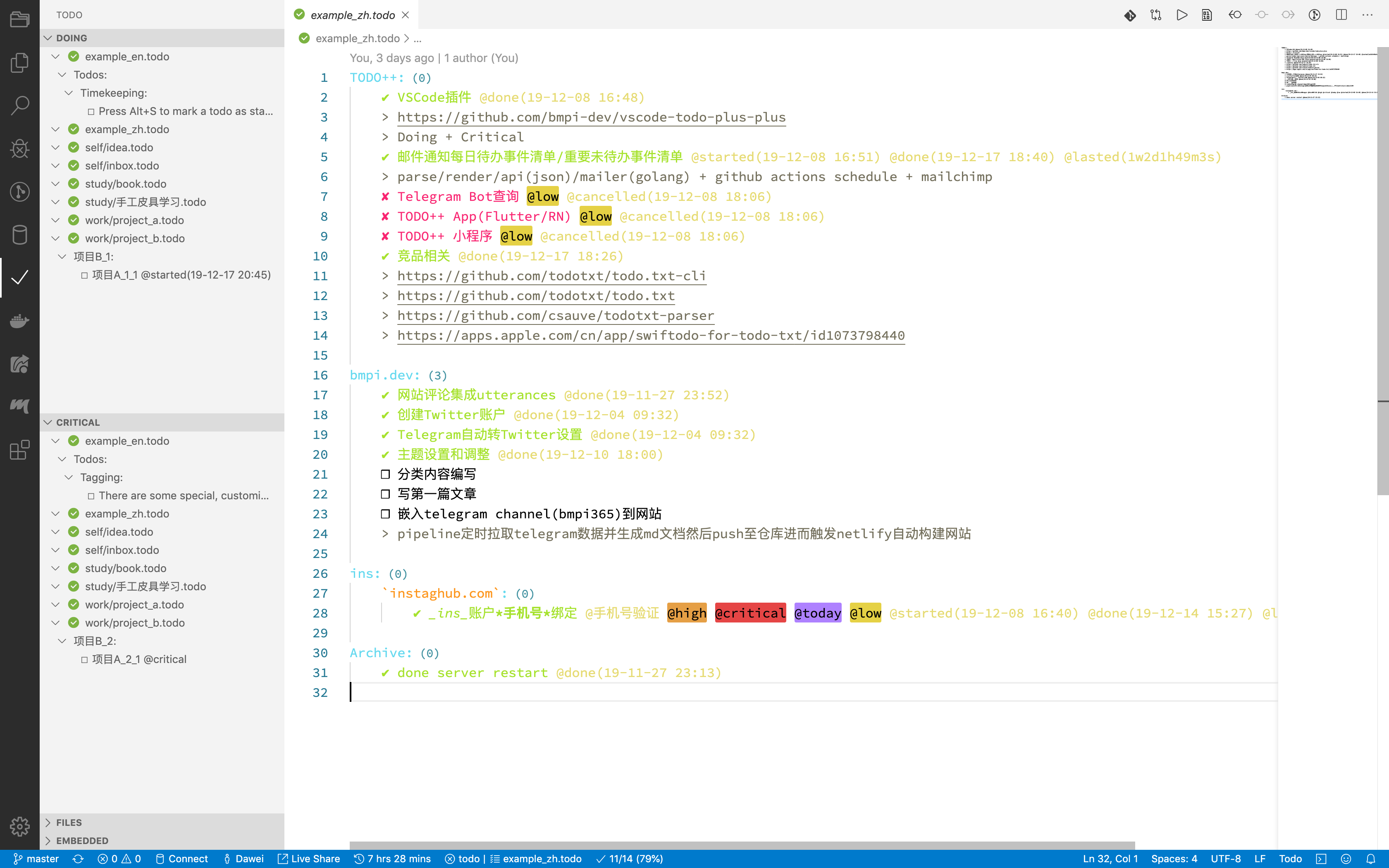
With this VSCode plug-in, I solved the problem of editing to-do items on the computer. This method is flexible enough. You can manage your work, study, and life in the following ways:
.
├── self
│   ├── idea.todo
│   └── inbox.todo
├── study
│   ├── book.todo
│   └── Handmade leather goods learning.todo
└── work
    ├── project_a.todo
    └── project_b.todo
Each area you focus on is managed using a todo file. Then you can split countless projects in this area. Each project can be divided into sub-projects indefinitely. Each sub-project is finally disassembled into executable tasks. Item, use shortcut keys to quickly mark the three states of this to-do item (started / done / canceled), and you can also use @critical to mark whether the task is important.
Project B_1:
    ☐ Project A_1_1 @started(19-12-17 20:45)
    ✔ Project A_1_2 @done(19-12-17 20:45)

Project B_2:
    ☐ Project A_2_1 @critical
    ☐ Project A_2_2 @low
When you have done this, you can immediately see in the left window of VSCode which tasks are being done and which tasks are important but have not started.

I also made a template library for todo, use this template to create my own private repository: todo_starter. After creating the clone, use VSCode and TODO ++ plugins to start using it.
After solving the operation problems on the computer side, a very important function on the mobile side is to remind, how can I receive the current work and important but not started things on the mobile phone every day?
To solve this problem, I developed a parser library for todo files: todo_parser_lib. This library can parse the todo files in the specified directory and filter out what is currently being done. The things that are important but not started yet are then rendered into an html file. With this library, we can combine the Actions 8 function provided by GitHub. Every time we push update to the repository, we can automatically use this library to render html, and then send an email to our designated mailbox to remind us. The configuration of this GitHub Actions is also placed in the template library todo_starter. You only need to provide the email address and SMTP address of the mail service provider in the warehouse settings-> secrets. The configuration is as follows:
name: schedule-email
on:
  schedule:
    # * is a special character in YAML so you have to quote this string
    - cron:  '0 1 * * *' # Change this to your time
  push:
    branches:
      - master # Change this to your default branch
jobs:
  make-html-send-email:
    name: make-html-send-email
    runs-on: ubuntu-latest
    steps:
    - name: Checkout repository
      uses: actions/checkout@master
    - name: Set up Node.js
      uses: actions/setup-node@master
      with:
        node-version: 10.0.0
    - run: npm install -g todo-plus-parser
    - run: todo-plus-parser -i "./" -o "./out.html"
    - name: send-email
      uses: bmpi-dev/action-send-mail@master
      with:
        server_address: ${{secrets.MAIL_SMTP_SERVER}} # your send mail SMTP addr
        server_port: 465
        username: ${{secrets.MAIL_USERNAME}} # your send mail username
        password: ${{secrets.MAIL_PASSWORD}} # your send mail password
        subject: TODO++
        body: file://out.html
        to: ${{secrets.MAIL_TO}} # your receive mail
        from: ${{secrets.MAIL_FROM}} # your send mail username
I set up a scheduled task at the same time, GitHub Actions will automatically build at 9 am every day, and then send an email to remind you. Since the data is plain text, you can put it anywhere (web disk, GitHub, etc.). The final effect is as follows:

Imagine that every morning you receive an email reminding you of what you should do today and those things that are important to you but haven’t started yet. Always remind yourself of your important goals. When there are some new things to do, turn on your computer to add them, push them to GitHub’s cloud service, and then your phone will automatically receive a newly built to-do list email. What do you need to record when you are not at your computer? You can temporarily record it into your mobile phone memo, and when you have a computer, reorganize it into your todo file. For those events that need to be reminded at a specific time, add them directly to the calendar.
We have a tool for editing TODO on the computer side. It may not be good to just accept the reminder on the mobile phone side. Can we make a Bot notification based on Telegram? Can you create an app to support mobile editing? Can you make a command line tool? Of course it is possible. Now that we have made a parser, with the json data parsed by the parser, we can further do further processing based on the json data format. When I had this idea, I suddenly realized that someone must have thought of it and did it. After some searching, I finally found todotxt 9.
Although todotxt is also a txt-based time management tool, it still doesn’t match my needs, so I finally came out with v3.
When it comes to To Do, I can’t justify Emacs’s org.
Org mode is for keeping notes, maintaining TODO lists, planning projects, and authoring documents with a fast and effective plain-text system.10
It can be said that Org is omnipotent. It can take notes and TODO, and can also plan projects and write documents. All of this is pure text! The only drawback may be that you need to master the ancient artifact of Emacs, and you may also need to master the ancient language elisp. These two mountains are not easy to climb and scare away a lot of people, so although the artifact is good, the cost of use has to be considered. Does not meet my requirements for low learning costs.
From “Zeng Guang Xian Wen” ↩︎
https://zh.wikipedia.org/wiki/%E5%B0%BD%E7%AE%A1%E5%8E%BB%E5%81%9A ↩︎
此内容由惯性聚合(RSS阅读器)自动聚合整理,仅供阅读参考。 原文来自 — 版权归原作者所有。