










Note: This post is a pairing between the author and GitHub Copilot. Copilot did about 5% of the work on this post. The author also partially documented Copilot’s work in this Tweet.
As an amateur indie developer, I don’t invest much time or money in development, so I have two very basic requirements for my side project tech stack:
The first point is that I would choose to use a more efficient tech stack, including programming language, ecology, architecture, etc.
The second impact on me is that I will avoid using large, resource-intensive tech stack and instead look for cheap, lightweight alternatives. This also means that I won’t be looking for high SLA, cost effectiveness is my main goal. Choosing an industrial-grade tech stack, sacrificing some availability, allows me to accept the cost on the one hand, and get industrial-grade scalability on the other. This is reflected in my cost analysis of Serverless, where I choose the service components that are affordable and the most cost-effective billing service.
My initial impression of the K8S is that it doesn’t meet my requirements on either of these points. That’s why I never tried it on my side project. Until I came across this long post The Architecture Behind A One-Person Tech Startup.
The author describes his experience using K8S on his personal projects, which is resource intensive but brings great scalability and reliability.
Application architectures, in terms of composition pattern, are divided into monolithic and distributed architectures.
Primitive distributed architectures predate even monoliths, as early computers were all poor in performance and could not meet the expanding human demand for computing power, which in turn led to the evolution of application architectures. As the performance of single computers improved, and the original distributed technologies were so complex that monolithic architectures became popular for a long time until the performance of single computers could not meet the massive amount of information needed to compute the explosive growth of human society.
Distributed architectures provide higher performance, higher availability, and higher scalability by coordinating the use of the computing power of multiple computers. However, due to its complexity, the evolution of distributed architectures is further divided into these phases.
As the virtualized infrastructure expands from containers of individual services to clusters of services, communication networks and storage facilities consisting of multiple containers, the line between software and hardware is blurred. Once virtualized hardware is able to keep up with the flexibility of software, technical issues that are not business-related can be stripped away from the software and silently resolved within the hardware infrastructure, allowing software to focus solely on the business and truly “build teams and products around business capabilities. (From Phoenix Architecture/Post-Microservices Era)
K8S creates a DSL language in which users define every resource (e.g., compute, network, storage, routing, secrets, certificates) used in a distributed system architecture declaratively. When the user defines the state of the resources they expect, K8S automatically helps them create those resources and manages them automatically.
Resources is an extremely common term in Kubernetes. Broadly speaking, all aspects of the Kubernetes system that you can touch are abstracted into resources, such as resources for workloads (Pod, ReplicaSet, Service, ……), resources for storage (Volume, PersistentVolume, Secret, ……), resources for policies (SecurityContext, ResourceQuota, LimitRange, …), and resources for policies (SecurityContext, ResourceQuota, LimitRange, …). resources (Volume, PersistentVolume, Secret, ……), resources representing policies (SecurityContext, ResourceQuota, LimitRange, …), and resources representing identities. …), resources representing identities (ServiceAccount, Role, ClusterRole, ……), and so on. The “everything is a resource” design is an essential prerequisite for Kubernetes to be able to implement declarative APIs, and Kubernetes uses resources as a vehicle to build a domain-specific language that encompasses both abstract elements (e.g., policies, dependencies, permissions) and physical elements (e.g., software, hardware, networks). The collection of descriptions of resource states, from the state of the entire cluster or even a cluster federation down to a memory area or a small number of processor cores, through the relationship of resource usage between different layers, together form a panoramic picture of the working operation of an information system. (From Phoenix Architecture/Unchangeable Infrastructure)
My choice of Kubernetes hosting solution for different cloud platforms is mainly based on cost considerations. This K8S Cluster Cost Compare document provides a cost analysis of different cloud platforms (AWS/Azure/GCP/ DigitalOcean/Vultr) for Kubernetes hosting solutions.
I ended up with the cheapest DigitalOcean cloud platform, where Master Control Plane Basic is free, Worker nodes are 2-core 4GB RAM machines in Singapore region ($20/month), and a $10/month Load Balancer fee. The total cost for a month is $30/month.
Since the Worker node needs to install some K8S services such as kube-proxy, core-dns, etc., there are 12 pods, which take up half of the memory of the Worker node. This leaves 2GB of resources left for user application usage.

The above diagram shows the development and deployment process of this cloud-native application and the architecture of each internal service deployed by K8S.
The final result is available at: Online version.
The source code is available at: code repository.
If you don’t know anything about K8S, you can start by watching this high-quality introductory video: Kubernetes Tutorial for Beginners [FULL COURSE in 4 Hours]. Make sure you understand the basic K8S concepts: Namespace, Deployment, Service, Pod, Node, Ingress before you get into the real thing.
You will need to register for the following account first.
And install these software.
.
├── .github
│   └── workflows
|       └── workflow.yml
├── Makefile
├── backend
├── frontend
└── infra
    ├── Dockerfile.backend
    ├── k8s
    │   ├── free4chat-svc.yaml
    │   ├── ingress-free4-chat.yaml
    │   ├── ingress_nginx_svc.yaml
    │   └── production_issuer.yaml
    └── tools
        └── nsenter-node.sh
The overall project is divided into frontend, backend, and infra parts, and this article focuses on the infra part, which is the K8S deployment. infra does not use IaC because K8S itself is a declarative yaml files, and there is no need to add complexity to use IaC if you are not using some cloud hosting service. the CI/CD part is done by using GitHub Actions.
The backend service is a Golang application, and the packaged Dockerfile is here. I also made a simple configuration of Makefile for compiling the backend service. Local deployment of backend services using Docker can use this Makefile.
Creating a K8S Cluster at DigitalOcean is a very simple task, you just need to select the region (depending on where your business users are located) and the specifications of the Worker Node (depending on your cost budget) to create a Cluster.
Configure K8S using doctl:
doctl kubernetes cluster kubeconfig save use_your_cluster_name
Namespace is a mechanism used by K8S to isolate groups of resources within a single cluster. For example, we can create different business Namespace in the same cluster, and under this Namespace, we can store Pods, Services, Deployment and other resources related to this business, if we want to delete the resources related to this business, we just need to delete this Namespace.
By default, K8S has a kube-system Namespace, which holds K8S-related resources. There is also a default Namespace, which holds the resources created by default (without the Namespace).
First create a Namespace for the backend service.
kubectl create namespace free4chat
Then create a backend Service template free4chat-svc.yaml.
apiVersion: v1
kind: Service
metadata:
  name: apifree4chat
spec:
  ports:
  - port: 80
    targetPort: 8888
  selector:
    app: apifree4chat
---
apiVersion: apps/v1
kind: Deployment
metadata:
  name: apifree4chat
spec:
  selector:
    matchLabels:
      app: apifree4chat
  replicas: 1
  template:
    metadata:
      labels:
        app: apifree4chat
    spec:
      containers:
      - name: echo
        image: <IMAGE>
        resources:
          requests:
            memory: "128Mi"
            cpu: "250m"
          limits:
            memory: "500Mi"
            cpu: "1000m"
        ports:
        - containerPort: 8888
The reason this is a template is that there is a <IMAGE> placeholder in the image section that will be replaced with the real image when GitHub Actions are deployed later.
This template defines a Deployment and Service resource; Deployment defines the CPU and memory limits for Pod instances, the number of instances, port mapping, and container images, etc. Service defines the domain name and port for accessing backend services inside the Cluster.
Finally, GitHub Actions deploys this Service and Deployment to the free4chat namespace in the K8S Cluster.
How do you get external traffic to the backend service when you have a Service for the backend service? This is what K8S Ingress does. Our first choice is to install the Ingress Controller, which comes in many types, such as HAProxy, Nginx, Traefik, etc. We choose Nginx here. Find Nginx Ingress Controller on the DigitalOcean K8S administration interface, and click Install.
This will automatically create an ingress-nginx namespace and a DigitalOcean Load Balance service, which costs $10/month and has a separate IP address (available in the DigitalOcean administration interface). We will use this IP in our DNS configuration later.
Now we need to create an ingress rule under default Namespace to forward the LoadBalance traffic to the backend service, the configuration file is ingress-free-4-chat.yaml.
apiVersion: networking.k8s.io/v1
kind: Ingress
metadata:
  name: api-free4chat-ingress
  annotations:
    kubernetes.io/ingress.class: nginx
    cert-manager.io/cluster-issuer: letsencrypt-prod # This is the ClusterIssuer for cert-manager, which is used to automatically generate SSL certificates
spec:
  tls:
  - hosts:
    - api.k.free4.chat
    secretName: api-free4chat-tls
  rules:
  - host: api.k.free4.chat # Back-end service domain name
    http:
      paths:
      - pathType: Prefix
        path: "/"
        backend:
          service:
            name: apifree4chat
            port:
              number: 80
---
kind: Service
apiVersion: v1
metadata:
  name: apifree4chat
spec:
  type: ExternalName # Because the backend service is not in the default Namespace, it needs to be forwarded to the backend service in the apifree4chat Namespace through the ExternalName service.
  externalName: apifree4chat.free4chat.svc.cluster.local # Back-end service domains across Namespace
This configuration file will generate two resources, an ingress rule and a Service of type ExternalName. we will use kubectl to create this resource after configuring the ClusterIssuer for cert-manager.
The SSL certificate for the domain is automatically generated and updated in K8S via Cert Manager, where we use the Let’s Encrypt service to issue the certificate for us.
First, install the Cert Manager application via Helm with one click.
kubectl create namespace cert-manager
helm repo add jetstack https://charts.jetstack.io
helm repo update
helm install cert-manager jetstack/cert-manager --namespace cert-manager --version v1.2.0 --set installCRDs=true
After executing these commands you need to create a ClusterIssuer resource that issues SSL certificates for the production environment, the configuration file is production_issuer.yaml.
apiVersion: cert-manager.io/v1
kind: ClusterIssuer
metadata:
  name: letsencrypt-prod
spec:
  acme:
    # Email address used for ACME registration
    email: [email protected]
    server: https://acme-v02.api.letsencrypt.org/directory
    privateKeySecretRef:
      # Name of a secret used to store the ACME account private key
      name: letsencrypt-prod-private-key
    # Add a single challenge solver, HTTP01 using nginx
    solvers:
    - http01:
        ingress:
          class: nginx
In DigitalOcean, in order for Cert Manager to be self-check, Pod-Pod communication must be enabled through the Nginx Ingress Controller for Cert Manager to work properly. To create a Service resource for the K8S approach certificate, the configuration file is ingress_nginx_svc.yaml.
apiVersion: v1
kind: Service
metadata:
  annotations:
    service.beta.kubernetes.io/do-loadbalancer-enable-proxy-protocol: 'true'
    service.beta.kubernetes.io/do-loadbalancer-hostname: "k.free4.chat"
  labels:
    helm.sh/chart: ingress-nginx-2.11.1
    app.kubernetes.io/name: ingress-nginx
    app.kubernetes.io/instance: ingress-nginx
    app.kubernetes.io/version: 0.34.1
    app.kubernetes.io/managed-by: Helm
    app.kubernetes.io/component: controller
  name: ingress-nginx-controller
  namespace: ingress-nginx
spec:
  type: LoadBalancer
  externalTrafficPolicy: Local
  ports:
    - name: http
      port: 80
      protocol: TCP
      targetPort: http
    - name: https
      port: 443
      protocol: TCP
      targetPort: https
  selector:
    app.kubernetes.io/name: ingress-nginx
    app.kubernetes.io/instance: ingress-nginx
    app.kubernetes.io/component: controller
After the above steps we have some declarative K8S resource creation profiles, now it’s time to actually start creating these resources:
kubectl apply -f production_issuer.yaml # Create the ClusterIssuer resource for issuing SSL certificates
kubectl apply -f ingress_nginx_svc.yaml # Create a Service resource that resolves Pod-Pod communication
kubectl apply -f ingress-free-4-chat.yaml # Create ingress rule resource
When these commands are executed, we are still missing some steps.
Configuring DNS resolution on Cloudflare.
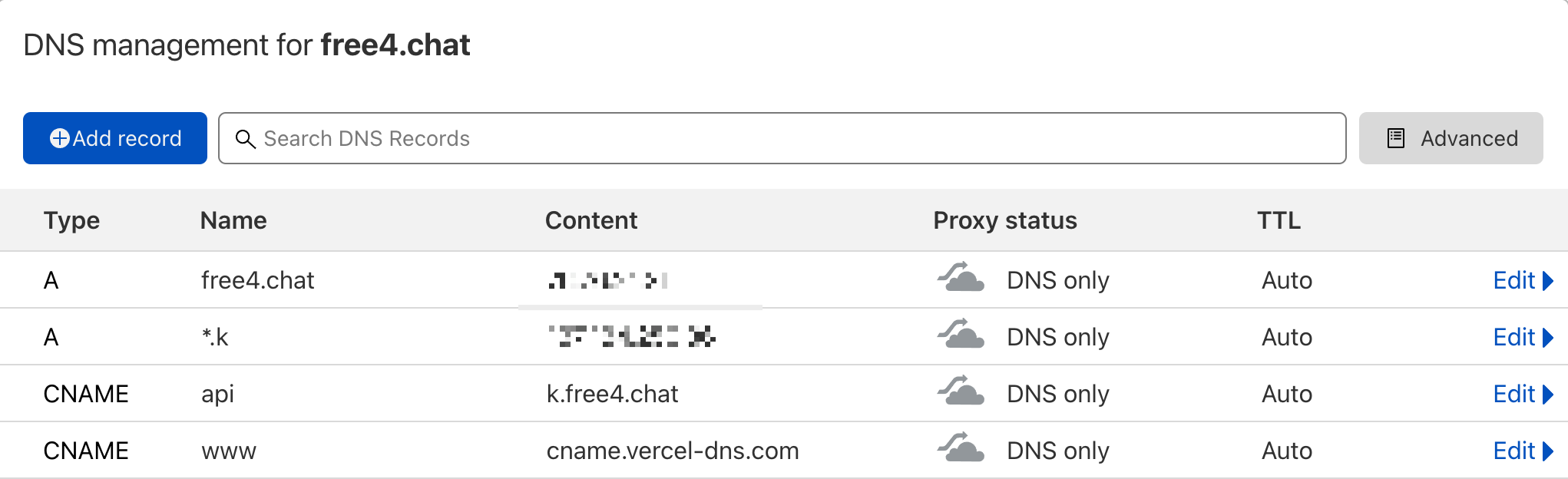
The reason for this is that we cannot create two different IP records for a primary domain at the same time, so we have to give the back-end domain name to solve this problem.
Finally, we create two CNAME records, which are
api.k.free4.chat: the domain name of our backend service API.www.free4.chat: our main domain name.At this point we can access https://www.free4.chat. But https://api.k.free4.chat doesn’t work yet, because the backend service hasn’t been created yet. So next we need to create the backend service via GitHub Actions.
The benefit of creating backend services via GitHub Actions is that it automates deployments and automatically triggers GitHub Actions to build new images and create new backend services when changes are made to the backend code.
To create a GitHub Workflow, just create .github/workflows/workflow.yaml.
name: DO_K8S_Deploy

on:
  push:
    branches:
      - main
    paths:
      - 'backend/src/**'
      - 'infra/Dockerfile.backend'
      - '.github/workflows/**'

# A workflow run is made up of one or more jobs that can run sequentially or in parallel.
jobs:
  # This workflow contains a single job called "build".
  build:
    # The type of runner that the job will run on.
    runs-on: ubuntu-latest

    # Steps represent a sequence of tasks that will be executed as part of the job
    steps:

    # Checks-out your repository under $GITHUB_WORKSPACE, so your job can access it.
    - name: Checkout master
      uses: actions/checkout@main

    # Install doctl.
    - name: Install doctl
      uses: digitalocean/action-doctl@v2
      with:
        token: ${{ secrets.DIGITALOCEAN_ACCESS_TOKEN }}

    # Build a Docker image of your application in your registry and tag the image with the $GITHUB_SHA.
    - name: Build container image
      run: docker build -t ghcr.io/madawei2699/apifree4chat:$(echo $GITHUB_SHA | head -c7) -f ./infra/Dockerfile.backend .

    - name: Log in to GitHub Packages
      run: echo "${{ secrets.GITHUB_TOKEN }}" | docker login ghcr.io -u ${{ github.actor }} --password-stdin

    - name: Push image to GitHub Packages
      run: docker push ghcr.io/madawei2699/apifree4chat:$(echo $GITHUB_SHA | head -c7)

    - name: Update deployment file
      run: TAG=$(echo $GITHUB_SHA | head -c7) && sed -i 's|<IMAGE>|ghcr.io/madawei2699/apifree4chat:'${TAG}'|' $GITHUB_WORKSPACE/infra/k8s/free4chat-svc.yaml

    - name: Save DigitalOcean kubeconfig with short-lived credentials
      run: doctl kubernetes cluster kubeconfig save --expiry-seconds 600 ${{ secrets.CLUSTER_NAME }}

    - name: Deploy to DigitalOcean Kubernetes
      run: kubectl apply -f $GITHUB_WORKSPACE/infra/k8s/free4chat-svc.yaml -n free4chat

    - name: Verify deployment
      run: kubectl rollout status deployment/apifree4chat -n free4chat
The only thing you need to do here is create the CLUSTER_NAME and DIGITALOCEAN_ACCESS_TOKEN environment variables in the Actions secrets for this repo in advance for GitHub Actions to use. where DIGITALOCEAN_ACCESS_TOKEN is the DigitalOcean API Token and CLUSTER_NAME is the name of our Kubernetes Cluster on DigitalOcean.
This way, whenever a code update is pushed to GitHub, a new service (including front-end and back-end) is automatically built and published to Vercel and DigitalOcean K8S.
When you are here, our application goes live!
At this point we have built a K8S cluster from scratch (without including the K8S Master control plane). Let’s think about the question, what problem does K8S help us solve?
Let’s start by thinking about the 12 Factor that are often considered in modern software development.
K8S offers solutions to all of these factors, directly or indirectly, and the ecosystem around it allows engineers to build robust software that meets these software design factors at low cost.
I think this is the reason why K8S is called the operating system on the cloud.
此内容由惯性聚合(RSS阅读器)自动聚合整理,仅供阅读参考。 原文来自 — 版权归原作者所有。