



惯性聚合 高效追踪和阅读你感兴趣的博客、新闻、科技资讯
阅读原文 在惯性聚合中打开

推荐订阅源

S
Secure Thoughts
罗磊的独立博客
T
The Blog of Author Tim Ferriss
人人都是产品经理
人人都是产品经理
博客园 - 叶小钗
Last Week in AI
Last Week in AI
美团技术团队
Google Online Security Blog
Application and Cybersecurity Blog
D
Docker
G
Google Developers Blog
大猫的无限游戏
大猫的无限游戏
酷 壳 – CoolShell
酷 壳 – CoolShell
小众软件
小众软件
月光博客
月光博客
L
LINUX DO - 最新话题
cs.AI updates on arXiv.org
CTFtime.org: upcoming CTF events
W
WeLiveSecurity
H
Heimdal Security Blog
Vercel News
Vercel News
SecWiki News
SecWiki News
Forbes - Security
Forbes - Security
Blog — PlanetScale
Blog — PlanetScale
Google DeepMind News
Exploit-DB.com RSS Feed
www.infosecurity-magazine.com
TaoSecurity Blog
TaoSecurity Blog
T
Troy Hunt's Blog
A
About on SuperTechFans
C
Check Point Blog
S
Security Affairs
Hacker News - Newest:
Hacker News - Newest: "LLM"
AI
AI
WordPress大学
WordPress大学
K
KPMG report finds enterprise disconnect between AI and its ROI | CIO
Help Net Security
Help Net Security
博客园_首页
The Last Watchdog
The Last Watchdog
S
SegmentFault 最新的问题
Hugging Face - Blog
Hugging Face - Blog
Security Archives - TechRepublic
Engineering at Meta
Engineering at Meta
cs.CV updates on arXiv.org
I
Intezer
K
Kaspersky official blog
M
MIT News - Artificial intelligence
J
Java Code Geeks
G
GRAHAM CLULEY
P
Palo Alto Networks Blog

oldj's blog

SwitchHosts 5.0 - oldj's blog 开源本站博客系统 - Publa - oldj's blog 当写作软件遇上 AI:Scrivener 论坛上一场持续三年的产品哲学之争 - oldj's blog 使用 GitHub Action 自动更新 SSL 证书 AB 工作法 - oldj's blog 使用 uv 管理 Python 依赖 富文本框架体验 - oldj's blog 使用函数计算运行定时任务 - oldj's blog 使用 Dokploy 部署网站服务 - oldj's blog Electron 中的 Kiosk 窗口 - oldj's blog 使用 acme.sh 申请 SSL 证书 在 Flutter 中适配 1Password 登录
处理苹果平台的 CONSUMPTION_REQUEST 消息 - oldj's blog
2024-08-09 · via oldj's blog

最近完善了一下产品的购买流程,其中的一项工作是处理来自苹果 App Store 平台的 CONSUMPTION_REQUEST 消息,在这儿记录一下要点。

消息说明

App 如果使用了苹果的内购(IAP),每当发生用户购买、续费、退款等操作时,苹果服务器都会向开发者指定的地址发送一条消息,不同的消息有不同的 notificationType 值,其中 CONSUMPTION_REQUEST 消息的意思是用户为应用内购买发起了退款请求,App Store 请求开发者服务器提供用户的消费数据,用于协助 App Store 决定是否给用户退款。

开发者可以忽略 CONSUMPTION_REQUEST 消息,也可以根据需要,在 12 小时内回应 App Store。

回应消息

要回应 CONSUMPTION_REQUEST 消息,只需向指定的地址发一个 PUT 请求即可。具体细节可见官网文档

这个 PUT 消息的要点主要有两个:

  1. 在 Header 中添加认证 token 信息;
  2. 在 Body 中发送一个 JSON 格式的对象,向 App Store 提交对应的信息。

数据内容

我们先看 Body 中的数据内容。

根据文档,数据字段以及含义大致如下:

{
    "accountTenure": 0,  // 用户年龄段,0 表示未知
    "appAccountToken": "",  // 用户 uuid,由于之前没有设置,此处留空
    "consumptionStatus": 0,  // 消费状态,0:未知,1:未消费,2:部分消费,3:全部消费
    "customerConsented": True,  // 用户是否同意提供消费数据
    "deliveryStatus": 0,  // 交付状态,0:已成功交付
    "lifetimeDollarsPurchased": 0,  // 用户在应用内购买的总金额,0 表示未知
    "lifetimeDollarsRefunded": 0,  // 用户在应用内退款的总金额,0 表示未知
    "platform": 1,  // 平台,0:未知,1:苹果平台,2:其他平台
    "playTime": 0,  // 用户在应用内的总时间,0 表示未知
    "refundPreference": 1,  // 商家对退款的意见,0:未知,1:支持,2:不支持,3:不确定
    "sampleContentProvided": True,  // 是否已经提供了示例内容
    "userStatus": 1,  // 用户账号状态,0:未知,1:活跃,2:暂停,3:关闭,4:受限
}

你可以根据需要,修改对应字段的值。

请求 Header

请求 Header 中有两个必填的自定义字段,分别是:

  • Content-Type 值固定是 application/json
  • Authorization 值为 Bearer $jwt_token

其中 jwt_token 必须要正确填写,否则请求会返回 401 错误。

jwt_token 的具体生成说明可见官方文档,大致格式类似下面这样:

Header:

{
  "kid": "ZA12345678",
  "alg": "ES256",
  "typ": "JWT"
}

Payload:

{
  "iss": "your_uuid",
  "iat": 1723173620,
  "exp": 1723183620,
  "aud": "appstoreconnect-v1",
  "bid": "your_bundle_id"
}

其中 kidiss,以及生成 JWT 时所需的私钥等几项,需要去 App Store Connect 后台生成。

JWT 私钥

如果你之前还没有生成过对应的私钥,可以前往 App Store Connect 后台的“用户和访问” → “集成” → “App 内购买项目”页面生成,如下图所示:
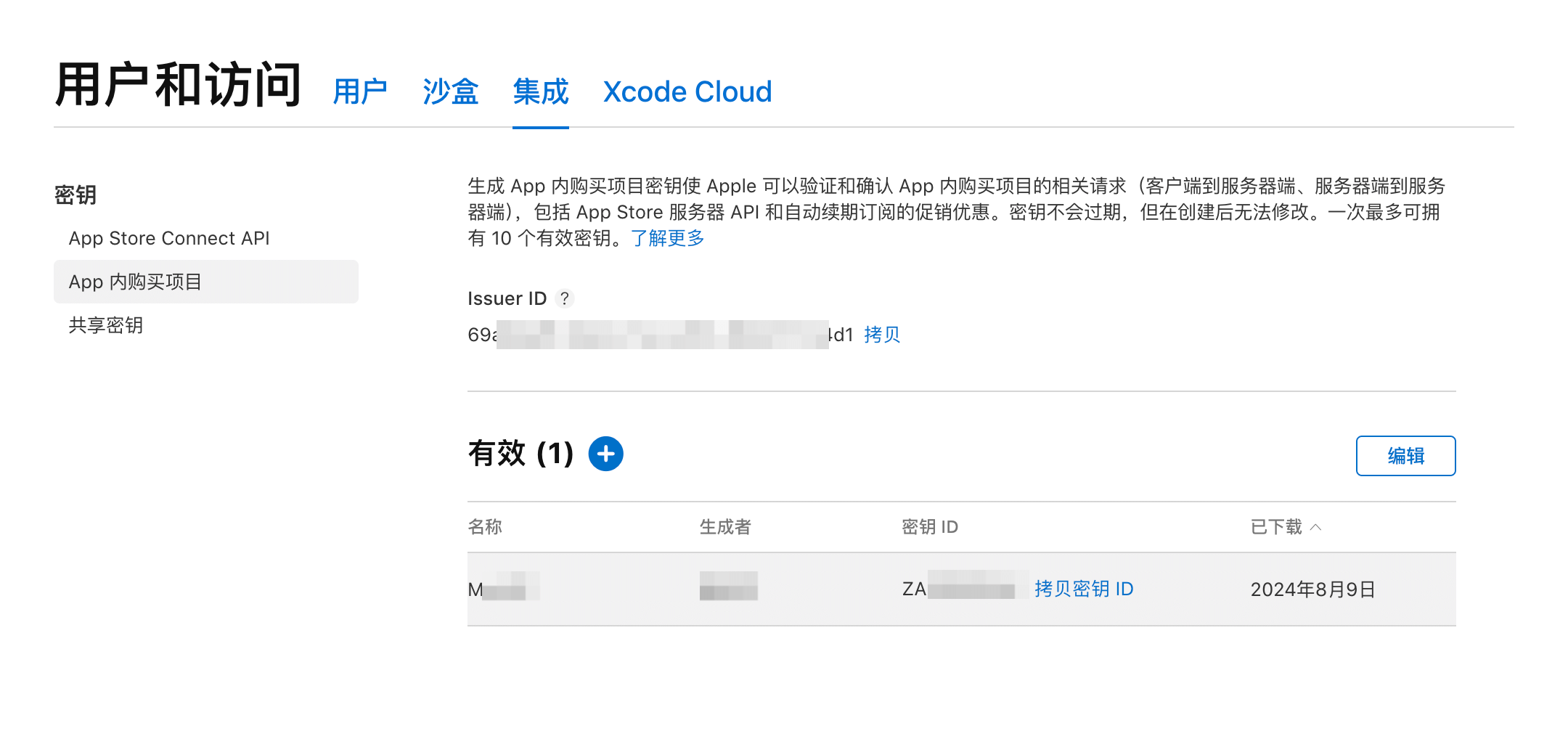
生成之后,可以在这个页面下载 .p8 格式的私钥。注意这个私钥只能下载一次,下载之后请妥善保存,如果不慎遗失,只能删除再重新生成一个。

上面生成 JWT 所需的 kid 对应上图中的“密钥 ID”,iss 对应“Issuer ID”,私钥即上面下载的 .p8 文件中的内容。

然后就可以用类似下面的方法生成 JWT 了:

import jwt

jwt_token = jwt.encode(
    payload,
    private_key,
    algorithm="ES256",
    headers=headers,
)

最后,将得到的 jwt_tokenBearer $jwt_token 的形式包含在请求头的 Authorization 中,发起 PUT 请求即可。

如果请求返回 202 状态码,表示请求成功了。如果是其他值,可根据错误状态再仔细检查处理。