惯性聚合 高效追踪和阅读你感兴趣的博客、新闻、科技资讯
阅读原文 在惯性聚合中打开

推荐订阅源

W
WeLiveSecurity
T
The Exploit Database - CXSecurity.com
C
CXSECURITY Database RSS Feed - CXSecurity.com
S
Security @ Cisco Blogs
T
Threat Research - Cisco Blogs
TaoSecurity Blog
TaoSecurity Blog
Recent Commits to openclaw:main
cs.AI updates on arXiv.org
腾讯CDC
Exploit-DB.com RSS Feed
OSCHINA 社区最新新闻
OSCHINA 社区最新新闻
T
The Blog of Author Tim Ferriss
Microsoft Azure Blog
罗磊的独立博客
F
Full Disclosure
博客园 - 【当耐特】
C
CERT Recently Published Vulnerability Notes
Engineering at Meta
Engineering at Meta
Application and Cybersecurity Blog
T
Threatpost
I
Intezer
V2EX - 技术
V2EX - 技术
H
Hackread – Cybersecurity News, Data Breaches, AI and More
The Hacker News
The Hacker News
小众软件
小众软件
Google DeepMind News
T
Tailwind CSS Blog
D
Darknet – Hacking Tools, Hacker News & Cyber Security
B
Blog RSS Feed
Microsoft Security Blog
N
News | PayPal Newsroom
MyScale Blog
MyScale Blog
AI
AI
Vercel News
Vercel News
Spread Privacy
Spread Privacy
美团技术团队
CTFtime.org: upcoming CTF events
The GitHub Blog
The GitHub Blog
V
Vulnerabilities – Threatpost
Schneier on Security
Cyberwarzone
Cyberwarzone
G
GRAHAM CLULEY
Help Net Security
Help Net Security
Hacker News: Ask HN
Hacker News: Ask HN
Google DeepMind News
MongoDB | Blog
MongoDB | Blog
L
LINUX DO - 热门话题
U
Unit 42
L
LangChain Blog
Recent Announcements

oldj's blog

SwitchHosts 5.0 - oldj's blog 开源本站博客系统 - Publa - oldj's blog 当写作软件遇上 AI:Scrivener 论坛上一场持续三年的产品哲学之争 - oldj's blog 使用 GitHub Action 自动更新 SSL 证书 AB 工作法 - oldj's blog 使用 uv 管理 Python 依赖 富文本框架体验 - oldj's blog 使用函数计算运行定时任务 - oldj's blog 使用 Dokploy 部署网站服务 - oldj's blog Electron 中的 Kiosk 窗口 - oldj's blog 使用 acme.sh 申请 SSL 证书 处理苹果平台的 CONSUMPTION_REQUEST 消息 - oldj's blog
在 Flutter 中适配 1Password 登录
2024-06-27 · via oldj's blog

最近在开发 Flutter 项目,其中 iOS 版 App 账号登录时,需要适配 1Password 等密码管理器,即需要告诉 1Password 等密码管理器当前 App 的登录特征信息(域名),以及应该填写界面上的哪些表单项。在这儿记录一下要点。

基本设置

我们首先要处理的,是让 App 和某个域名(通常是官网域名)关联,这样在 App 中唤起 1Password 填写密码时,1Password 才知道应该显示哪些账号。

这儿主要有三个步骤。

Apple 开发者后台设置

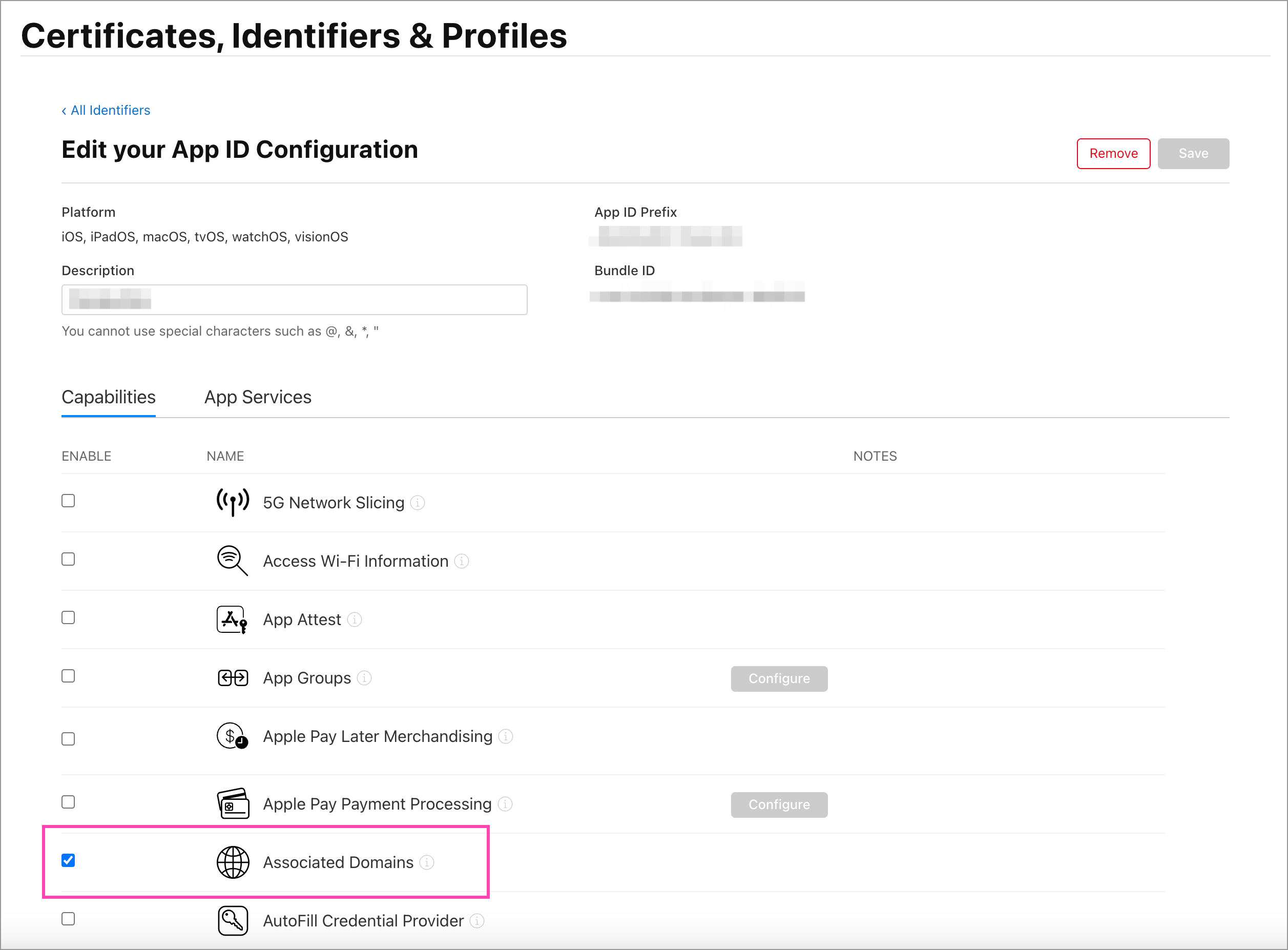
在 Apple 开发者后台的 Certificates, Identifiers & Profiles 页面,记得要选中 Associated Domains 选项,如下图所示:
Xcode 中的设置

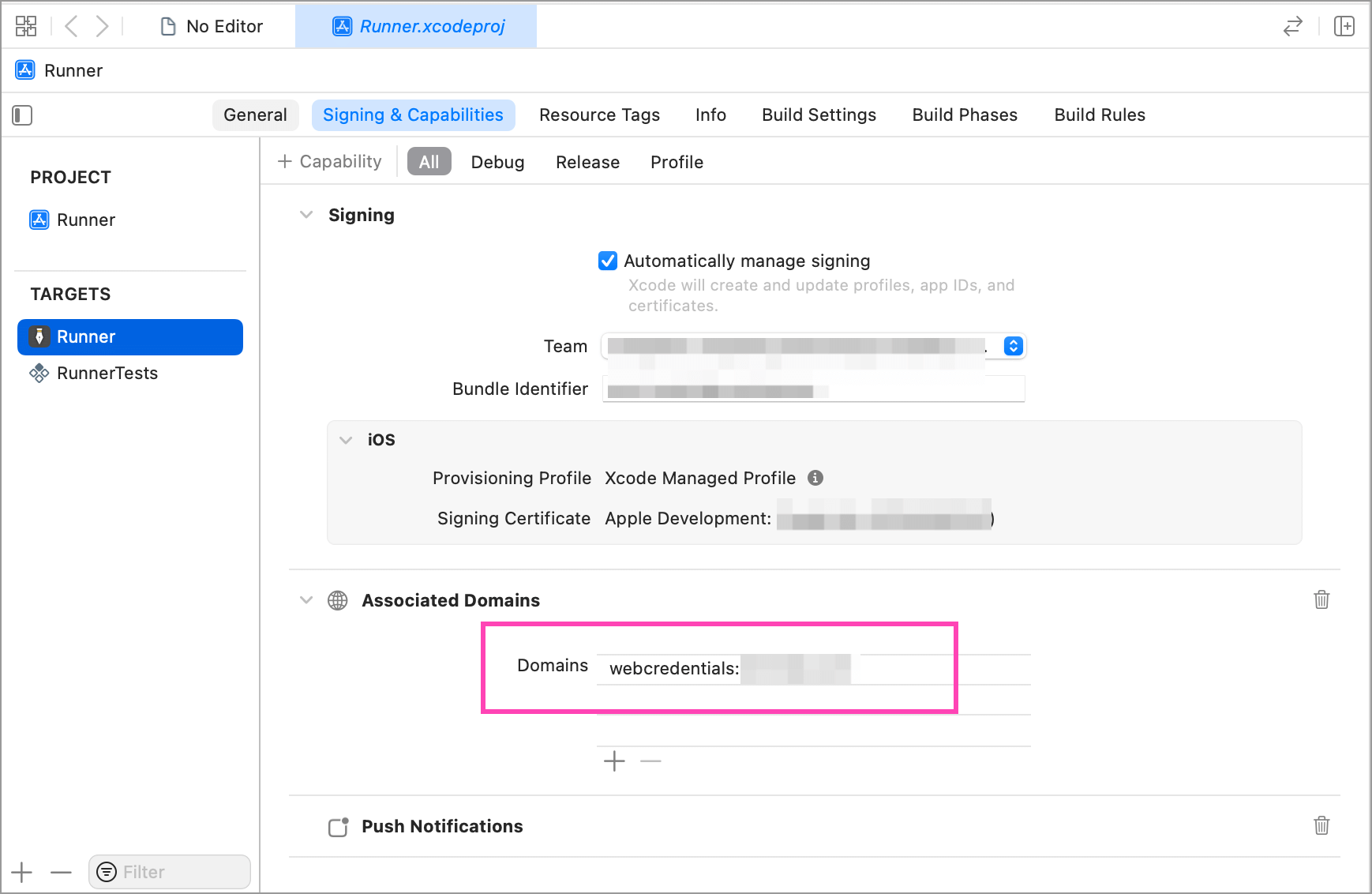
接下来,要在 Xcode 中为你的 App 添加关联域名,如下图所示:

在 Domains 那一栏,添加 webcredentials:你的域名 即可,比如你的域名是 test.com,那么添加 webcredentials:test.com 就行。

网站设置

最后,还需要在你的域名对应的网站上添加一个认证文件,证明指定 App 确实和当前域名相关。这个文件的文件名固定为 apple-app-site-association,可以放在网站的根目录,或者 .well-known 目录下,确保可以通过网络访问到。

这个文件的用途很多,可能还会包含一些其他字段,和密码管理器相关的主要是以下内容:

{
  "webcredentials": {
    "apps": [
      "TeamId.BundleId"
    ]
  }
}

确保你的 apple-app-site-association 文件包含 webcredentials 字段,并将其中 apps 中的 TeamId、BundleId 换成你的真实 ID。

Flutter 中的设置

为了得到更好的登录体验,Flutter 中也要做一些设置,主要是告诉 1Password 等密码管理器需要填写哪些字段,以及各个字段分别对应什么内容。

关键代码如下:

@override
Widget build(BuildContext context) {
  // ...
  return Container(
    body: Center(
      child: AutofillGroup(
        child: Column(
          children: [
            TextField(
              autofillHints: const [AutofillHints.email],
              decoration: InputDecoration(
                labelText: 'Email',
              ),
            ),
            TextField(
              autofillHints: const [AutofillHints.password],
              decoration: InputDecoration(
                labelText: 'Password',
              ),
            ),
            ElevatedButton(
              onPressed: () {
                // Submit the form
              },
              child: Text('Submit'),
            ),
          ],
        ),
      ),
    ),
  );
}

其中最关键的有两处,一是需要自动填写的表单部分,需要用 AutofillGroup 组件包起来,这样 1Password 就知道哪些字段是需要自动填写的。二是 Email、用户名、密码等需要填写的字段,需要添加 autofillHints 属性,比如 autofillHints: const [AutofillHints.email],这样 1Password 才知道当前字段应该填什么内容。

完成这些设置之后,App 登录时就应该能正常适配 1Password 了。