
惯性聚合 高效追踪和阅读你感兴趣的博客、新闻、科技资讯
阅读原文 在惯性聚合中打开

推荐订阅源

Cisco Talos Blog
Cisco Talos Blog
V
V2EX
C
Check Point Blog
GbyAI
GbyAI
D
Docker
Cyber Security Advisories - MS-ISAC
B
Blog RSS Feed
H
Hackread – Cybersecurity News, Data Breaches, AI and More
N
Netflix TechBlog - Medium
T
Troy Hunt's Blog
博客园 - Franky
Threat Intelligence Blog | Flashpoint
Microsoft Security Blog
P
Privacy & Cybersecurity Law Blog
WordPress大学
WordPress大学
The Cloudflare Blog
S
SegmentFault 最新的问题
Latest news
Latest news
Microsoft Azure Blog
P
Proofpoint News Feed
I
InfoQ
博客园 - 【当耐特】
NISL@THU
NISL@THU
A
About on SuperTechFans
T
Tailwind CSS Blog
酷 壳 – CoolShell
酷 壳 – CoolShell
The Hacker News
The Hacker News
奇客Solidot–传递最新科技情报
奇客Solidot–传递最新科技情报
Scott Helme
Scott Helme
雷峰网
雷峰网
C
CXSECURITY Database RSS Feed - CXSecurity.com
Security Latest
Security Latest
V
Vulnerabilities – Threatpost
Security Archives - TechRepublic
A
Arctic Wolf
Hacker News: Ask HN
Hacker News: Ask HN
N
News and Events Feed by Topic
IT之家
IT之家
cs.CL updates on arXiv.org
aimingoo的专栏
aimingoo的专栏
T
Threat Research - Cisco Blogs
OSCHINA 社区最新新闻
OSCHINA 社区最新新闻
阮一峰的网络日志
阮一峰的网络日志
SecWiki News
SecWiki News
大猫的无限游戏
大猫的无限游戏
S
Security Affairs
The Register - Security
www.infosecurity-magazine.com
L
LINUX DO - 热门话题
T
Tor Project blog

轶哥博客

blog blog blog blog blog blog blog blog blog blog blog blog blog blog blog blog blog blog blog blog blog blog blog blog blog blog blog blog blog blog blog blog blog blog blog blog blog blog blog blog blog blog blog blog blog blog blog blog blog blog blog blog blog blog blog blog blog blog blog blog blog blog blog blog blog blog blog blog blog blog blog blog blog blog blog blog blog blog blog blog blog blog blog blog blog blog blog blog blog blog blog blog blog blog blog blog blog blog blog blog
blog
2022-04-24 · via 轶哥博客

OpenWRT默认的DHCP Server服务器是Dnsmasq,借助Dnsmasq可以实现根据网址段分配不同网关(旁路由),也可以实现根据MAC地址/IP地址分配不同网关。

换句话说,可以实现一个OpenWRT下搭配多个旁路由,方便针对不同的设备指定其实用的旁路由是哪一个。

Dnsmasq为小型网络提供网络基础设施:DNS、DHCP、Router Advertisement 和 Network boot。它设计轻巧,资源占用少,适用于资源有限的路由器和防火墙。它还被广泛用于在智能手机和便携式热点上,并支持虚拟化框架中的虚拟网络。支持的平台包括Linux(带有glibc和uclibc)、Android、*BSD和Mac OS X。Dnsmasq包含在大多数Linux发行版以及FreeBSD、OpenBSD和NetBSD的端口系统中。Dnsmasq提供全面的IPv6支持。

应用场景

  1. OpenWRT作为主路由,其它OpenWRT/路由器系统作为旁路由,可以实现一个主路由搭配多个旁路由,用于新OpenWRT系统测试调试或均衡负载。只要是同一个网段的IP都可以设置为旁路由,包括但不仅限于ESXi中的多个OpenWRT系统。
  2. OpenWRT作为主路由,只让部分指定设备(网址段、MAC地址、IP地址)上网时候走旁路由,其余设备不走旁路由。类似于爱快在DHCP绑定MAC和IP静态地址后可以指定网关。

基础要求

  1. 既然是配置旁路由为网关,因此必然是要求旁路由和主路由处于同一个网段(例如处于192.168.1.0/24中的两个地址,可以互相访问)。
  2. 主路由必须作为DHCP Server(lan接口启用DHCP,OpenWRT中,该服务是默认由Dnsmasq实现)。

设置方法

由于目前OpenWRT的GUI(页面)中没有可视化配置的方法,设置需要通过修改配置文件进行。

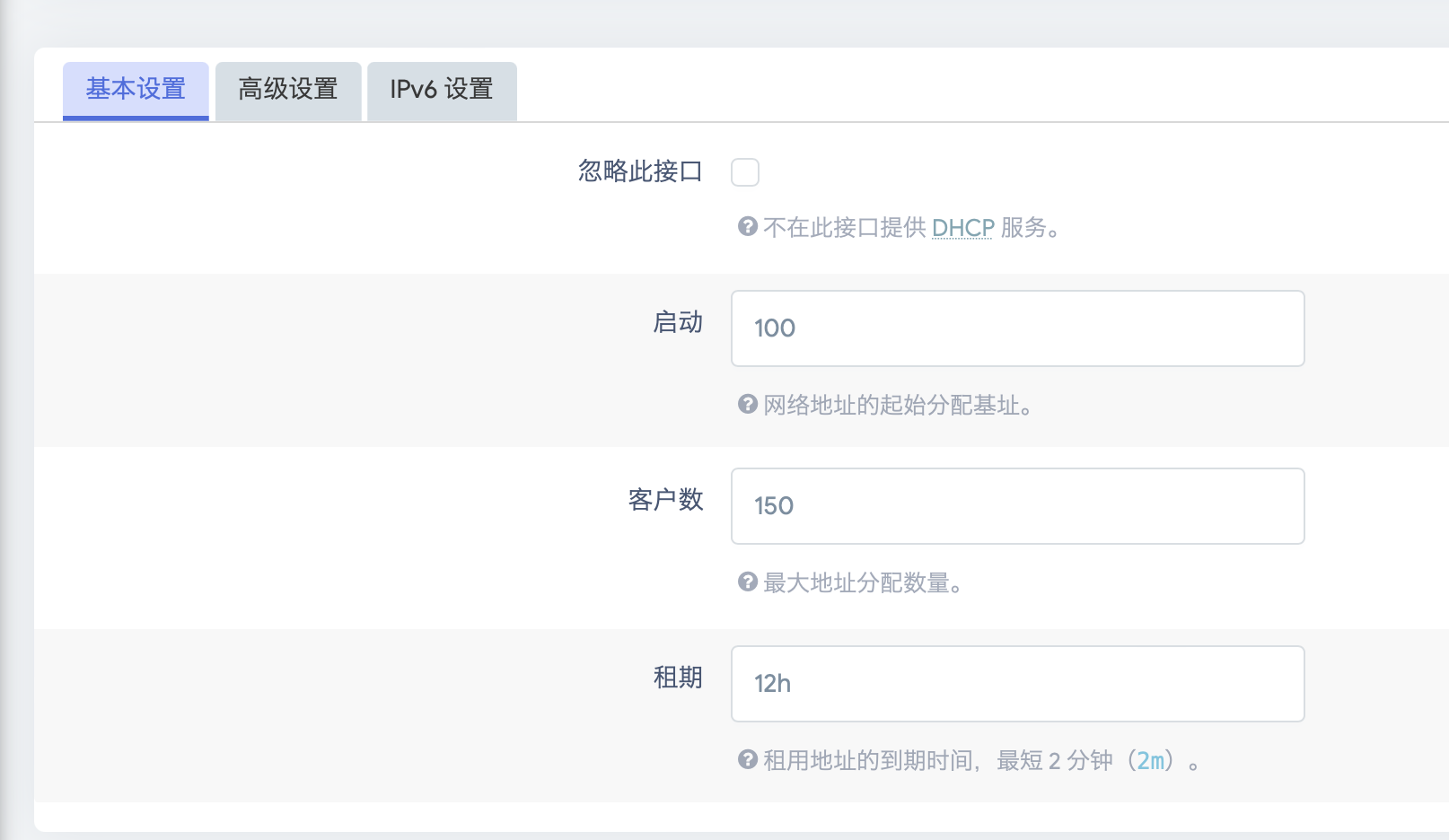
先在可视化管理后台,进入网络-接口-LAN,移动到最下方,查看当前DHCP服务器分配相关设置信息。
lan.png

修改vim /etc/dnsmasq.conf文件。

dhcp-range=set:OTHER,192.168.1.100,192.168.1.250
dhcp-option=tag:OTHER,3,192.168.1.254
dhcp-option=tag:OTHER,6,192.168.1.254

第一行代表设置组OTHER的网址段范围是192.168.1.100-192.168.1.250。需要特别注意,不要在该行最末尾添加有效期(例如12h),否则将变为修改DHCP服务器相关配置。网段范围必须包含于上图设置中DHCP服务器的分配范围,例如启动是100,客户数150,则意味着DHCP服务器的分配范围是192.168.1.100-192.168.1.250,而此处标记的dhcp-range范围必须在此范围之内,否则设置是无效的。

第二行则确定该组的网关地址是192.168.1.254

第三行确定该组的DNS服务器为网关地址。

重启dnsmasq生效:

/etc/init.d/dnsmasq restart

同理,也可以针对不同网口设置同一网段不同IP地址段(这种情况下则需要加上不同地址段的有效期,同时可视化管理后台中针对LAN接口的DHCP配置不再可用)。

如果需要针对MAC地址进行设置,第一行替换为:

dhcp-host=A1:B2:C3:D4:E5:F6,set:OTHER

如果需要针对某一个IP地址,则绑定MAC和IP后设置MAC地址即可。