



惯性聚合 高效追踪和阅读你感兴趣的博客、新闻、科技资讯
阅读原文 在惯性聚合中打开

推荐订阅源

S
Security @ Cisco Blogs
Microsoft Security Blog
GbyAI
GbyAI
Google DeepMind News
WordPress大学
WordPress大学
L
LangChain Blog
爱范儿
爱范儿
N
Netflix TechBlog - Medium
The Register - Security
Jina AI
Jina AI
V
V2EX
Hugging Face - Blog
Hugging Face - Blog
I
InfoQ
罗磊的独立博客
Stack Overflow Blog
Stack Overflow Blog
Microsoft Azure Blog
Last Week in AI
Last Week in AI
Recorded Future
Recorded Future
D
DataBreaches.Net
Project Zero
Project Zero
博客园 - 【当耐特】
宝玉的分享
宝玉的分享
T
The Exploit Database - CXSecurity.com
A
Arctic Wolf
freeCodeCamp Programming Tutorials: Python, JavaScript, Git & More
Engineering at Meta
Engineering at Meta
D
Docker
F
Fortinet All Blogs
P
Palo Alto Networks Blog
Cyber Security Advisories - MS-ISAC
T
Tailwind CSS Blog
S
Schneier on Security
博客园 - 司徒正美
Threat Intelligence Blog | Flashpoint
Scott Helme
Scott Helme
Security Latest
Security Latest
V
Visual Studio Blog
T
Tor Project blog
I
Intezer
T
Threat Research - Cisco Blogs
MyScale Blog
MyScale Blog
月光博客
月光博客
MongoDB | Blog
MongoDB | Blog
P
Privacy International News Feed
云风的 BLOG
云风的 BLOG
C
Cisco Blogs
The Cloudflare Blog
Simon Willison's Weblog
Vercel News
Vercel News
S
Securelist

轶哥博客

blog blog blog blog blog blog blog blog blog blog blog blog blog blog blog blog blog blog blog blog blog blog blog blog blog blog blog blog blog blog blog blog blog blog blog blog blog blog blog blog blog blog blog blog blog blog blog blog blog blog blog blog blog blog blog blog blog blog blog blog blog blog blog blog blog blog blog blog blog blog blog blog blog blog blog blog blog blog blog blog blog blog blog blog blog blog blog blog blog blog blog blog blog blog blog blog blog blog blog blog
blog
2021-03-10 · via 轶哥博客

转眼间使用Redash已经两年多了,redash给我的感觉就是省心省事。基础需求都能实现,用户体验很好,升级版本也容易,二次开发也方便简单。

只不过有两个需求redash没有实现:

  • API刷新整个仪表盘
  • 导出仪表盘中所有的Widget数据为Excel文件

第二个需求,我在《Redash导出仪表盘中所有数据为Excel文件》一文进行了实现说明。
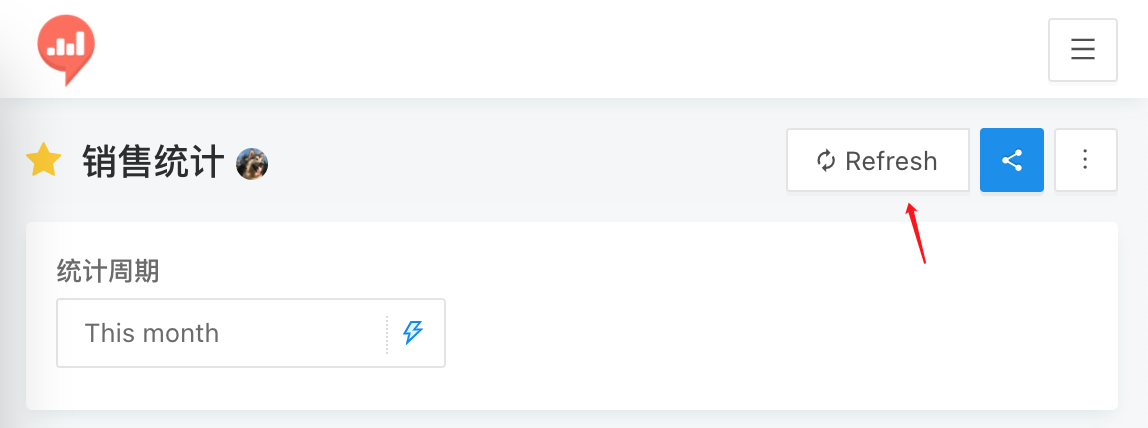
需求分析

redash.png

Refresh按钮可以设置定时刷新,但是某些情况下我们需要根据条件触发刷新。

或者在内网部署,通过iframe将Share的链接嵌入到OA系统。分享链接不具备刷新功能。

刷新整个仪表盘

官方API文档中就有关于刷新整个仪表盘的说明,指向了这个文件:https://github.com/getredash/redash-toolbelt/blob/master/redash_toolbelt/examples/refresh_dashboard.py

执行上面的代码需要安装Poetry,可以参考《Poetry快速安装教程》。

安装poetry后,安装依赖:

poetry install

然后可以执行:

poetry run python3 redash_toolbelt/examples/refresh_dashboard.py https://example.com API_Key slug

实现对相应slug的仪表盘所有query进行刷新。

refresh_dashboard.py代码默认的刷新周期需要手动进行修改:

params = {
  "created_at": {
    # p.get("name"): fill_dynamic_val(todays_dates, p)
    # for p in qry["options"].get("parameters", [])
    "start": str(start) + " 00:00:00",
    "end": str(end) + " 23:59:59"
  }
}

封装命令为API

from flask import Flask
import subprocess, json

app = Flask(__name__)


@app.route("/")
def welcome():
    output = subprocess.check_output(["poetry run python3 redash_toolbelt/examples/refresh_dashboard.py https://example.com API_Key slug"], shell = True)
    out = output.decode()
    return json.dumps({"out": out},ensure_ascii=False)


if __name__ == "__main__":
    app.run(host="0.0.0.0", port=5001)

访问http://127.0.0.1:5001即可实现对指定仪表盘进行刷新。

这个实现方法过于简单除暴,只适用于临时使用,正式实现还是参考redash_toolbelt代码来写吧。