惯性聚合 高效追踪和阅读你感兴趣的博客、新闻、科技资讯
阅读原文 在惯性聚合中打开

推荐订阅源

N
News and Events Feed by Topic
S
Security @ Cisco Blogs
S
Secure Thoughts
Attack and Defense Labs
cs.AI updates on arXiv.org
Hacker News - Newest:
Hacker News - Newest: "LLM"
Recent Commits to openclaw:main
H
Hacker News: Front Page
博客园 - 叶小钗
H
Heimdal Security Blog
Microsoft Security Blog
Forbes - Security
Forbes - Security
AI
AI
cs.CV updates on arXiv.org
T
Troy Hunt's Blog
罗磊的独立博客
Application and Cybersecurity Blog
爱范儿
爱范儿
GbyAI
GbyAI
The Last Watchdog
The Last Watchdog
TaoSecurity Blog
TaoSecurity Blog
C
CXSECURITY Database RSS Feed - CXSecurity.com
D
DataBreaches.Net
Recent Announcements
Schneier on Security
C
Cisco Blogs
美团技术团队
D
Docker
让小产品的独立变现更简单 - ezindie.com
WordPress大学
WordPress大学
月光博客
月光博客
雷峰网
雷峰网
Threat Intelligence Blog | Flashpoint
H
Hackread – Cybersecurity News, Data Breaches, AI and More
A
Arctic Wolf
B
Blog RSS Feed
Cisco Talos Blog
Cisco Talos Blog
C
Cybersecurity and Infrastructure Security Agency CISA
V
Vulnerabilities – Threatpost
V2EX - 技术
V2EX - 技术
Y
Y Combinator Blog
N
News and Events Feed by Topic
www.infosecurity-magazine.com
W
WeLiveSecurity
Security Archives - TechRepublic
G
GRAHAM CLULEY
Jina AI
Jina AI
Hugging Face - Blog
Hugging Face - Blog
酷 壳 – CoolShell
酷 壳 – CoolShell
The Hacker News
The Hacker News

轶哥博客

blog blog blog blog blog blog blog blog blog blog blog blog blog blog blog blog blog blog blog blog blog blog blog blog blog blog blog blog blog blog blog blog blog blog blog blog blog blog blog blog blog blog blog blog blog blog blog blog blog blog blog blog blog blog blog blog blog blog blog blog blog blog blog blog blog blog blog blog blog blog blog blog blog blog blog blog blog blog blog blog blog blog blog blog blog blog blog blog blog blog blog blog blog blog blog blog blog blog blog blog
blog
2021-10-09 · via 轶哥博客

在win11正式版中,设置默认浏览器的方法被微软修改了,更加精细,以至于一开始我竟没有找到在哪里设置。

以前在win10中,设置默认浏览器只需要进入设置-应用-默认应用,对Web浏览器进行选择即可调整默认应用程序。但是在win11中居然开了个倒车,没有提供这样的默认选项,取而代之的是精细化的默认应用设置。

虽然精细化的设置能够最大程度的把管理权交给用户,但是win10的快捷设置方式也不失为一个值得保留的选项。两者完全可以共存。摒弃简单方案提高了用户切换默认浏览器的难度,在第一次启动Edge的时候不小心点了介绍界面的确定按钮,win11就把默认浏览器设置一键为Edge了,还不晓得杂个改回去,就这实在是有点流氓。

设置方法

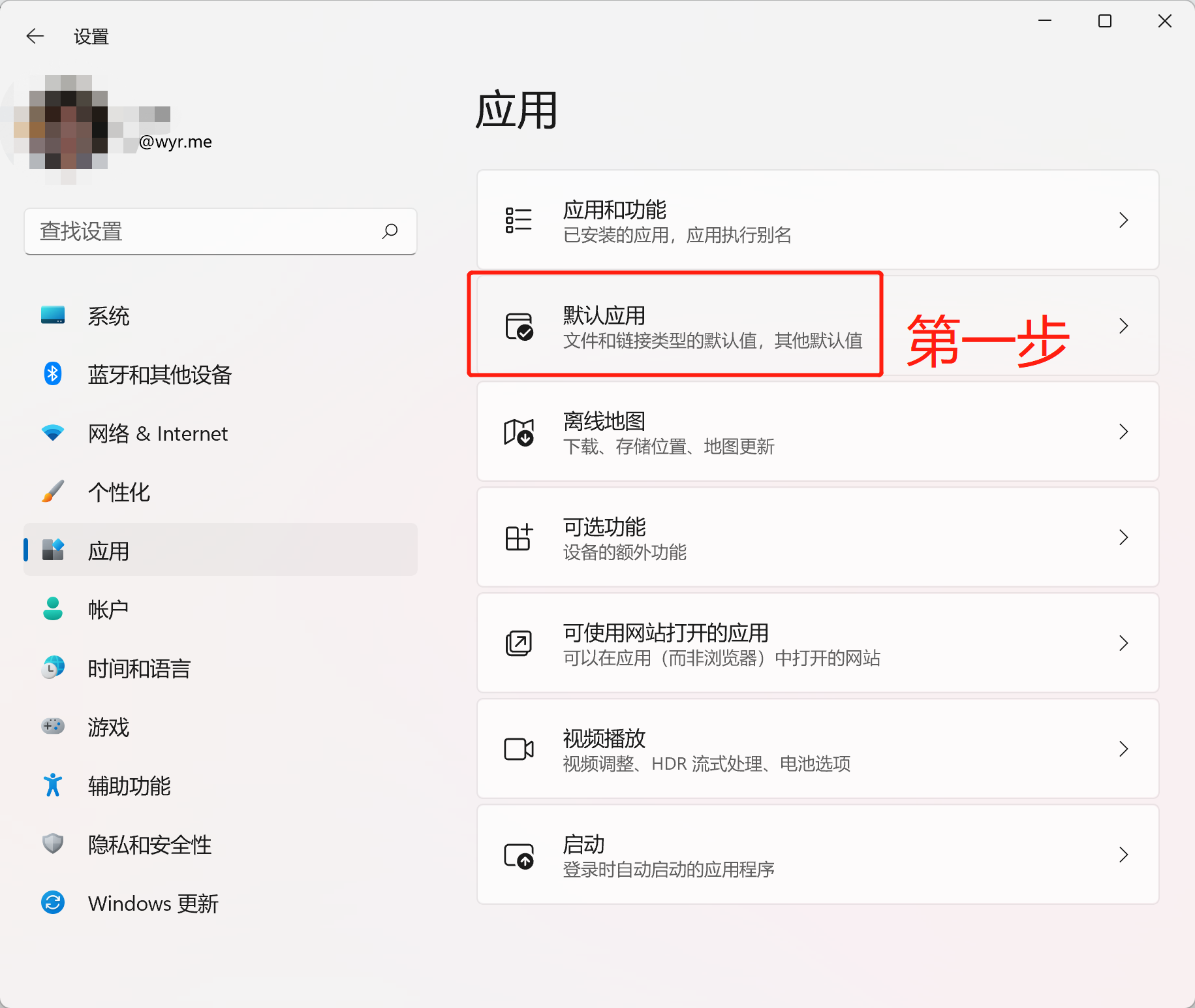
进入设置-应用-默认程序

image.png

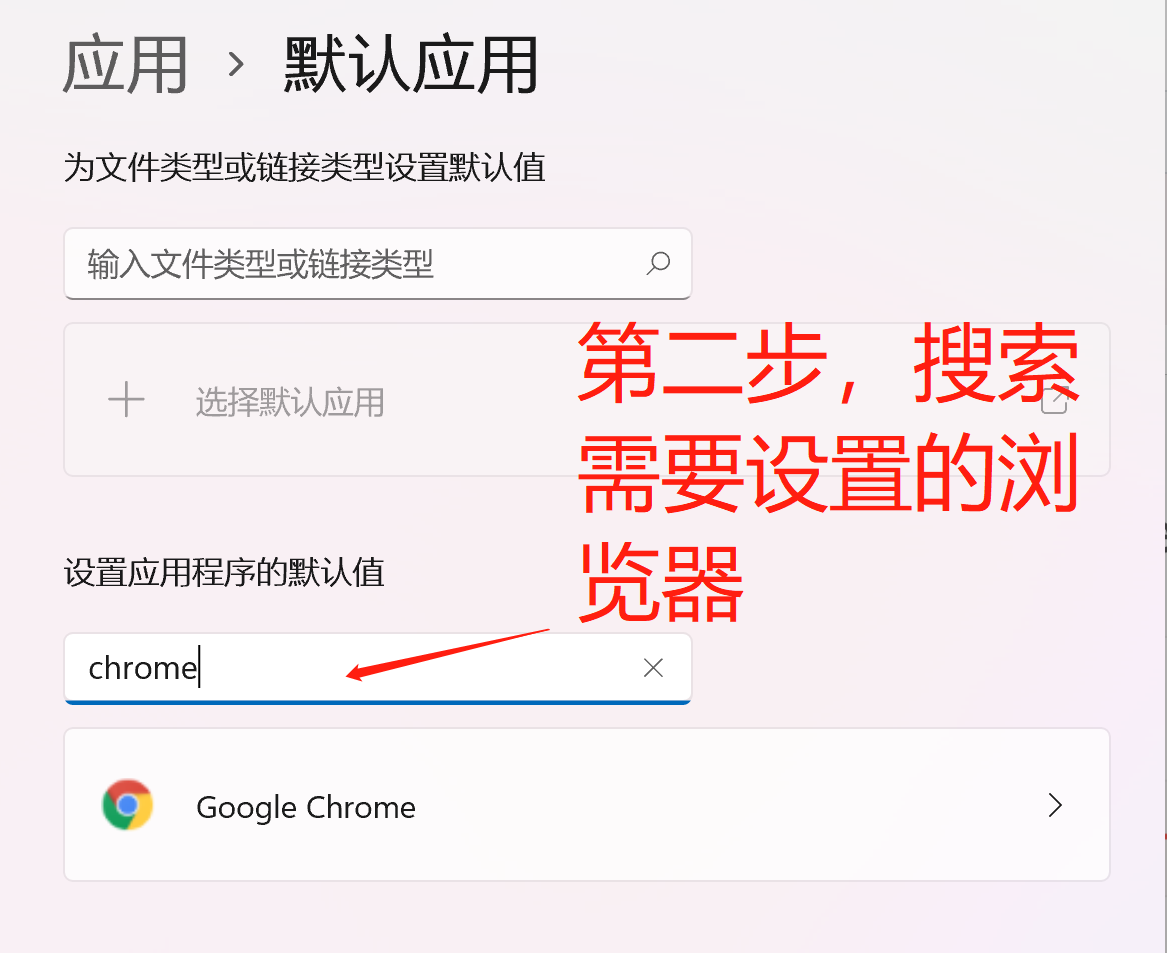
搜索需要设置的浏览器(如Chrome)或任意浏览器。

image.png

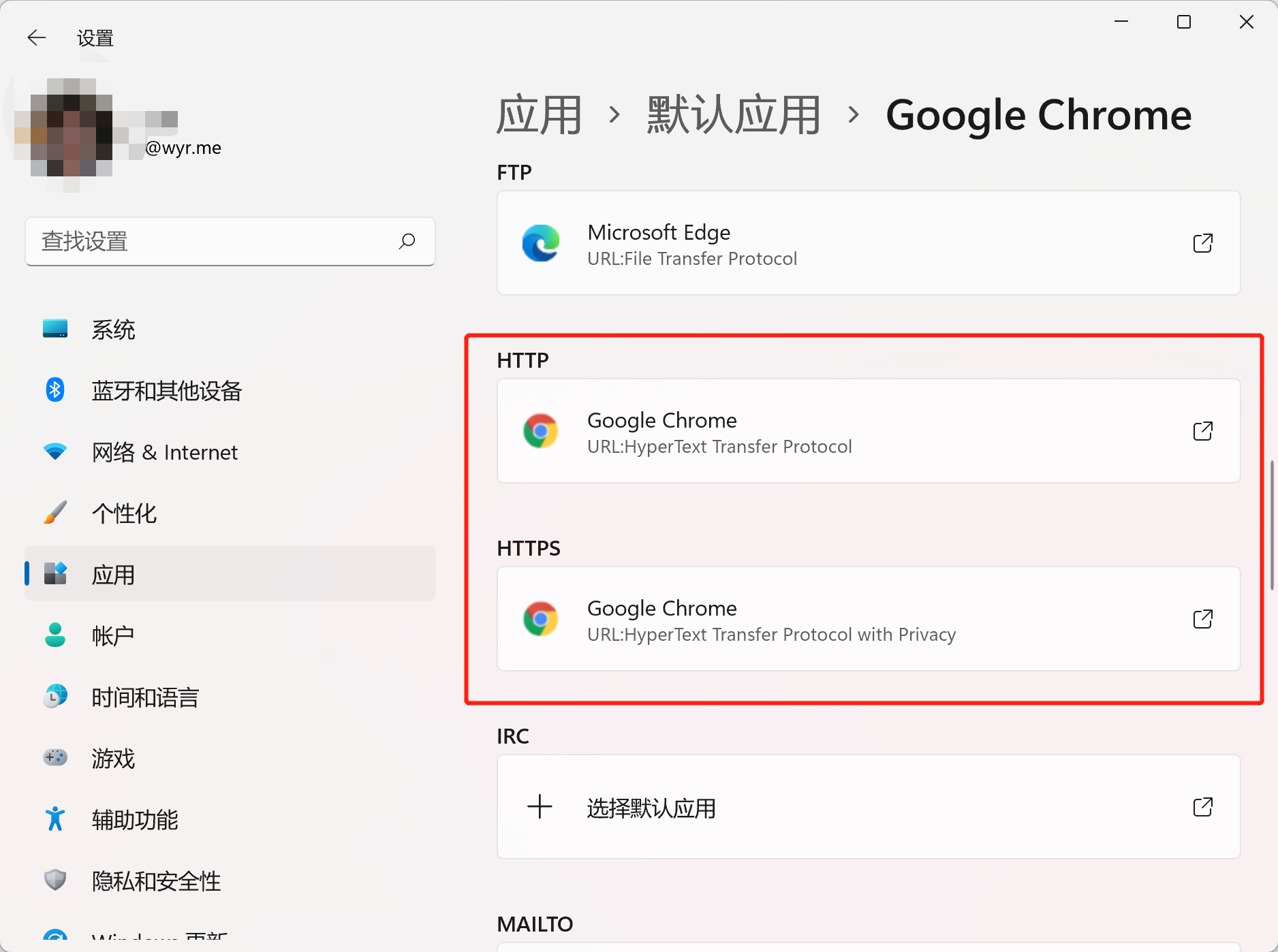
找到HTTPHTTPS,修改为需要使用的浏览器。

image.png

修改后立即生效。

2022-04-01 11:20:49 更新:

微软现已允许用户一键更改默认浏览器。

微软已于本周开始推送一个新的 Windows 11 更新,此次更新中最大的变化就是允许 Windows 11 用户仅需一次点击就能更改默认浏览器。这项变化曾在去年 12 月的预览版中进行了测试,如今这个功能正式登陆 Windows 11,该更新已陆续推送至各个设备上。