







本文介绍如何开启Raspberry Pi 4 USB OTG模式,让树莓派变身有线网卡。
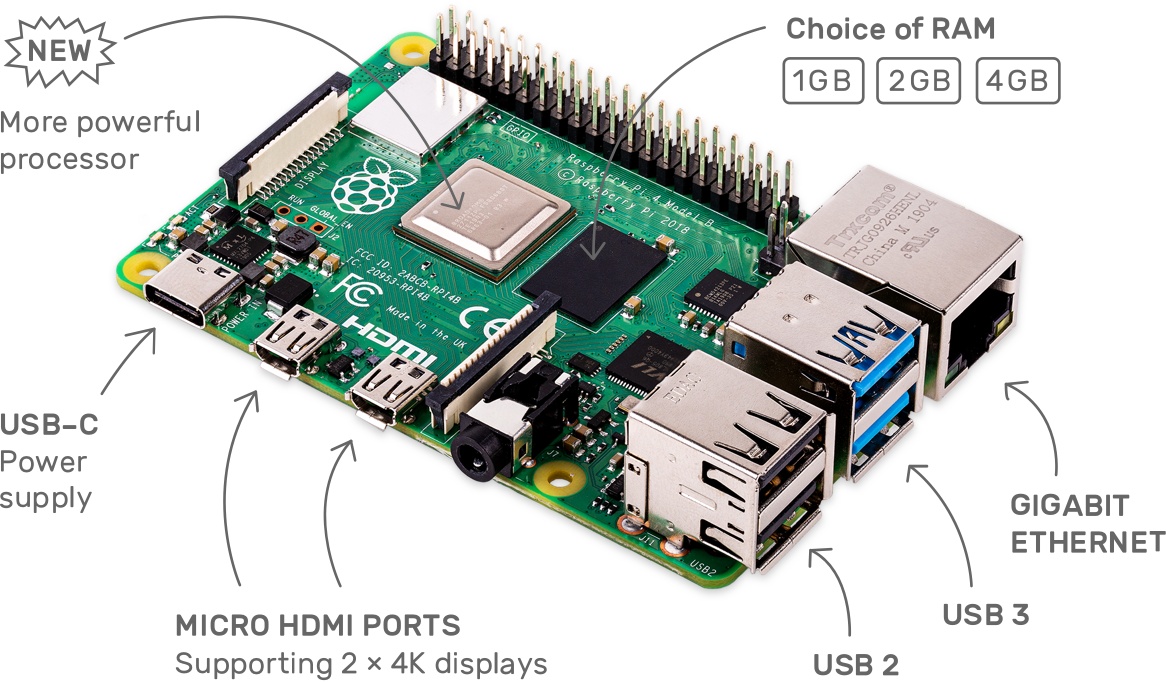
树莓派4相比之前的版本具备三倍的计算性能提升和高达4G的LPDDR4内存,自带双屏无线+蓝牙,千兆网扣,支持双屏4k,新增俩USB3.0,可玩性非常强。无风扇禁音,非常适合作为一个边缘计算节点、旁路由来使用。如果再开启NAT转发,即可实现的变身有线网卡的同时作为无线网络接收器、路由器来使用。
Raspberry 4 和 Raspberry Zero 一样,具备一个带OTG功能的USB接口(很遗憾Raspberry pi model B、Raspberry pi model B+、Raspberry pi 2 model B、Raspberry pi 3 model B、Raspberry pi 3 model B+均无USB OTG功能)。
刷入官方Raspbian系统。经过测试,树莓派爱好者基地发行的Debian-Pi-Aarch64系统、Ubuntu Server系统,暂时都不支持USB OTG模式。
刷入后,先不急移除TF卡。进入已挂载的boot分区,touch SSH文件(新建一个名称为SSH的空白文件,开启SSH连接功能)。
插入TF卡、有线网络并启动设备,使用电脑在同一个网络下连接SSH。
ssh pi@raspberrypi
执行passwd设置当前用户pi的密码。执行sudo su切换为root用户,执行passwd设置root用户的密码。
修改/etc/ssh/sshd_config文件,在第33行添加
PermitRootLogin yes
允许root用户以SSH方式登录系统。执行systemctl restart sshd重启sshd。*此步骤是可选的。
执行rpi-update进行系统升级。
将内核切换为64位内核,打开树莓派USB OTG模式。修改/boot/config.txt文件,在最后一行加入:
# enbale 64 bit kernel
arm_64bit=1

# enable USB OTG
dtoverlay=dwc2
/boot/cmdline.txt文件,在rootwait后,添加空格并加入:modules-load=dwc2,g_ether
修改后Raspberry 4的/boot/cmdline.txt文件内容可能像这样:
console=serial0,115200 console=tty1 root=PARTUUID=738a4d67-02 rootfstype=ext4 elevator=deadline fsck.repair=yes rootwait modules-load=dwc2,g_ether
telinit 6,重启设备。将USB-C接口与电脑相连,从现在起可以拔除有线网卡了。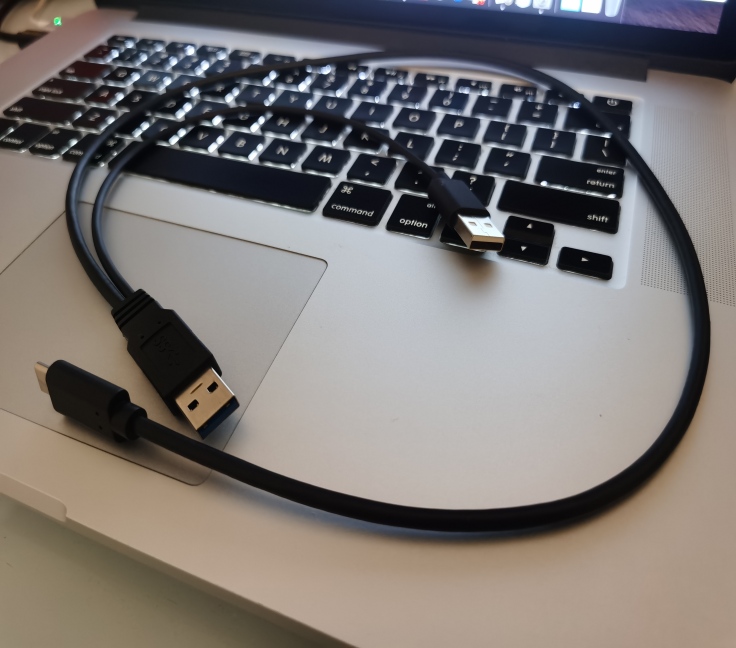
请注意,由于电脑主板供电的原因,您有可能需要一根类似这样的USB3.0 TypeC 带辅助供电的数据线。您需要15w(5V 3A)的电源以确保树莓派获得足够的动力。
MacOS系统下是不需要安装驱动的,设备会检测到RNDIS/Ethernet Gadget的网卡,并且自动分配类似169.254.192.68的IP地址。Windows系统需要安装驱动程序。如果没有执行第五步,则需要将用户改为pi,即ssh pi@raspberrypi.local。ssh root@raspberrypi.local
以Root身份进入系统。这时ifconfig -a下出现usb0网卡。
usb0: flags=4163<UP,BROADCAST,RUNNING,MULTICAST>  mtu 1500
        inet 169.254.147.254  netmask 255.255.0.0  broadcast 169.254.255.255
        inet6 fe80::25c3:8e3b:1f05:eb2f  prefixlen 64  scopeid 0x20<link>
        ether 82:9a:4c:72:4a:60  txqueuelen 1000  (Ethernet)
        RX packets 985  bytes 180096 (175.8 KiB)
        RX errors 0  dropped 0  overruns 0  frame 0
        TX packets 2481  bytes 168355 (164.4 KiB)
        TX errors 0  dropped 0 overruns 0  carrier 0  collisions 0
小提示,如果没有出现wlan0网卡,可能是因为还没有设置Wifi使用的国家标准,执行raspi-config根据提示设置无线网络即可。
使用USB OTG网卡,网速上限为300M。开启TypeC接口USB OTG功能不会影响其它USB接口的正常使用。
树莓派4中的无线网卡大约能达到114M的网速。如果使用外置USB3.0网卡,则可以跑满千兆。
安装Remote - SSH插件后,树莓派也可以作为Visual Studio Code的远程计算节点来使用,降低电脑的计算压力。
您的代码直接保存在树莓派、程序也直接在树莓派中运行,使用树莓派作为USB网卡几乎零延迟,开发体验与本机无异。
(受疫情影响,我们仍在一个临时办公地点办公。我所使用的Mac设备配置很低,但是使用树莓派作为计算节点之后,我调试代码的效率提高了很多。)
如何使树莓派变身无线网卡及路由器?请关注我后续的文章😄。
此内容由惯性聚合(RSS阅读器)自动聚合整理,仅供阅读参考。 原文来自 — 版权归原作者所有。