









为了方便大家快速集成,我将推送URL到百度、谷歌、Bing搜索引擎的功能整合至submit-url模块中。
模块支持两种方式调用,如果您使用的是海外服务器,且使用Node.js作为服务器端,可以通过npm install submit-url的方式安装该模块。否则,请运行模块作为HTTP服务,您的程序通过调用此HTTP API来提交网址,确保推送到谷歌和Bing搜索引擎的稳定。
npm install submit-url
import submitURL from 'submit-url'

const submitURL = new SubmitURL({
  siteURL: process.env.SITE_URL || '',
  baiduToken: process.env.BAIDU_TOKEN || '',
  googleClientEmail: process.env.GOOGLE_CLIENT_EMAIL || '',
  googlePrivateKey: process.env.GOOGLE_PRIVATE_KEY || '',
  bingAPIKey: process.env.BING_API_KEY || ''
})

const [baidu, google, bing] = await Promise.allSettled([
  submitURL.toBaidu(urlList),
  submitURL.toGoogle(urlList),
  submitURL.toBing(urlList)
])

return { baidu, google, bing }
其中,siteURL为站点地址,例如https://www.wyr.me。
docker run --name submit-url -itd -m 300m --restart=always \
-e TOKEN=cbe205ad-1026-4906-8caa-cf4ab8b35d1a \
-e SITE_URL=https://www.xxx.xx \
-e BAIDU_TOKEN=bKRK********EiOB \
-e BING_API_KEY=3356082b***************7b039e756 \
-e GOOGLE_CLIENT_EMAIL=blog-***@blog-******.iam.gserviceaccount.com \
-e GOOGLE_PRIVATE_KEY="-----BEGIN PRIVATE KEY-----\n********\n-----END PRIVATE KEY-----\n" \
-p 8080:80 \
wy373226722/submit-url:latest
POST /
Content-Type: application/json
{
    "token": "16e*****-c0d8-4b53-b52b-d216e5ea35fc",
    "urlList": ["https://www.wyr.me/post/630"]
}
{
    "baidu": {
        "status": "fulfilled",
        "value": {
            "code": 1,
            "msg": "success",
            "result": {
                "success": 1,
                "remain": 99999
            }
        }
    },
    "google": {
        "status": "fulfilled",
        "value": {
            "code": 1,
            "msg": "success",
            "result": {
                "successNumber": 1,
                "commitLog": [
                    {
                        "status": "fulfilled",
                        "value": {
                            "code": 1,
                            "msg": "success",
                            "result": {
                                "urlNotificationMetadata": {
                                    "url": "https://www.wyr.me/post/630",
                                    "latestUpdate": {
                                        "url": "https://www.wyr.me/post/630",
                                        "type": "URL_UPDATED",
                                        "notifyTime": "2020-08-04T14:30:06.848150189Z"
                                    }
                                }
                            }
                        }
                    }
                ]
            }
        }
    },
    "bing": {
        "status": "fulfilled",
        "value": {
            "code": 1,
            "msg": "success",
            "result": {
                "d": null
            }
        }
    }
}
进入百度搜索资源平台,登录并添加站点、验证网站。

如上图,复制Token的值为实例化SubmitURL的第二个参数。
谷歌实现API推送新页面URL最为复杂。
官方说明文档《Indexing API 快速入门》。这里对重点步骤进行简要说明。
根据《使用 Indexing API 的前提条件》,在此页面【通过此链接进入创建的,默认有Indexing API权限,否则需要在凭据页面启用该API权限】创建一个自命名项目,基本选项默认即可。
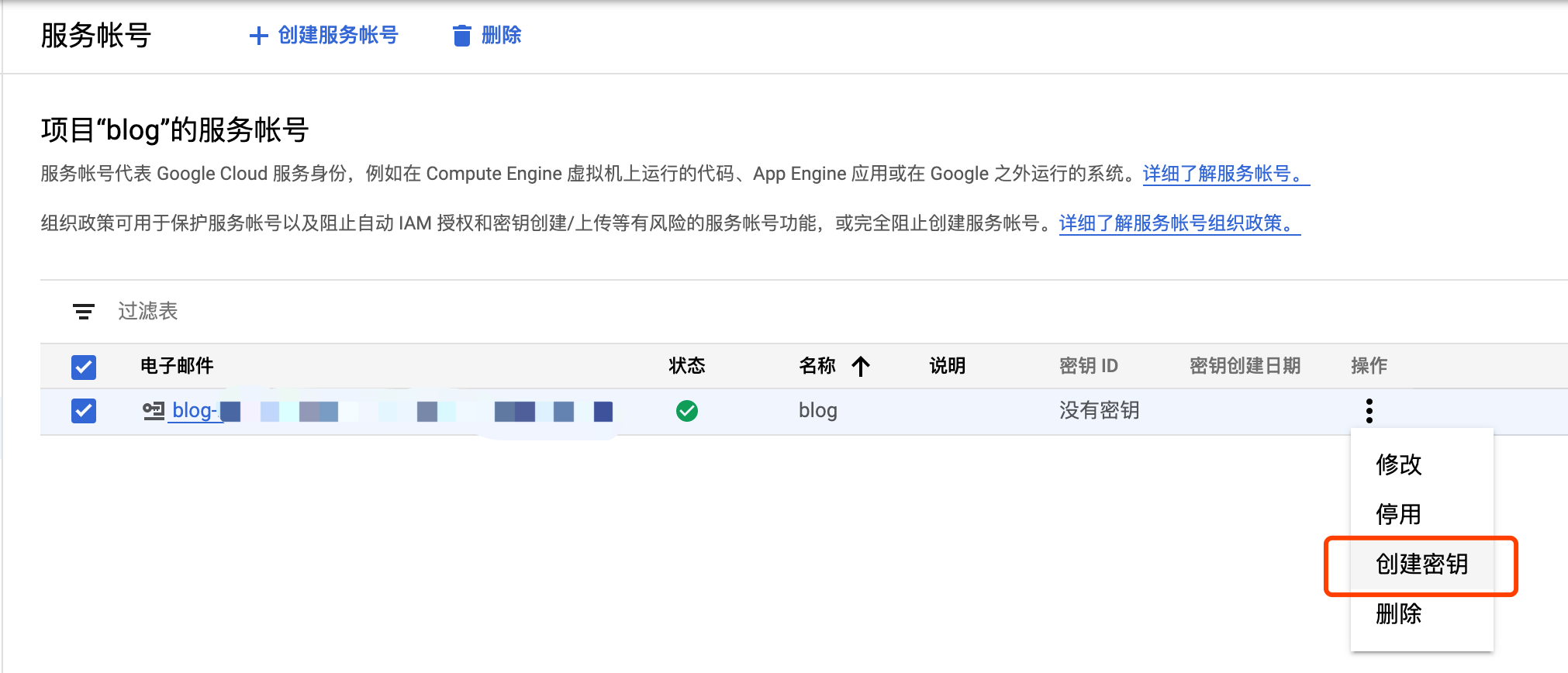
项目创建完成后,根据《使用 Indexing API 的前提条件》进入服务账号管理页面,创建服务账号,创建完成后点击创建秘钥。创建JSON格式的秘钥。
秘钥创建完成后,同样参考《使用 Indexing API 的前提条件》,在 Search Console 中验证网站所有权。
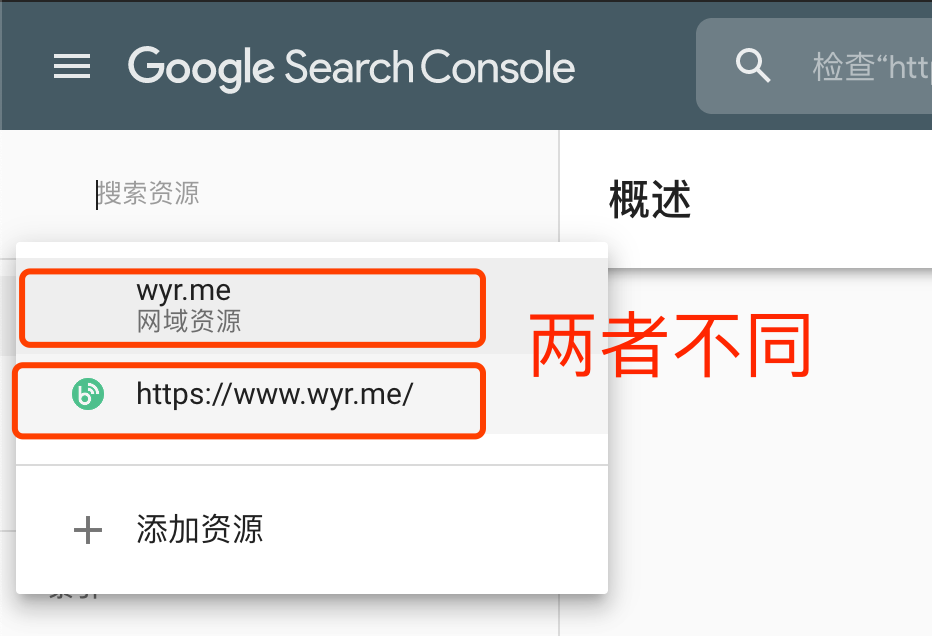
如上图,如果提交的网址是www.wyr.me,需要选择具体的网址后,再添加资源所有者。如果选择网域资源wyr.me,但是提交收录的地址以www.wyr.me,则接口将报403错误。
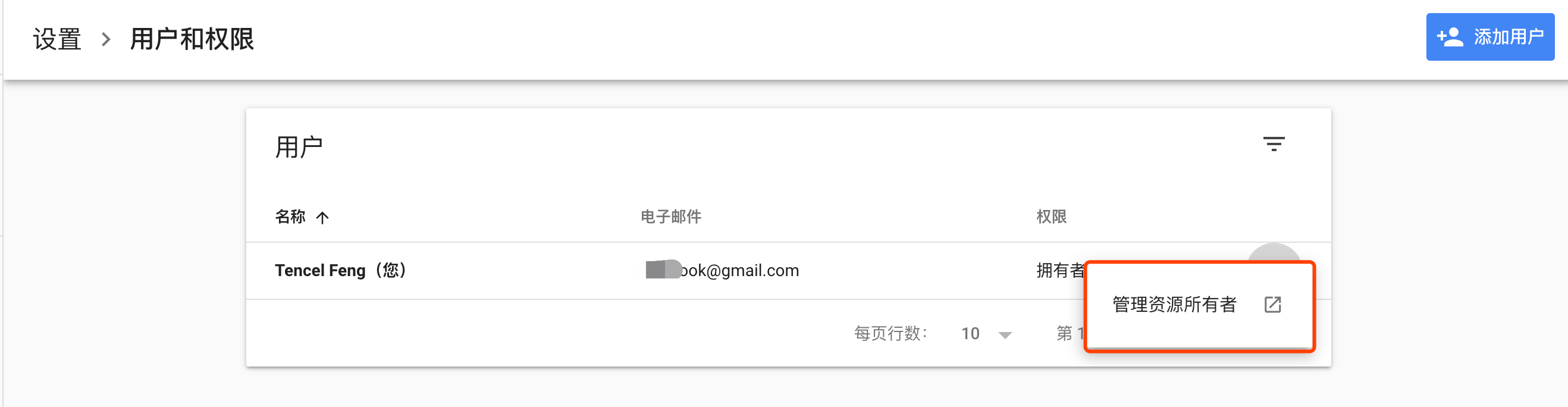
注意,添加资源所有者的时候,应选择上图所示按钮,并非添加用户。
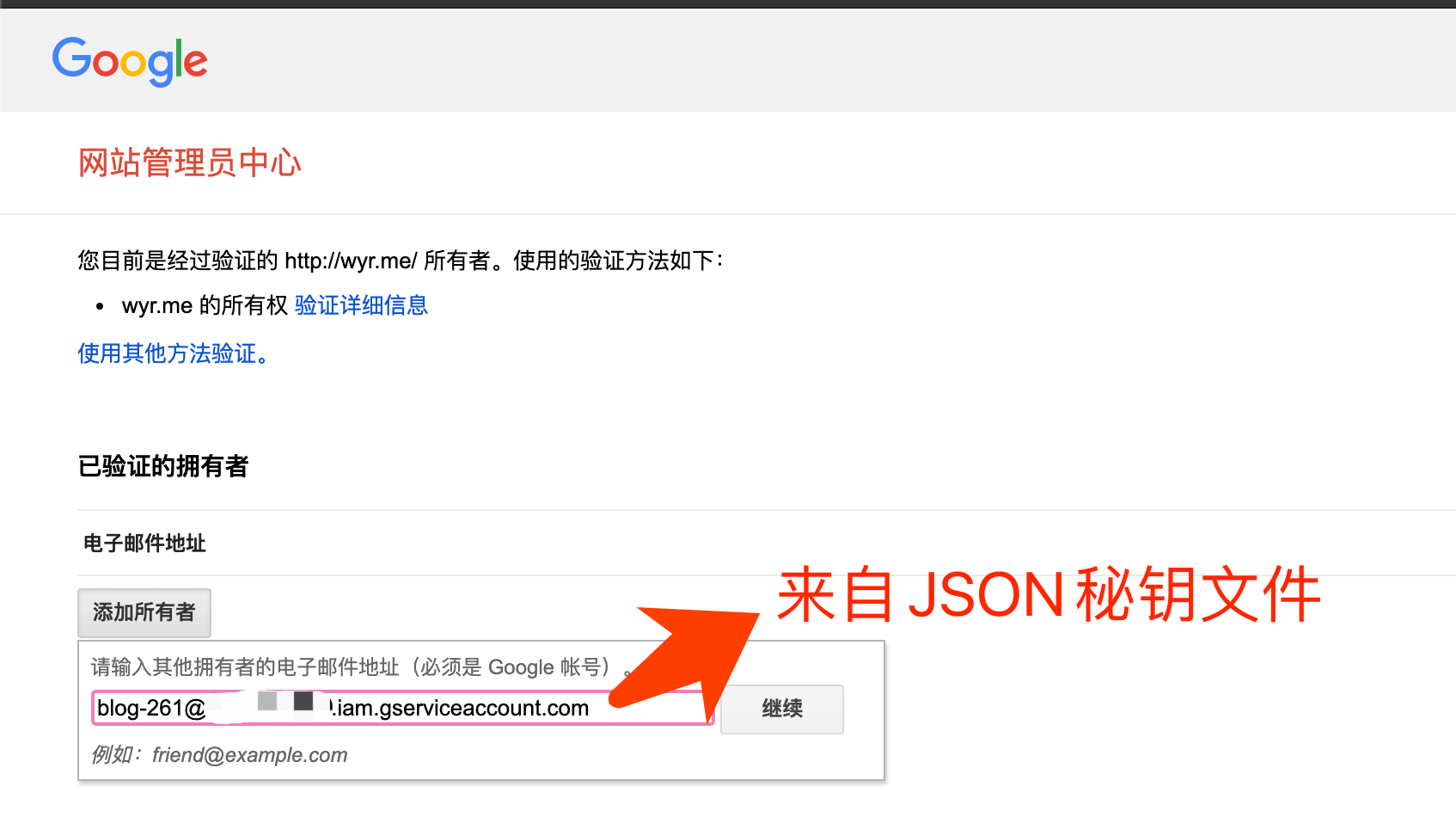
复制JSON秘钥文件中的client_email作为所有者邮箱,同时作为SubmitURL的第三个参数。密钥中的private_key作为第四个参数。
如果返回值是403,需要查看具体的body内容,谷歌友好的返回了可能的报错信息。其中最常见的问题是Indexing API 未启用,进入https://console.developers.google.com/apis/api/indexing.googleapis.com/overview启用即可。
必应搜索引擎URL提交API文档地址https://www.bing.com/webmasters/url-submission-api。
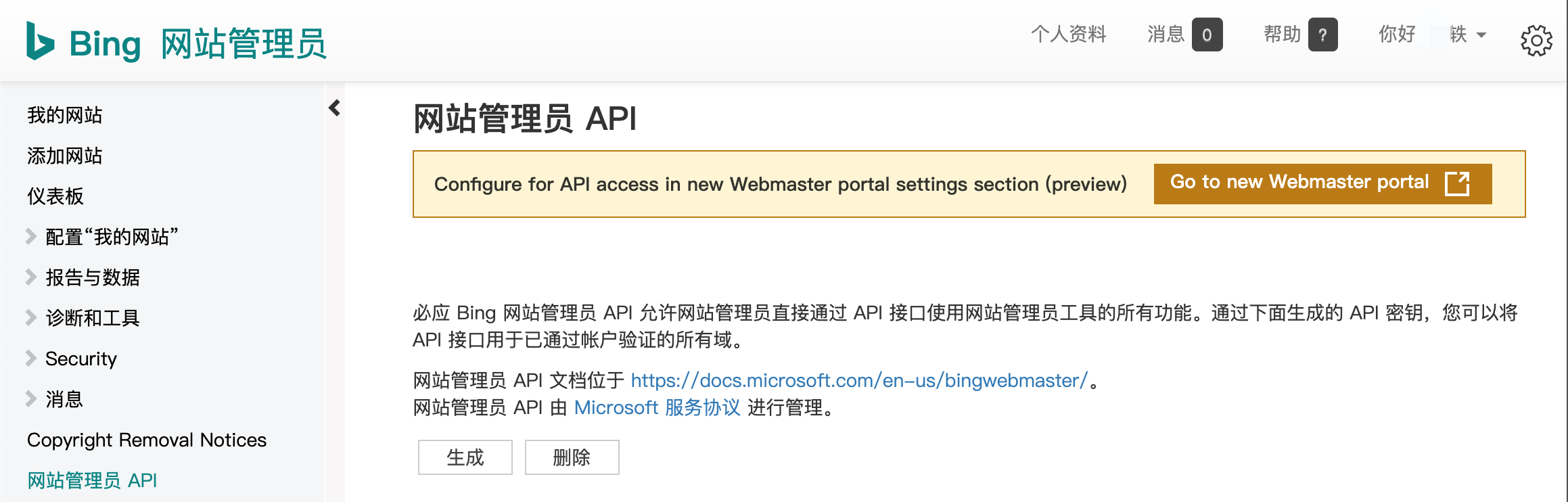
先验证网站(可以通过第二步Google Console同步验证信息,快速进行所有者认证),进入Bing 网站管理员生成API秘钥。该密钥作为SubmitURL第五个参数。
https://github.com/yi-ge/submit-url
有人问我“为什么这么简单的API调用还封装为模块”,答“记录各个密钥获取方式、制作docker镜像,方便自己下次使用,也方便他人”。
此内容由惯性聚合(RSS阅读器)自动聚合整理,仅供阅读参考。 原文来自 — 版权归原作者所有。