惯性聚合 高效追踪和阅读你感兴趣的博客、新闻、科技资讯
阅读原文 在惯性聚合中打开

推荐订阅源

D
Docker
AI
AI
博客园 - 三生石上(FineUI控件)
腾讯CDC
freeCodeCamp Programming Tutorials: Python, JavaScript, Git & More
Y
Y Combinator Blog
大猫的无限游戏
大猫的无限游戏
H
Hackread – Cybersecurity News, Data Breaches, AI and More
雷峰网
雷峰网
NISL@THU
NISL@THU
S
Schneier on Security
T
Threatpost
T
Tenable Blog
Application and Cybersecurity Blog
IT之家
IT之家
宝玉的分享
宝玉的分享
T
Tailwind CSS Blog
C
Cybersecurity and Infrastructure Security Agency CISA
P
Privacy & Cybersecurity Law Blog
I
Intezer
Microsoft Azure Blog
月光博客
月光博客
T
Threat Research - Cisco Blogs
SecWiki News
SecWiki News
AWS News Blog
AWS News Blog
博客园 - Franky
钛媒体:引领未来商业与生活新知
钛媒体:引领未来商业与生活新知
P
Proofpoint News Feed
V
V2EX
Recorded Future
Recorded Future
Microsoft Security Blog
S
Secure Thoughts
Google DeepMind News
MongoDB | Blog
MongoDB | Blog
Apple Machine Learning Research
Project Zero
Project Zero
PCI Perspectives
PCI Perspectives
G
GRAHAM CLULEY
Help Net Security
Help Net Security
Cloudbric
Cloudbric
Recent Announcements
V
Visual Studio Blog
Hacker News: Ask HN
Hacker News: Ask HN
N
News and Events Feed by Topic
C
CERT Recently Published Vulnerability Notes
The Cloudflare Blog
Forbes - Security
Forbes - Security
C
Cisco Blogs
O
OpenAI News
www.infosecurity-magazine.com

轶哥博客

blog blog blog blog blog blog blog blog blog blog blog blog blog blog blog blog blog blog blog blog blog blog blog blog blog blog blog blog blog blog blog blog blog blog blog blog blog blog blog blog blog blog blog blog blog blog blog blog blog blog blog blog blog blog blog blog blog blog blog blog blog blog blog blog blog blog blog blog blog blog blog blog blog blog blog blog blog blog blog blog blog blog blog blog blog blog blog blog blog blog blog blog blog blog blog blog blog blog blog blog
blog
2020-07-19 · via 轶哥博客

玩客云是性价比极高的NAS,用来作单臂路由同样给力。玩客云作为单臂路由,可以在提供NAS功能的同时可以用来作为Web测试服务器、APP测试工具等。

很抱歉,不同的人对OpenWRT的用法不同,就像一把刀,有人用来切菜,有人用来行凶。因此,OpenWRT固件不提供,请自行查找。

准备工作

制作OpenWrt固件

下载固件(请自行查找,不提供固件,抱歉),使用下述任一烧录工具烧录固件到U盘。

烧写方法和烧写Raspberry镜像的方法一致。

拆机烧录固件

wankeyundismantle.jpeg

撕掉背面的黑色塑料片,拧下六颗螺丝。拆开后,主板可以直接拔出来。

打开晶晨刷机工具 Amlogic USB Burning Tool,选择文件-导入烧录包,导入与固件配套的晶晨s805Flash。其余配置默认即可,点击开始,然后公对公USB线分别插入电脑的usb接口和玩客云远离网卡的USB接口。准备短接与上电。

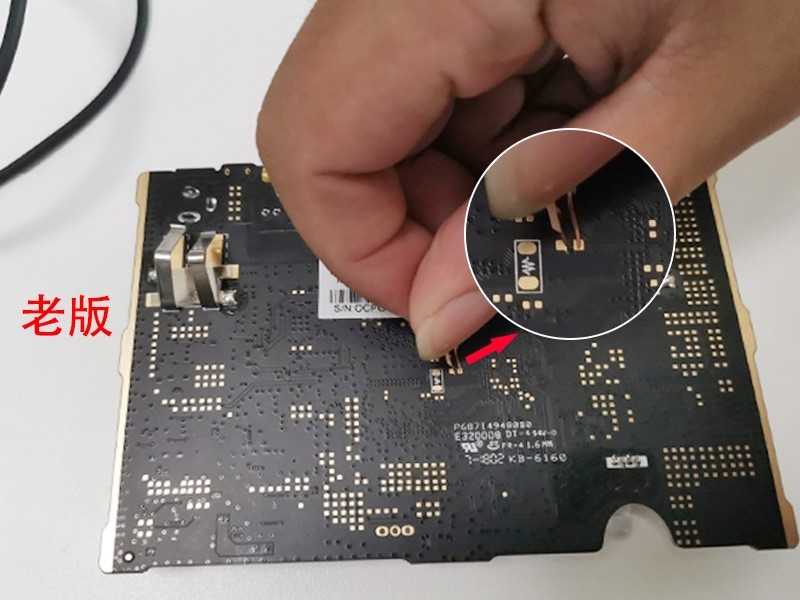
注意,玩客云主要有两个硬件版本,均可刷机。
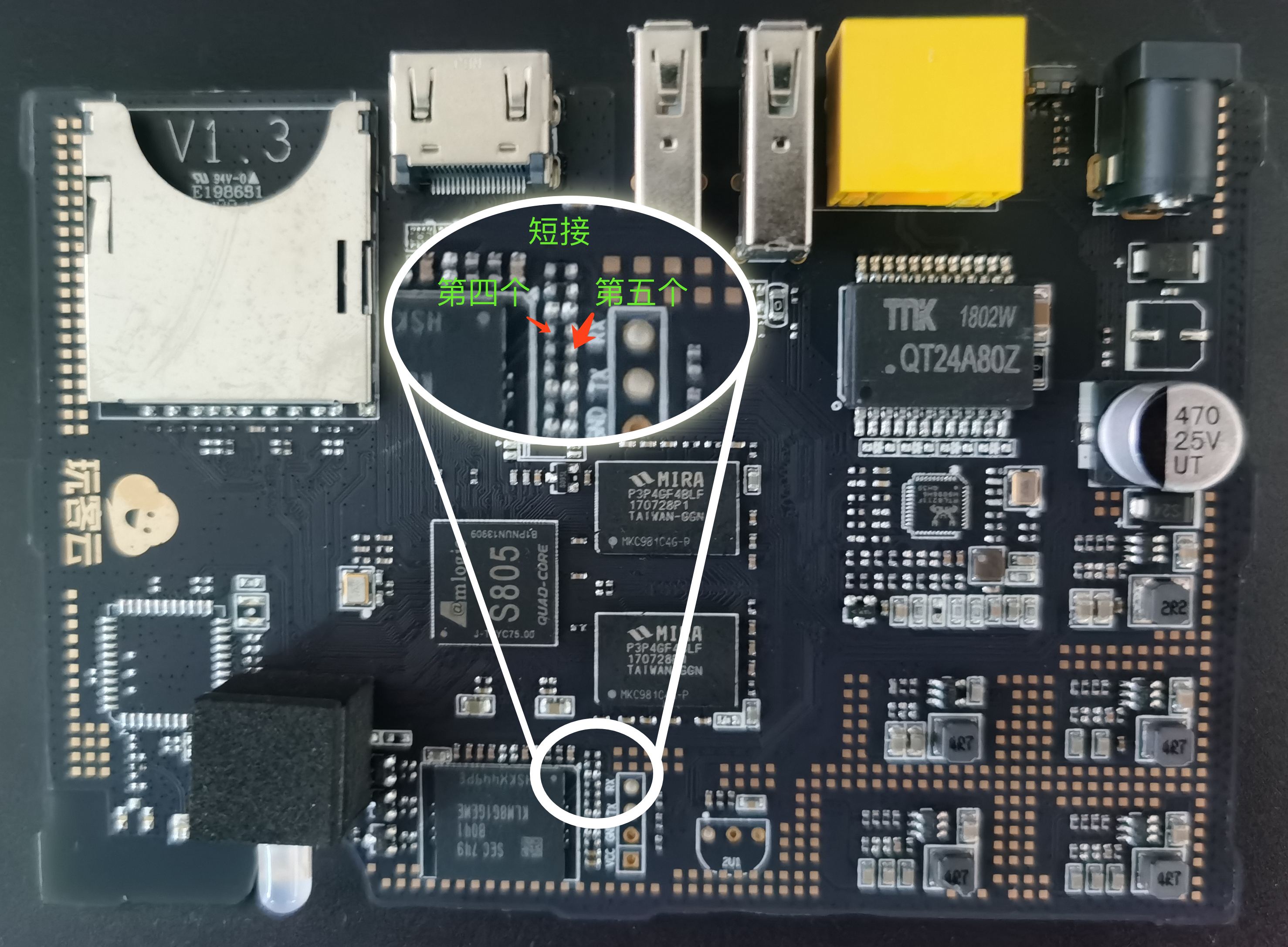
wankeyunduanjie.jpg

通电同时短接上图所示焊点。如果您的板子不是上图所示,参考下图的方式短接:

wankeold.jpg

特别说明:上图来自 http://feelsight.cn/post/114.htmlimage.png

如果提示上图异常,重新上电即可。

烧写后设备亮绿灯/蓝灯,重新上电变红灯。也有可能直接亮红灯。

image.png

通过U盘启动OpenWRT镜像

将第二步制作好的U盘插入到靠近网卡的USB接口。

插入网线,给设备上电,无所谓亮什么灯(有可能蓝灯,有可能红灯)。等待约1分钟。

查找内网IP

nmap 192.168.1.0/24

如提示找不到命令,请查找nmap命令安装方法。

查找当前玩客云设备的IP地址。

ssh root@ip

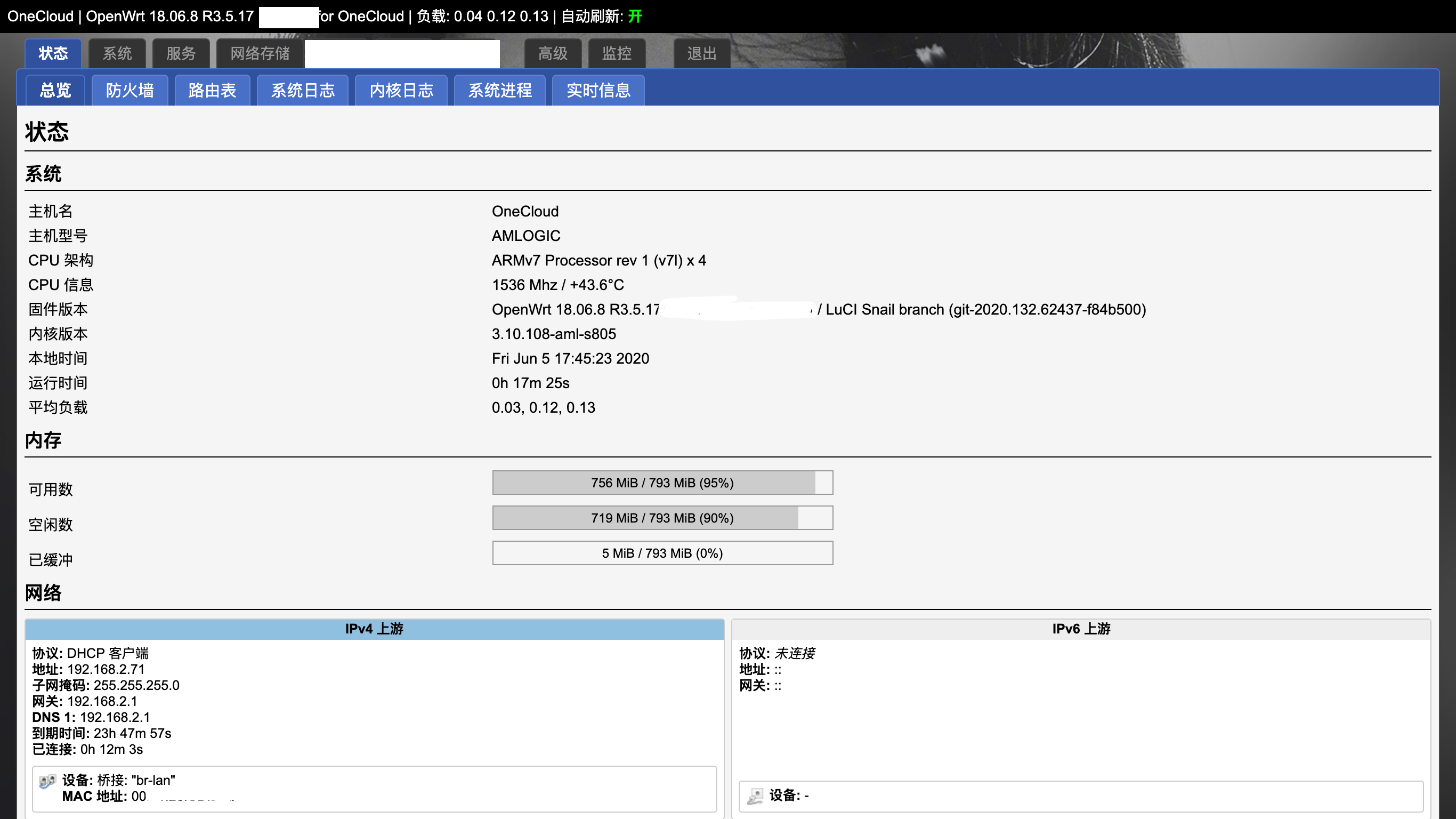
通过SSH访问设备或直接访问IP地址进入设置界面。至此,刷机完成。
总结

wankesuccess.png

目前玩客云可运行的OpenWRT内核版本较低,且运行稳定性有待时间检验(刷了三台,有两台无法正常运行,不断重启、掉线。官方系统运行正常,这两台疑似有坏块,有可能官方系统做了坏块屏蔽)。这也可能是性价比最高的千兆路由OpenWRT方案了。

旁路由单臂路由的设置方法,请参考《斐讯N1刷OpenWrt及开启旁路由/单臂路由教程(Mac&Win)》