惯性聚合 高效追踪和阅读你感兴趣的博客、新闻、科技资讯
阅读原文 在惯性聚合中打开

推荐订阅源

爱范儿
爱范儿
Know Your Adversary
Know Your Adversary
Google DeepMind News
A
Arctic Wolf
P
Privacy & Cybersecurity Law Blog
云风的 BLOG
云风的 BLOG
Stack Overflow Blog
Stack Overflow Blog
V
Visual Studio Blog
Project Zero
Project Zero
L
LangChain Blog
N
News and Events Feed by Topic
博客园 - Franky
Last Week in AI
Last Week in AI
cs.AI updates on arXiv.org
T
The Blog of Author Tim Ferriss
宝玉的分享
宝玉的分享
Scott Helme
Scott Helme
T
The Exploit Database - CXSecurity.com
P
Proofpoint News Feed
Blog — PlanetScale
Blog — PlanetScale
www.infosecurity-magazine.com
W
WeLiveSecurity
月光博客
月光博客
博客园_首页
美团技术团队
CTFtime.org: upcoming CTF events
freeCodeCamp Programming Tutorials: Python, JavaScript, Git & More
腾讯CDC
Latest news
Latest news
WordPress大学
WordPress大学
cs.CV updates on arXiv.org
Spread Privacy
Spread Privacy
Attack and Defense Labs
量子位
L
LINUX DO - 热门话题
C
CERT Recently Published Vulnerability Notes
Webroot Blog
Webroot Blog
L
Lohrmann on Cybersecurity
aimingoo的专栏
aimingoo的专栏
T
Troy Hunt's Blog
Security Latest
Security Latest
小众软件
小众软件
Cloudbric
Cloudbric
Hacker News: Ask HN
Hacker News: Ask HN
S
Secure Thoughts
雷峰网
雷峰网
T
Threat Research - Cisco Blogs
H
Hacker News: Front Page
IT之家
IT之家
Simon Willison's Weblog

轶哥博客

blog blog blog blog blog blog blog blog blog blog blog blog blog blog blog blog blog blog blog blog blog blog blog blog blog blog blog blog blog blog blog blog blog blog blog blog blog blog blog blog blog blog blog blog blog blog blog blog blog blog blog blog blog blog blog blog blog blog blog blog blog blog blog blog blog blog blog blog blog blog blog blog blog blog blog blog blog blog blog blog blog blog blog blog blog blog blog blog blog blog blog blog blog blog blog blog blog blog blog blog
blog
2020-09-17 · via 轶哥博客

VMware vSphereVMware虚拟化平台VMwarev Sphere的两个核心组件是ESXivCenter ServerESXi是用于创建并运行虚拟机和虚拟设备的虚拟化平台。vCenter Server是一项服务,用于管理网络中连接的多个主机,并将主机资源池化

可以简单理解为ESXi是安装在物理机上的,通过vCenter Server将多个物理机资源整合起来。

目前ESXi可以独立运行在某个物理设备上,为设备提供虚拟化平台(虚拟机)。例如在软路由中安装ESXi 7.0,以实现爱快+OpenWrt等组合搭配。

ESXi 7.0 硬件要求

请参阅官方文档《ESXi硬件要求》

其中,重点要求:

  • 64 位 x86 处理器,至少两个核心的CPU,且CPU支持 Intel VT虚拟化技术或AMD-VI。(CPU版本要足够新,购买或安装前查询是否支持。常见软路由 3865U、4415U、j4105 都是可以正常安装 ESXi 7.0 的)
  • 在 BIOS 中针对 CPU 启用 NX/XD 位
  • 至少4GB内存(RAM)
  • 至少32GB本地硬盘(16GB实测不行)
  • 网卡必须兼容ESXi 7.0(ESXi 7.0放弃了对部分旧网卡的支持,以前在ESXi 6.x中能正常使用的网卡,全新安装ESXi 7.0中可能无法正常驱动)

准备工作

  • 官网下载ESXi 6.xESXi 7.0的IOS镜像文件(需要先安装6.x版本,再安装7.0,否则可能存在120G虚拟内存占用的问题)
  • 制作U盘引导工具或将ISO镜像文件刻录到光盘。

制作UEFI版U盘引导工具

选择任一PE制作工具制作UEFI版本U盘引导工具

快捷导航:

PE工具水很深,生产环境请刻录光碟

MAC用户请在虚拟机中安装Windows来制作PE工具,以免不必要的折腾(通过dd命令balenaEther制作UEFI引导的U盘可能无法正常启动)。

制作完成后,将ESXi 6.xESXi 7.0的ISO文件放置于制作好的U盘中。

引导并运行对应的ISO文件进行安装

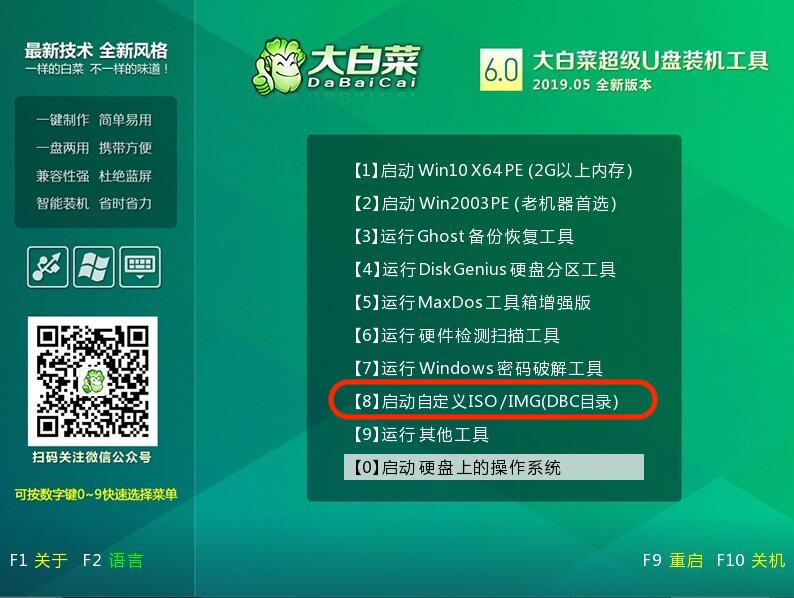
pe.jpg

用U盘引导启动,选择不带UEFI的选项,看到如上图的选项后,引导自定义ISO文件进行安装。

esxi7.0.png

先选择ESXi 6.x版本进行安装,至少正常启动一次,然后再重复操作,安装ESXi 7.0时选择同一个盘符即可进行升级。

提示:如果没有正常启动一次,则安装ESXi 7.0后,root密码始终不正确。此事再次安装ESXi 7.0,选择同一个盘符,然后选择“安装并保留数据”的选项(如图,第二个。空格选中,回车确认),重新输入密码即可。

install.png

关于移除120G虚拟闪存

强烈建议通过安装ESXi 6.x版本再升级ESXi 7.0的方式,绕过120G虚拟闪存占用问题。

另外还有一种方法(实测部分硬件下此设置无效):

  1. 进入安装ESXI7.0时,在5秒倒计时之内按下按 Shift + O(字母)。
  2. 在显示cdromBoot runweasel后输入autoPartitionOSDataSize=8192 (单位为MB)指定OSDataSzie为8GB。

升级

安装 ESXi 7.0.0 后,建议参考《ESXi 7.0.0 升级到 ESXi 7.0 Update 1》进行升级,以获得更好的使用体验。