惯性聚合 高效追踪和阅读你感兴趣的博客、新闻、科技资讯
阅读原文 在惯性聚合中打开

推荐订阅源

Google DeepMind News
TaoSecurity Blog
TaoSecurity Blog
T
Threat Research - Cisco Blogs
Cisco Talos Blog
Cisco Talos Blog
cs.CL updates on arXiv.org
T
Tenable Blog
C
Cybersecurity and Infrastructure Security Agency CISA
GbyAI
GbyAI
Microsoft Security Blog
N
Netflix TechBlog - Medium
AWS News Blog
AWS News Blog
Security Latest
Security Latest
L
LINUX DO - 热门话题
Blog — PlanetScale
Blog — PlanetScale
T
Threatpost
Stack Overflow Blog
Stack Overflow Blog
Vercel News
Vercel News
S
Securelist
I
Intezer
D
Darknet – Hacking Tools, Hacker News & Cyber Security
H
Heimdal Security Blog
T
The Exploit Database - CXSecurity.com
Threat Intelligence Blog | Flashpoint
The Hacker News
The Hacker News
cs.CV updates on arXiv.org
H
Hackread – Cybersecurity News, Data Breaches, AI and More
U
Unit 42
The Register - Security
NISL@THU
NISL@THU
S
Schneier on Security
M
MIT News - Artificial intelligence
The Last Watchdog
The Last Watchdog
Cyber Security Advisories - MS-ISAC
Hugging Face - Blog
Hugging Face - Blog
cs.AI updates on arXiv.org
Hacker News - Newest:
Hacker News - Newest: "LLM"
Y
Y Combinator Blog
Know Your Adversary
Know Your Adversary
罗磊的独立博客
MongoDB | Blog
MongoDB | Blog
美团技术团队
W
WeLiveSecurity
P
Privacy International News Feed
Forbes - Security
Forbes - Security
H
Hacker News: Front Page
小众软件
小众软件
博客园 - 【当耐特】
P
Proofpoint News Feed
P
Privacy & Cybersecurity Law Blog
T
Tor Project blog

轶哥博客

blog blog blog blog blog blog blog blog blog blog blog blog blog blog blog blog blog blog blog blog blog blog blog blog blog blog blog blog blog blog blog blog blog blog blog blog blog blog blog blog blog blog blog blog blog blog blog blog blog blog blog blog blog blog blog blog blog blog blog blog blog blog blog blog blog blog blog blog blog blog blog blog blog blog blog blog blog blog blog blog blog blog blog blog blog blog blog blog blog blog blog blog blog blog blog blog blog blog blog blog
blog
2020-08-19 · via 轶哥博客

MacOS使用双网卡连接不同网络时,通常是不能同时使用内网外网系统的。这是由于计算机不知道那些网段一定属于内网导致。

温馨提示:单台计算机同时接入内网外网在大部分单位都属于违规操作,非得到授权人员,切勿以身试法。

双网卡不需要都是有线或者都是无线,外网用WIFI,内网用有线,也属于使用双网卡。
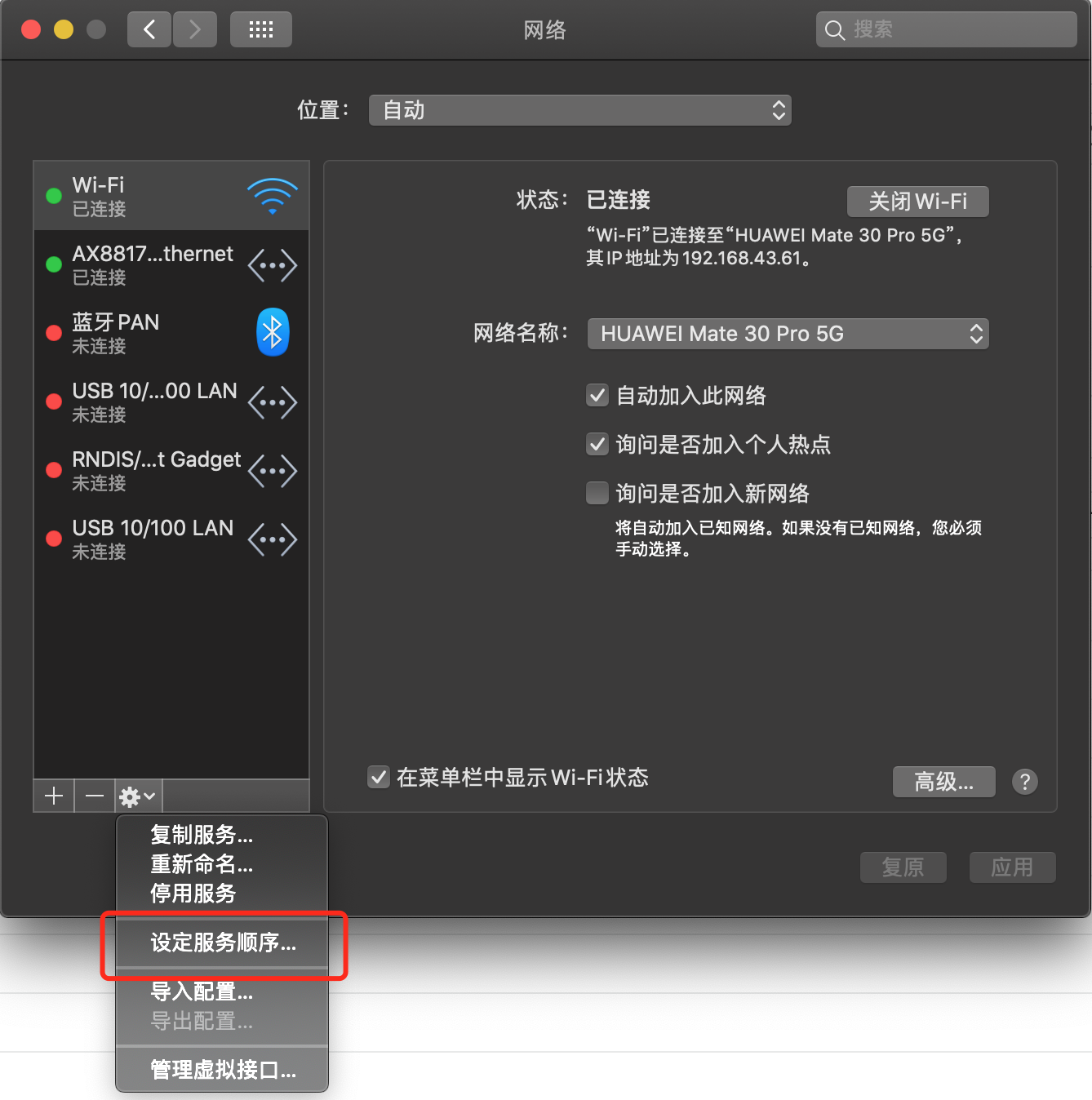
设置正确的网卡服务顺序

netselect.png

进入系统偏好设置-网络-设定服务顺序,拖动来进行网络优先级设置。使连接外网的网卡位于内网网卡之上。此时可以正常访问外网。
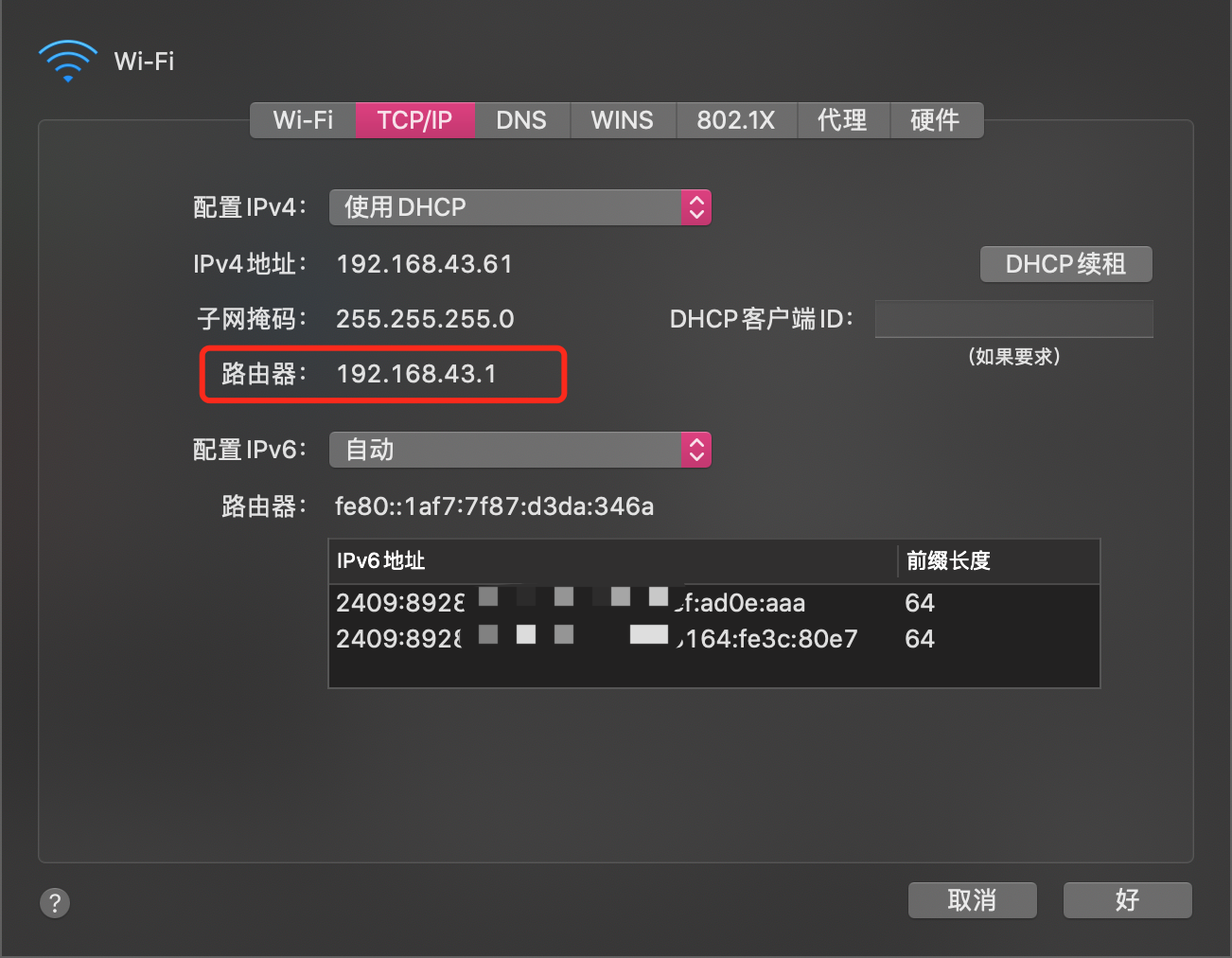
设置内网网卡对应的网段

获取内网网卡网关地址

routerip.png

通常内网采取固定IP地址的方式,无论采用什么方式,都可以在网络-高级界面中看到路由器地址,该地址即为下一步设置使用的网关地址。

设置内网网段

解决内网访问的方法是设置本地静态路由,添加网段指向对应内网的网关即可。

添加:

sudo route add -net 10.0.0.0 -netmask 255.255.0.0 10.0.2.1
sudo route add -net 30.1.0.0 -netmask 255.255.0.0 10.0.2.1

删除:

sudo route delete -net 10.0.0.0 -netmask 255.255.0.0 10.0.2.1
sudo route delete -net 30.1.0.0 -netmask 255.255.0.0 10.0.2.1

net参数对应网段IP,netmask是子网掩码。最后的IP是内网网关,即上一步看到的路由器IP地址。

测试内外网连通技巧

测试内网和外网是否能连通,请先不要使用浏览器进行测试。主要是因为浏览器普遍对域名解析结果有缓存,使用浏览器测试有可能无法得到即时结果。另外,内网域名解析通常是失败的。具体原因请看下文。

使用ping命令,分别ping对应的内外网在线地址。此结果能判断是否正常同时连入不同网络。

# 查看当前路由表
netstat -rn

# 获取默认路由
route get 0.0.0.0

关于内网域名、内网DNS

关于内网域名与内网DNS解析

如果内网DNS服务器不解析外网地址,那么是无法仅通过设置实现内外网域名自动解析的。

MacOS系统中,不支持同时添加内网和外网DNS服务器地址到外网网卡来起到解析内网地址的作用。

较为方便的方法是:先关闭外网网卡,进入纯内网模式,ping内网域名得到内网IP地址,写入到hosts中进行本地解析。

测试DNS解析结果

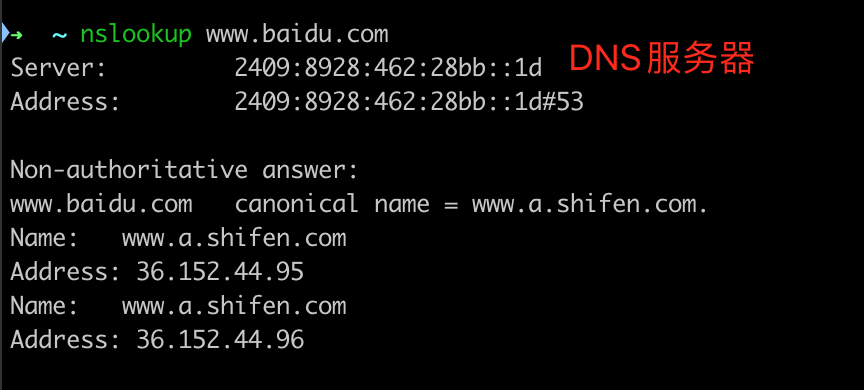
可以使用nslookup 域名命令来检测当前域名使用到了哪个DNS服务器。

dnsserver.png

总结

此方法也同样适用于为单台计算机同时接入两种不同类型的内部网络使用。例如,同时接入企业专网和政务内网,两个网络都是内网的情况下,无需调整网卡服务顺序,为两个网络都设置对应网段即可,如果网段冲突则需配置不同的权重或使用专门的网络设备。

其它操作系统也可以用同样的方法设置同时使用内外网,命令略有差异。