





检查网站的TLS版本 有时候需要知道某个网站支持的TLS的版本。现在SSL 2.0和SSL 3.0都
已经被淘汰了。其中TLS 1.0,TLS 1.1,
有时候需要知道某个网站支持的TLS的版本。现在SSL 2.0和SSL 3.0都已经被淘汰了。其中TLS 1.0,TLS 1.1,TLS 1.2是目前的的主流,相对也是安全的。主要看加密的算法。TLS 1.3是目前最新的协议版本,也是相对最安全的版本了。
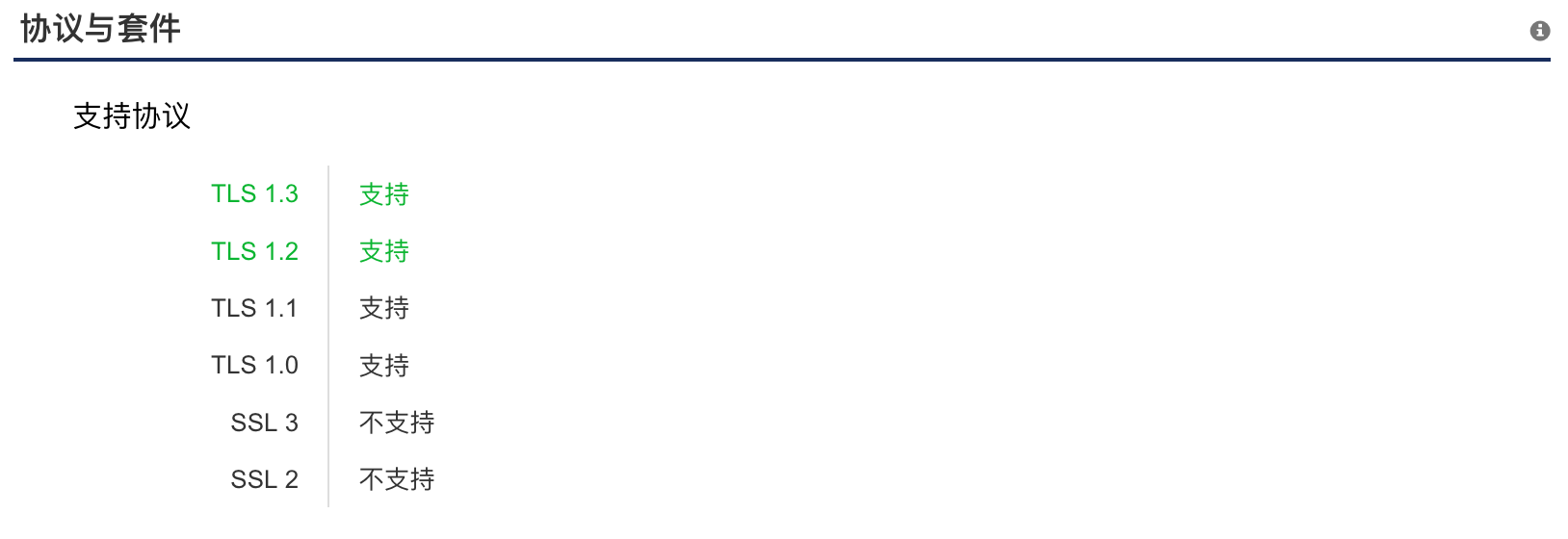
openssl s_client -connect www.baidu.com:443 -tls1_2
openssl s_client -connect www.baidu.com:443 -tls1_1
openssl s_client -connect www.baidu.com:443 -tls1
以上分别检查了tls1.2,tls1.1和 tls1。如果握手失败的话,那么就是不支持了。
依赖于 nmap
nmap --script ssl-enum-ciphers -p 443 baidu.com
结果如下:
Starting Nmap 7.91 ( https://nmap.org ) at 2020-11-29 09:51 CST
Nmap scan report for baidu.com (39.156.69.79)
Host is up (0.0068s latency).
Other addresses for baidu.com (not scanned): 220.181.38.148

PORT    STATE SERVICE
443/tcp open  https
| ssl-enum-ciphers:
|   SSLv3:
|     ciphers:
|       TLS_ECDHE_RSA_WITH_RC4_128_SHA (secp256r1) - C
|       TLS_ECDHE_RSA_WITH_AES_128_CBC_SHA (secp256r1) - A
|       TLS_ECDHE_RSA_WITH_AES_256_CBC_SHA (secp256r1) - A
|       TLS_RSA_WITH_AES_128_CBC_SHA (rsa 2048) - A
|       TLS_RSA_WITH_AES_256_CBC_SHA (rsa 2048) - A
|       TLS_RSA_WITH_RC4_128_SHA (rsa 2048) - C
|     compressors:
|       NULL
|     cipher preference: server
|     warnings:
|       Broken cipher RC4 is deprecated by RFC 7465
|       CBC-mode cipher in SSLv3 (CVE-2014-3566)
|   TLSv1.0:
|     ciphers:
|       TLS_ECDHE_RSA_WITH_RC4_128_SHA (secp256r1) - C
|       TLS_ECDHE_RSA_WITH_AES_128_CBC_SHA (secp256r1) - A
|       TLS_ECDHE_RSA_WITH_AES_256_CBC_SHA (secp256r1) - A
|       TLS_RSA_WITH_AES_128_CBC_SHA (rsa 2048) - A
|       TLS_RSA_WITH_AES_256_CBC_SHA (rsa 2048) - A
|       TLS_RSA_WITH_RC4_128_SHA (rsa 2048) - C
|     compressors:
|       NULL
|     cipher preference: server
|     warnings:
|       Broken cipher RC4 is deprecated by RFC 7465
|   TLSv1.1:
|     ciphers:
|       TLS_ECDHE_RSA_WITH_RC4_128_SHA (secp256r1) - C
|       TLS_ECDHE_RSA_WITH_AES_128_CBC_SHA (secp256r1) - A
|       TLS_ECDHE_RSA_WITH_AES_256_CBC_SHA (secp256r1) - A
|       TLS_RSA_WITH_AES_128_CBC_SHA (rsa 2048) - A
|       TLS_RSA_WITH_AES_256_CBC_SHA (rsa 2048) - A
|       TLS_RSA_WITH_RC4_128_SHA (rsa 2048) - C
|     compressors:
|       NULL
|     cipher preference: server
|     warnings:
|       Broken cipher RC4 is deprecated by RFC 7465
|   TLSv1.2:
|     ciphers:
|       TLS_ECDHE_RSA_WITH_AES_128_GCM_SHA256 (secp256r1) - A
|       TLS_ECDHE_RSA_WITH_AES_128_CBC_SHA256 (secp256r1) - A
|       TLS_ECDHE_RSA_WITH_RC4_128_SHA (secp256r1) - C
|       TLS_ECDHE_RSA_WITH_AES_128_CBC_SHA (secp256r1) - A
|       TLS_ECDHE_RSA_WITH_AES_256_CBC_SHA (secp256r1) - A
|       TLS_ECDHE_RSA_WITH_AES_256_GCM_SHA384 (secp256r1) - A
|       TLS_ECDHE_RSA_WITH_AES_256_CBC_SHA384 (secp256r1) - A
|       TLS_RSA_WITH_AES_128_GCM_SHA256 (rsa 2048) - A
|       TLS_RSA_WITH_AES_256_GCM_SHA384 (rsa 2048) - A
|       TLS_RSA_WITH_AES_128_CBC_SHA256 (rsa 2048) - A
|       TLS_RSA_WITH_AES_128_CBC_SHA (rsa 2048) - A
|       TLS_RSA_WITH_AES_256_CBC_SHA256 (rsa 2048) - A
|       TLS_RSA_WITH_AES_256_CBC_SHA (rsa 2048) - A
|       TLS_RSA_WITH_RC4_128_SHA (rsa 2048) - C
|     compressors:
|       NULL
|     cipher preference: server
|     warnings:
|       Broken cipher RC4 is deprecated by RFC 7465
|_  least strength: C

Nmap done: 1 IP address (1 host up) scanned in 3.22 seconds
可以用如下的函数,来源:Test web server SSL/TLS protocol support with PowerShell - PKI Extensions
function Test-ServerSSLSupport {
[CmdletBinding()]
    param(
        [Parameter(Mandatory = $true, ValueFromPipeline = $true)]
        [ValidateNotNullOrEmpty()]
        [string]$HostName,
        [UInt16]$Port = 443
    )
    process {
        $RetValue = New-Object psobject -Property @{
            Host = $HostName
            Port = $Port
            SSLv2 = $false
            SSLv3 = $false
            TLSv1_0 = $false
            TLSv1_1 = $false
            TLSv1_2 = $false
            KeyExhange = $null
            HashAlgorithm = $null
        }
        "ssl2", "ssl3", "tls", "tls11", "tls12" | %{
            $TcpClient = New-Object Net.Sockets.TcpClient
            $TcpClient.Connect($RetValue.Host, $RetValue.Port)
            $SslStream = New-Object Net.Security.SslStream $TcpClient.GetStream(),
                $true,
                ([System.Net.Security.RemoteCertificateValidationCallback]{ $true })
            $SslStream.ReadTimeout = 15000
            $SslStream.WriteTimeout = 15000
            try {
                $SslStream.AuthenticateAsClient($RetValue.Host,$null,$_,$false)
                $RetValue.KeyExhange = $SslStream.KeyExchangeAlgorithm
                $RetValue.HashAlgorithm = $SslStream.HashAlgorithm
                $status = $true
            } catch {
                $status = $false
            }
            switch ($_) {
                "ssl2" {$RetValue.SSLv2 = $status}
                "ssl3" {$RetValue.SSLv3 = $status}
                "tls" {$RetValue.TLSv1_0 = $status}
                "tls11" {$RetValue.TLSv1_1 = $status}
                "tls12" {$RetValue.TLSv1_2 = $status}
            }
            # dispose objects to prevent memory leaks
            $TcpClient.Dispose()
            $SslStream.Dispose()
        }
        $RetValue
    }
}
此内容由惯性聚合(RSS阅读器)自动聚合整理,仅供阅读参考。 原文来自 — 版权归原作者所有。