惯性聚合 高效追踪和阅读你感兴趣的博客、新闻、科技资讯
阅读原文 在惯性聚合中打开

推荐订阅源

T
The Blog of Author Tim Ferriss
Know Your Adversary
Know Your Adversary
P
Palo Alto Networks Blog
D
Darknet – Hacking Tools, Hacker News & Cyber Security
K
Kaspersky official blog
L
LINUX DO - 热门话题
P
Proofpoint News Feed
P
Privacy & Cybersecurity Law Blog
Google DeepMind News
Attack and Defense Labs
Cisco Talos Blog
Cisco Talos Blog
AI
AI
L
LINUX DO - 最新话题
H
Heimdal Security Blog
Hacker News: Ask HN
Hacker News: Ask HN
Webroot Blog
Webroot Blog
Threat Intelligence Blog | Flashpoint
The GitHub Blog
The GitHub Blog
I
Intezer
Blog — PlanetScale
Blog — PlanetScale
有赞技术团队
有赞技术团队
S
Securelist
博客园_首页
IT之家
IT之家
Schneier on Security
博客园 - 叶小钗
罗磊的独立博客
WordPress大学
WordPress大学
cs.CL updates on arXiv.org
MongoDB | Blog
MongoDB | Blog
P
Proofpoint News Feed
阮一峰的网络日志
阮一峰的网络日志
A
Arctic Wolf
Cyber Security Advisories - MS-ISAC
Exploit-DB.com RSS Feed
W
WeLiveSecurity
The Register - Security
D
DataBreaches.Net
S
Security @ Cisco Blogs
Security Archives - TechRepublic
让小产品的独立变现更简单 - ezindie.com
腾讯CDC
Recorded Future
Recorded Future
NISL@THU
NISL@THU
N
News and Events Feed by Topic
T
Tailwind CSS Blog
N
News and Events Feed by Topic
Cyberwarzone
Cyberwarzone
T
Tor Project blog
www.infosecurity-magazine.com

Hexo

做了一个支持 hexo markdown 里 mermaid 的插件 - V2EX 大佬们?有没有好看的 hugo 和 hexo 主题推荐呀? - V2EX hexo 行内公式渲染问题 - V2EX hexo delopy 如何添加一个 CNAME 文件 - V2EX 找一个简洁风格的主题。 - V2EX Hexo mermaid 支持问题 - V2EX hexo + next + github pages 搭建博客 - V2EX Hexo 插件博客自动备份至云端 - V2EX 做了一个 Java 迁移 csdn 博客到 hexo 功能 - V2EX 求助, Hexo 生成的网站地图无法被 Google Search Console 读取怎么办? - V2EX 发现一种全平台多端发布 hexo 博客的方法 - V2EX 有交换友链的吗 - V2EX 本地部署 hexo 后怎么打不开?http://localhost:4000 - V2EX Hexo 主题: Oliver - V2EX 可以长期运行 hexo server 吗? - V2EX Hexo 从 Vercel, Cloudflare Pages 这些平台消失了 - V2EX 还有人在用 hexo 吗?征集一下 hexo 博客,做友链 - V2EX 求一个 dogma 的极简 hexo 主题,非常的简约 - V2EX 「折腾」一个 hexo 插件 - V2EX hexo 像这样的系列文章是怎么弄的? - V2EX 请问 hexo 有 include 代码文件到 md 的插件吗? - V2EX hexo 这个问题有人能解决吗? - V2EX 分享一款自己写的开源 Hexo 流程图插件 hexo-filter-kroki - V2EX [月经贴]博客来一波友链😁 - V2EX 将自己在用的主题 (Pure) 移植到 Hexo 上了 - V2EX 关于 hexo 博客的 markdown 渲染器 - V2EX 分享自己原创的 hexo 主题 soul - V2EX HEXO 博客如何导入原来的帖子 - V2EX Hexo Next 主题中的 Pisces 和 Gemini 有什么区别? - V2EX hexo deploy 无法将 html 文件 push 到 github - V2EX 关于上传图片无法显示的玄学问题 - V2EX [hexo 插件] 向谷歌、必应、百度提交 URLs 以快速被收录 - V2EX 维护了五年多的 Hexo 主题 Icarus 又大版本更新啦 - V2EX [hexo 插件] 关于 GIF 动画相关的 - V2EX 一个运行在树莓派上的小网站 - V2EX 使用 git hooks 部署 hexo 到阿里云 ECS,提示仓库不存在 - V2EX 又一个简陋自称简洁的 Hexo 主题: hexo-theme-yun - V2EX 博客友链有人添加一波吗 - V2EX github 账号没有设置 ssh,但是还是能连接到 github 中的 repository - V2EX 利用 Hexo 打造属于自己的网页版简历 - V2EX 博客放在 Coding 的注意了 - V2EX 这是 hexo 的啥主题呀 - V2EX hexo 每次新增文章都要把之前的全编译一遍吗? - V2EX 求助一个 Hexo 主题的 CSS 格式的修改 - V2EX Hexo 4.0 发布 - V2EX 想写一个《你的名字》 主题的 hexo theme - V2EX HexoClient 1.2.6 发布,支持 hexo front-matter 特性 - V2EX
分享一个自己写的 Hexo 主题 Ayer - V2EX
shenyu · 2019-12-15 · via Hexo

介绍

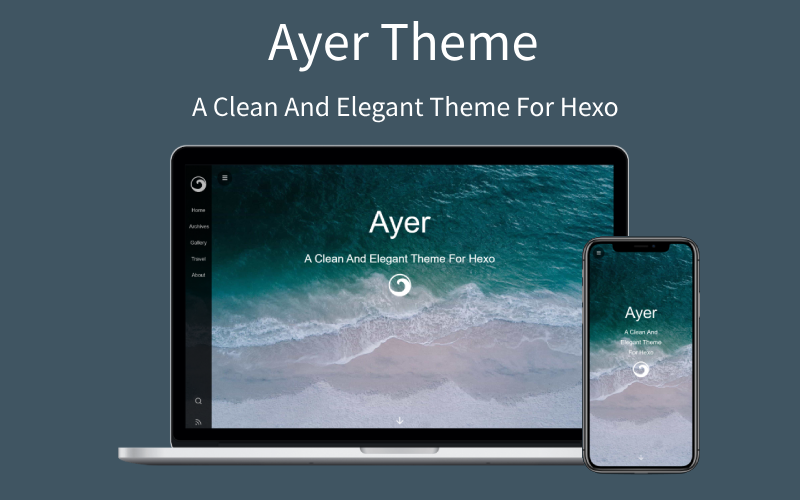
Ayer 是一个干净且优雅的 Hexo 主题,自带响应式,加载速度很快,该有的功能都有,可配置项也很多,非常适合作为你的博客主题,主题内还附送了 6 张精美的高清壁纸。欢迎使用和 Star 支持,如果你在使用过程中有任何疑问或者建议,欢迎联系我!

已上架 Hexo 官网~
hexo-theme-ayer

GitHub 地址

效果预览

中文说明

特性

  1. 干净且优雅,文章内容美观易读
  2. 首页封面全屏平铺,扁平化设计,更加高大上
  3. 响应式设计,博客在桌面端、平板、手机等设备上均能很好的展现
  4. 首页封面和文案可以任意更换,主题内附送 6 张精美高清壁纸
  5. 时间轴式的归档页
  6. 侧边栏可以点击显示和隐藏
  7. 关于我的页面用文章,自定义性更强
  8. 支持文章置顶和文章打赏
  9. 支持 MathJax
  10. TOC 目录在文章页悬浮,跳转更方便
  11. 可设置阅读文章时做密码验证
  12. ValineGitalk评论模块(推荐配合 leancloud 使用 Valine
  13. 集成了不蒜子、百度统计、Google Analytics、CNZZ 等统计功能
  14. 支持 Github Ribbons

如果想体验手机浏览效果,可以扫一下二维码:

手机端效果

安装

$ git clone https://github.com/Shen-Yu/hexo-theme-ayer.git themes/ayer

修改

将博客根目录下的 _config.yml 里的 theme 值修改成 ayer

theme: ayer

更新

cd themes/ayer
git pull

主题配置

ayer 目录下的 _config.yml

# 侧边栏菜单
menu:
  主页: /
  目录: /archives
  摄影: http://shenyu-vip.lofter.com
  旅行: /tags/旅行 /
  关于我: /2019/about

# 网站图标和侧边栏 logo
favicon: /favicon.ico
logo: /images/ayer-side.svg

# 封面配置
# enable-是否启用封面; path-封面背景图; logo-封面 logo
cover:
  enable: true
  path: /images/cover1.jpg  # images 目录下附送多张美图,可更换
  logo: /images/ayer.svg  # 如果不要直接设置成 false

# 页面顶部进度条  
progressBar: ture

# 文章配置
# 文章太长,截断按钮文字(在需要截断的行增加此标记:<!--more-->)
excerpt_link: 阅读更多...
# 文章分享文字
share_text: 分享
# 分页文字
nav_text:
  page_prev: 上一页
  page_next: 下一页
  post_prev: 上一篇
  post_next: 下一篇

# 文章页是否显示目录
toc: true

# 打赏
# 打赏 type 设定:0-关闭打赏; 1-文章对应的 md 文件里有 reward:true 属性,才有打赏; 2-所有文章均有打赏
reward_type: 2
# 打赏 wording
reward_wording: '请我喝杯咖啡吧~'
# 支付宝二维码图片地址,跟你设置 logo 的方式一样。比如:/images/alipay.jpg
alipay: /images/alipay.jpg
# 微信二维码图片地址
weixin: /images/wechat.jpg

# 是否启用搜索
search: true

# RSS 订阅(先安装 hexo-generator-feed 插件,再去博客根目录 config 进行配置)
rss: /atom.xml

# 评论:1、Valine(推荐); 2、Gitalk

# 1、Valine[一款快速、简洁且高效的无后端评论系统]( https://github.com/xCss/Valine)
# 启用 Valine 必须先创建 leancloud 应用, 获取 id|key 填入即可
leancloud:  
  enable: true
  app_id: #
  app_key: #
# Valine 配置
valine:
  enable: true # 是否启用
  avatar: mp # 头像样式( https://valine.js.org/avatar.html)
  placeholder: 给我的文章加点评论吧~ # placeholder

# 2、Gitalk( https://github.com/gitalk/gitalk)
gitalk:
  enable: false # true
  clientID: # GitHub Application Client ID
  clientSecret: # Client Secret
  repo: # Repository name
  owner: # GitHub ID
  admin: # GitHub ID
  
# GitHub Ribbons( https://github.blog/2008-12-19-github-ribbons/)
github: 
  # (关闭请设置为 false)
  url: https://github.com/Shen-Yu/hexo-theme-ayer

# fancybox(仅用于相册展示,若需要可配置 albums)
fancybox: true

# 访问量统计(不蒜子)
busuanzi:
  enable: true

# 友盟 cnzz 统计(url 填 js 代码 src 链接)
cnzz:
  enable: true
  url: #

# Google Analytics
google_analytics: ''
# 百度统计
baidu_analytics: ''

# 数学公式
mathjax: true

# 网站成立年份(默认为 2019,若填入年份小于当前年份,则显示为 2018-2019 类似的格式)
since: 2019

#是否显示页脚信息(建议保留,有助于本主题的推广)
pageFooter: true

如果你在配置过程中有问题,可以参考我的博客源码

插件

  • hexo-generator-search 搜索

    $ npm install hexo-generator-searchdb --save
    

    然后将以下配置复制到你博客根目录下的 _config.yml 里(注意不是 ayer 目录下的):

    # Hexo-generator-search
    search:
      path: search.xml
      field: post
      format: html
    
  • hexo-generate-feed RSS

    $ npm install hexo-generator-feed --save
    

    然后将以下配置复制到你博客根目录下的 _config.yml 里(注意不是 ayer 目录下的):

    feed:
        type: atom
        path: atom.xml
        limit: 20
        hub:
        content:
        content_limit: 140
        content_limit_delim: ' '
        order_by: -date	
    
  • hexo-generator-index-pin-top

    $ npm uninstall hexo-generator-index --save
    $ npm install hexo-generator-index-pin-top --save
    

相册

需要在文章顶部配置

---
title: Gallery

albums: [
        ["img_url","img_caption"],
        ["img_url","img_caption"]
        ]
---

文章目录

用 Tocbot 解析文章标题并生成目录

  • 将以下配置复制到你 ayer 目录下的 _config.yml 里:

    # Toc
    toc: true
    
  • 当然你也可以选择关闭:

    toc: false