












心里只有一万个WTF,一万个草泥马。
GAE的Datastore收费方法简直令人恶心,一个App的开发过程中,想着怎么优化write/read Op,浪费的时间和精力,你定可以转换为很多创新点子...特别是对于一个不存在code review的个人App来说。
如果app自用且足够小,放到GAE上追求个稳定,还是可以接受的,但理由也仅限如此了...
本来是一个py3+Django写的小程序,跑在我的Linode JP VPS上。在优化扶墙的过程中,想将debian8换成debian7,然后想想为了未来省事,感觉把几个app移到gae上去吧,以后折腾vps也无所谓了。
软件成品在此,实现也很简单,每五分钟抓一些feed,然后jieba分词,然后推送消息...已经超免费配额了,大家随便看看就好,我不是职业写代码的,也就不敢开源出来献丑了。
CPU:600 Mhz, 内存:128 MB, 28个执行小时。
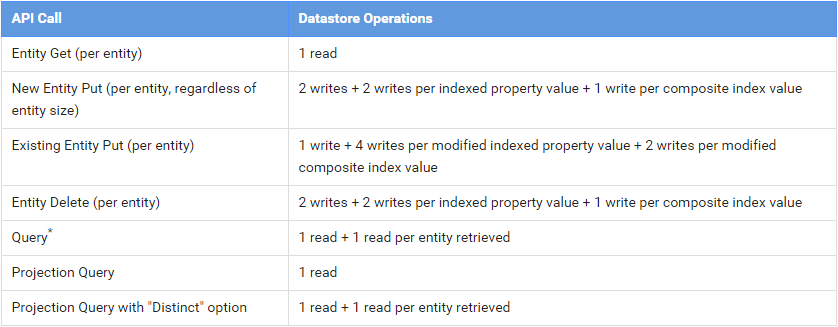
5万次数据库读作业,5万次写作业。
不支持Python3:处理中文,要花费大量时间在utf-8上。
不支持tempfile:很多库需要改造。
免费配额不支持socket:无法使用外部数据库。收费配额皆不可socket listen。
相比之下,其他的配额对应用的影响微不足道:Memcache是免费的。UrlFetch除非抓来的数据不做任何处理,Mail除非用来滥发邮件。
GAE的数据库额度存在3个关键:
keys_only=True可以随便用。user = User.query(User.username = "tom").first()
替换为
user = User.get_by_key_name("tom")
原方法会消耗1 Fetch Op + 1 Query Op = 2 read Op,修改后,会产生1 Small Op + 1 read Op,而且这个read Op会被自动memcache。
比如一个表有,我想一次取出N条数据时,常规ORM的写法:
feeds = Feed.query().fetch(N)
每次查询,都会消耗1+N Read Op,为了优化额度,可以修改成:
q = Feed.query()
feeds = ndb.get_multi(q.fetch(N,keys_only=True))
首次查询,消耗1 Small Op + N Read Op,但是在重复查询是,则只消耗1 Small Op + m*N Read Op,m是memcache未命中的概率,理想情况是0。
至于性能,可以参看这里,大概75%缓存命中是性能的分界线。
Memcache hit ratio: 100% (everything was in cache)

  Query for entities:              3755 ms
  Query/memcache/ndb:              3239 ms
    Keys-only query:       834 ms
    Memcache.get_multi:   2387 ms
    ndb.get_mutli:           0 ms

Memcache hit ratio: 75%

  Query for entities:              3847 ms
  Query/memcache/ndb:              3928 ms
    Keys-only query:       859 ms
    Memcache.get_multi:   1564 ms
    ndb.get_mutli:        1491 ms

Memcache hit ratio: 50%

  Query for entities:              3507 ms
  Query/memcache/ndb:              5170 ms
    Keys-only query:       825 ms
    Memcache.get_multi:   1061 ms
    ndb.get_mutli:        3168 ms

Memcache hit ratio: 25%

  Query for entities:              3799 ms
  Query/memcache/ndb:              6335 ms
    Keys-only query:       835 ms
    Memcache.get_multi:    486 ms
    ndb.get_mutli:        4875 ms

Memcache hit ratio: 0% (no memcache hits)

  Query for entities:              3828 ms
  Query/memcache/ndb:              8866 ms
    Keys-only query:       836 ms
    Memcache.get_multi:     13 ms
    ndb.get_mutli:        8012 ms
为所有不需要的被query()和order()的字段,使用indexed=False
当你插入一条数据时,每个索引字段都会产生write Op,特别当操作对象是ListProperty,会根据list的数量,倍数消耗写配额。
对于一些查询,有些和实际逻辑需求相左,但能大幅节约Op的手段。。
class EntryCollect(ndb.Model):
    apublished = ndb.DateTimeProperty()
    need_collect_word = ndb.BooleanProperty(default=True, indexed=False)
    key_word = ndb.StringProperty(repeated=True, indexed=False)
对于原先是in(List)的查询:
keys = EntryCollect.query().order(-EntryCollect.published)
entrys = ndb.get_multi(keys.fetch(PER_PAGE*2, keys_only=True))
new_entry = []
for entry in entrys:
    if keyword.decode('utf-8') in entry.key_word:
        new_entry.append(entry)
对于原先是list.IN(other_list)的查询:
keys = EntryCollect.query().order(-EntryCollect.published)
entrys = ndb.get_multi(keys.fetch(PER_PAGE*2, keys_only=True))
top_entry = []
for entry in entrys:
    if set(other_list).intersection(set(entry.key_word)):
        top_entry.append(entry)
对于原先是Boolean的字段:
keys = EntryCollect.query().order(-EntryCollect.published)
entrys = ndb.get_multi(kesy.fetch(CONT*2, keys_only=True))
for entry in entrys:
    if entry.need_collect_word:
        # do something
这里就有个权衡,如果read Op紧张,write Op富裕,那么就可以使用projected()。
将查询的参数作为key,取md5,查询的结果用json存储起来。
json_data = memcache.get('{}:XXXXXXX'.format(md5sum))
if json_data is None:
    # do something....
    json_data = json.dumps(data)
    memcache.add('{}:Analyse'.format(md5sum), json_data, MEMCACHE_TIMEOUT)
一个App拆分成多个App,是最简单的,倍翻利用app engine的方法。
根据我自己的测试结果:
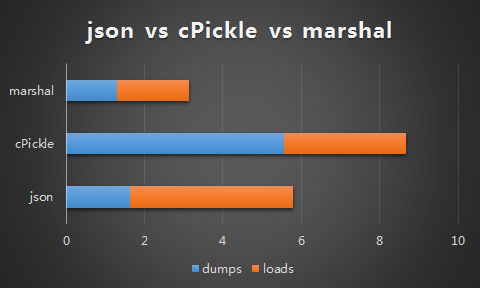
marshal取胜,而且处理utf-8更简便一些,但切记marshal不能用于两个不同版本的python之间序列化数据,不适用于开放的api。
如果使用json,要随时注意编码:
form_fields = {
        "something": self.request.get("something", default_value="").encode("utf-8"),
    }
    form_data = urllib.urlencode(form_fields)
    result = urlfetch.fetch(url=SOME_URL,
                            payload=form_data,
                            method=urlfetch.POST,
                            follow_redirects=False,
                            headers={'Content-Type': 'application/x-www-form-urlencoded'})
    self.response.headers['Content-Type'] = 'application/json'
    self.response.out.write(result.content)
为节约网络延迟而浪费的cputime,使用异步urlfetch就十分重要。 官方手册在这里,例如:在抓取多个feed时:
q = Feed.query()
results = ndb.get_multi(q.fetch(keys_only=True))

rpcs = []
for f in results:
    rpc = urlfetch.create_rpc()
    urlfetch.make_fetch_call(rpc, f.url)
    rpcs.append(rpc)

for rpc in rpcs:
    rpc.wait()
    result = rpc.get_result()
    d = feedparser.parse(result.content)
    for e in d['entries']:
    # do something....
以jieba词库为例:默认情况,jieba每次初始化,都会将本地词库dict.txt进行readline操作,生成字典,这个过程在GAE默认的CPU上需要将近6秒。先将这个字典在本地使用marshal.dump,在GAE中在load,初始化阶段则只消耗1.x秒。
try:
        with open(cache_file, 'rb') as cf:
            object_a, object_b = marshal.load(cf)
    except :
        for line in open(dict, 'rb').read().decode('utf-8').splitlines():
            # do something....
        with open(cache_file, 'wb') as cf:
            marshal.dump((object_a, object_b), cf)
能省则省,虽然memcache免费的,但还想省掉cpu怎么办?
self.response.headers['Cache-Control'] = 'public, max-age:300'
self.response.headers['Pragma'] = 'Public'
节约数据库存储空间最简单的方法,就是删掉过时的数据,而对于ndb,不存在Object.query().del() 这样的方法,需要使用:
earliest = datetime.datetime.now() - datetime.timedelta(days=10)
keys = EntryCollect.query(EntryCollect.published <= earliest).fetch(keys_only=True)
ndb.delete_multi(keys)
减少搜索引擎对app的负载,不失为一个办法,一个个位数pv的app,被bot拖到配额超限真的好23333...
然后?然后就没有然后了...
我用一个周末django写的app,用了2个周末迁移到gae上,跟配额,特别是Datastore write/read Op奋斗了2个星期,经验写出来,希望同样蛋痛的V友们少走弯路。
本人不是职业程序员,金融从业者,希望少拍代码砖=.=
此内容由惯性聚合(RSS阅读器)自动聚合整理,仅供阅读参考。 原文来自 — 版权归原作者所有。