






最近看了一篇文章「解决前端常见问题:竞态条件」(PDF), 解释了什么是竞态条件以及如何解决这个问题, 不过觉得例子不是很完美, 所以用自己的例子复述一遍.
在上面这个博客中, 通过点击标题跳转到文章内容, 而文章内容需要发送网络请求才能拿到, 因为网络环境复杂, 所以请求成功与否与耗时都无法预估, 为了简化, 假设请求都会成功, 且获取「浏览器内存」内容需要 3s, 其他都是 1s.
大多数情况下上面的博客都没有问题. 如果点击「浏览器内存」后快速点击「monorepo 简介」, 就会发现展示「monorepo 简介」后变成了展示「浏览器内存」:


如上图所示, 路径和 ID 都是 monorepo, 展示的却是「浏览器内存」的内容. 如果我们把请求的时间线画出来可以很容易的发现问题:
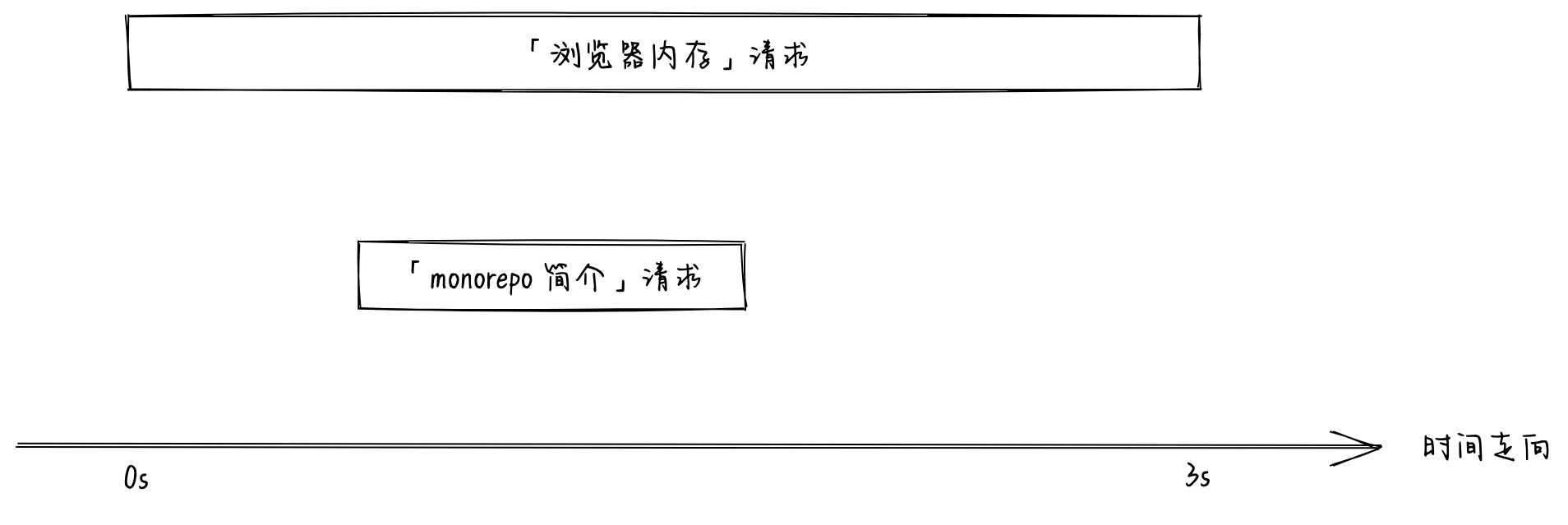
因为在切换到「monerepo 简介」后, 「浏览器内存」请求没有被取消, 所以当请求响应时会把当前内容替换掉. 这就是前端的竞态条件问题.
在 React 中解决这个问题通常有以下几个方法:
key
我们知道在 React 中渲染列表每个列表项指定 key 值可以优化性能以及避免一些 bug, 其实 key 除了用在列表项外也可以用于普通节点, 节点添加 key props 后, key 值发生变化 React 会卸载旧的节点然后生成新的节点. 上面例子中导致问题的是两次请求的 setArticleContent 是同一个 state, 如果把 articleId 作为 ArticleContent 的 key, 那么每次请求的 setArticleContent 都是不同的 state, 就不会产生竞态条件问题.
function ArticleContentWrapper() {
  const { articleId } = useParams<{ articleId: string }>();
  return (
    <ArticleContent key={articleId} articleId={articleId!} />
  );
}
setArticleContent 之前进行判断
如果能在请求响应后判断请求是否已经过时, 如果过时的话则跳过 setArticleContent. 一种可行的方法是通过 useRef:
const reqIdRef = useRef(0); // 永远指向最新的 reqId
const getArticleContent = useCallback(async () => {
  /** 每次请求都会生成一个 reqId */
  const reqId = Math.random();
  reqIdRef.current = reqId;

  setArticleContent({
    error: null,
    loading: true,
    content: null,
  });
  try {
    const content = await requestArticleContent(articleId);

    /** 如果 reqId 是最新的则更新 */
    if (reqIdRef.current === reqId) {
      setArticleContent({
        error: null,
        loading: false,
        content,
      });
    }
  } catch (error) {
    /** 如果 reqId 是最新的则更新 */
    if (reqIdRef.current === reqId) {
      setArticleContent({
        error: error as Error,
        loading: false,
        content: null,
      });
    }
  }
}, [articleId]);
每次发起请求都会生成一个 reqId, 然后赋值给外面的 reqIdRef, 这样 reqIdRef 永远指向最新的 reqId, 所以每当有新的请求发起, 旧的请求永远都符合 reqId !== reqIdRef.current 所以会跳过 setArticleContent.
通过 AbortController 取消请求
上面都是通过 hack 方式解决竞态条件问题的, 真正的解决方案应该是切换文章取消之前未完成的请求. 取消请求的话我们可以使用 AbortController:
const abortControllerRef = useRef(new window.AbortController());
const getArticleContent = useCallback(async () => {
  /** 发起新的请求之前取消上一次的请求 */
  abortControllerRef.current.abort();

  setArticleContent({
    error: null,
    loading: true,
    content: null,
  });
  try {
    const content = await window.fetch(
      `https://example.com/api/article?id=${articleId}`,
      {
        /** 将 AbortController 注入 fetch */
        signal: abortControllerRef.current.signal,
      },
    );

    setArticleContent({
      error: null,
      loading: false,
      content,
    });
  } catch (error) {
    setArticleContent({
      error: error as Error,
      loading: false,
      content: null,
    });
  }
}, [articleId]);
AbortController 同样支持 axios 之类的请求库.