









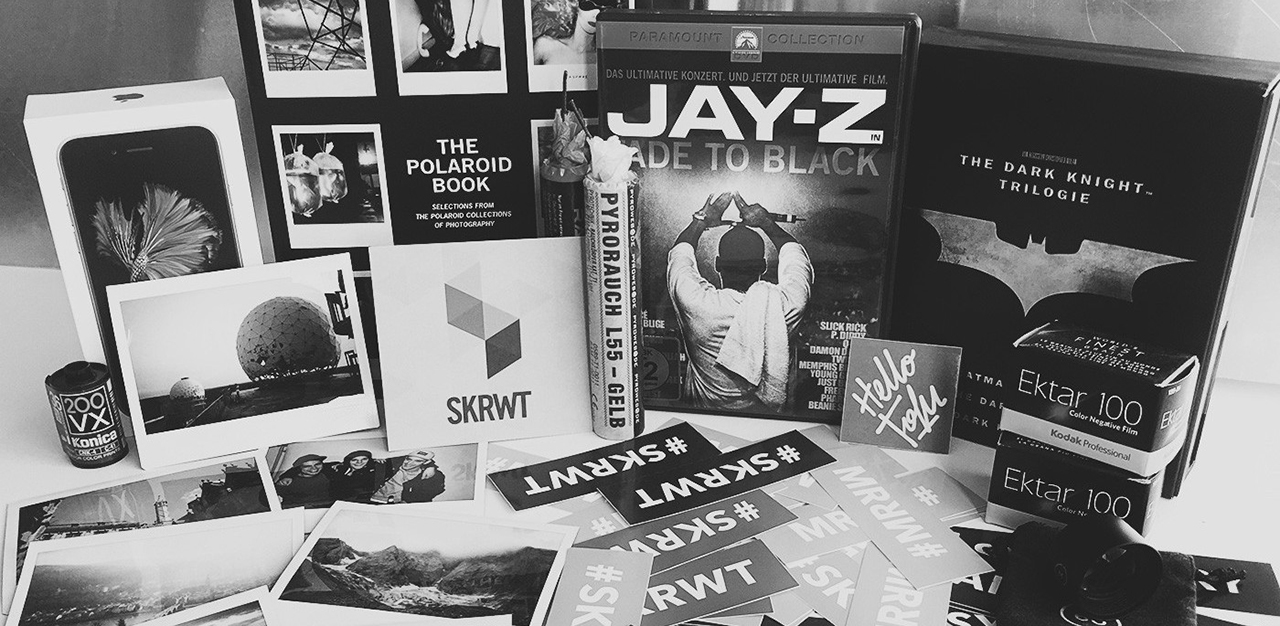
众所周知,前段时间 Apple 的秋季发布会对新款 iPhone 的摄像头进行了较大幅度的更新。6s 及 6s+ 的实际拍摄效果到底如何,真的像 Apple 宣传的那样吗?
著名的图片畸变畸变矫正应用 SKRWT 通过实际测试,让我们更加直观的了解 iPhone 4s 到 6s+ 拍摄效果的变化。普通人也能很容易的看出来到底谁更胜一筹。
全文采用中英对照编译,部分内容为更好理解进行了适当演绎。
I am excited to get a new iPhone again. The 5s has been my favorite device for a long time now. The 6 and 6+ were, for me, just bigger phones and I am not into that size matters thing.
我再一次对拿到一部新的 iPhone 而感到无比惊喜。很长的一段时间里,5s 是我最钟爱的手机。至于 6 和 6+,对于我而言仅仅是一部更大的手机罢了。当然,我对尺寸这事不太在意。
The geek and photographer inside of me needed to know if the 6s and 6s+ camera update is really worth the upgrade. So, I decided to make a quick and easy first test pointing all my devices onto a little scenery I prepared the other day.
生活中,我是一名极客,同时也是一名摄影师。如果 6s 以及 6s+ 在摄像头方面更新的话,还是值得我考虑更换新款 iPhone。因此,我决定拿我手中现有的设备进行一次简单而直接的对比测试,看看拍摄效果是否像所期待的那样。
Please note, this is the very first time I have made a camera comparison. I shot all images handheld in a reasonably pace and let the iPhones do all the metering.
请注意,这是我第一次尝试做手机相机方面的对比测试。下面的这些照片均为手持拍摄,为了对比 iPhone 系列的测光表现,我合理范围内选用了不同的距离进行测试。
I didn't use a tripod because I wanted the test to feel more like a spontaneous shooting. I could have used a camera app with manual controls, but I decided the auto-mode is the most important one to me and because I do think that these apps are a waste of time in combination with mobile photography (for now).
测试过程中,没有使用三脚架,还原生活中自然而然的拍摄过程。并且没有使用可以实现手动控制相机的应用,选用的是自带相机的自动模式。我觉得到目前为止,在移动设备上的使用手动模式拍摄就是在浪费时间。
You can download all original files through the link at the foot of this article.
另外,你可以通过文末的链接下载本文中所有的对比图的原始文档。
GOOD LIGHTING CONDITIONS 100%
A big quality improvement from the 4s to the 5s - the 6s and 6s+ megapixel boost is already a small plus.
第一组:良好光照条件下(图像 100% 显示)
透过下图可以看出,4s 到 5s 是一个巨大的提升,而 6s 和 6s+ 的改善并不明显。
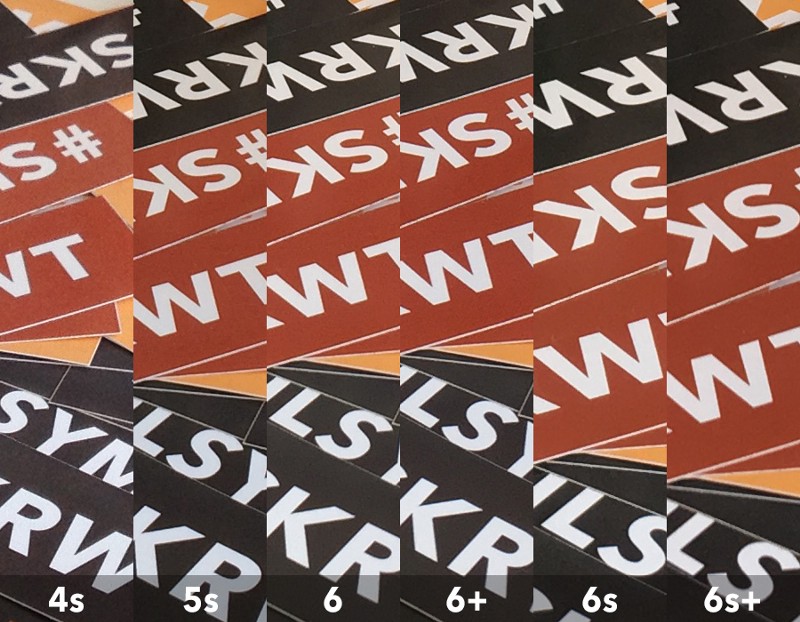
MID LIGHTING CONDITIONS 100%
The 4s is out, but the 5s is still keeping up with the newer ones. The 6+ and 6s+ seam to benefit from their stronger processor and handle the upcoming noise slightly better then their predecessors - Hova knows.
第二组:中等光照条件下(图像 100% 显示)
4s 到 5s 的图像质量依旧是改善最明显的。而 6+ 以及 6s+ 得益于更强大的图像传感器,在噪点控制方面表现的更好。
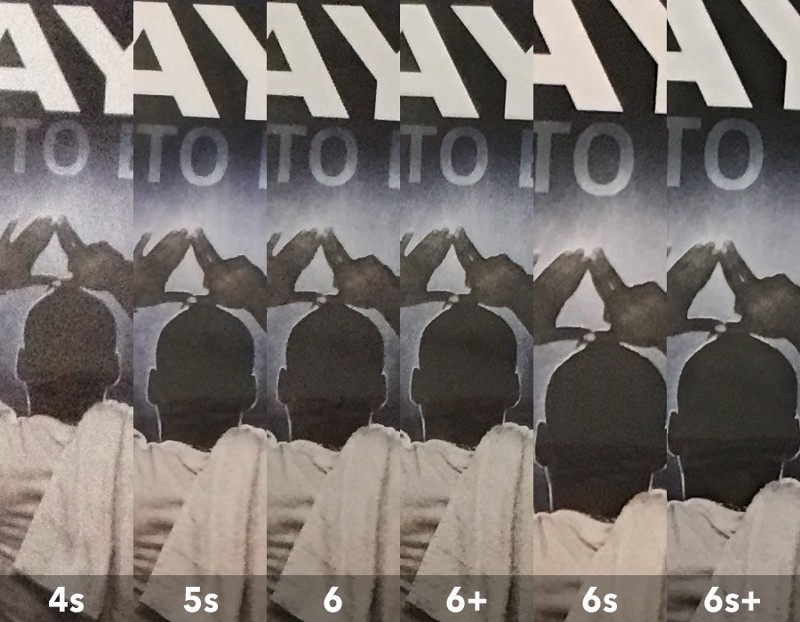
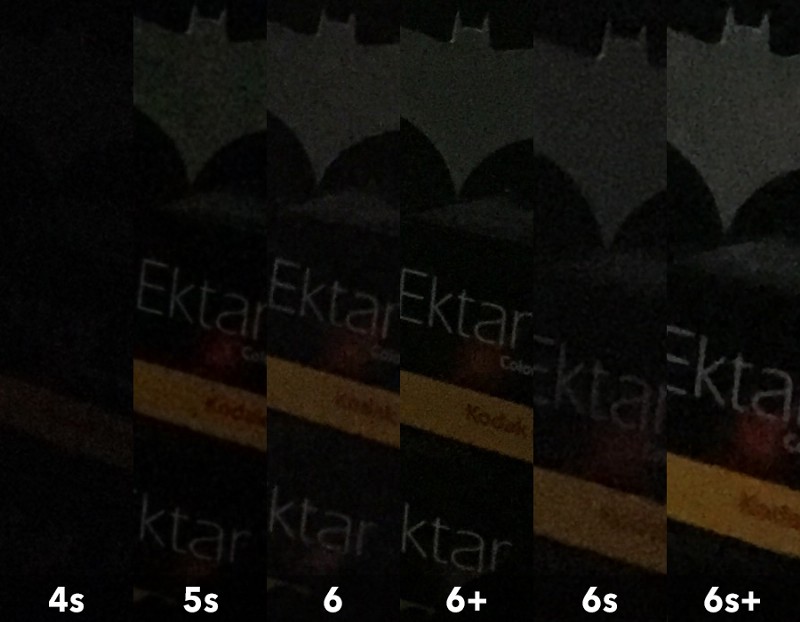
BAD LIGHTING CONDITIONS 100%
The 5s is showing big artifacts and noise blocks. In general all devices started struggling at the low light performance and delivered different results. It seams like the phones do have big problems with a steady performance when it gets darker. I got confused that the 6+ image came out significantly better than the 6 one, even though I took multiple shots with each phone. The 6+ can easily keep up with the 6s and 6s+ at this stage - all three devices have a decent noise cancellation.
第三组:光照条件恶劣下(图像 100% 显示)
5s 中呈现出来的工艺品已经布满了噪点。通常情况下,所有的设备在低光照条件下都摆脱不了高噪点的苦恼。似乎也说明,手机的摄像头在环境变暗的情况下成像的稳定性方面都会遇到教为明显的问题。令我困惑的是,6+ 的表现要比 6 好很多,我进行了多次比较验证。6+ 和 6s 以及 6s+ 的水平差不多,三者在消噪方面的表现都不错。
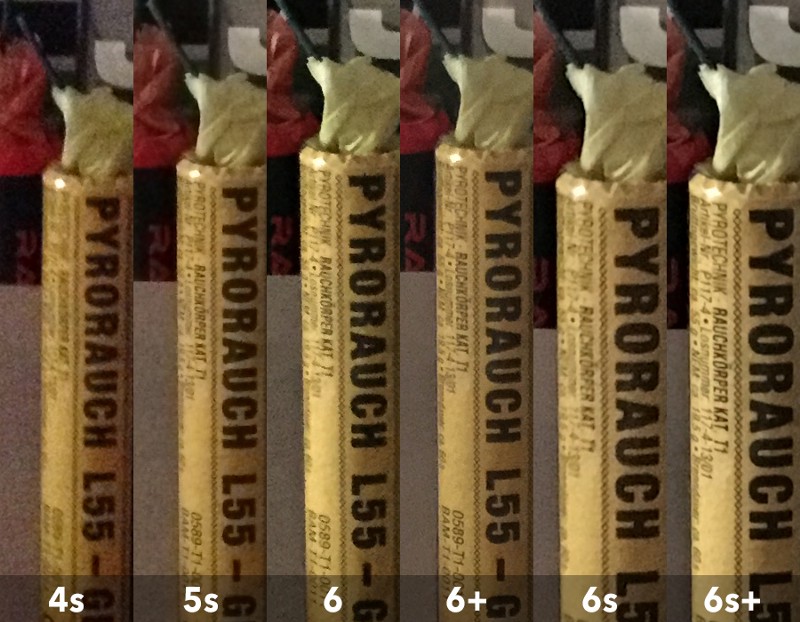
VERY BAD LIGHTING CONDITIONS 100%
Again the “+” phones are winning the comparison. At this point I got the very first “oha” moment. The 6s+ really boosted up the brightness, but it’s noise cancellation algorithms killed all the details. The 6+ may capture a slightly darker image, that’s something you can change in post, but the detail-difference is huge.
第四组:严重不足的光照条件下将照片放大到 100% 显示
带 + 的设备又一次夺魁。这一组的对比使我第一次感到有些 DAN 疼,6s+ 亮度有所提高,但是由于消除噪点的算法使得细节严重丢失。6+ 看起来似乎要暗一点,但是细节方面要好很多。至于亮度,后期可以调节,而细节丢失是无法弥补的。
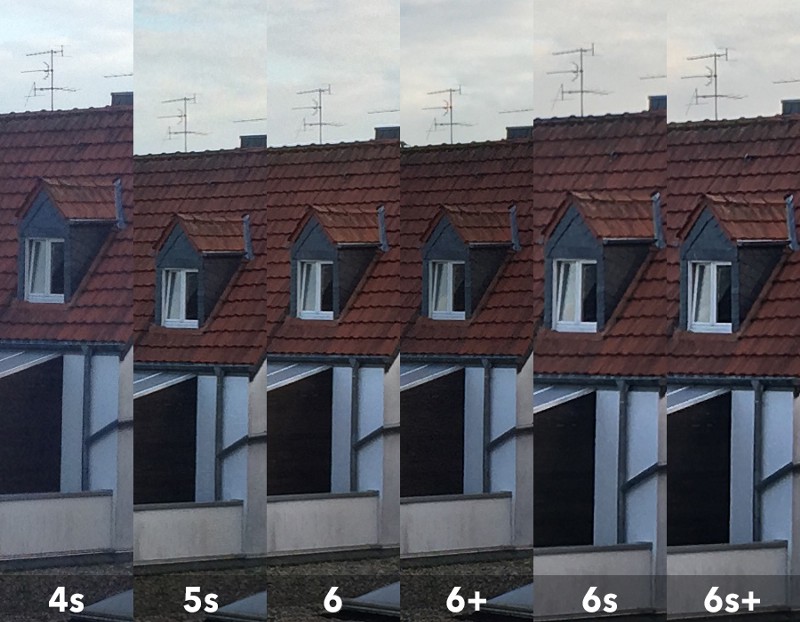
GREY BACKYARD 100%
To be honest, I did not expect the 6-series to out-perform the 5s that much. After seeing this I don’t think I will be able to stick to my beloved perfect-sized 5s. The 6+ image came out a little bit darker, but I have been shooting without a tripod and it did as good as the other ones. The 6s+ wins this one, not as much as expected, but details and dynamic range are a tiny bit better with the 6s and 6s+,a bit.
第五组:灰白的后院(100% 显示)
说实话,一开始并没有想到 6 系列会比 5s 的表现好这么多。看完这组对比之后,我一直坚持使用尺寸完美的 5s 的决心开始动摇了。6+ 拍摄的图片看起来有点暗,但是我没有使用三脚架并且和其他的看起来并没有太大差别。6s+ 是这组的冠军,但是效果仍然不及预期。6s+ 在细节保留和动态范围方面比 6s 稍稍好一点点。
编注:动态范围表示图像所包含的从「最暗」至「最亮」的范围。动态范围越大,所能表示的层次越丰富,所包含的色彩空间也越广。它能同时记录的暗部细节和亮部细节越丰富。
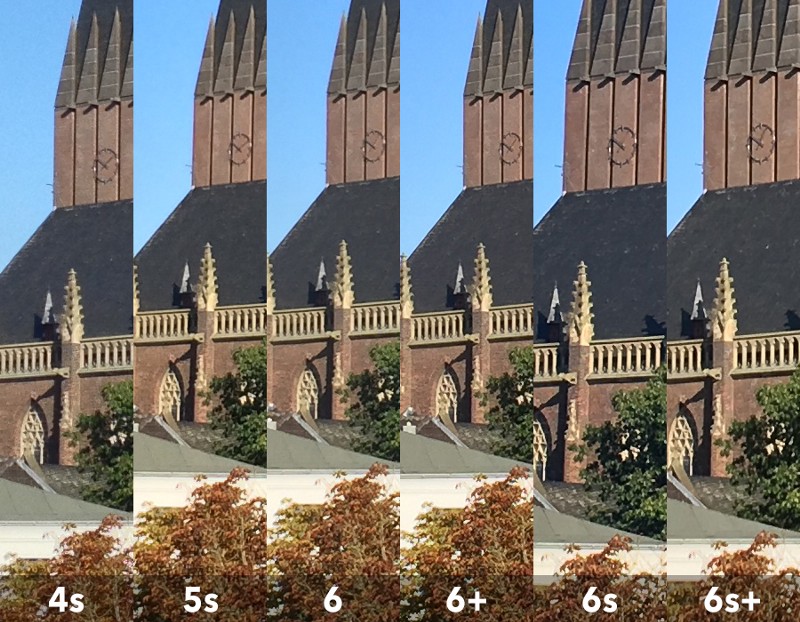
MORNING LIGHT 100%
For this test I forced the devices to shoot in HDR ON mode. At bright daylight Apple’s new phones do show their real benefits. The 6s and 6s+ images are slightly more detailed and do handle bright whites with a marginally better dynamic range.
第六组:早晨的光照条件下(100% 显示)
这组测试中,我将 HDR 模式打开。Apple 的新设备在明亮的光照条件下表现的确会好许多。6s 和 6s+ 在细节保留和动态范围保留方面更为出色。
After Apple’s keynote I really expected a huge image quality improvement, but as hard as I tried, I could not really see it. Yes, more megapixels are the biggest deal here, I haven’t shot any portraits yet, the images you get are somewhat warmer and the processor seams to handle noise a bit better.
通过 Apple 发布会上的 Keynote,我看到了成像质量方面巨大的改善。但是经过实际测试发现,很难达到 Apple 宣传的那种程度。像素的提升是这次 iPhone 摄像头方面最大的改变。另外,本次测试中我并没有拍摄人像。如果你尝试拍摄,应该会得到暖色调更为强烈且噪点控制更好的人像表现。
The new front-camera is something worth talking about: by boosting it to 5mpx I can see many people placing their phones on the ground and shooting some nice lookups - it's so much better!
新的前置摄像头是值得一提的:像素提高到 500 万,应该会有更多的人热衷于自拍了。当然,肯定会得到表现更好的照片。
The biggest surprise has been the 6+, I never believed when people said, that it is taking better images than the regular 6 one,now I do.
测试中,最令人惊讶的就是 6+ 了。之前我一直不相信有人讲它比 6 的成像质量更好,如今已坚信不疑。
There is a Galaxy S5 on my desk, but the images were so horrible, that I did not even bother to include them into this article. I wish I had a S6 though - its camera looks really nice, even though the dynamic range processing can’t keep up with the iPhone’s and the lens is noticeably wider.
我手中还有一部三星的 Galaxy S5,它拍摄的照片看起来真是太「可怕」了,我都不敢将其放入这次的对比测试中。我很想拥有一部 Galaxy S6,它的拍摄的效果看起来的确不错。虽然在动态范围上依旧不如 iPhone,但是镜头的表现力方面明显增强了很多。
此内容由惯性聚合(RSS阅读器)自动聚合整理,仅供阅读参考。 原文来自 — 版权归原作者所有。