


经常关注学术界最新动态的同学对arXiv可能会非常熟悉,它是全球最大的学术开放共享平台,目前存储了8个学科领域近200万篇学术文章1,学者们经常会将其即将发表或者未发表的文章挂在arXiv上让同行评议,这极大地促进了学术界的开放性与协作性。
众多的文章让人眼花缭乱,让人无法马上获取自己关注的领域的文章。笔者最近使用arXiv API2 + Github Actions3 实现了每天自动从arXiv获取相关主题文章并发布在Github以及Github Page的功能,预览点击这里。
这是代码仓库:Vincentqyw/cv-arxiv-daily。
首先给出预览图,Github的README.md中以表格的形式列出了关于SLAM最新的文章,这样看起来岂不是一目了然。
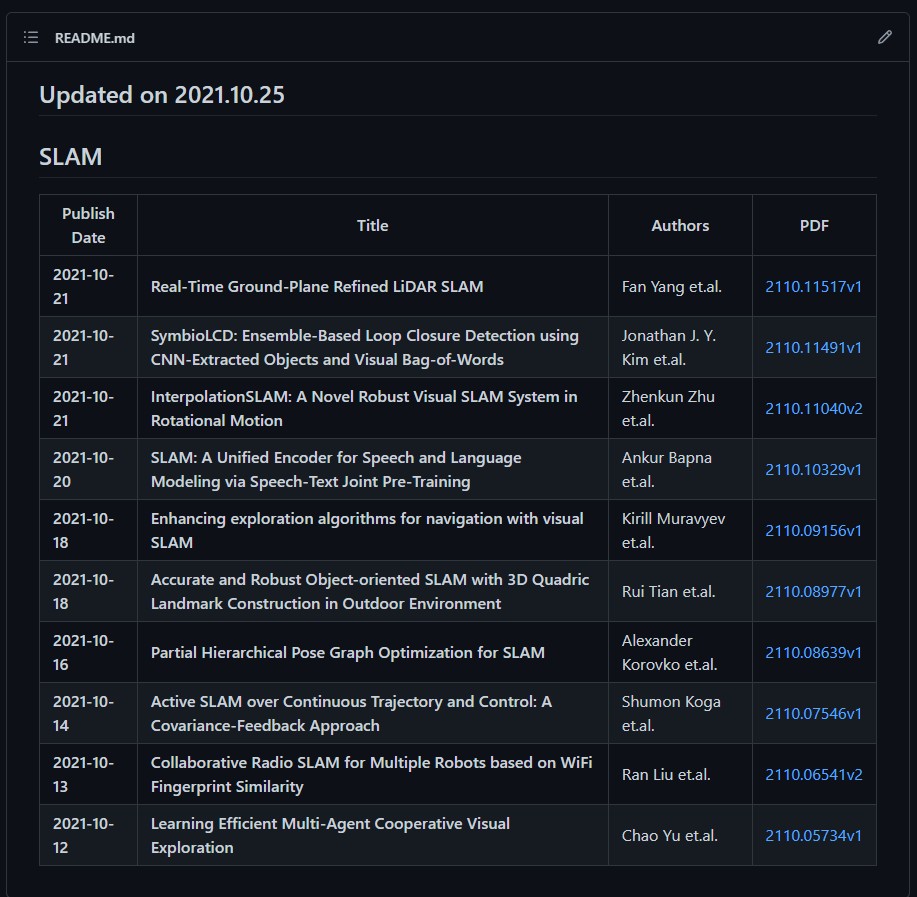
arXiv API2允许用户以编程方式访问arXiv.org上托管的数百万份电子论文。arXiv API2用户手册提供了论文检索的基本语法,按照其提供的语法检索可得到对应论文的metadata,即元数据,包括论文题目,作者,摘要,评论等信息。API调用的格式如下所示:
http://export.arxiv.org/api/{method_name}?{parameters}以method_name=query为例子,我们想要检索论文作者Adrian DelMaestro且论文题目中包含checkerboard的文章,可以这么写:
http://export.arxiv.org/api/query?search_query=au:del_maestro+AND+ti:checkerboard其中前缀au表示author,ti表示Title,+是对空格的编码(由于url中不可出现空格)。
| prefix | explanation |
|---|---|
| ti | Title |
| au | Author |
| abs | Abstract |
| co | Comment |
| jr | Journal Reference |
| cat | Subject Category |
| rn | Report Number |
| id | Id (use id_list instead) |
| all | All of the above |
另外,AND表示与运算,API的query方法支持布尔运算:AND、OR以及ANDNOT。
上述搜索的结果是以Atom feeds的形式返回的,任何能够进行HTTP请求并能够解析Atom feeds的语言都可调用该API,以Python为例:
import urllib.request as libreq
with libreq.urlopen('http://export.arxiv.org/api/query?search_query=au:del_maestro+AND+ti:checkerboard') as url:
    r = url.read()
print(r)
这里会返回如下结果:
<?xml version="1.0" encoding="UTF-8"?>
<feed xmlns="http://www.w3.org/2005/Atom">
  <link href="http://arxiv.org/api/query?search_query%3Dau%3Adel_maestro%20AND%20ti%3Acheckerboard%26id_list%3D%26start%3D0%26max_results%3D10" rel="self" type="application/atom+xml"/>
  <title type="html">ArXiv Query: search_query=au:del_maestro AND ti:checkerboard&id_list=&start=0&max_results=10</title>
  <id>http://arxiv.org/api/FX5wusAMkzsShow84WzqqTGlDpk</id>
  <updated>2021-10-24T00:00:00-04:00</updated>
  <opensearch:totalResults xmlns:opensearch="http://a9.com/-/spec/opensearch/1.1/">1</opensearch:totalResults>
  <opensearch:startIndex xmlns:opensearch="http://a9.com/-/spec/opensearch/1.1/">0</opensearch:startIndex>
  <opensearch:itemsPerPage xmlns:opensearch="http://a9.com/-/spec/opensearch/1.1/">10</opensearch:itemsPerPage>
  <entry>
    <id>http://arxiv.org/abs/cond-mat/0603029v1</id>
    <updated>2006-03-02T02:22:45Z</updated>
    <published>2006-03-02T02:22:45Z</published>
    <title>From stripe to checkerboard order on the square lattice in the presence
  of quenched disorder</title>
    <summary>  We discuss the effects of quenched disorder on a model of charge density wave
(CDW) ordering on the square lattice. Our model may be applicable to the
cuprate superconductors, where a random electrostatic potential exists in the
CuO2 planes as a result of the presence of charged dopants. We argue that the
presence of a random potential can affect the unidirectionality of the CDW
order, characterized by an Ising order parameter. Coupling to a unidirectional
CDW, the random potential can lead to the formation of domains with 90 degree
relative orientation, thus tending to restore the rotational symmetry of the
underlying lattice. We find that the correlation length of the Ising order can
be significantly larger than the CDW correlation length. For a checkerboard CDW
on the other hand, disorder generates spatial anisotropies on short length
scales and thus some degree of unidirectionality. We quantify these disorder
effects and suggest new techniques for analyzing the local density of states
(LDOS) data measured in scanning tunneling microscopy experiments.
</summary>
    <author>
      <name>Adrian Del Maestro</name>
    </author>
    <author>
      <name>Bernd Rosenow</name>
    </author>
    <author>
      <name>Subir Sachdev</name>
    </author>
    <arxiv:doi xmlns:arxiv="http://arxiv.org/schemas/atom">10.1103/PhysRevB.74.024520</arxiv:doi>
    <link title="doi" href="http://dx.doi.org/10.1103/PhysRevB.74.024520" rel="related"/>
    <arxiv:comment xmlns:arxiv="http://arxiv.org/schemas/atom">10 pages, 11 figures; added reference</arxiv:comment>
    <arxiv:journal_ref xmlns:arxiv="http://arxiv.org/schemas/atom">Phys. Rev. B 74, 024520 (2006)</arxiv:journal_ref>
    <link href="http://arxiv.org/abs/cond-mat/0603029v1" rel="alternate" type="text/html"/>
    <link title="pdf" href="http://arxiv.org/pdf/cond-mat/0603029v1" rel="related" type="application/pdf"/>
    <arxiv:primary_category xmlns:arxiv="http://arxiv.org/schemas/atom" term="cond-mat.str-el" scheme="http://arxiv.org/schemas/atom"/>
    <category term="cond-mat.str-el" scheme="http://arxiv.org/schemas/atom"/>
    <category term="cond-mat.supr-con" scheme="http://arxiv.org/schemas/atom"/>
  </entry>
</feed>
上述结果中包含了论文的metadata,那么接下来的任务是解析上述数据并将其中我们关注的信息按照某种格式写下来。
已经有人帮我们做好了上述结果的解析,我们不必重复造轮子。同时,论文查询的方式也更加优雅。在这里我们推荐的是arxiv.py4。
首先安装arxiv.py:
pip install arxiv然后在Python脚本中import arxiv即可。
以搜索SLAM为关键词,要求返回10个结果,同时按照发布日期排序,脚本如下:
import arxiv

search = arxiv.Search(
  query = "SLAM",
  max_results = 10,
  sort_by = arxiv.SortCriterion.SubmittedDate
)

for result in search.results():
print(result.entry_id, '->', result.title)上述脚本中(Search).results()函数返回了论文的metadata,arxiv.py已经帮我们解析好了,我们可以直接调用诸如result.title这样的元素,类似的还有:
| element | explanation |
|---|---|
| entry_id | A url http://arxiv.org/abs/{id}. |
| updated | When the result was last updated. |
| published | When the result was originally published. |
| title | The title of the result. |
| authors | The result’s authors, as arxiv.Authors. |
| summary | The result abstract. |
| comment | The authors’ comment if present. |
| journal_ref | A journal reference if present. |
| doi | A URL for the resolved DOI to an external resource if present. |
| primary_category | The result’s primary arXiv category. See arXiv: Category Taxonomy5. |
| categories | All of the result’s categories. See arXiv: Category Taxonomy. |
| links | Up to three URLs associated with this result, as arxiv.Links. |
| pdf_url | A URL for the result’s PDF if present. Note: this URL also appears among result.links. |
上述搜索脚本在终端打印出如下结果:
http://arxiv.org/abs/2110.11040v1 -> InterpolationSLAM: A Novel Robust Visual SLAM System in Rotational Motion
http://arxiv.org/abs/2110.10329v1 -> SLAM: A Unified Encoder for Speech and Language Modeling via Speech-Text Joint Pre-Training
http://arxiv.org/abs/2110.09156v1 -> Enhancing exploration algorithms for navigation with visual SLAM
http://arxiv.org/abs/2110.08977v1 -> Accurate and Robust Object-oriented SLAM with 3D Quadric Landmark Construction in Outdoor Environment
http://arxiv.org/abs/2110.08639v1 -> Partial Hierarchical Pose Graph Optimization for SLAM
http://arxiv.org/abs/2110.07546v1 -> Active SLAM over Continuous Trajectory and Control: A Covariance-Feedback Approach
http://arxiv.org/abs/2110.06541v2 -> Collaborative Radio SLAM for Multiple Robots based on WiFi Fingerprint Similarity
http://arxiv.org/abs/2110.05734v1 -> Learning Efficient Multi-Agent Cooperative Visual Exploration
http://arxiv.org/abs/2110.03234v1 -> Self-Supervised Depth Completion for Active Stereo
http://arxiv.org/abs/2110.02593v1 -> InterpolationSLAM: A Novel Robust Visual SLAM System in Rotating Scenes接下来的脚本daily_arxiv.py将实现从arXiv获取关于SLAM的论文,并将论文的发布时间、论文名、作者以及代码等信息制作成Markdown表格并写为README.md文件。
注意:以下脚本发布于2021年10月,最新版本代码请参考GitHub。
import datetime
import requests
import json
import arxiv
import os
def get_authors(authors, first_author = False):
    output = str()
    if first_author == False:
        output = ", ".join(str(author) for author in authors)
    else:
        output = authors[0]
    return output
def sort_papers(papers):
    output = dict()
    keys = list(papers.keys())
    keys.sort(reverse=True)
    for key in keys:
        output[key] = papers[key]
    return output

def get_daily_papers(topic,query="slam", max_results=2):
    """
    @param topic: str
    @param query: str
    @return paper_with_code: dict
    """

    # output
    content = dict()

    search_engine = arxiv.Search(
        query = query,
        max_results = max_results,
        sort_by = arxiv.SortCriterion.SubmittedDate
    )

    for result in search_engine.results():

        paper_id       = result.get_short_id()
        paper_title    = result.title
        paper_url      = result.entry_id

        paper_abstract = result.summary.replace("\n"," ")
        paper_authors  = get_authors(result.authors)
        paper_first_author = get_authors(result.authors,first_author = True)
        primary_category = result.primary_category

        publish_time = result.published.date()

        print("Time = ", publish_time ,
              " title = ", paper_title,
              " author = ", paper_first_author)

        # eg: 2108.09112v1 -> 2108.09112
        ver_pos = paper_id.find('v')
        if ver_pos == -1:
            paper_key = paper_id
        else:
            paper_key = paper_id[0:ver_pos]

        content[paper_key] = f"|**{publish_time}**|**{paper_title}**|{paper_first_author} et.al.|[{paper_id}]({paper_url})|\n"
    data = {topic:content}

    return data

def update_json_file(filename,data_all):
    with open(filename,"r") as f:
        content = f.read()
        if not content:
            m = {}
        else:
            m = json.loads(content)

    json_data = m.copy()

    # update papers in each keywords
    for data in data_all:
        for keyword in data.keys():
            papers = data[keyword]

            if keyword in json_data.keys():
                json_data[keyword].update(papers)
            else:
                json_data[keyword] = papers

    with open(filename,"w") as f:
        json.dump(json_data,f)

def json_to_md(filename):
    """
    @param filename: str
    @return None
    """

    DateNow = datetime.date.today()
    DateNow = str(DateNow)
    DateNow = DateNow.replace('-','.')

    with open(filename,"r") as f:
        content = f.read()
        if not content:
            data = {}
        else:
            data = json.loads(content)

    md_filename = "README.md"

    # clean README.md if daily already exist else create it
    with open(md_filename,"w+") as f:
        pass

    # write data into README.md
    with open(md_filename,"a+") as f:

        f.write("## Updated on " + DateNow + "\n\n")

        for keyword in data.keys():
            day_content = data[keyword]
            if not day_content:
                continue
            # the head of each part
            f.write(f"## {keyword}\n\n")
            f.write("|Publish Date|Title|Authors|PDF|\n" + "|---|---|---|---|\n")
            # sort papers by date
            day_content = sort_papers(day_content)

            for _,v in day_content.items():
                if v is not None:
                    f.write(v)

            f.write(f"\n")
    print("finished")

if __name__ == "__main__":

    data_collector = []
    keywords = dict()
    keywords["SLAM"] = "SLAM"

    for topic,keyword in keywords.items():

        print("Keyword: " + topic)
        data = get_daily_papers(topic, query = keyword, max_results = 10)
        data_collector.append(data)
        print("\n")

    # update README.md file
    json_file = "cv-arxiv-daily.json"
    if ~os.path.exists(json_file):
        with open(json_file,'w')as a:
            print("create " + json_file)
    # update json data
    update_json_file(json_file,data_collector)
    # json data to markdown
    json_to_md(json_file)
上述脚本的要点在于:
主题和关键词都是SLAM,返回最新的10篇文章;主题是用作表格前二级标题的名字,而关键词才是真正要检索的内容,特别注意对于有空格关键词多搜索格式,如camera localization要写成\"camera Localization\",其中的\"表转义,各位同学可按照规则增加自己感兴趣的keywords;这看起来似乎已经大功告成,但这里存在两个问题:1. 每次使用必须手动运行;2. 仅可在本地进行查看。为了能够每天自动地运行上述脚本且同步在Github仓库,Github Actions就派上用场了。
再次明确,我们的目标是使用GitHub Actions每天自动从arXiv获取关于SLAM的论文,并将论文的发布时间、论文名、作者以及代码等信息制作成Markdown表格发布在Github上。
Github Actions 是 GitHub 的持续集成服务,于2018年10月推出。
以下是官方解释3:
GitHub Actions help you automate tasks within your software development life cycle. GitHub Actions are event-driven, meaning that you can run a series of commands after a specified event has occurred. For example, every time someone creates a pull request for a repository, you can automatically run a command that executes a software testing script.
简而言之,GitHub Actions由Events驱动,可实现任务自动化。
workflow (工作流程):持续集成一次运行的过程,就是一个 workflow;job (任务):一个 workflow 由一个或多个 jobs 构成,含义是一次持续集成的运行,可以完成多个任务;step(步骤):每个 job 由多个 step 构成,一步步完成;action (动作):每个 step 可以依次执行一个或多个命令(action);
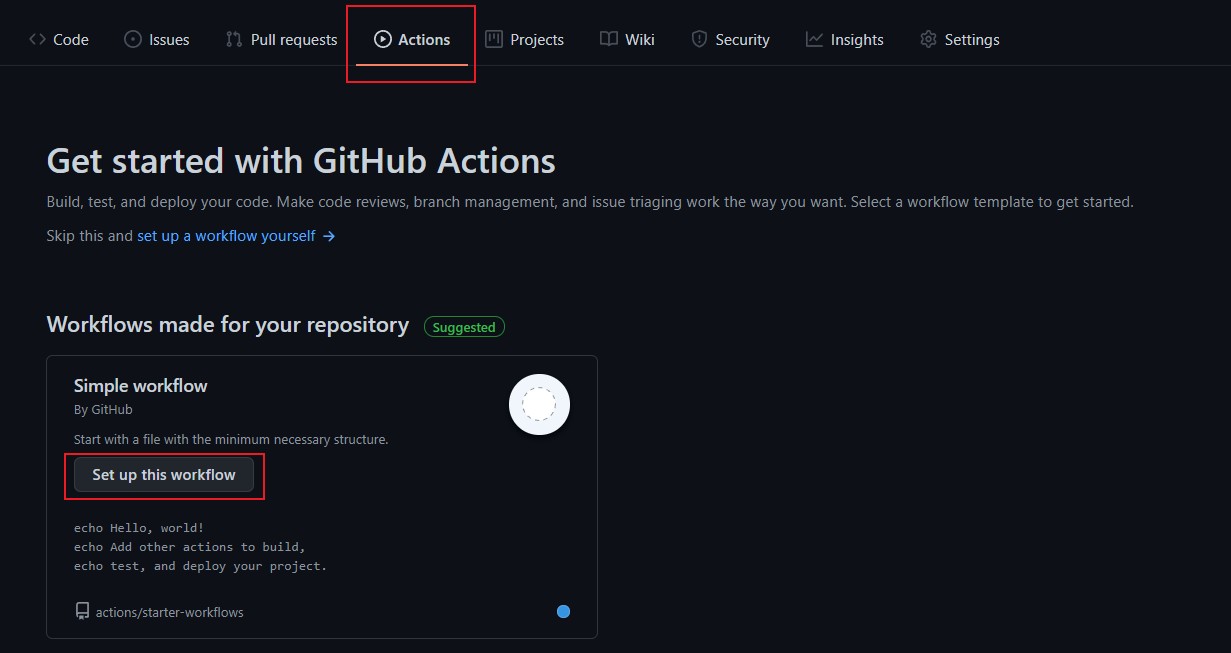
登陆自己的Github账号,新建一个仓库,如cv-arxiv-daily,点击Actions,然后点击Set up this workflow,如下图所示:
经过上述步骤后,会新建一个名为black.yml的文件(如下图所示),它所在的目录是.github/workflows/,注意这个目录绝对不可改变,这个文件夹下存放了需要执行的workflow,即工作流,GitHub Actions会自动识别这个文件夹下的yml工作流文件并按照规则执行。
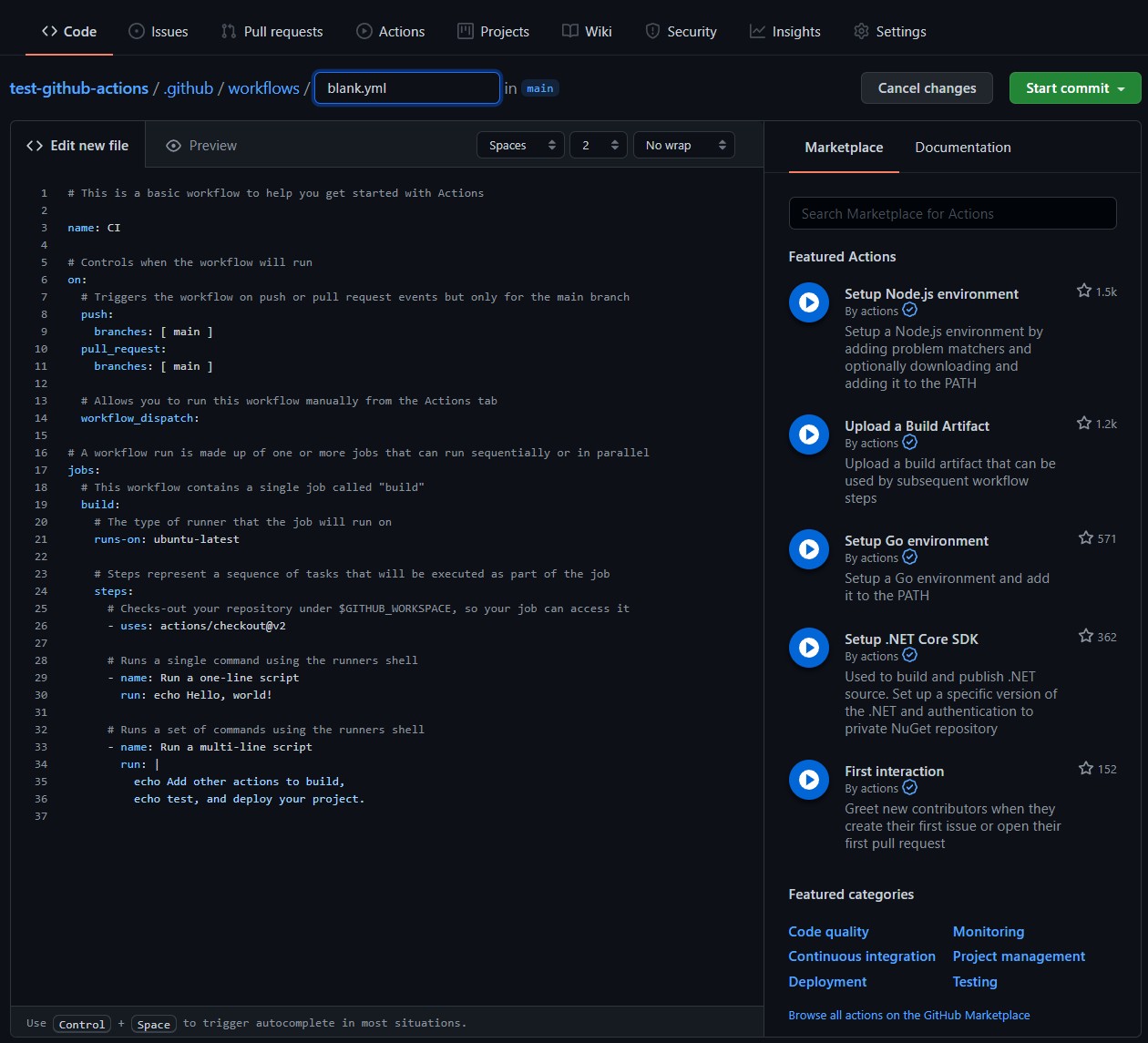
这个black.yml实现了一个最简单的工作流:打印Hello, world!。
需要注意的是GitHub Actions工作流有自己的一套语法,由于篇幅限制,不在此处细说,具体请参考这里7。
为了能够实现上节的python脚本daily_arxiv.py自动运行,不难得到如下工作流配置cv-arxiv-daily.yml,注意其中的两个环境变量GITHUB_USER_NAME以及GITHUB_USER_EMAIL分别替换成自己的ID与邮箱。
# name of workflow
name: Run Arxiv Papers Daily

# Controls when the workflow will run
on:
  # Allows you to run this workflow manually from the Actions tab
  workflow_dispatch:
  schedule:
    - cron:  "0 12 * * *"  # Runs At 12:00
env:

  GITHUB_USER_NAME: Vincentqyw # your github id
  GITHUB_USER_EMAIL: realcat@126.com # your email address

# A workflow run is made up of one or more jobs that can run sequentially or in parallel
jobs:
  # This workflow contains a single job called "build"
  build:
    name: update
    # The type of runner that the job will run on
    runs-on: ubuntu-latest

    # Steps represent a sequence of tasks that will be executed as part of the job
    steps:
      - name: Checkout
        uses: actions/checkout@v3

      - name: Set up Python Env
        uses: actions/setup-python@v4
        with:
          python-version: '3.10'

      - name: Install dependencies
        run: |
          python -m pip install --upgrade pip
          pip install arxiv
          pip install requests
          pip install pyyaml

      - name: Run daily arxiv
        run: |
          python daily_arxiv.py

      - name: Push new cv-arxiv-daily.md
        uses: github-actions-x/commit@v2.9
        with:
          github-token: ${{ secrets.GITHUB_TOKEN }}
          commit-message: "Github Action Automatic Update CV Arxiv Papers"
          files: README.md cv-arxiv-daily.json
          rebase: 'true'
          name: ${{ env.GITHUB_USER_NAME }}
email: ${{ env.GITHUB_USER_EMAIL }}其中,workflow_dispatch表示用户可以通过手动点击的方式运行,schedule8表示定时执行,具体规则请查看Events that trigger workflows。
这里使用了cron的语法,它有5个字段,分别用空格分开,具体如下:
┌───────────── minute (0 - 59)
│ ┌───────────── hour (0 - 23)
│ │ ┌───────────── day of the month (1 - 31)
│ │ │ ┌───────────── month (1 - 12 or JAN-DEC)
│ │ │ │ ┌───────────── day of the week (0 - 6 or SUN-SAT)
│ │ │ │ │
│ │ │ │ │
│ │ │ │ │
* * * * *cron的时间是UTC时间,北京时间需要减去8小时,即北京时间12:00对应UTC时间4:00。这里有一个将cron快速翻译成“人话”的工具,另外补充一张速查表
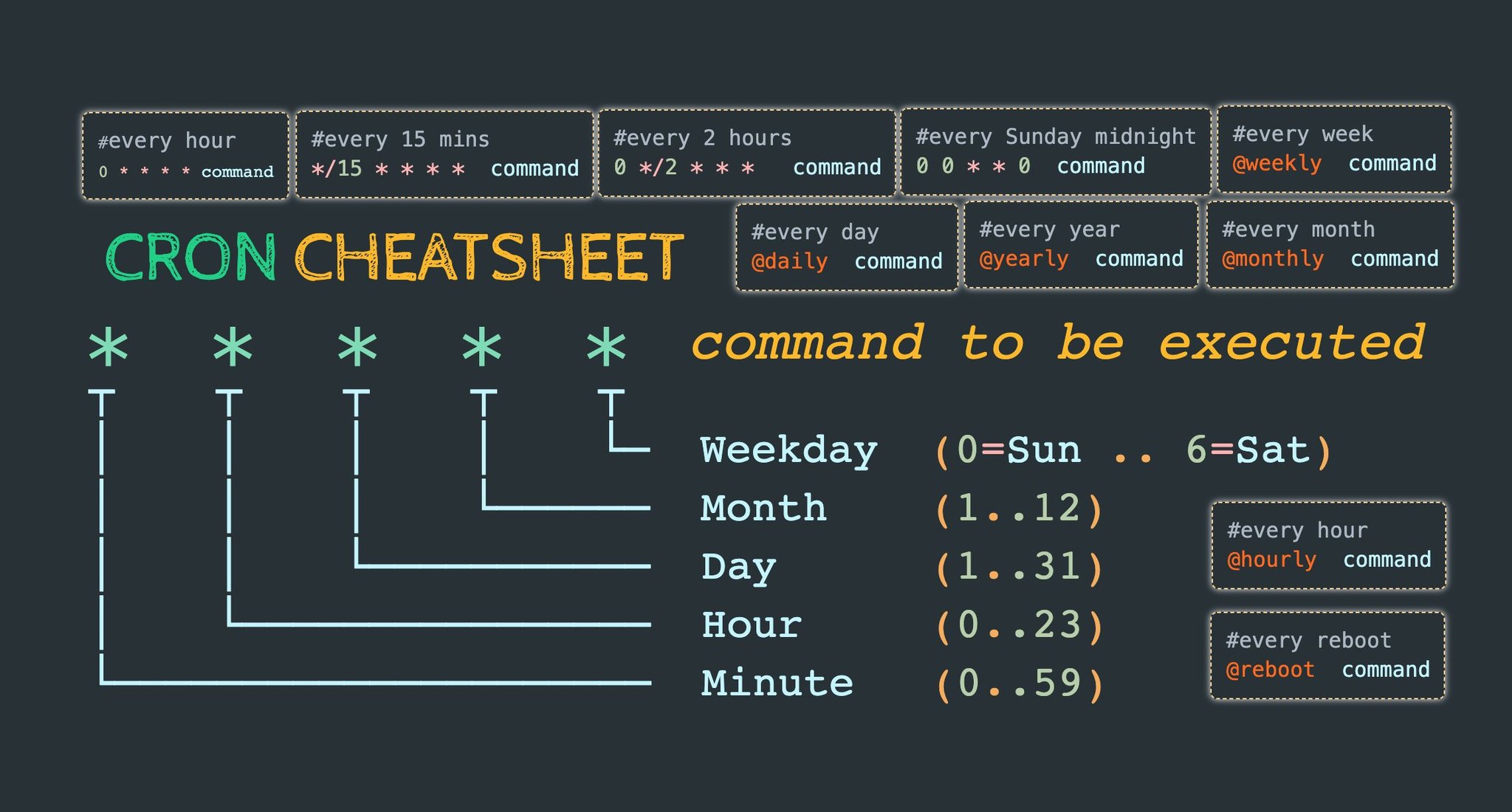
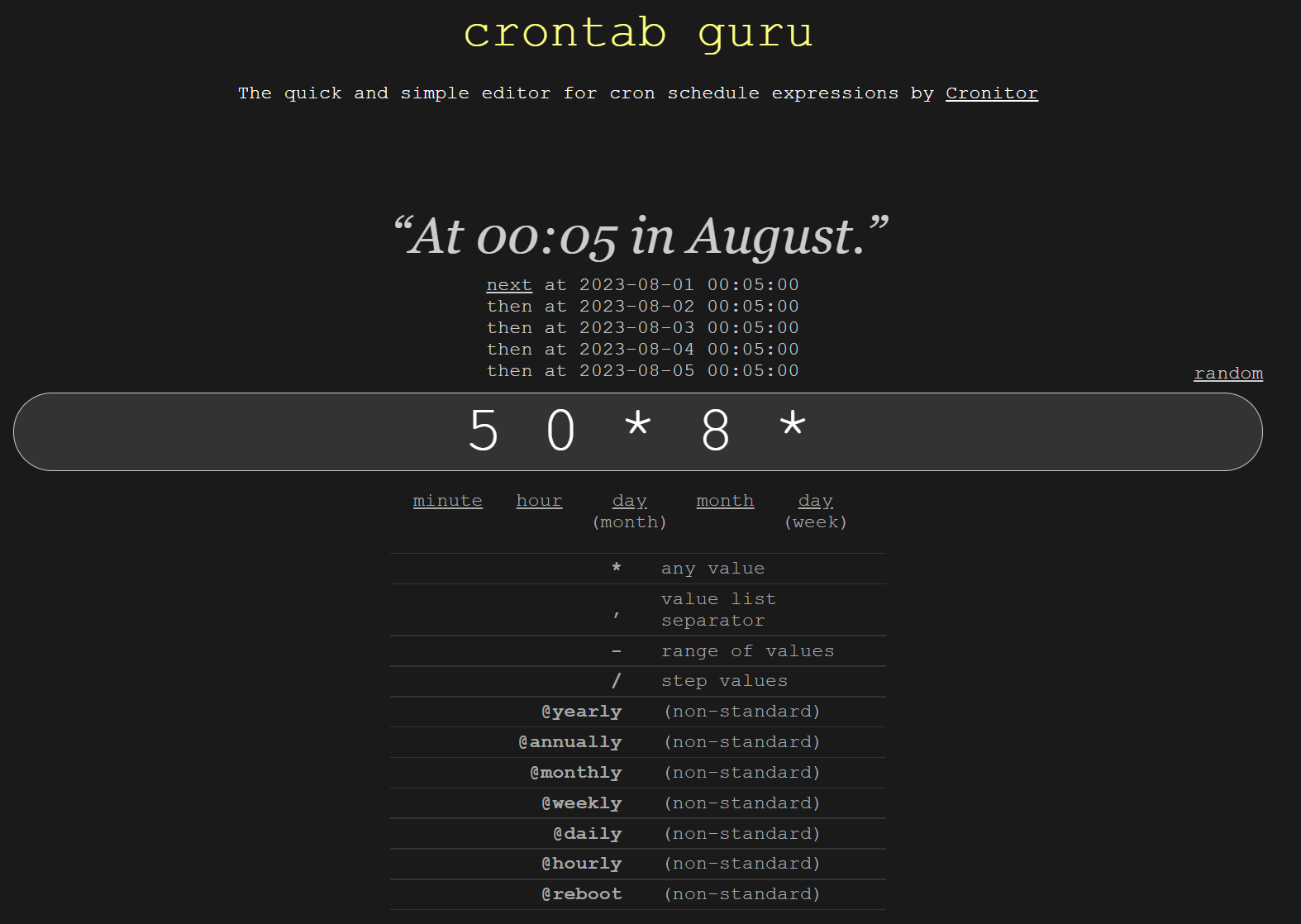
补充语法:
| Operator | Description | Example |
|---|---|---|
| * | Any value | `* * * * *` runs every minute of every day. |
| , | Value list separator | `2,10 4,5 * * *` runs at minute 2 and 10 of the 4th and 5th hour of every day. |
| - | Range of values | `0 4-6 * * *` runs at minute 0 of the 4th, 5th, and 6th hour. |
| / | Step values | `20/15 * * * *` runs every 15 minutes starting from minute 20 through 59 (minutes 20, 35, and 50). |
上述 workflow 的要点总结如下:
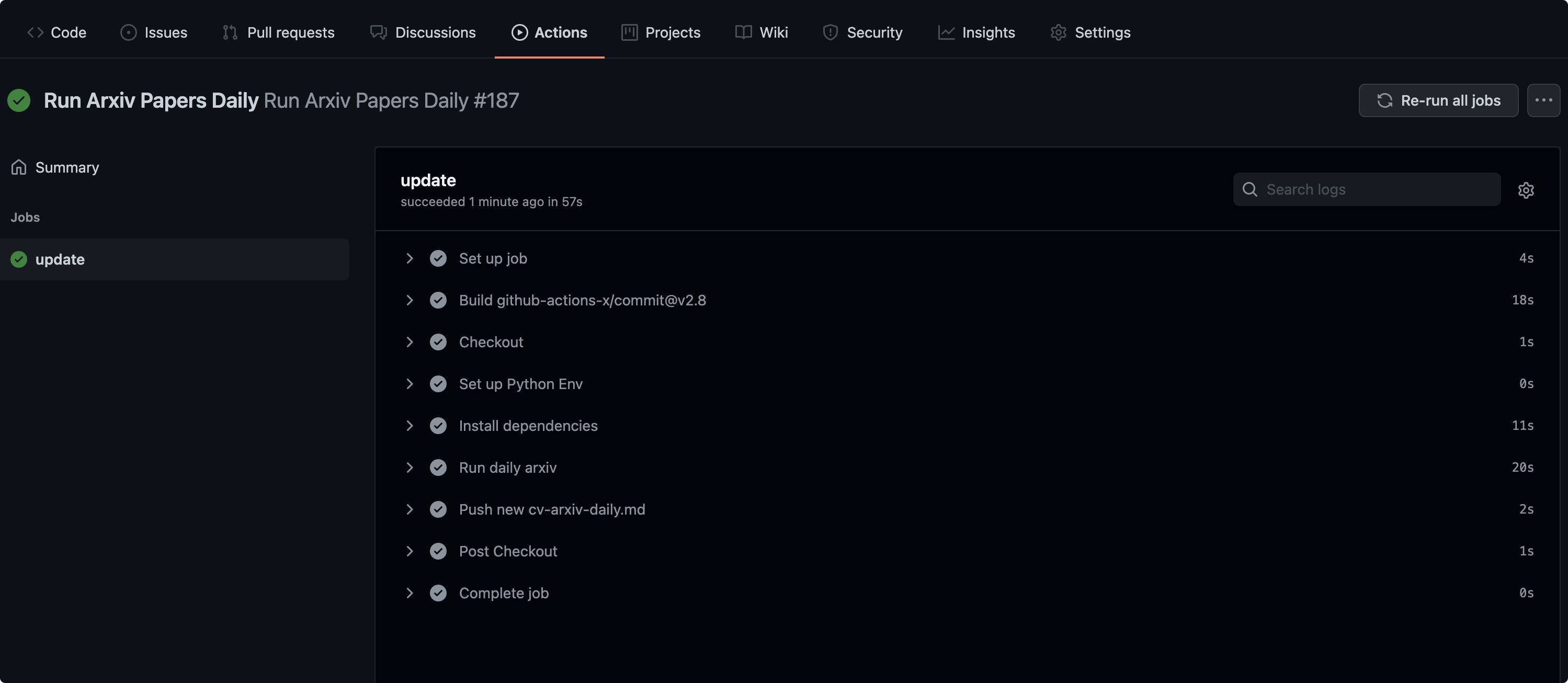
workflow,push不触发;build的job,运行在虚拟机环境ubuntu-latest;action 是 actions/checkout@v3;action 是 actions/setup-python@v4,python版本是3.10;pip,安装arxiv.py库,安装requests库以及pyyaml;daily_arxiv.py脚本,该步骤生成json临时文件以及对应的README.md;action 是 github-actions-x/commit@v2.99,需要配置的参数包括,提交的commit-message,需要提交的文件files,Github用户名name以及邮箱email;workflow成功部署后就会在Github repo下生成一个json文件以及README.md文件,同时将会看到如本文开头的文章列表,Github Action后台的log如下:
本文介绍了一种使用Github Actions实现自动每天获取arXiv论文的方法,可较为方便地获取并预览感兴趣的最新文章。本文列举的例子较为方便修改,各位读者可通过增加keywords的内容来甄选感兴趣的主题。文中所有的代码已开源,地址见文章结尾。最新的代码中增加了获取arXiv论文源代码的功能,增加了几个关键词以及增加了自动部署到一个Github Page页面的功能。
此外,本文列举的方法存在几个问题:1. 所生成的json文件为临时文件,可优化将其删除;2. README.md文件大小会随时间推移逐渐增大,后续可增加归档功能;3. 并非每个人每天都会浏览Github,后续将增加发送文章到邮箱的功能。
欢迎大家 fork & star,打造自己的论文利器:)
代码:github.com/Vincentqyw/cv-arxiv-daily
About arXiv, https://arxiv.org/about ↩
arXiv API User’s Manual, https://arxiv.org/help/api/user-manual ↩ ↩2 ↩3
Github Actions: https://docs.github.com/en/actions/learn-github-actions ↩ ↩2
Python wrapper for the arXiv API, https://github.com/lukasschwab/arxiv.py ↩
arXiv Category Taxonomy: https://arxiv.org/category\_taxonomy ↩
GitHub Actions 入门教程, http://www.ruanyifeng.com/blog/2019/09/getting-started-with-github-actions.html ↩
Workflow syntax for GitHub Actions, https://docs.github.com/en/actions/learn-github-actions/workflow-syntax-for-github-actions ↩ ↩2
Github Actions on.schedule: https://docs.github.com/en/actions/learn-github-actions/workflow-syntax-for-github-actions#onschedule ↩
Git commit and push, https://github.com/github-actions-x/commit ↩
此内容由惯性聚合(RSS阅读器)自动聚合整理,仅供阅读参考。 原文来自 — 版权归原作者所有。