









如何在wcf中用net tcp协议进行通讯,一个打开Wcf的公共类。比较好好,可以记下来。 配置文件中注意配置 Service,binding,behaviors. Service中配置endpoint 指明abc ,binding中配置tcp通讯的要关参数,behaivor中配置http请求的 地址
还是用上次的代码,提供一个user类,实现一个方法
[ServiceContract]
    public interface IUser
    {
        [OperationContract]
        string GetUserInfo();
    }
[ServiceContract]
    public interface IUser
    {
        [OperationContract]
        string GetUserInfo();
    }
通过公有类可以减少代码编写量,可以保存下来,以后用的时候 直接拿来用
public interface IServiceHostmanager : IDisposable
    {
        void Start();
        void Stop();
    }

    public class ServiceHostManager<TService>:IServiceHostmanager
        where TService:class
    {
        private ServiceHost host;
        public void Dispose()
        {
            Stop();
        }

        public ServiceHostManager()
        {
            host=new ServiceHost(typeof(User));
            host.Opened+= (sender, e) =>
            {
                Console.WriteLine("wcf服务已经启动监听{0}",host.Description.Endpoints[0].Address);
            };
            host.Closed+= (sender, e) =>
            {
                Console.WriteLine("wcf服务已经启动关闭{0}", host.Description.Endpoints[0].Address);
            };
        }
        public void Start()
        {
            Console.WriteLine("正在启动wcf服务{0}",host.Description.Endpoints[0].Name);
            host.Open();
        }

        public void Stop()
        {
            if (host != null && host.State == CommunicationState.Opened)
            {
                Console.WriteLine("正在关闭wcf服务{0}", host.Description.Endpoints[0].Name);
                host.Close();
            }

        }

        public static Task StartNew(CancellationTokenSource conTokenSource)
        {
            var task = Task.Factory.StartNew(() =>
            {
                IServiceHostmanager shm = null;
                try
                {
                    shm = new ServiceHostManager<TService>();
                    shm.Start();
                    while (true)
                    {
                        if (conTokenSource.IsCancellationRequested && shm != null)
                        {
                            shm.Stop();
                            break;
                        }
                    }
                }
                catch (Exception ex)
                {
                    Console.WriteLine(ex.Message);
                    if (shm != null) shm.Stop();
                }
            },conTokenSource.Token);
            return task;
        }
    }
配置文件中注意配置 Service,binding,behaviors. Service中配置endpoint 指明abc ,binding中配置tcp通讯的要关参数,behaivor中配置http请求的 地址
<?xml version="1.0" encoding="utf-8" ?>
<configuration>
  <system.serviceModel>
    <services>
      <service name="hcbServiceB.User"  behaviorConfiguration="userBehavior">
        <endpoint address="net.tcp://localhost:12345/User" binding="netTcpBinding" contract="hcbServiceB.IUser">
          <identity>
            <dns value="localhost"/>
          </identity>
        </endpoint>
      </service>
    </services>
    <bindings>
      <netTcpBinding>
        <binding name="netTcpBindingConfig" closeTimeout="00:30:00" openTimeout="00:30:00" receiveTimeout="00:30:00" sendTimeout="00:30:00" transactionFlow="false" transferMode="Buffered" transactionProtocol="OleTransactions" hostNameComparisonMode="StrongWildcard" listenBacklog="100" maxBufferPoolSize="2147483647" maxBufferSize="2147483647" maxConnections="100" maxReceivedMessageSize="2147483647">
          <readerQuotas maxDepth="64" maxStringContentLength="2147483647" maxArrayLength="2147483647 " maxBytesPerRead="4096" maxNameTableCharCount="16384" />
          <reliableSession ordered="true" inactivityTimeout="00:30:00" enabled="false" />
          <security mode="Transport">
            <transport clientCredentialType="Windows" protectionLevel="EncryptAndSign" />
          </security>
        </binding>
      </netTcpBinding>
    </bindings>
    <behaviors>
      <serviceBehaviors>
        <behavior name="userBehavior">
          <serviceMetadata httpGetEnabled="True" httpGetUrl="http://localhost:8081/User" />
          <serviceDebug includeExceptionDetailInFaults="True" />
          <serviceThrottling maxConcurrentCalls="1000" maxConcurrentInstances="1000" maxConcurrentSessions="1000" />
        </behavior>

      </serviceBehaviors>
    </behaviors>
  </system.serviceModel>

</configuration>
控制台中启动服务
 static void Main(string[] args)
 {
     Console.WriteLine("初始化...");
     Console.WriteLine("服务运行期间,请不要关闭窗口。");
     Console.Title = "wcf net tcp测试 ";
     var cancelTokenSouce = new CancellationTokenSource();
     ServiceHostManager<User>.StartNew(cancelTokenSouce);
     while (true)
     {
         if (Console.ReadKey().Key == ConsoleKey.Escape)
         {
             Console.WriteLine();
             cancelTokenSouce.Cancel();
             break;
         }
     }
 }
软件路径位于,可以根据自己安装vs的目录去找。
D:\Program Files (x86)\Microsoft Visual Studio\2017\Professional\Common7\IDE
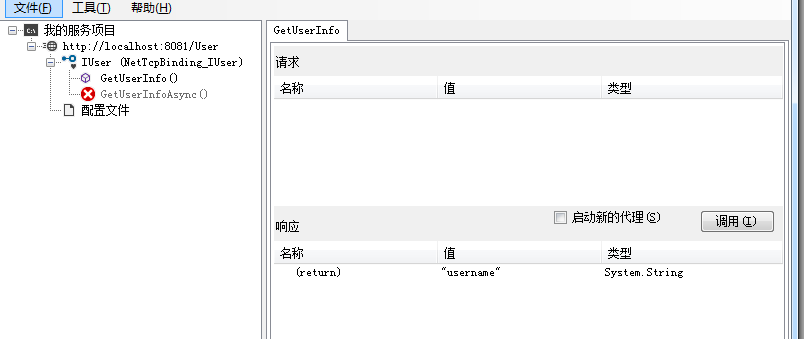
WCF绑定netTcpBinding寄宿到控制台应用程序:https://www.cnblogs.com/felixnet/p/7397139.html
我对我的文章负责,发现好多网上的文章 没有实践,都发出来的,让人走很多弯路,如果你在我的文章中遇到无法实现,或者无法走通的问题。可以直接在公众号《爱码农爱生活 》留言。必定会再次复查原因。让每一篇 文章的流程都能顺利实现。

此内容由惯性聚合(RSS阅读器)自动聚合整理,仅供阅读参考。 原文来自 — 版权归原作者所有。