


惯性聚合 高效追踪和阅读你感兴趣的博客、新闻、科技资讯
阅读原文 在惯性聚合中打开

推荐订阅源

T
Threatpost
The Hacker News
The Hacker News
AWS News Blog
AWS News Blog
Spread Privacy
Spread Privacy
T
Tenable Blog
C
CERT Recently Published Vulnerability Notes
Cisco Talos Blog
Cisco Talos Blog
Threat Intelligence Blog | Flashpoint
S
Securelist
P
Privacy & Cybersecurity Law Blog
Know Your Adversary
Know Your Adversary
T
The Exploit Database - CXSecurity.com
Latest news
Latest news
D
Darknet – Hacking Tools, Hacker News & Cyber Security
I
Intezer
F
Fortinet All Blogs
Engineering at Meta
Engineering at Meta
Simon Willison's Weblog
The Register - Security
CTFtime.org: upcoming CTF events
L
Lohrmann on Cybersecurity
C
Cyber Attacks, Cyber Crime and Cyber Security
Microsoft Azure Blog
P
Proofpoint News Feed
H
Help Net Security
T
Threat Research - Cisco Blogs
D
DataBreaches.Net
S
Schneier on Security
Cyberwarzone
Cyberwarzone
Google DeepMind News
P
Privacy International News Feed
S
Secure Thoughts
Cyber Security Advisories - MS-ISAC
Recorded Future
Recorded Future
C
Cybersecurity and Infrastructure Security Agency CISA
MyScale Blog
MyScale Blog
M
MIT News - Artificial intelligence
Stack Overflow Blog
Stack Overflow Blog
IT之家
IT之家
人人都是产品经理
人人都是产品经理
NISL@THU
NISL@THU
博客园 - Franky
T
Tor Project blog
G
GRAHAM CLULEY
博客园 - 【当耐特】
Jina AI
Jina AI
Security Archives - TechRepublic
K
KPMG report finds enterprise disconnect between AI and its ROI | CIO
A
About on SuperTechFans
Hacker News - Newest:
Hacker News - Newest: "LLM"

博客园 - Henry Cui

招聘高级.Net工程师 Node.js Web开发(一)从零开始 Html5 Step by Step(二) 本地存储 HTML 5 Step by Step(一) 拖放API Git学习笔记(一)初识Git DDD中的Specification模式 Silverlight 4之旅(三)数据绑定(中) Silverlight 4之旅(二)数据绑定(上) Silverlight 4之旅(一) .Net 4.0 Parallel 编程之旅 .Net 4.0 Parallel 编程(九)Task中的数据共享(下) .Net 4.0 Parallel编程(八)Task中的数据共享(中) .Net 4.0 Parallel 编程(七)Task中的数据共享(上) .Net 4.0 Parallel 编程(六)Task(下) .Net 4.0 Parallel 编程(五)Task(中) .Net 4.0 Parallel 编程(四) Task(上) Entity Framework Code-First(下) Entity Framework Code-First(上) Entity Framework POCO T4模板使用
Node.js Web开发(二)认识Express(上)
Henry Cui · 2012-10-29 · via 博客园 - Henry Cui

2012-10-29 17:00  Henry Cui  阅读(6085)  评论()    收藏  举报

实现试图母版

上篇的Post中,最后虽然采用Ejs的试图引擎成功了,但是发现没有按照我们预想的实现使用母版功能,首选我们先把上次遗留的问题给实现了。

这里我使用Express的partials来实现,在3.0之前的版本中,partials包含在Express中,现在单独出来了,需要我们安装后来使用:

npm install express-partials

安装完成后,在Express配置中指定使用partials:

app.configure(function () {
    app.set('port', process.env.PORT || 3000);
    app.set('views', __dirname + '/views');
    app.set('view engine', 'ejs');
    app.use(express.favicon());
    app.use(partials());
    app.use(express.logger('dev'));
    app.use(express.bodyParser());
    app.use(express.methodOverride());
    app.use(app.router);
    app.use(express.static(path.join(__dirname, 'public')));
});

启动后我们看到生成的前台源码:
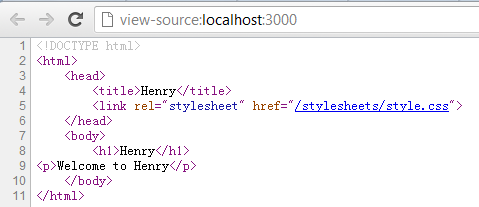
image

下面我们会详细讲解Express use的作用。

Express的配置

在之前的例子中我们一直看到了configure方法,configure方法用于指定express的环境的配置。在Express中支持多工作环境,有我们比较常见的环境如“开发环境”(development)、“生产环境”(producation)。在我们定义全局的环境时,直接使用configure(function)的方式,如指定特定的环境时的配置需要configure(key,function)中的环境值,下面我们写段例子来演示各种配置:

app.configure('production', function () {
    
});
app.configure('development', function(){
  app.use(express.errorHandler({dumpExceptions:true}));
});

这里我配置了在开发环境时,遇到异常直接抛出来,对于生产环境没有使用异常处理的机制。

我们修改下index.ejs让其出错:

<h1><%=title%></h1>
<p>Welcome to <%=name%></p>

同事我们需要设置下环境为生产环境:

app.set('env', 'production');

启动后我们发现:
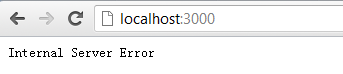
image

当我们设置为开发环境时:

image

我们就可以在页面上看到抛出的错误。这里只是通过这个演示来看下configure的作用,一般在生产情况下对于出错会进行其他的处理,如跳转到统一出错的界面,并进行日志记录。

Express的设置及中间件

在上面我们可以看到在配置是我们设置了express常用的一些设置,这里简单说明下:

    app.set('port', process.env.PORT || 3000);
    app.set('views', __dirname + '/views');
    app.set('view engine', 'ejs');
    app.set('env', 'development');

port:端口设置,这里使用的是环境的端口,或则3000端口;

view:试图存放的目录;

view engine:试图模板引擎;

env:环境;

另外我们还可以通过设置view options来设置全局视图的选项。

我们看下中间件的使用,在上面的例子我们已经使用了好几个中间件,通常的时候我们可以再configure中使用app.use来使用中间件。

    app.use(express.favicon());
    app.use(partials());
    app.use(express.logger('dev'));
    app.use(express.bodyParser());
    app.use(express.methodOverride());
    app.use(app.router);
    app.use(express.static(path.join(__dirname, 'public')));

这里我们修改下使用的日志件,能让其将日志写入到文件中去。首先引用fs:

var fs = require('fs');
var accessLogFile = fs.createWriteStream('access.log', { flags: 'a' });

使用logger:

    app.use(express.logger({stream:accessLogFile}));

浏览后我们发现已经将访问信息写入到日志中了:

image

总结

本篇中我们主要了解了Express的配置以及中间件的功能,了解了Express最基础的一些东西。本篇讲解的内容比较少,下篇中将会讲解Express中MVC的实现。
