


2010-07-25 14:42 Henry Cui 阅读(11004) 评论() 收藏 举报
在7.14号微软ado.net团队发布了EF Feature CTP4,在ctp4中code-first得到了很大的加强,支持了很多属性。本篇文章中就code-first进行一些尝试。
1.下载ctp4:Entity Framework Feature CTP4.
2.准备我们的工程:
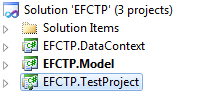
各个项目之间的关系以及作用就不必多说了。
我们建立一个employee、department的model。employee:
    public class Employee
    {
        public int EmployeeID { get; set; }
        public string FirstName { get; set; }
        public string LastName { get; set; }
        public int Age { get; set; }
        public int DepartmentID { get; set; }

        public virtual Department Department { get; set; }

    }
Department:
    public class Department
    {
        public int DepartmentID { get; set; }
        public string DepartName { get; set; }

        public virtual ICollection<Employee> Employees { get; set; }
    }
在context项目中,我们建立一个NorthwindContext,让它继承与DbContext。别忘了添加对ctp4的引用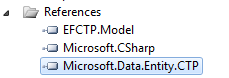 。
。
NorthwindContext:
    public class NorthwindContext:DbContext
    {
        public NorthwindContext()
            : base()
        { }

        public NorthwindContext(string connName)
            : base(connName)
        { }

        public DbSet<Employee> Employees { get; set; }

        public DbSet<Department> Departments { get; set; }
    }
我们添加如下的数据链接:
  <connectionStrings>
    <add name="EFCTP" connectionString="Data Source=HENRYCUI-PC;Initial Catalog=EFCTP;Integrated Security=True" providerName="System.Data.SqlClient"/>
  </connectionStrings>
测试方法:
        [TestMethod]
        public void CodeFirstTest()
        {
            using (var context = new NorthwindContext("EFCTP"))
            {
                context.Departments.Add(new Department()
                {
                    DepartName="IT"
                });
                context.SaveChanges();
                Assert.AreEqual(1,context.Departments.Count());
            }
        }
在测试之前我们看些我的数据库中:
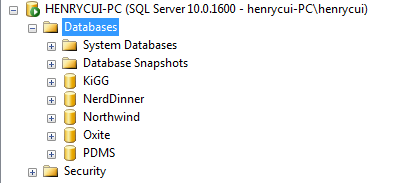
并不存在EFCTP数据库。运行测试方法:
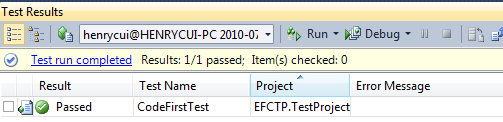
我们看看数据库中:
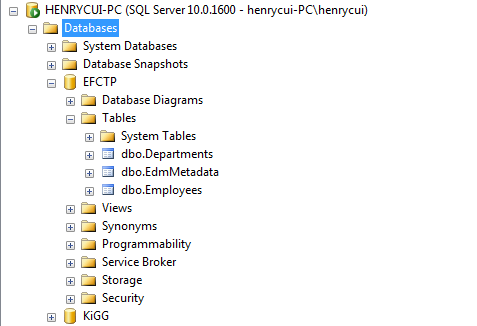
看到已经帮我们创建好了数据库EFCTP,并且已经建好了表Departments,Employees,以及主键关系跟外键关系。
其实在上面的示例中让我们感到惊讶的是,不但自动帮我们建立好了数据库以及表,就连表里面的主键、外键也帮我们建立好了。默认的时候,code-frist库会生成一个跟我们contex名字一样的数据库,而且会在./SQLEXPRESS下面。下面就说下有关主键以及外键的默认生成:
1)Primary Key:code-fist将我们定的类中属性名为ID或则classname+ID的属性默认设置为主键(上面示例中的EmployeeID、DepartmentID),如果这个属性被定义为int 、long、short那么将设置为identity 列。
2)Relationship:code-first会通过定义的类型之间的引用关系推算出外键的关系,但是这只是在两个类型中只有一个导航属性的时候才会检测出来,当两个类型中存在多个导航属性时,那就检测不出来了。
当我们需要定义一些跟默认的检测不一样的东西的时候,我们可以使用Data Annotations进行显示的标识。对于Data Annotation的使用大家可能不会陌生的,在RIA Service也有使用。在Entity Framework ctp3中已经包含了Data Annotaions。我们看一下Data Annotaions会提供了那些标识给Entity Framework 使用呢:
Key
StringLength
ConcurrencyCheck
Required
Timestamp
DataMember
RelatedTo
MaxLength
StoreGenerated
我们修改下前面定义的几个实体,使用Data Annotaions进行标识,首先需要添加System.ComponentModel.DataAnnotations的引用。
Employee.cs:
    public class Employee
    {
        [Key]
        public int EmployeeID { get; set; }
        [Required]
        [StringLength(50,ErrorMessage="FirstName can't over 50 chars")]
        public string FirstName { get; set; }
        [Required]
        public string LastName { get; set; }

        public int Age { get; set; }
        public int DepartmentID { get; set; }

        [RelatedTo(ForeignKey = "FK_EmDepartment", Property = "Department")]
        public virtual Department Department { get; set; }

    }
本文中介绍了下entity framework ctp 4中的code-first的功能,希望对您有用。其实在ctp4中提供了另外的一种方式去实现Data Annotaions的功能,以及如果我们的定义类型发生改变的时候怎么办呢?在下篇文中会介绍下其他部分的内容。
2.Data Annotations in the Entity Framework and Code First

此内容由惯性聚合(RSS阅读器)自动聚合整理,仅供阅读参考。 原文来自 — 版权归原作者所有。