


Node.js不必介绍,已经太火爆了。简单说是用Javascript开发Web服务端,基于Google V8引擎,单线程。不多说从零开始Windows平台下的Node.js的开发之旅。
首先到Node.js的官方网站上下载安装包,一步步安装,现在最新版本为V0.8.12。安装完成后,验证下安装是否成功:打开命令行窗口输入:
node --version
获得如下提示,表示安装成功。

Windows下我使用微软的WebMatrix作为开发工具,WebMatrix提供了Node.js开发时的几种模板,使用跟Visual Studio很接近,非常方便。另外提供了一些扩展的工具,比如Git的扩展工具等等。刚使用时,我还是使用node的命令进行一些操作,不直接使用WebMatrix,WebMatrix只作为编写工具,这样更容易理解。
我们通过使用Node.js里面的‘http’模块进行http请求、响应的操作,来实现自己的Web框架,这里就不自己造轮子了(自己也没那个水平),使用Node.js比较流行的Web框架“Express”。Node.js提供了很好的包的管理器“npm”,方便的进行包的安装、卸载、更新。
安装Express:
npm install –g express
会出现如下信息:
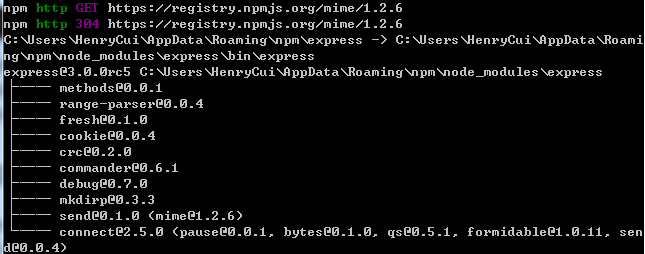
验证是否安装成功:
express –version

这里简单说下npm,上面的-g代表是全局的,默认npm是进行本地安装。本地安装时,npm会将包安装到当前目录的node_modules目录中,一般情况不可以直接在命令行中使用;全局安装时会将包安装到系统目录中,这样我们就可以在命令行中到处使用。
我们通过Express命令创建项目S055:
Express –t ejs S055
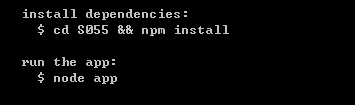
这里Express提示我们要进入S005里面进行安装项目的依赖项,我们打开package.json:
{
  "name": "application-name",
  "version": "0.0.1",
  "private": true,
  "scripts": {
    "start": "node app"
  },
  "dependencies": {
    "express": "3.0.0rc5",
    "jade": "*"
  }
}
奇怪的是,我发现依赖项里面有“jade”,而我希望使用的ejs来创建的,不知道为什么还是使用了jade(知道的朋友指点下我 ).
).
jade是一种View引擎,我更喜欢使用ejs,方便,简单,这里修改成ejs.
执行npm install.
会提示我们: ,ejs跟express安装完成。
启动Node.js:
node app
启动成功后,我们再浏览器中输入http://localhost:3000/,意外发生了:

提示找不到jade模块,不管他了,把它修改成使用ejs.
使用WebMatrix打开网站 ,选择刚才创建的目录(也可以直接使用WebMatrix创建Express站点),WebMatrix会自动帮我们检测到是Node.js站点。
1)打开app.js,修改下视图引擎:
app.configure(function(){
  app.set('port', process.env.PORT || 3000);
  app.set('views', __dirname + '/views');
  app.set('view engine', 'jade');
  app.use(express.favicon());
  app.use(express.logger('dev'));
  app.use(express.bodyParser());
  app.use(express.methodOverride());
  app.use(app.router);
  app.use(express.static(path.join(__dirname, 'public')));
});
将‘View engine’修改成‘ejs’。
2)删除layout.jade、index.jade,创建layout.ejs、index.ejs.
layout.ejs:
<!DOCTYPE html>
<html>
    <head>
        <title><%=title%></title>
        <link rel="stylesheet" href="/stylesheets/style.css">
    </head>
    <body>
        <%- body%>
    </body>
</html>
index.ejs:
<h1><%=title%></h1>
<p>Welcome to <%=title%></p>
这里只是把刚才的jade翻译成了ejs引擎的表现方式,其实大家可以猜下layout.ejs的作用,应该是想作为站点的模板。重新启动下Node.js,刷新下浏览器:
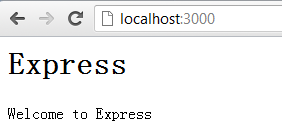
好像成功了,但是我们查看源,发现不对,没使用模板:
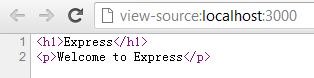
这里就不继续下去了,留到下一节的了解Express结构后,去解决它。
本小节,初步使用了Node.js的Express框架成功创建了站点,但是视图模板还没使用成功,我们在下一节里面初步了解了Express结构之后,再去解决它。
此内容由惯性聚合(RSS阅读器)自动聚合整理,仅供阅读参考。 原文来自 — 版权归原作者所有。