













WCF4.0安装及NET.TCP启用
WCF 4.0 一般默认安装.net Framework 4.0的时候已经安装。
但如果先装.net framework 4.0,后装IIS,就会出现问题。需要重新注册WCF4.0。
WCF4.0 已经是.net 4.0的一个内部组件,不需要.net3.5 那样麻烦先装windows组件。
一、确认是否安装WCF4.0:
如下图,查看*.svc 后缀的文件是否被svc-Integrated-4.0 或 svc-ISAPI-4.0_64/32bit 程序处理:
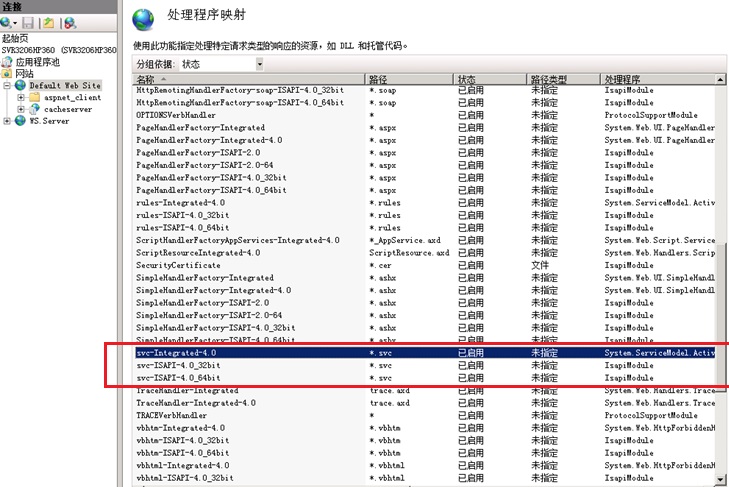
如果没有上面的三个处理程序,则可以判定 wcf 4.0 没有安装。
二、安装WCF 4.0
找到对应的.net framework 目录,运行命令:
"%WINDIR%\Microsoft.Net\Framework\v4.0.30319\aspnet_regiis" –i –enable
"%WINDIR%\Microsoft.Net\Framework\v4.0.30319\ServiceModelReg.exe" -r
Running the command aspnet_regiis –i –enable will make the Default App Pool run using .NET Framework 4, which may produce incompatibility issues for other applications on the same computer.
如果你有另外的app Pool,可以不用管这个 –enable,可以手动去设置那个pool的.net 版本是4.0.
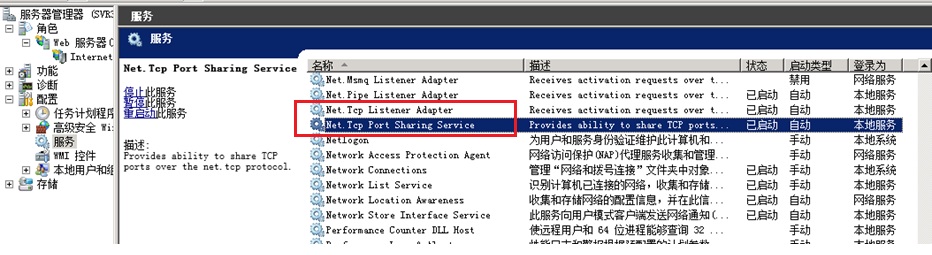
三、启动服务:NetTCP Listener Adapter 和 Net TCp Port Sharing Service:
四、为IIS站点配置NETTCP协议支持:
1)绑定808:*端口:
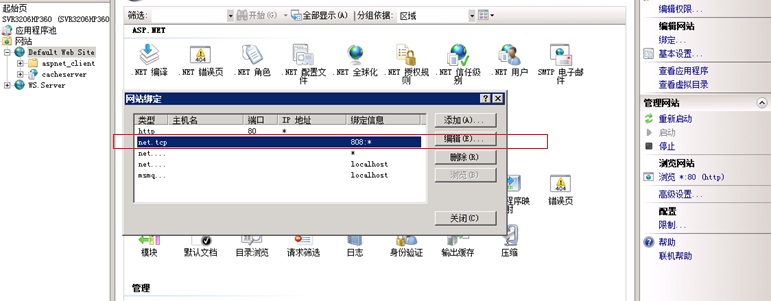
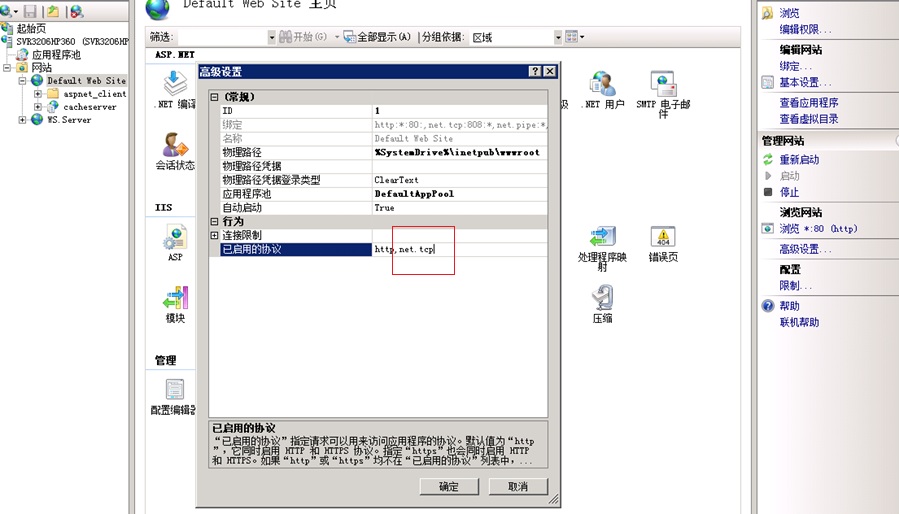
2)启用net.tcp协议:
如果不配置会出现下面错误:
Could not find a base address that matches scheme net.tcp for the endpoint with binding NetTcpBinding. Registered base address schemes are [http].
五、WCF3.0 和WCF 4.0 冲突:
如果有.net 3.5 和.net 4.0同时存在,有可能程序会找错对应的处理程序。
Could not load type ‘System.ServiceModel.Activation.HttpModule’ from assembly ‘System.ServiceModel, Version=3.0.0.0, Culture=neutral, PublicKeyToken=b77a5c561934e089′.
重新注册就可以:
"%WINDIR%\Microsoft.Net\Framework\v4.0.30319\aspnet_regiis" –i –enable
"%WINDIR%\Microsoft.Net\Framework\v4.0.30319\ServiceModelReg.exe" -r
我有参考这篇文章:http://www.cnblogs.com/Gyoung/archive/2012/12/11/2812555.html
在 WCF 4.0 启用NET.TCP 不需要 这2个操作:
1) 安装WAS
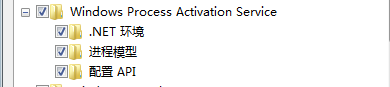
2) 确定WCF是否启用Non-Http支持

六、其他可能的错误:
1) IIS站点多主机头绑定的错误:
Server Error in '/WcfServiceOfMyTest' Application.
This collection already contains an address with scheme http. There can be at most one address per scheme in this collection. If your service is being hosted in IIS you can fix the problem by setting 'system.serviceModel/serviceHostingEnvironment/multipleSiteBindingsEnabled' to true or specifying 'system.serviceModel/serviceHostingEnvironment/baseAddressPrefixFilters'.
Parameter name: item
方法是:在config的</system.serviceModel> 里面允许多主机头绑定:
</system.serviceModel>
.......
<serviceHostingEnvironment multipleSiteBindingsEnabled="true" />
</system.serviceModel>
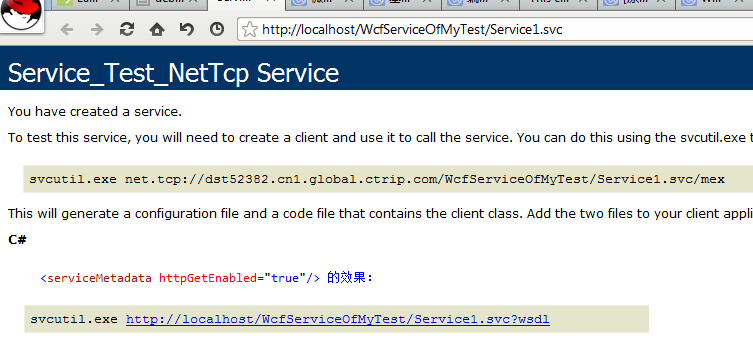
2) 为什么测试界面的协议不一样
svcutil.exe http://localhost/WcfServiceOfMyTest/Service1.svc?wsdl
与
svcutil.exe net.tcp://dst52382.cn1.global.ctrip.com/WcfServiceOfMyTest/Service1.svc/mex
区别在协议 http 和 net.tcp 的是否启用,配置在这里会影响:
<serviceMetadata httpGetEnabled="false"/>
七、测试程序
新建一个默认的wcf service
配置如下:
<?xml version="1.0"?>
<configuration>

  <system.web>
    <compilation debug="true" targetFramework="4.0" />
  </system.web>
    <system.serviceModel>
      <protocolMapping>
        <add scheme="tcp" binding="netTcpBinding"/>
      </protocolMapping>
      <bindings>
        <netTcpBinding>
          <binding name="netTcpBindConfig"  closeTimeout="00:30:00" portSharingEnabled="true"
                  openTimeout="00:30:00" receiveTimeout="00:30:00" sendTimeout="00:30:00" maxBufferPoolSize="2147483647" maxBufferSize="2147483647"
                    maxConnections="100" maxReceivedMessageSize="2147483647"
                  transactionFlow="false" transferMode="Buffered" transactionProtocol="OleTransactions"
                  hostNameComparisonMode="StrongWildcard" listenBacklog="100">

            <readerQuotas maxDepth="2147483647"
                                      maxStringContentLength="2147483647"
                                      maxArrayLength="2147483647"
                                      maxBytesPerRead="2147483647"
                                      maxNameTableCharCount="2147483647" />
            <reliableSession ordered="true"  inactivityTimeout="00:01:00" enabled="false" />
            <security mode="None">
              <transport clientCredentialType="Windows" protectionLevel="EncryptAndSign"  />
              <message clientCredentialType="Windows"  />
            </security>
          </binding>
        </netTcpBinding>
      </bindings>
      <services>

        <service behaviorConfiguration="MyBehavior" name="WcfServiceOfMyTest.Service_Test_NetTcp"> <!--这个服务名字不是随便取得,要跟你的class文件里的类的名字一致!-->
          <endpoint address="" binding="netTcpBinding" contract="WcfServiceOfMyTest.IJustAnInterface" bindingConfiguration="netTcpBindConfig"></endpoint>
          <endpoint address="mex" binding="mexTcpBinding" contract="IMetadataExchange" ></endpoint>
        </service>

      </services>
      <behaviors>
        <serviceBehaviors>
          <behavior name="MyBehavior" >
            <serviceMetadata httpGetEnabled="false"/>
            <serviceDebug includeExceptionDetailInFaults="true" />
            <dataContractSerializer maxItemsInObjectGraph="6553600"/>
          </behavior>
        </serviceBehaviors>
      </behaviors>
      <serviceHostingEnvironment multipleSiteBindingsEnabled="true" />
    </system.serviceModel>

  <system.webServer>
    <modules runAllManagedModulesForAllRequests="true"/>
  </system.webServer>

</configuration>
这个配置会有错误:
There is no compatible TransportManager found for URI 'net.tcp://dst52382.cn1.global.ctrip.com/WcfServiceOfMyTest/Service1.svc/mex'. This may be because that you have used an absolute address which points outside of the virtual application, or the binding settings of the endpoint do not match those that have been set by other services or endpoints. Note that all bindings for the same protocol should have same settings in the same application.
对应的中文描述:
未找到 URI“net.tcp://gyoung/Service1.svc/mex”的兼容 TransportManager。这可能是因为使用了指向虚拟应用程序外部的绝对地址,或终结点的绑定设置与其他服务或终结点所设置的绑定设置不匹配。 请注意,同一协议的所有绑定在同一应用程序中应具有相同的设置。
这个错误的重点在后半句话,endpoint的binding配置需要一致,这里2个endpoint,一个是服务终结点,它的 maxConnections="100" 不是默认值10,另外一个是元数据终结点,这里的max connection默认是10.
<endpoint address="" binding="netTcpBinding"
<endpoint address="mex" binding="mexTcpBinding"他们的binding类型不一致。将他们改为一致。如下:
 <service behaviorConfiguration="MyBehavior" name="WcfServiceOfMyTest.Service_Test_NetTcp">
      <endpoint address="" binding="netTcpBinding" contract="WcfServiceOfMyTest.IJustAnInterface" bindingConfiguration="netTcpBindConfig"></endpoint>
      <endpoint address="mex" binding="netTcpBinding" contract="IMetadataExchange"  bindingConfiguration="netTcpBindConfig" ></endpoint>
 </service>
八、完整源代码:
接口源代码:
namespace WcfServiceOfMyTest
{
    // NOTE: You can use the "Rename" command on the "Refactor" menu to change the interface name "IService1" in both code and config file together.
    [ServiceContract]
    public interface IJustAnInterface
    {

        [OperationContract]
        string GetData(int value);

        [OperationContract]
        CompositeType GetDataUsingDataContract(CompositeType composite);

        // TODO: Add your service operations here
    }


    // Use a data contract as illustrated in the sample below to add composite types to service operations.
    [DataContract]
    public class CompositeType
    {
        bool boolValue = true;
        string stringValue = "Hello ";

        [DataMember]
        public bool BoolValue
        {
            get { return boolValue; }
            set { boolValue = value; }
        }

        [DataMember]
        public string StringValue
        {
            get { return stringValue; }
            set { stringValue = value; }
        }
    }
}
服务源代码:
using System;
using System.Collections.Generic;
using System.Linq;
using System.Runtime.Serialization;
using System.ServiceModel;
using System.ServiceModel.Web;
using System.Text;

namespace WcfServiceOfMyTest
{
    // NOTE: You can use the "Rename" command on the "Refactor" menu to change the class name "Service1" in code, svc and config file together.
    public class Service_Test_NetTcp : IJustAnInterface
    {
        public string GetData(int value)
        {
            return string.Format("You entered: {0}", value);
        }

        public CompositeType GetDataUsingDataContract(CompositeType composite)
        {
            if (composite == null)
            {
                throw new ArgumentNullException("composite");
            }
            if (composite.BoolValue)
            {
                composite.StringValue += "Suffix";
            }
            return composite;
        }
    }
}
web.config 配置:
<?xml version="1.0"?>
<configuration>

  <system.web>
    <compilation debug="true" targetFramework="4.0" />
  </system.web>
    <system.serviceModel>
      <protocolMapping>
        <add scheme="tcp" binding="netTcpBinding"/>
      </protocolMapping>
      <bindings>
        <netTcpBinding>
          <binding name="netTcpBindConfig"  closeTimeout="00:30:00" portSharingEnabled="true"
                  openTimeout="00:30:00" receiveTimeout="00:30:00" sendTimeout="00:30:00" maxBufferPoolSize="2147483647" maxBufferSize="2147483647"
                    maxConnections="100" maxReceivedMessageSize="2147483647"
                  transactionFlow="false" transferMode="Buffered" transactionProtocol="OleTransactions"
                  hostNameComparisonMode="StrongWildcard" listenBacklog="100">

            <readerQuotas maxDepth="2147483647"
                                      maxStringContentLength="2147483647"
                                      maxArrayLength="2147483647"
                                      maxBytesPerRead="2147483647"
                                      maxNameTableCharCount="2147483647" />
            <reliableSession ordered="true"  inactivityTimeout="00:01:00" enabled="false" />
            <security mode="None">
              <transport clientCredentialType="Windows" protectionLevel="EncryptAndSign"  />
              <message clientCredentialType="Windows"  />
            </security>
          </binding>
        </netTcpBinding>
      </bindings>
      <services>

        <service behaviorConfiguration="MyBehavior" name="WcfServiceOfMyTest.Service_Test_NetTcp">
          <endpoint address="" binding="netTcpBinding" contract="WcfServiceOfMyTest.IJustAnInterface" bindingConfiguration="netTcpBindConfig"></endpoint>
          <endpoint address="mex" binding="netTcpBinding" contract="IMetadataExchange"  bindingConfiguration="netTcpBindConfig" ></endpoint>
        </service>

      </services>
      <behaviors>
        <serviceBehaviors>
          <behavior name="MyBehavior" >
            <serviceMetadata httpGetEnabled="false"/>
            <serviceDebug includeExceptionDetailInFaults="true" />
            <dataContractSerializer maxItemsInObjectGraph="6553600"/>
          </behavior>
        </serviceBehaviors>
      </behaviors>
      <serviceHostingEnvironment multipleSiteBindingsEnabled="true" />
    </system.serviceModel>

  <system.webServer>
    <modules runAllManagedModulesForAllRequests="true"/>
  </system.webServer>

</configuration>
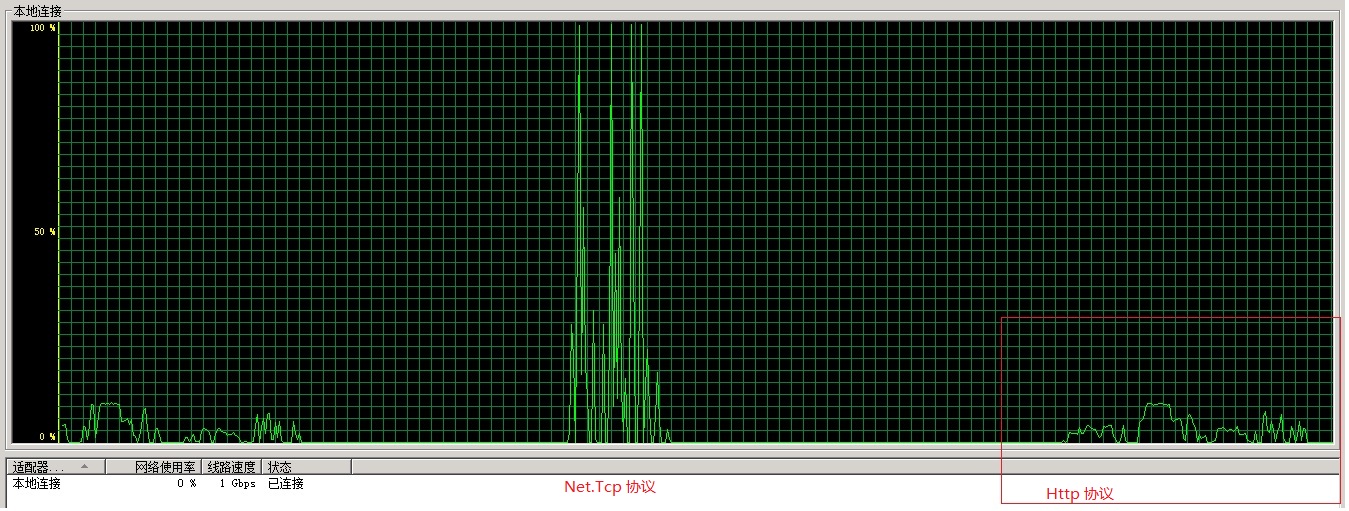
九、HTTP 与 NET.TCP 通信效率的差别:
参考资料:
http://www.cnblogs.com/artech/archive/2009/06/21/1507945.html
http://www.cnblogs.com/Gyoung/archive/2012/12/11/2812555.html
http://blogs.msdn.com/b/swiss_dpe_team/archive/2008/02/08/iis-7-support-for-non-http-protocols.aspx
http://www.cnblogs.com/webabcd/archive/2010/08/02/1790175.html
http://www.codeproject.com/Articles/16765/WCF-Windows-Communication-Foundation-Example
http://www.codeproject.com/Tips/90804/Using-WCF-without-a-generated-proxy-by-using-Chann
http://blogs.msdn.com/b/vipulmodi/archive/2006/11/16/dynamic-programming-with-wcf.aspx
http://www.codeproject.com/Articles/89312/Windows-Communication-Foundation-QuickStart-Multip
此内容由惯性聚合(RSS阅读器)自动聚合整理,仅供阅读参考。 原文来自 — 版权归原作者所有。