







一、背景:
在一个项目中碰到大数据插入的问题,一次性插入20万条数据(SQL Server),并用200个线程去执行,计算需要花费多少时间,因此需要等200个线程处理完成后,记录花费的时间,需要考虑的一个问题是:如何判断判断多个线程是否全部执行完成。在执行数据库的插入过程中,当每个线程需要处理的数据量大时,是个耗时的过程,故对通过配置开启多个线程。
二、问题:
问题出来了,那么如何知道所有的线程操作都全部完成了,答案是利用C#中的的ManualResetEvent来处理;于是有下面的写法。
//针对每个线程 绑定初始化一个ManualResetEvent实例
ManualResetEvent doneEvent = new ManualResetEvent(false);
//通过ThreadPool.QueueUserWorkItem(网络请求方法HttpRequest,doneEvent ) 来开启多线程

//将等待事件一一加入事件列表

 List<ManualResetEvent> listEvent = new List<ManualResetEvent>();
for(int i=0;i<线程数;i++){
        listEvent.Add(doneEvent);
}

//主线程等待每个线程全部完成
WaitHandle.WaitAll(listEvent.ToArray());
//....接下去的时间计算


//在保存数据的的每个线程中调用
doneEvent.Set();//通知主线程 本线程保存数据方法已经调用完成
运行好像没有问题,但是当线程数大于64个之后抛出异常 WaitHandles must be less than or equal to 64
通过网上查询,得知原来WaitHandle.WaitAll(listEvent.ToArray()); 这里listEvent线程数不能超过64个
三、解决方案:
原理:封装一个ManualResetEvent对象,一个计数器current,提供SetOne和WaitAll方法;
主线程调用WaitAll方法使ManualResetEvent对象等待唤醒信号;
各个子线程调用setOne方法 ,setOne每执行一次current减1,直到current等于0时表示所有子线程执行完毕 ,调用ManualResetEvent的set方法,这时主线程可以执行WaitAll之后的步骤。
目标:减少ManualResetEvent对象的大量产生和使用的简单性。
四、例子:
 public class MutipleThreadResetEvent : IDisposable
    {
        private readonly ManualResetEvent done;
        private readonly int total;
        private long current;
        /// <summary>
        /// 构造函数
        /// </summary>
        /// <param name="total">需要等待执行的线程总数</param>
        public MutipleThreadResetEvent(int total)
        {
            this.total = total;
            current = total;
            done = new ManualResetEvent(false);
        }

        /// <summary>
        /// 唤醒一个等待的线程
        /// </summary>
        public void SetOne()
        {
            // Interlocked 原子操作类 ,此处将计数器减1
            if (Interlocked.Decrement(ref current) == 0)
            {
                //当所以等待线程执行完毕时,唤醒等待的线程
                done.Set();
            }
        }

        /// <summary>
        /// 等待所以线程执行完毕
        /// </summary>
        public void WaitAll()
        {
            done.WaitOne();
        }

        /// <summary>
        /// 释放对象占用的空间
        /// </summary>
        public void Dispose()
        {
            ((IDisposable)done).Dispose();
        }
    }
本质就是只通过1个ManualResetEvent 对象就可以实现同步N(N可以大于64)个线程
    public class Process
    {
       public static int workItemCount = 0;
        Process() { }
        public static void ProcessDataThread(object state)
        {
            State stateinfo = state as State;

            int count = Int32.Parse(stateinfo.perthreadtotal.ToString());
            if (count == 0)
            {
                ProcessManage.InputLog("输入的数据不正确,请重新输入");
                return;
            }
            int workItemNumber = workItemCount;
            Interlocked.Increment(ref workItemCount);
            ProcessManage.InputLog(string.Format("线程{0}开始工作", workItemNumber.ToString()));
            string sql = @"insert into gpsposition (PlateType,CarNo,Latitude,Longitude,Altitude,Heading,Speed,Timestamp)
values";
            string insertvalue = string.Empty;
            string va = @"('02','渝B12345',10,10,10,20,10,'2016/11/1 12:00'),";
            for (int i = 0; i < count; i++)
            {
                insertvalue = (insertvalue + va);
            }
            insertvalue = insertvalue.TrimEnd(',');
            //执行sql语句
            try
            {
                ProcessManage.ProcessData(string.Concat(sql, insertvalue));
            }
            catch (Exception ex)
            {
                ProcessManage.InputLog(string.Format("线程{0},SQL执行错误:{1}", workItemNumber.ToString(), ex.Message));
            }
            finally
            {
                ProcessManage.InputLog(string.Format("线程{0}执行完成", workItemNumber.ToString()));
                stateinfo.manualEvent.SetOne();
            }
        }
    }
页面调用代码如下:
 private void button1_Click(object sender, EventArgs e)
        {
            Process.workItemCount = 0;
            int threadcount = 0;
            int totalcount = 0;
            Int32.TryParse(this.txtThreadCount.Text, out threadcount);
            Int32.TryParse(this.txtTotalCount.Text, out totalcount);
            if (threadcount == 0 || totalcount == 0)
            {
                MessageBox.Show("文本中输入的数字不正确,请输入大于0的整数");
                return;
            }
            int perthreadtotal = totalcount / threadcount;
            ProcessManage.InputLog(string.Format("总记录数-{0}条", totalcount));
            ProcessManage.InputLog(string.Format("线程执行数量-{0}个", threadcount));
            ProcessManage.InputLog(string.Format("每个线程执行记录数-{0}条", perthreadtotal));
            ProcessManage.InputLog("=================================================");
            ProcessManage.InputLog("开始启动线程执行");

            State stateInfo;
            Stopwatch watch = new Stopwatch();
            watch.Start();
            using (var manualEvents = new MutipleThreadResetEvent(threadcount))
            {
                for (int i = 0; i < threadcount; i++)
                {
                    stateInfo = new State(manualEvents, perthreadtotal);
                    ThreadPool.QueueUserWorkItem(new WaitCallback(Process.ProcessDataThread), stateInfo);
                }
                manualEvents.WaitAll();
            }
            watch.Stop();
            ProcessManage.InputLog(string.Format("全部线程执行完成,耗时{0}秒",watch.Elapsed));
        }
五、UI效果:
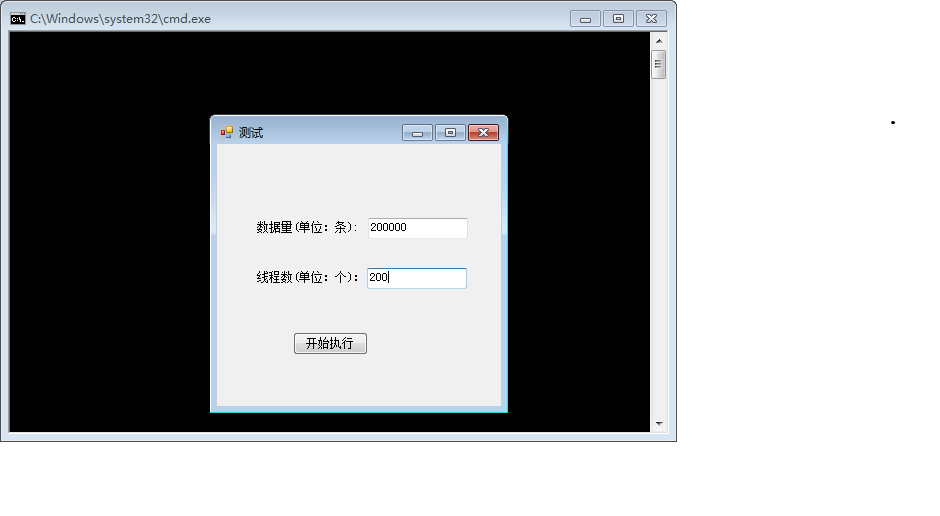
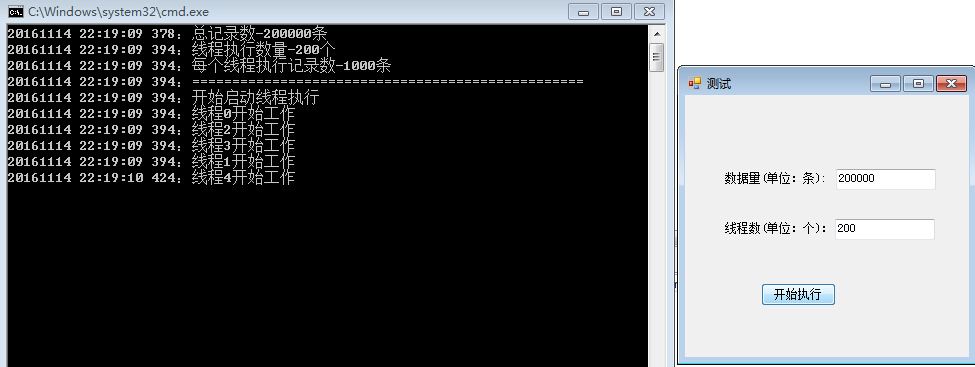
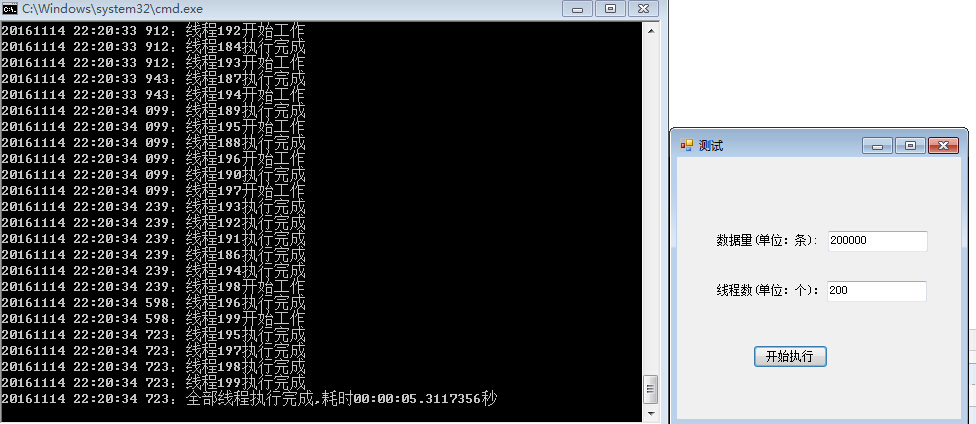
总结:20万数据一次性用200个线程执行,只花费了5秒多的时间即完成。
此内容由惯性聚合(RSS阅读器)自动聚合整理,仅供阅读参考。 原文来自 — 版权归原作者所有。