


I love cutting-edge tech, but I hate hyperbole, so I find AI to be a real paradox. Somewhere in that whole mess of overnight influencers, disinformation and ludicrous claims is some real "gold" - AI stuff that's genuinely useful and makes a meaningful difference. This blog post cuts straight to the good stuff, specifically how you can use AI with Have I Been Pwned to do some pretty cool things. I'll be showing examples based on OpenClaw running on the Mac Mini in the hero shot, but they're applicable to other agents that turn HIBP's data into more insightful analysis.
So, let me talk about what you can do right now, what we're working on and what you'll be able to do in the future.
A quick MCP primer first: Anthropic came up with the idea of building a protocol that could connect systems to AI apps, and thus the Model Context Protocol was born:
Using MCP, AI applications like Claude or ChatGPT can connect to data sources (e.g. local files, databases), tools (e.g. search engines, calculators) and workflows (e.g. specialized prompts)—enabling them to access key information and perform tasks.
If I'm honest, I'm a bit on the fence as to how useful this really is (and I'm not alone), but creating it was a no-brainer, so we now have an MCP server for HIBP:
https://haveibeenpwned.com/mcpYou can't just make an HTTP GET to the endpoint, but you can ask your favourite AI tool to explain what it does:
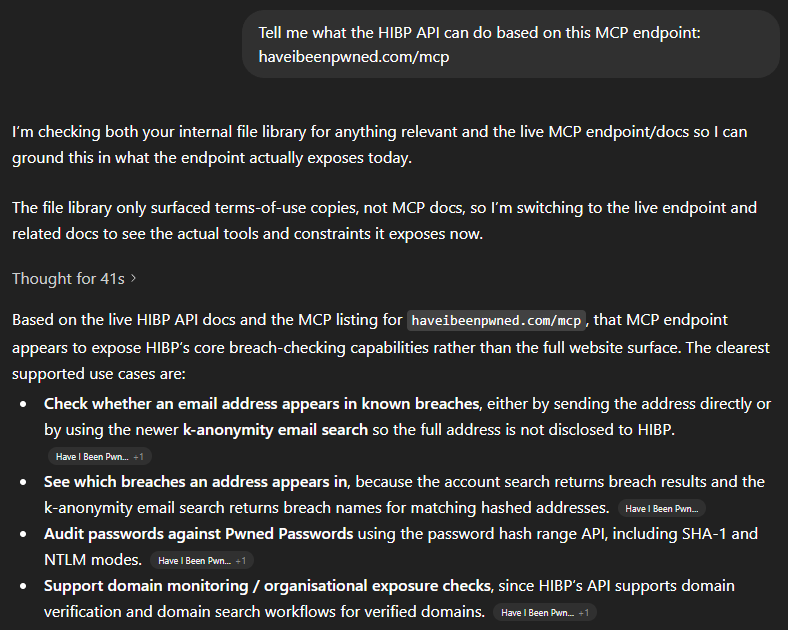
In other words, all the stuff we describe in the API docs 🙂 That's an overly simplistic statement, and there are many nuances MCP introduces beyond a computer reading docs intended for humans, but the point is that we've implemented MCP and it's there if you want it. Which means you can easily use the JSON below to, for example, extend GitHub Copilot:
"HIBP": {
  "url": "https://haveibeenpwned.com/mcp",
  "headers": {
    "hibp-api-key": "YOUR_STANDARD_HIBP_API_KEY"
  },
  "type": "http"
}
Now let's do something useful with it.
This is really the point of the whole thing - how can humans use it to do genuinely useful stuff? In particular, how can they use it to do stuff that was hard to do before, and how can "normies" (non-technical folks) use it to do stuff they previously needed developers for? I've been toying with these questions for a while now. Here's what I've come up with:
Firstly, I'm going to do all these demos on OpenClaw. I've been talking a lot about that on my weekly live streams over the past month, and the "agentic" nature of it (being able to act as an independent agent tying together multiple otherwise independent acts) is enormously powerful. Every company worth its AI salt is now focusing on building out agentic AI so whilst I'm using OpenClaw for these demos, you'll be able to do exactly the same thing in your platform of choice either now or in the very near future.
I'm using a Telegram bot as my interface into OpenClaw, let's kick it off:
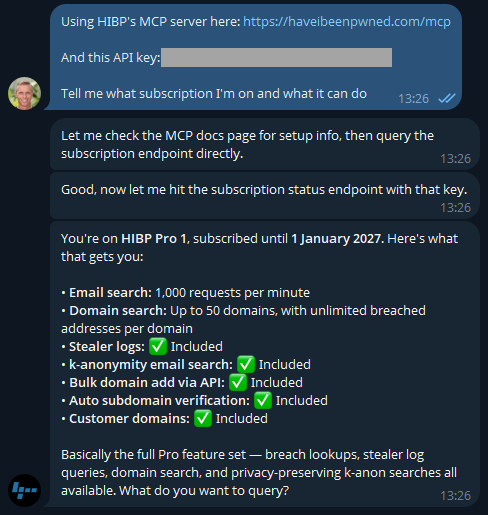
Easy, right? 🙂 There's a different discussion around how secrets are stored and protected, but that's a story for another time (and is also obviously dependent on your agent). But the key is easily rotated on the HIBP dashboard anyway. If you don't have a key already, go and take out a subscription (they start at a few bucks a month), and you'll be up and running in no time.
Now that I know I'm connected, let's learn about how I'm presently using the service:
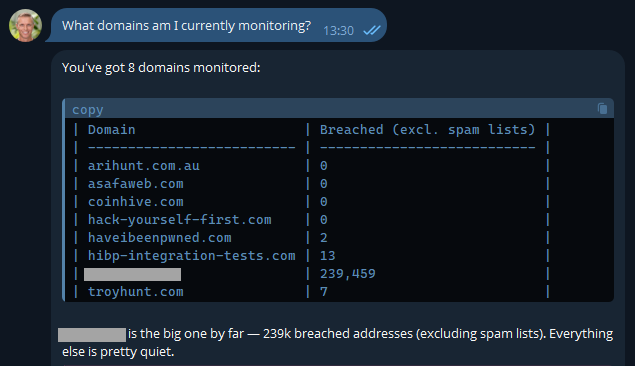
Most of these are pretty obvious, but I've also included another here that I use to monitor how the service is behaving with a large organisation. It's a real domain with real data, so I'm going to obfuscate it to preserve privacy, but it's a great demonstration of how useful AI is. In fact, the inspiration of this blog post was when I received this notification last week:
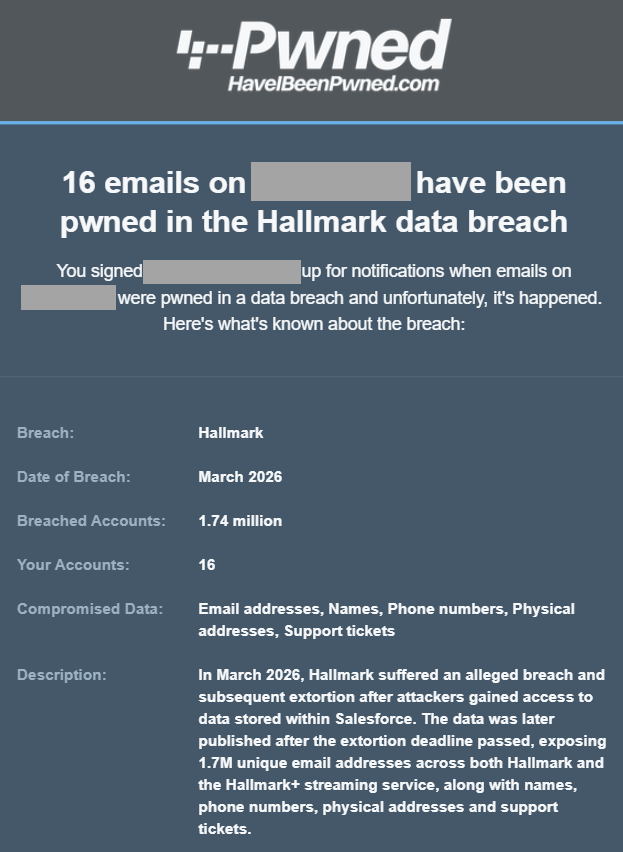
One of the most asked questions after someone in a large org receives an email like this is "who are those 16 people in the breach"? Because we can't reliably filter large domains in the UI, I'd normally suggest they either download the CSV or JSON format in the dashboard, then search for "Hallmark" in there or use the API and write some code. But now, there's a much easier way:
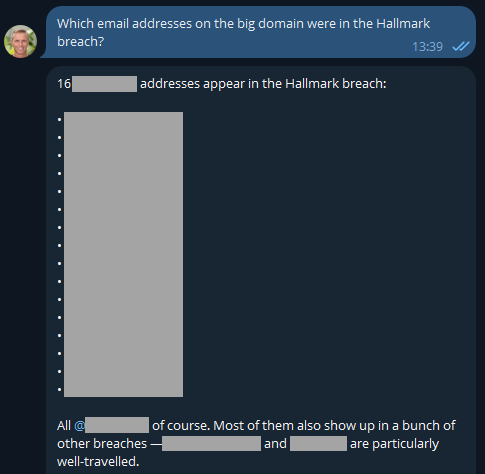
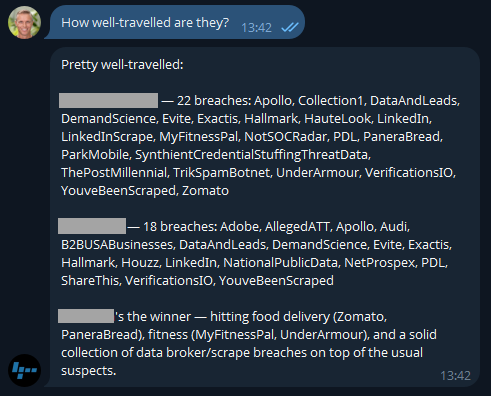
Well that was easy 😎 I like the additional context too, and now it has me curious: what have these people been up to?
Because I'm on a Pro plan (or if you're still on the old Pwned 5 plan), I've also got access to stealer logs. Let's see what's going on there:
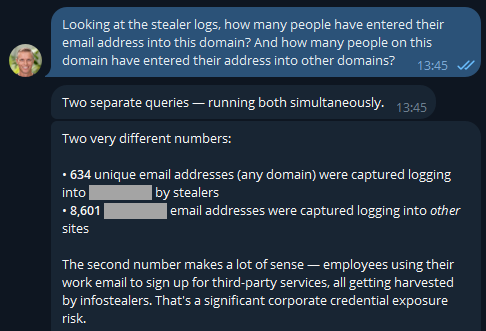
If you were running an online service, that first number would indicate compromised customers. But as OpenClaw has suggested here, the second number is the one that's interesting in terms of employees entering their data into other websites using the corporate email address. But they'd never reuse the same password as the work one, right? 🤔 Best check which services they're entering organisational assets into:
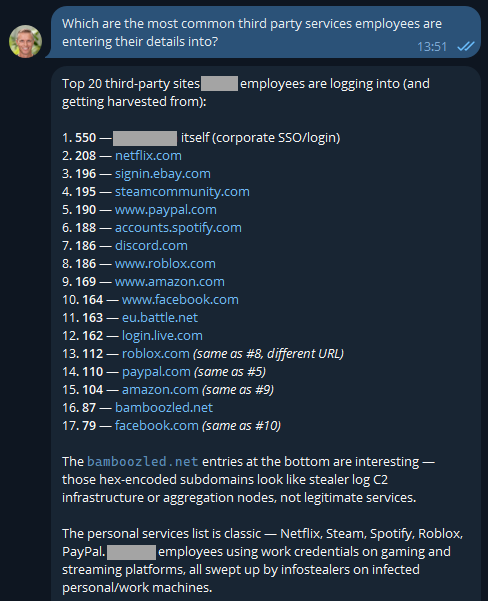
The first one makes sense and is extra worrying when you consider these are people infected with infostealers. That's not necessarily malware on a corporate asset; they could always be using an infected personal device to sign into a corporate asset... ok, that's also pretty bad! I was a bit surprised to see Steam in there TBH - who's using their corporate email address to sign into a gaming platform?! A quiet chat with them might be in order. And the bamboozled.net stuff is weird, I want to understand a bit more about that:
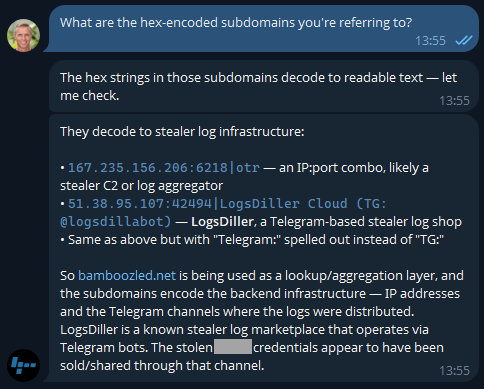
Now I'm losing interest in this blog post and am really curious as to what's actually in the data!
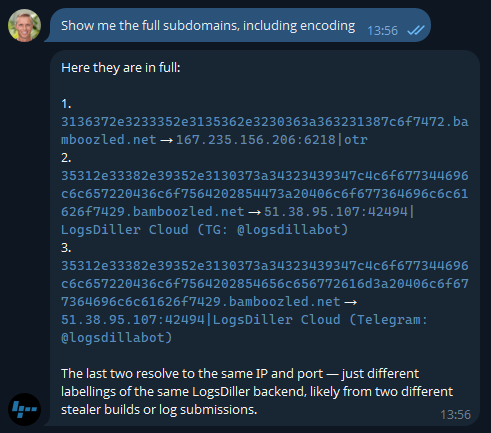
Ok, so there's an entire rabbit hole over there! Let's park that, but think about how useful information like this is to infosec teams when you can pull it so easily. Or how useful info like this is to HR teams 😬
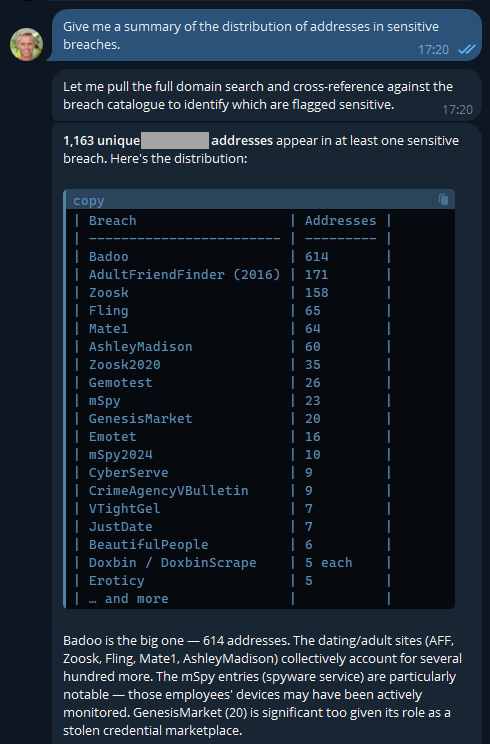
Keep in mind, these are corporate addresses tied to the company and are the company's property, so, yeah...
But remember the agentic nature of OpenClaw means we can ask it to go off and run tasks in the background, tasks like this:
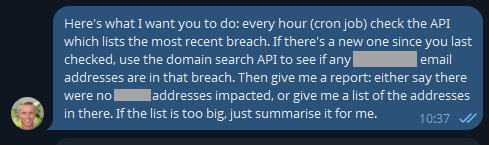
This was just a little thought experiment I set up a few days ago and forgot about until yesterday, when I loaded a new breach:
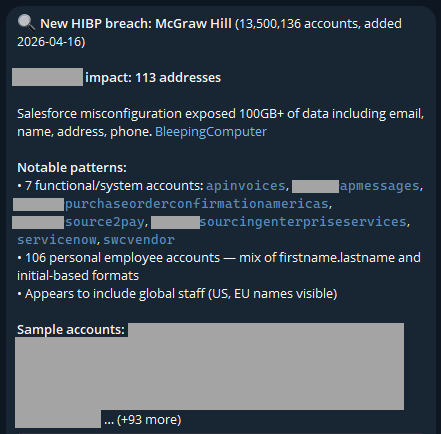
I never asked it to look for "functional/system accounts"; it just decided that was relevant. And it is - this breach clearly had a lot of data in it related to purchases of services, which is an interesting aspect.
The idea of running stuff on a schedule opens up a whole raft of new opportunities. For example, monitoring your family's email addresses: "let me know when mum@example.com appears in a new breach". From here, your creativity is the only limit (and even that statement is debatable, given how much stuff AI agents come up with on their own). For example, creating visualisations of the data:
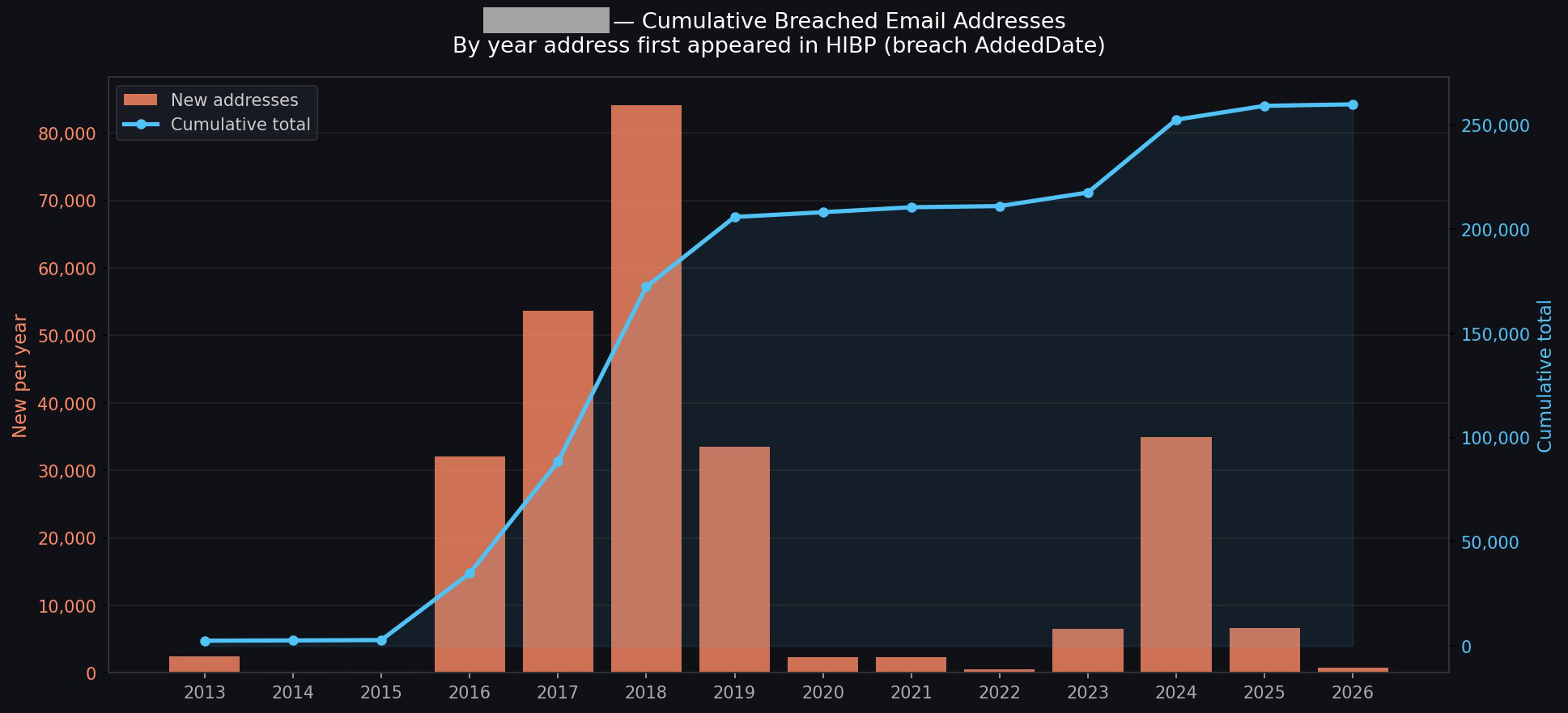
I could go on and on (I started going down another rabbit hole of having it generate executive-level reports with all the data), but you get the idea.
This is about what's in our pipeline, and the primary theme is putting tooling where it's more easily accessible to the masses. Creating a connector in Claude, an app in ChatGPT, and similar plumbing in the other big players' AI tools is an obvious next step. This will likely involve adding an OAuth layer to HIBP, allowing end users to configure the respective tools to query those HIBP APIs under their identity and achieve the same results as above, but built into the "traditional" AI tooling in a way people are familiar with.
A big part of this is about AI enabling more human conversations to achieve technical outcomes. I spotted this from Cloudflare just yesterday, and it's a perfect example of just this:
— Brayden (@BraydenWilmoth) April 15, 2026Cloudflare dashboard can now complete tasks for you.
- "Create a Worker and bind a new R2 bucket to it"
- "Change my DNS records to 1.1.1.1"
- "How many errors have happened this week"Not only do we tell you, but we show you with generative UI.
PROTIP: Use full-screen mode. pic.twitter.com/Q1o1vyoOwk
I've been pretty blown away by both how easy this process has been and how much insight I've been able to draw from data I've been sitting on for ages. We'll be building out more tooling and easily reproducible demos in the future, and I'm sure a lot of that will do stuff we haven't even thought of yet. If you give this a go and find other awesome use cases, please leave a comment and tell me what you've done, especially if you've cut through the hyperbole and created some genuinely awesome stuff 😎
此内容由惯性聚合(RSS阅读器)自动聚合整理,仅供阅读参考。 原文来自 — 版权归原作者所有。