惯性聚合 高效追踪和阅读你感兴趣的博客、新闻、科技资讯
阅读原文 在惯性聚合中打开

推荐订阅源

美团技术团队
D
DataBreaches.Net
OSCHINA 社区最新新闻
OSCHINA 社区最新新闻
D
Docker
N
Netflix TechBlog - Medium
Cyber Security Advisories - MS-ISAC
C
Check Point Blog
腾讯CDC
Stack Overflow Blog
Stack Overflow Blog
V
Visual Studio Blog
IT之家
IT之家
月光博客
月光博客
U
Unit 42
K
Kaspersky official blog
T
Threatpost
cs.AI updates on arXiv.org
GbyAI
GbyAI
P
Proofpoint News Feed
Last Week in AI
Last Week in AI
云风的 BLOG
云风的 BLOG
酷 壳 – CoolShell
酷 壳 – CoolShell
I
InfoQ
Engineering at Meta
Engineering at Meta
Recorded Future
Recorded Future
Exploit-DB.com RSS Feed
freeCodeCamp Programming Tutorials: Python, JavaScript, Git & More
S
Security @ Cisco Blogs
MyScale Blog
MyScale Blog
大猫的无限游戏
大猫的无限游戏
Security Archives - TechRepublic
Webroot Blog
Webroot Blog
cs.CV updates on arXiv.org
Hacker News - Newest:
Hacker News - Newest: "LLM"
S
Schneier on Security
S
Secure Thoughts
The Register - Security
B
Blog RSS Feed
The Last Watchdog
The Last Watchdog
P
Palo Alto Networks Blog
爱范儿
爱范儿
B
Blog
让小产品的独立变现更简单 - ezindie.com
N
News and Events Feed by Topic
阮一峰的网络日志
阮一峰的网络日志
L
LINUX DO - 热门话题
C
Cisco Blogs
Spread Privacy
Spread Privacy
F
Full Disclosure
博客园 - 聂微东
T
The Blog of Author Tim Ferriss

博客园 - 深山老林

测试Varnish缓存服务器与IIS连接数 谈谈持续集成 亲测SQLServer的最大连接数 读书笔记:Oracle锁定策略的总结 jQuery formValidator不支持新版手机的解决办法 Mindjet.MindManager.v9.0“参数错误”解决办法 c#3.0提供的扩展方法 Entityframework提供的处理并发冲突方式 ASP.NET MVC2中返回Json异常的解决办法 Visual studio 配置文件下载 WF之基本概念 数据库访问的性能问题与瓶颈问题 SQLServer中批量插入数据方式的性能对比 再次探扩展-对xVal进行扩展解决验证不同步的问题 微软并行编程类库Parallel Extensions介绍 更改Outlook数据文件的路径 谈谈c#中的static 再次探讨企业级开发中的Try......Catch性能问题 在企业级开发中使用Try...Catch...会影响效率吗?
TFS Workspace错误解决办法
深山老林 · 2010-09-25 · via 博客园 - 深山老林

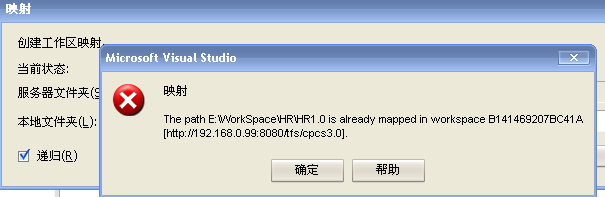
今天在给组员部署TFS客户端的时候遇到了错误,错误格式为:The Path <local path> is already mapped in workspace <machine name [old tfs server]>。如下图所示:

解决的办法如下:

  1. 打开Visual Studio Command Prompt输入命令:tf workspaces /remove:*
  2. 重新启动VS,重新进行工作区映射,就不会出现这样的问题了。