
惯性聚合 高效追踪和阅读你感兴趣的博客、新闻、科技资讯
阅读原文 在惯性聚合中打开

推荐订阅源

Apple Machine Learning Research
Application and Cybersecurity Blog
Exploit-DB.com RSS Feed
T
Tenable Blog
P
Proofpoint News Feed
爱范儿
爱范儿
The Hacker News
The Hacker News
W
WeLiveSecurity
WordPress大学
WordPress大学
让小产品的独立变现更简单 - ezindie.com
The Register - Security
I
Intezer
S
SegmentFault 最新的问题
P
Privacy & Cybersecurity Law Blog
人人都是产品经理
人人都是产品经理
Security Archives - TechRepublic
G
Google Developers Blog
酷 壳 – CoolShell
酷 壳 – CoolShell
G
GRAHAM CLULEY
MongoDB | Blog
MongoDB | Blog
Blog — PlanetScale
Blog — PlanetScale
Hugging Face - Blog
Hugging Face - Blog
P
Palo Alto Networks Blog
A
About on SuperTechFans
Attack and Defense Labs
奇客Solidot–传递最新科技情报
奇客Solidot–传递最新科技情报
D
Darknet – Hacking Tools, Hacker News & Cyber Security
博客园_首页
SecWiki News
SecWiki News
博客园 - 聂微东
cs.CL updates on arXiv.org
Hacker News - Newest:
Hacker News - Newest: "LLM"
Last Week in AI
Last Week in AI
Forbes - Security
Forbes - Security
C
Cyber Attacks, Cyber Crime and Cyber Security
Threat Intelligence Blog | Flashpoint
F
Full Disclosure
Help Net Security
Help Net Security
Cyber Security Advisories - MS-ISAC
P
Proofpoint News Feed
S
Schneier on Security
K
Kaspersky official blog
S
Secure Thoughts
C
Cisco Blogs
T
Tor Project blog
H
Hackread – Cybersecurity News, Data Breaches, AI and More
L
LangChain Blog
Hacker News: Ask HN
Hacker News: Ask HN
N
News and Events Feed by Topic
MyScale Blog
MyScale Blog

博客园 - my favorite

【转】QT样式表 (QStyleSheet) 【转】Qt事件循环与线程 二 [转]Qt 智能指针学习 【转】Android Web Server 【转】Android Http Server Java Annotation 注释语法 android中json的序列化与反序列化 JavaScript定义类的几种方式 js获取浏览器高度和宽度值(多浏览器) Setting up SSL made easy… Better, Faster, Easier SSL testing for ASP.NET MVC & WebForms ASP.NET MVC 3 Internationalization Windows 8 学习笔记(十四)--.map文件与.kml文件的解析 Windows 8 学习笔记(十三)--生命周期 Windows 8学习笔记(十一)---图片的显示与保存 Windows 8 Metro App学习笔记(九)—磁砖 Windows 8学习笔记(十)----Notification Windows 8 学习笔记(八)--各种流之间的转换 Windows 8学习笔记(七)--Input输入设备
Windows 8学习笔记(十二)--集合控件
my favorite · 2012-07-03 · via 博客园 - my favorite

在Win8 Metro App中,集合项的显示大多基于ListView\ListBox\GridView三个控件实现。

今天就用分别试用一下哈~

首先看一下,官方对这三个控件的定义

ListBox: Contains a list of selectable items.(包含可选项目的列表)

ListView: Represents a control that displays a list of data items.(展现数据项列表显示的控件)

GridView: Represents a specialized ordered list view.(展现特殊排序的列表视图)

三个控件都简单用了一下,发现了几个细微的地方:

相同点:

(1)它们都可以显示数据列表;

(2)都可以实现分组显示;

(3)都是基于Selector的控件

不同点:

(1)ListBox的SelectionMode只有 Extended、Multipule、Single三个属性,ListView和    GridView多一个None属性

(2)ListView和GridView有ItemClick事件,ListBox没有

其控件中的方法、属性非常多,只能结合需求涉及一部分属性。其基本用法与Phone7中基本相似,DataTemplate实现模板样式, 利用ItemSource绑定数据源,利用DataSelector绑定不同的数据模板。GroupStyle分组模板是我在Phone7中没有涉及过 的。

在学习GroupStyle之前,把我今天用ListView与ListBox的一些小插曲先整理一下:

当我在ListView中使用以下代码

  <ListView.ItemsPanel>                 <ItemsPanelTemplate>                     <WrapGrid Orientation="Horizontal" Height="400"></WrapGrid>                 </ItemsPanelTemplate> </ListView.ItemsPanel>                                                   

实现列表横向排列,当高度超过400自动向右横向排列,界面是如我所期望的展现了,但是在模拟器中使用触摸仿真手势却不能滑动了,当把标签改为ListBox时,却可以实现,不知其它同仁有没遇到这个问题,不知是不是在Win8中有部分是不是没全部开放???

GroupStyle

三个控件的使用方式相同,使用该模板,不得不提的数据源对象CollectionViewSource,在MSDN Sample里都用的这个对象作为数据源,当然传统的ItemSource赋数据源也是可以的。

CollectionViewSource 它是为支持分组集合类提供数据源

属性:

Source:用于设置列表显示数据源

ItemsPath:从CollectionViewSource的源中指定分组等级数据属性,如数据源是这样一个等级group---items—item我们对应的ItemsPath就可以设置这三个级别属性

IsSourceGrouped:该值表示数据源的数据是否分组

<GridView.GroupStyle>                 <GroupStyle>                     <GroupStyle.HeaderTemplate>                         <DataTemplate>                             <Grid Background="White" Margin="0">                                 <TextBlock Text='{Binding Key}' Foreground="Gray" FontSize="25" Margin="5" />                             </Grid>                         </DataTemplate>                     </GroupStyle.HeaderTemplate>                      <GroupStyle.Panel>                         <ItemsPanelTemplate>                             <VariableSizedWrapGrid Orientation="Vertical" Height="400" />                         </ItemsPanelTemplate>                     </GroupStyle.Panel>                 </GroupStyle>             </GridView.GroupStyle>  <GridView.ItemsPanel>                 <ItemsPanelTemplate>                     <StackPanel Orientation="Horizontal"/>                 </ItemsPanelTemplate>             </GridView.ItemsPanel> 

HeadTemplate:该模板表示每组组头的样式

GroupStyle中的ItemsPanelTemplate:用于设置每组其下的列表项显示的方式。

ItemPanel:用于设置每个独立组排列显示的方式

<page.resources>

        <collectionviewsource itemspath="Items" source="{Binding Groups}" issourcegrouped="true" x:name="cvs2">

</collectionviewsource></page.resources>

将CollectionViewSource数据源对象先加载进页面资源

<GridView x:Name="gridview" ItemsSource="{Binding Source={StaticResource cvs2}}">

再次控件的数据源绑定到CollectionViewSource对象即可

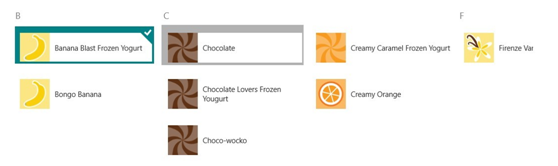
当然,还有很多用法也许我不是很了解,在Sample中SemanticZoom结合GridView实现了组头与组列表项显示的切换
image

image

当然还有很多结合不同控件的用法,等待发掘哦~

Trackback:

http://www.cnblogs.com/jing870812/archive/2012/04/23/2467194.html
