





今天在做项目时,意识到Win8 Meto App也有“墓碑”这个概念。从以下场景可以看出:从首页登录页面登录,进行列表页面,此时按Win键返加桌面开启另外一个应用程序,当我再次返回我第一 个页面时,却显示的是登录页面,这与想象的场景是不相符合的,做过Windows Phonen7的同胞应该都知道,在wp7 7.0的时是有“墓碑”的机制的,与以上场景完全类似。
不得不先学习一下Windows 8应用程序的生命周期啦,参照http://blogs.msdn.com/b/windowsappdev_cn/archive/2012/04/16/managing-app-lifecycle.aspx的博文进行学习的~
生命周期的状态
在Metro风格应用程序有四种状态:未运行、正在运行、已挂起或已终止。这些状态都会对应相应的事件,我们可以都过捕获这些事件做逻辑处理。
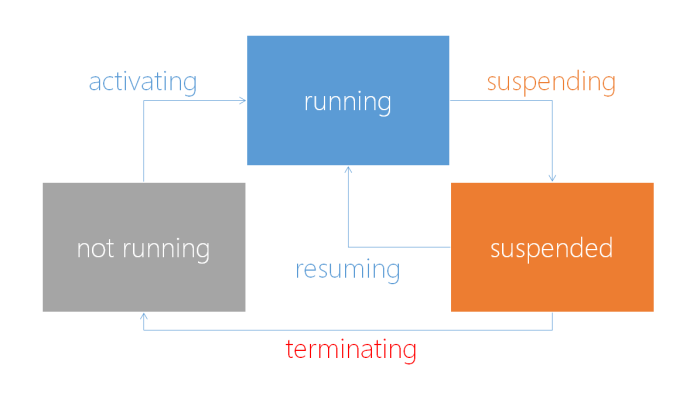
生命周期的相关事件
OnLaunched 程序开启事件
场景:第一次程序开启时会执行
OnSuspending 程序挂起事件
场景:在程序开启时,按win键或切换到其它应用程序,当前程序会处于挂起状态,大概测了一下,程序会在1分左右才会挂起,不会立即挂起
在该事件中,可以保存一些应用数据,以便在恢复时可以显示上一次浏览的页面及相应的数据
Resuming 当挂起状态恢复到程序运行时触发的事件
场景:当重新切换当前程序时,会执行,可以判断相关的数据是否保存,从而进行相应的显示
OnActivated 当应用程序不是普通的启动,而是通过其它途径被调用启动时触发
场景:该场景暂时还没有试验
生命周期状态分析
挂起
当用户切换到另一应用程序时当前程序停止运行。Windows会挂起不在前台的应用程序,程序需注册Suspending事件,当前应用程序离开前台时,我测了一下(不知与个人机器有无关系),在1分左右的时间后程序才会挂起。在该事件中,保存必须持久存储的相关数据。
首先在APP()构造函数中,注册Suspending事件
this.Suspending += OnSuspending;
void OnSuspending(object sender, SuspendingEventArgs e)
{
SuspendingDeferral deferral = e.SuspendingOperation.GetDeferral();
var localSettings = Windows.Storage.ApplicationData.Current.LocalSettings;
localSettings.Values["currentpage"] = MemoryData.CurrentPage;
deferral.Complete();
}
恢复
当重新回到应用程序时,应用程序状态将从挂起状态转成恢复状态,在注册Resuming事件后,应用程序中的数据将恢复到当时扶起时的数据。
这就是我们要实现“墓碑”的关键所在了,当程序恢复时,当前的数据应该至少与上一次看的相同,若更为真切地感觉程序处于运行状态,应该显示最新的数据,可以利用挂起时的数据获取更新的数据源。
同样也需要也注册:
this.Resuming += App_Resuming;
void App_Resuming(object sender, object e)
{
var localSettings = Windows.Storage.ApplicationData.Current.LocalSettings;
if (localSettings.Values.ContainsKey("currentpage"))
{
MemoryData.CurrentPage = localSettings.Values["currentpage"].ToString();
}
}
开启
当应用程序被启动时,会触发OnLaunch事件,该事件包含PreviousExecutionState属性,包含三个值:
Terminated、ClosedByUser、NotRunning、Running、Suspended
当值为Terminated时,必须还原已保存的会话数据,以使应用程序完全保持用户上次看到的界面。若为ClosedByUser、NotRunning时,则可忽略之前的会话数据,按默认方式显示。
protected override void OnLaunched(LaunchActivatedEventArgs args)
{
if (args.PreviousExecutionState == ApplicationExecutionState.Terminated)
{
var localSettings = Windows.Storage.ApplicationData.Current.LocalSettings;
if (localSettings.Values.ContainsKey("currentpage"))
{
MemoryData.CurrentPage=localSettings.Values["currentpage"].ToString();
}
if (MemoryData.CurrentPage == "Page1")
{
Window.Current.Content = new Page1();
}
}
Frame frame = new Frame();
frame.Navigate(typeof(LoginPage));
Window.Current.Content = frame;
CurrentDispatcher = Window.Current.Dispatcher;
Window.Current.Activate();
}
大概的机制状态就这些,我通过Logo跟踪了一下程序执行的状态,体会深刻一些,大家也不妨试一下~
Trackback:
http://www.cnblogs.com/jing870812/archive/2012/04/26/2472765.html
此内容由惯性聚合(RSS阅读器)自动聚合整理,仅供阅读参考。 原文来自 — 版权归原作者所有。