惯性聚合 高效追踪和阅读你感兴趣的博客、新闻、科技资讯
阅读原文 在惯性聚合中打开

推荐订阅源

有赞技术团队
有赞技术团队
cs.CV updates on arXiv.org
P
Palo Alto Networks Blog
C
Cisco Blogs
The Hacker News
The Hacker News
T
Threatpost
S
Schneier on Security
K
Kaspersky official blog
Spread Privacy
Spread Privacy
博客园_首页
钛媒体:引领未来商业与生活新知
钛媒体:引领未来商业与生活新知
NISL@THU
NISL@THU
量子位
cs.CL updates on arXiv.org
Google DeepMind News
Security Latest
Security Latest
博客园 - 司徒正美
云风的 BLOG
云风的 BLOG
博客园 - 叶小钗
H
Hackread – Cybersecurity News, Data Breaches, AI and More
N
News and Events Feed by Topic
爱范儿
爱范儿
P
Proofpoint News Feed
C
CERT Recently Published Vulnerability Notes
Project Zero
Project Zero
Application and Cybersecurity Blog
Cisco Talos Blog
Cisco Talos Blog
GbyAI
GbyAI
cs.AI updates on arXiv.org
Apple Machine Learning Research
T
Tenable Blog
Threat Intelligence Blog | Flashpoint
V
Vulnerabilities – Threatpost
Forbes - Security
Forbes - Security
博客园 - 三生石上(FineUI控件)
C
Cyber Attacks, Cyber Crime and Cyber Security
N
News and Events Feed by Topic
V
V2EX
Webroot Blog
Webroot Blog
The Register - Security
OSCHINA 社区最新新闻
OSCHINA 社区最新新闻
阮一峰的网络日志
阮一峰的网络日志
freeCodeCamp Programming Tutorials: Python, JavaScript, Git & More
Blog — PlanetScale
Blog — PlanetScale
M
MIT News - Artificial intelligence
Scott Helme
Scott Helme
Simon Willison's Weblog
L
LangChain Blog
W
WeLiveSecurity
Cloudbric
Cloudbric

博客园 - 老白先生

webpack4+vue2+axios+vue-router的多页+单页混合应用框架 ABAP:ALV的 Header中添加HTML内容 BDC处理时用到结构--BDCDATA ABAP:Smartform生成PDF FI 相关table的说明 ABAP:FI常用BAPI ABAP 自动生成EXCEL文件并作简单格式处理 smartform中打印bseg-wrbtr(凭证货币金额)字段的问题 Complex LUW processing (internal/external Session) ABAP 动态内表构建 Dynamic internal table AT LINE-SELECTION SAP:建表时如果有QUAN、CURR类型的字段不能激活的问题 关于SAP LUW ABAP:关于隐式与显式的DB Commit ABAP笔记:BDC完整版例子 SAP:Authority-check 加入收藏夹功能(jQuery) 成功的秘密? ERP流程的一个生动的例子
用文本增强修改SAP标准屏幕中的字段名称
老白先生 · 2011-11-18 · via 博客园 - 老白先生

如果想要改变标准屏幕中的字段名称,如把物料主数据基本数据2视图中的“页格式”改为“页面格式”,用文本增强的方法最简单,增强真强。

1、首先,事务MM03进入物料主数据的基本数据2视图中,将鼠标光标放在需要更改的字段“页格式”上,然后按F1键,出现一个对话框后,点击Technical Info按钮,然后copy数据元素:FORMT。如下图:
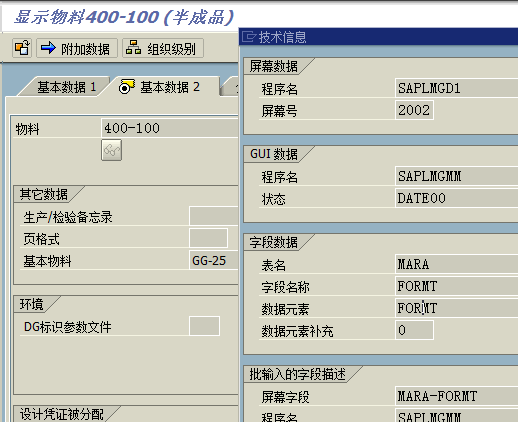
clip_image001

2、接着,通过TCODE:CMOD(管理SAP增强),点击菜单栏中“转到–文本增强–关键字–更改”,如下图:

clip_image003

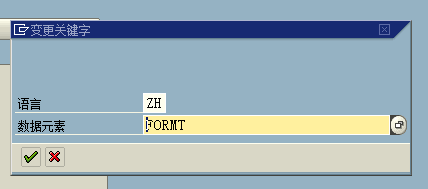
3、在下图中输入刚copy的数据元素:

clip_image004

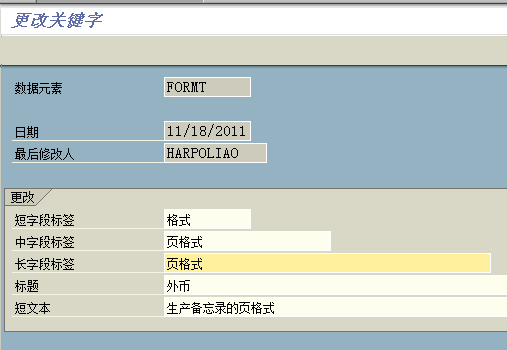
4、再在下图片修改想要的描述,保存,保存时会要求输入请求号,新建一个或用已有的请求号都行:
clip_image005

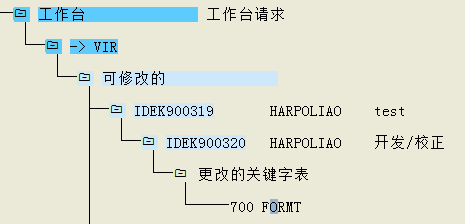
se10可查看请求号

clip_image006

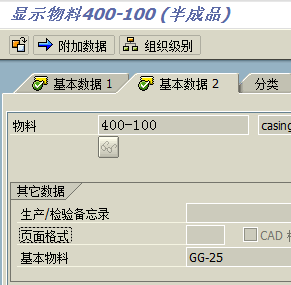
5、修改后的效果:

clip_image007