


2012-04-08 22:09 马伟 阅读(928) 评论() 收藏 举报
在ASP.NET中,它允许你继承CacheDependency类创建自定义的缓存依赖,这和上一节所讲的SqlCacheDependency类所做的差不多。设计一个自定义的CacheDependency类很简单,你要做的只是启动一个异步任务,它检查依赖项目何时发生变化。依赖项目发生变化时,将调用基方法CacheDependency.NotifyDependencyChanged。作为回应,基类更新HasChanged与UTclastModified属性值,并且ASP.NET自动从缓存中移除所有相关项目。
我们知道,现在的许多网站都提供了RSS功能,从而方便我们去订阅。因此,在我们的应用程序里订阅这些RSS的时候,你可以在缓存中放置 RSS 数据,显示的时候使用一个样式转换。而在检查依赖性的时候,我们只需要简单地比较一下当前的 RSS 与网站的 RSS 是否相同就可以了。
那么我们该何时去检查比较这些RSS数据呢?其实,你可以使用一个 Timer 来控制,让它定期去检查一个是否有更新,如果有更新则通知依赖发生了改变。
此外为了便于重用,我们需要在自定义的缓存依赖类MyCacheDependency中定义一个url变量,用来保存我们要获取的 RSS 数据的 URL。还需要定义一个时间间隔timeInterval,便于在使用的时候调整刷新速度。详细代码如代码清单19-3所示:
代码清单19-3:MyCacheDependency.cs
using System;
using System.Collections.Generic;
using System.Xml.XPath;
using System.Web;
using System.Web.Caching;
using System.Threading;
namespace _19_1
{
public class MyCacheDependency : CacheDependency
{
private Timer _timer;
private int _timeInterval;
private XPathNavigator _rss;
private string _url;
private int _pollTime = 5000;
public XPathNavigator RSS
{
get
{
return _rss;
}
}
public MyCacheDependency(string url, int timeInterval)
{
_url = url;
_timeInterval = timeInterval;
_rss = GetRSS();
_timer = new Timer(
new TimerCallback(CheckDependencyCallback),
this, _timeInterval * _pollTime,
_timeInterval * _pollTime);
}
private XPathNavigator GetRSS()
{
XPathDocument doc = new XPathDocument(_url);
return doc.CreateNavigator();
}
public void CheckDependencyCallback(object sender)
{
XPathNavigator nav = GetRSS();
if (nav.OuterXml != _rss.OuterXml)
{
base.NotifyDependencyChanged(this,
EventArgs.Empty);
_timer.Dispose();
}
}
protected override void DependencyDispose()
{
if (_timer != null)
{
_timer.Dispose();
}
}
}
}
在MyCacheDependency类中,我们在CheckDependencyCallback方法里将两个 RSS 信息进行比较,如果不同,则调用 NotifyDependencyChanged 方法通知基类,相应的缓存依赖已经发生了变化,缓存中的数据应当被清除。
与此同时,在本类的最后还重写了DependencyDispose方法执行所有必需的清理工作。使用NotifyDependencyChanged方法使缓存的项目失效之后,很快就会调用DependencyDispose方法。此时,已经不再需要依赖了。
MyCacheDependency类的测试页面MyCacheDependencyWebForm.aspx 如代码清单19-4所示:
代码清单19-4:MyCacheDependencyWebForm.aspx
<%@ Page Language="C#" AutoEventWireup="true"
CodeBehind="MyCacheDependencyWebForm.aspx.cs"
Inherits="_19_1.MyCacheDependencyWebForm" %>
<!DOCTYPE html PUBLIC "-//W3C//DTD XHTML 1.0 Transitional//EN"
"http://www.w3.org/TR/xhtml1/DTD/xhtml1-transitional.dtd">
<html xmlns="http://www.w3.org/1999/xhtml">
<head runat="server">
<title></title>
</head>
<body>
<form id="form1" runat="server">
<div>
博客园最新贴子:
<br />
<asp:Xml ID="RssXml" runat="server" />
<br />
<asp:Label ID="Label1" runat="server" ForeColor="red" />
</div>
</form>
</body>
</html>
在页面的后台代码里,我们首先需要判断RSS缓存项Cache["Key"]是否存在。如果Cache["Key"]为null,则调用MyCacheDependency类来创建一个缓存项,最后将缓存项绑定到RssXml控件上。如下面的代码所示:
public partial class MyCacheDependencyWebForm : System.Web.UI.Page
{
protected void Page_Load(object sender, EventArgs e)
{
string url = "http://www.cnblogs.com/RSS.aspx";
if (Cache["Key"] == null)
{
MyCacheDependency dependency =
new MyCacheDependency(url, 500);
Cache.Insert("Key", dependency.RSS, dependency);
Label1.Text = "当前数据为刚刚获取,并已更新入缓存!";
}
else
{
Label1.Text = "当前数据系从缓存中取得!";
}
RssXml.XPathNavigator = Cache["Key"] as
System.Xml.XPath.XPathNavigator;
RssXml.TransformSource= "translate.xsl";
}
}
其中,translate.xsl文件代码如下所示:
<xsl:stylesheet
xmlns:xsl="http://www.w3.org/1999/XSL/Transform" version="1.0"
xmlns:myns="http://www.comesns.com/sample">
<xsl:template match="channel">
<div style="background-color:#cccccc; font-size :12px;">
<xsl:for-each select="item">
<a>
<xsl:attribute name="href">
<xsl:value-of select="link"/>
</xsl:attribute>
<xsl:value-of select="title"/>
</a>
<br />
</xsl:for-each>
</div>
</xsl:template>
</xsl:stylesheet>
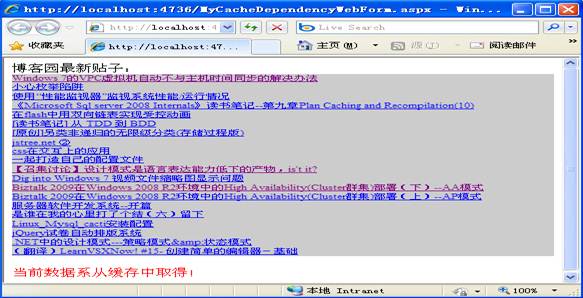
因为在MyCacheDependencyWebForm页面中,我们给MyCacheDependency类传入的url是http://www.cnblogs.com/RSS.aspx。所以,示例运行结果如图所示:
此内容由惯性聚合(RSS阅读器)自动聚合整理,仅供阅读参考。 原文来自 — 版权归原作者所有。