惯性聚合 高效追踪和阅读你感兴趣的博客、新闻、科技资讯
阅读原文 在惯性聚合中打开

推荐订阅源

WordPress大学
WordPress大学
T
Threatpost
阮一峰的网络日志
阮一峰的网络日志
美团技术团队
F
Fortinet All Blogs
The GitHub Blog
The GitHub Blog
月光博客
月光博客
V
Visual Studio Blog
T
Tailwind CSS Blog
Stack Overflow Blog
Stack Overflow Blog
博客园 - 聂微东
Jina AI
Jina AI
J
Java Code Geeks
Martin Fowler
Martin Fowler
大猫的无限游戏
大猫的无限游戏
Recorded Future
Recorded Future
C
Check Point Blog
腾讯CDC
N
Netflix TechBlog - Medium
aimingoo的专栏
aimingoo的专栏
罗磊的独立博客
Hacker News: Ask HN
Hacker News: Ask HN
SecWiki News
SecWiki News
博客园 - Franky
Hacker News - Newest:
Hacker News - Newest: "LLM"
N
News | PayPal Newsroom
cs.AI updates on arXiv.org
S
Security @ Cisco Blogs
W
WeLiveSecurity
The Last Watchdog
The Last Watchdog
Cloudbric
Cloudbric
F
Full Disclosure
The Cloudflare Blog
Y
Y Combinator Blog
Exploit-DB.com RSS Feed
Recent Commits to openclaw:main
Cyber Security Advisories - MS-ISAC
Google DeepMind News
MongoDB | Blog
MongoDB | Blog
S
Schneier on Security
Spread Privacy
Spread Privacy
L
LINUX DO - 热门话题
AI
AI
N
News and Events Feed by Topic
T
Tor Project blog
P
Palo Alto Networks Blog
让小产品的独立变现更简单 - ezindie.com
H
Hackread – Cybersecurity News, Data Breaches, AI and More
G
Google Developers Blog

博客园 - 林杰的博客

7z系列之一:7zip SDK中C++模块的编译 WORD2012 中使用“全屏阅读” Office2012中使用“冻结窗格”功能锁定标题栏 开发工具:Visual Studio 2005下方便宜用的代码行统计工具 为Visual Assist设置快捷键 Visual Studio 2010的Python支持工具 Linux 使用pid文件结束nginx Python 单元测试带案例名称输出 Linux 系统安装配置NTP时间服务器 Editplus中.proto文件的高亮文件 c#美味: 微软图表控件MSChart安装部署 测试工具:用性能监视器查看程序的性能 C#美味:Linq入门 讲座 C++零食:使用Unicode版的预定义宏__FUNCTION__ C++零食:VC中使用ForceInclude来强制包含stdafx.h C++零食:重启后消失的注册表键值 C++零食:WTL中使用双缓冲避免闪烁 C++零食:wprintf 中使用%I64d格式化输出LONGLONG C++零食:HRESULT 与 Windows Error Codes 不是一回事
让Win7资源管理器显示图片内容预览
林杰的博客 · 2011-03-17 · via 博客园 - 林杰的博客

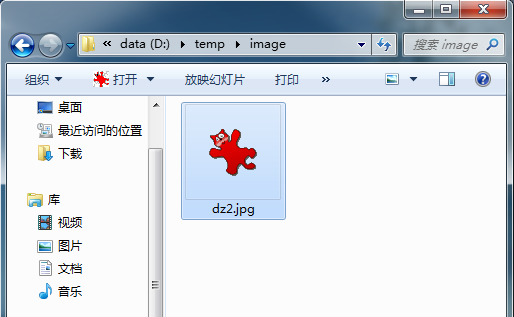
安装Win7 后有个不方便之处,就是文件夹显示的时候没有预览图了。如下:

image

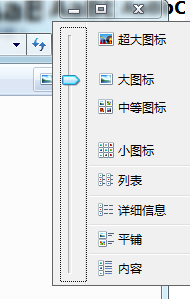
我选择了显示方式,找不到可以显示预览图的方式:

image

难道就没方法了吗?其实很简单,只需要改一个配置项即可:

1.点击“组织”选择“文件夹和搜索选项”

image

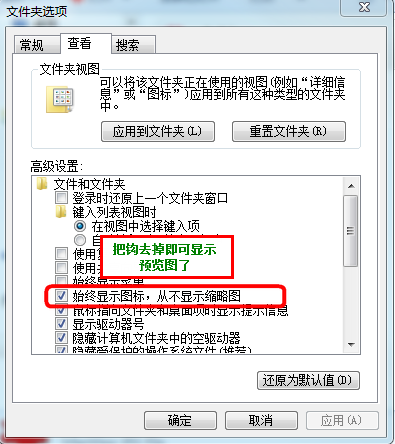
2.选中“查看”选项卡,把“始终显示图标,从不显示缩略图”的钩去掉,并点击“确定”

image

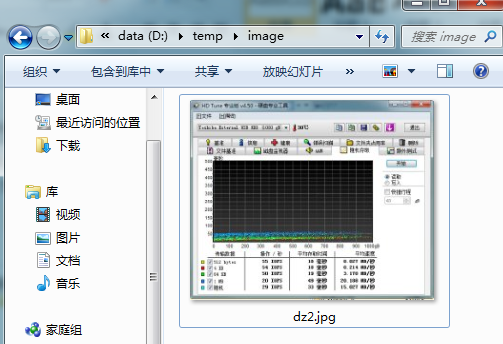
3.设置后效果如图:

image