









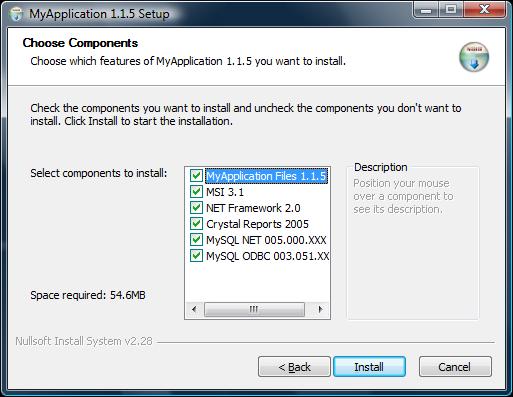
In this article I will cover core essentials of Nullsoft Scriptable Install System or also known as NSIS with focus on deploying applications programmed in Microsoft .NET Framework. I will cover deploying common objects that will immediately give you the power to use the opensource installer today!
As a RAD NET programmer I have spent many months looking at different installer systems trying to find one that compliments my application. While my requirements could not be any simpler, it seemed if each installer system I looked at created a new hurdle while solving an inefficiency of previous rival installer. At first look, NSIS reminded me of C programming language. As a programmer who has strong focus on eye candy within applications I write, I never imagined NSIS being able to offer it all for free. It turns out NSIS slices and dices NET deployments.
Software deployment with NSIS is really broken up into 3 phases, and they are:
So the following applications installed respectively..
Nullsoft Scriptable Install System
http://nsis.sourceforge.net/Main_Page
"NSIS is a professional open source system to create Windows installers."
HM NIS EDIT
http://hmne.sourceforge.net/
"HM NIS Edit is the best Editor/IDE for Nullsoft Scriptable Install System (NSIS)."
Notepad++http://sourceforge.net/projects/notepad-plus/
"Is a generic source code editor (it tries to be anyway)."
Notepad++ is great power pad cause it has collapsible code sections and excellent syntax highlighting and lots of quirky gremlins ;). Ultimately the idea is to uninstall HM NIS EDIT once you have written the bulk of your script.
What better way to get started than having visual wizard create all the script code for you. You will need to have NSIS installed at this point along with HM NIS EDIT. Once HM NIS EDIT is loaded just click on the magic wand and it will automatically generate following blank script...
 Collapse
; Script generated by the HM NIS Edit Script Wizard.; HM NIS Edit Wizard helper defines
!define PRODUCT_NAME "My application"
!define PRODUCT_VERSION "1.0"
!define PRODUCT_PUBLISHER "My company, Inc."
!define PRODUCT_WEB_SITE "http://www.mycompany.com/">http://www.mycompany.com"
!define PRODUCT_DIR_REGKEY "Software"Microsoft"Windows"CurrentVersion"App Paths"AppMainExe.exe"
!define PRODUCT_UNINST_KEY "Software"Microsoft"Windows"CurrentVersion"Uninstall"${PRODUCT_NAME}"
!define PRODUCT_UNINST_ROOT_KEY "HKLM"
; MUI 1.67 compatible ------
!include "MUI.nsh"
; MUI Settings
!define MUI_ABORTWARNING
!define MUI_ICON "${NSISDIR}"Contrib"Graphics"Icons"modern-install.ico"
!define MUI_UNICON "${NSISDIR}"Contrib"Graphics"Icons"modern-uninstall.ico"
; Welcome page
!insertmacro MUI_PAGE_WELCOME
; License page
!insertmacro MUI_PAGE_LICENSE "c:"path"to"licence"YourSoftwareLicence.txt"
; Directory page
!insertmacro MUI_PAGE_DIRECTORY
; Instfiles page
!insertmacro MUI_PAGE_INSTFILES
; Finish page
!define MUI_FINISHPAGE_RUN "$INSTDIR"AppMainExe.exe"
!insertmacro MUI_PAGE_FINISH
; Uninstaller pages
!insertmacro MUI_UNPAGE_INSTFILES
; Language files
!insertmacro MUI_LANGUAGE "English"
; MUI end ------
Name "${PRODUCT_NAME} ${PRODUCT_VERSION}"
OutFile "Setup.exe"
InstallDir "$PROGRAMFILES"My application"
InstallDirRegKey HKLM "${PRODUCT_DIR_REGKEY}" ""
ShowInstDetails show
ShowUnInstDetails show
Section "MainSection" SEC01
SetOutPath "$INSTDIR"
SetOverwrite ifnewer
File "c:"path"to"file"AppMainExe.exe"
CreateDirectory "$SMPROGRAMS"My application"
CreateShortCut "$SMPROGRAMS"My application"My application.lnk" "$INSTDIR"AppMainExe.exe"
CreateShortCut "$DESKTOP"My application.lnk" "$INSTDIR"AppMainExe.exe"
SectionEnd
Section -AdditionalIcons
CreateShortCut "$SMPROGRAMS"My application"Uninstall.lnk" "$INSTDIR"uninst.exe"
SectionEnd
Section -Post
WriteUninstaller "$INSTDIR"uninst.exe"
WriteRegStr HKLM "${PRODUCT_DIR_REGKEY}" "" "$INSTDIR"AppMainExe.exe"
WriteRegStr ${PRODUCT_UNINST_ROOT_KEY} "${PRODUCT_UNINST_KEY}" "DisplayName" "$(^Name)"
WriteRegStr ${PRODUCT_UNINST_ROOT_KEY} "${PRODUCT_UNINST_KEY}" "UninstallString" "$INSTDIR"uninst.exe"
WriteRegStr ${PRODUCT_UNINST_ROOT_KEY} "${PRODUCT_UNINST_KEY}" "DisplayIcon" "$INSTDIR"AppMainExe.exe"
WriteRegStr ${PRODUCT_UNINST_ROOT_KEY} "${PRODUCT_UNINST_KEY}" "DisplayVersion" "${PRODUCT_VERSION}"
WriteRegStr ${PRODUCT_UNINST_ROOT_KEY} "${PRODUCT_UNINST_KEY}" "URLInfoAbout" "${PRODUCT_WEB_SITE}"
WriteRegStr ${PRODUCT_UNINST_ROOT_KEY} "${PRODUCT_UNINST_KEY}" "Publisher" "${PRODUCT_PUBLISHER}"
SectionEnd
Function un.onUninstSuccess
HideWindow
MessageBox MB_ICONINFORMATION|MB_OK "$(^Name) was successfully removed from your computer."
FunctionEnd
Function un.onInit
MessageBox MB_ICONQUESTION|MB_YESNO|MB_DEFBUTTON2 "Are you sure you want to completely remove $(^Name) and all of its components?" IDYES +2
Abort
FunctionEnd
Section Uninstall
Delete "$INSTDIR"uninst.exe"
Delete "$INSTDIR"AppMainExe.exe"
Delete "$SMPROGRAMS"My application"Uninstall.lnk"
Delete "$DESKTOP"My application.lnk"
Delete "$SMPROGRAMS"My application"My application.lnk"
RMDir "$SMPROGRAMS"My application"
RMDir "$INSTDIR"
DeleteRegKey ${PRODUCT_UNINST_ROOT_KEY} "${PRODUCT_UNINST_KEY}"
DeleteRegKey HKLM "${PRODUCT_DIR_REGKEY}"
SetAutoClose true
SectionEnd
The fastest way to compile a .nsi file is from Windows Explorer using right click context menu. Providing you have NSIS installed you will have full self contained Setup.EXE in same folder in few seconds, depending on dependencies.
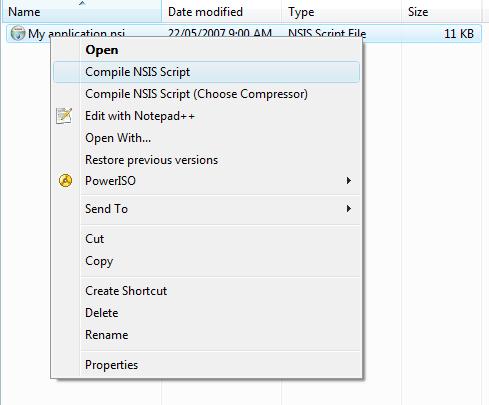
The fastest way to edit a .nsi file is from Windows Explorer using right click context menu. Providing you have Notepad++ installed you will be looking at editable script with full syntax highlighting in a fraction of a second...
At the heart of the NSIS are sections that perform specific installation tasks. These not only make it easier for managing your script but also make you installer more powerful by allowing the end user to control which aspects of your software are installed. Sections may be optional, hidden, bold, read only and unchecked.

There is always 1 desktop in every business that is running XP SP0. This is a major problem cause it is going to crash NET Framework installer. Here is the code for checking MSI version and installing MSI 3.1 if required...
Section 'MSI 3.1' SEC02 #NOTE should be installed before NET and stuffGetDLLVersion '$SYSDIR"msi.dll' $R0 $R1
IntOp $R2 $R0 / 0x00010000 ; $R2 now contains major version
IntOp $R3 $R0 & 0x0000FFFF ; $R3 now contains minor version
IntOp $R4 $R1 / 0x00010000 ; $R4 now contains release
IntOp $R5 $R1 & 0x0000FFFF ; $R5 now contains build
StrCpy $0 '$R2.$R3' ;.$R4.$R5' ; $0 now contains string like '1.2.0.192'
${if} $R2 < '4'
${if} $0 != '3.1'
;options
SetOutPath '$TEMP'
SetOverwrite on
;file work
File 'd:"mmm.runtimes"WindowsInstaller-KB893803-v2-x86.exe'
ExecWait '$TEMP"WindowsInstaller-KB893803-v2-x86.exe /quiet /norestart' $0
DetailPrint '..MSI 3.1 exit code = $0'
Delete '$TEMP"WindowsInstaller-KB893803-v2-x86.exe'
${Else}
DetailPrint '..MSI $0 already installed !!'
${EndIf}
${Else}
DetailPrint '..MSI $0 already installed !!'
${EndIf}
SectionEnd
NSIS have 100 or so code articles on their site and you may want to check it out here http://nsis.sourceforge.net/Category:Code_Examples. However lets take a detailed look at current release and future release of NET Framework.
| NET20 | Whidbey |
2.0.50727 |
Major | 2005 |
| NET30 | WinFX |
2.0.50727 |
Bolt on | 2007 |
| NET35 | Orcas |
2.0.50727 + (NET20 SP1) |
Bolt on | 2007 |
| NET40 | Hawaii |
4.0.00000 + (NET35 SP1) |
Major | 2008 |
Firstly, it is not a good idea to uninstall NET Framework considering it is part of Vista. Secondly, I strongly recommend you stick to deploying NET20, which is the simplest in terms of dependencies, the fastest and the smallest in terms of footprints. And given that NET30 contains NET20, this is best option. It will be very interesting to see, just how many changes are allowed in NET35 codename "Orcas". I have noticed ListView flickering to one included fix in Windows.Forms 3.5, although Microsoft are holding back on majority of fix's for compatibility reasons.
Section 'NET Framework 2.0 SP1' SEC03;registry
ReadRegDWORD $0 HKLM 'SOFTWARE"Microsoft"NET Framework Setup"NDP"v2.0.50727' Version
${If} $0 == '2.1.21022'
DetailPrint '..NET Framework 2.0 SP1 already installed !!'
${Else}
;options
SetOutPath '$TEMP'
SetOverwrite on
;file work
File 'c:"path.to.file"netfx20sp1_x86.exe'
ExecWait '$TEMP"netfx20sp1_x86.exe /quiet /norestart' $0
DetailPrint '..NET Framework 2.0 SP1 exit code = $0'
Delete '$TEMP"netfx20sp1_x86.exe'
${EndIf}
SectionEnd
Let's assume that your software needs to install an ODBC driver, and this needs to be installed with "quiet option. Your NSIS section should look like this...
Section 'MySQL ODBC 003.051.XXX' SEC02DetailPrint '..Installing MySQL ODBC'
;options
SetOutPath '$TEMP'
SetOverwrite on
;file work
File "c:"path.to.file"mysql-connector-odbc-3.51.22-win32.msi" # NOTE Dont forget to change to uninstall GUID
ExecWait 'MsiExec.exe /q /i $TEMP"mysql-connector-odbc-3.51.22-win32.msi' $0
DetailPrint '..MySQL ODBC Connector exit code = $0'
Delete '$TEMP"mysql-connector-odbc-3.51.22-win32.msi'
SectionEnd
And now for uninstalling...
Section Uninstall.
.
ExecWait 'MsiExec.exe /q /X{88164D59-4FFD-4874-93BC-5E001A7938F3}' $0
DetailPrint '..MyODBC exit code = $0'
SectionEnd
You can get the GUID from registry HKEY_LOCAL_MACHINE"SOFTWARE"Microsoft"Windows"CurrentVersion"Uninstall".
Now we have installed NET Framework you may want to install 3rd party Assemblies. The best way to do this is with gacutil.exe provided by Microsoft in NET20...
Section 'MySQL NET 005.000.XXX' SEC03DetailPrint '..Installing NET connector'
;options
SetOutPath '$INSTDIR'
SetOverwrite ifnewer
;uninstall #if required, code added for cp user Jonathan [Darka]
;ExecWait '"$INSTDIR"gacutil.exe" /uf "$INSTDIR"MySql.Data"' $0
;file work
File 'c:"path.to.file"gacutil.exe'
File 'c:"path.to.file"MySql.Data.dll'
;install
ExecWait '"$INSTDIR"gacutil.exe" /silent /i "$INSTDIR"MySql.Data.dll"' $0 #FIX wasn't working without double quotes
DetailPrint '..MySQL NET Connector exit code = $0'
SectionEnd
NOTE ABOUT UNINSTALLING PREVIOUS ASSEMBLIES
1. ExecWait '"$INSTDIR"gacutil.exe" /uf "$INSTDIR"MySql.Data"' $0
2. /UF = Uninstall + Force
3. The above command will not work if you pass gacutil.exe the file extension ".DLL"
4. I have positive feedback about the FCT plugin which closes apps by window title.. sam6nz says "reliable and flexible"
And now for uninstalling...
Section Uninstall.
.
;SEC05 – NET
;options
SetOutPath '$TEMP'
SetOverwrite on
;file work
File 'c:"path.to.file"gacutil.exe'
File 'c:"path.to.file"MySql.Data.dll'
DetailPrint '..Uninstalling MySql.Data.dll'
ExecWait '$TEMP"gacutil.exe /silent /u MySql.Data' $0
DetailPrint '..MySql.Data exit code = $0'
SectionEnd
This is actually same as 11. Un/Installing 3rd Party .MSI except we have to convert the .MSM to a .MSI file. For example lets assume you want to convert Crystal Reports 2005 .MSM to an standard .MSI file. Once the conversion is completed you can throw any standard install option flags at the .MSI file for example /q and it works like it would with any other .MSI file. The easiest way to achieve .MSM > .MSI this is through VS2005 Setup Project. See pictures below for instructions...
Adding MSM file to Setup Project...

Some or most MSM files have various dependencies, for example if the MSM file you are trying to convert requires another MSM file such as C:"Program Files"Common Files"Merge Modules"Microsoft_VC80_ATL_x86.msm which is installed with VS2005 if you check 'Install Redistributables' during setup. If you don't have this file just run VS setup again and check the box.

Here are some Installer Attributes (flags) I use and strongly recommend...
SetCompress off |
Speeds up installation |
CRCCheck on |
Verifies downloads and CDs |
RequestExecutionLevel user |
Uninstalls start menu item on Vista |
BrandingText "ACME Inc." |
Customizes installer wizard |
Here are some macros you may wish to include as extra...
!insertmacro MUI_PAGE_LICENSE ".."Folder"YourLicense.rtf"
For a rapid response try the NSIS forums http://forums.winamp.com/forumdisplay.php?s=315447ba88ebb577ca060ea8dcffa07d&forumid=65, although they may point you towards code example link I gave early.
If you need to debug your script, best thing to do is write debug info using DetailPrint and then throw in a MessageBox MB_ICONINFORMATION|MB_OK "Break point" , this will pause the installer until you can verify the point of failure.
转载 http://www.codeproject.com/KB/install/NSIS.aspx#13msm3
此内容由惯性聚合(RSS阅读器)自动聚合整理,仅供阅读参考。 原文来自 — 版权归原作者所有。