






数据绑定是WPF,Silverlight以及Windows Phone应用开发中最为常用的开发技术,在基于XAML的Windows Store应用开发中,数据绑定是其开发特性之一,本文将讨论Windows 8应用开发数据绑定的使用。
快速理解数据绑定(Data Binding)
对于应用开发人员而言,无论是应用界面还是应用逻辑往往是为了简化用户对于数据层的操作,通过应用控件实现数据同步更新是最直接最简单的。但是在实际项目开发中,复杂的数据结构以及繁琐的数据操作使应用控件与数据交互难度增加,对此微软推出数据绑定实现应用控件直接同步更新数据。简单理解数据绑定,创建一个对象实例绑定到指定控件,通过DataContext的依赖关系,当对象实例数据改变时,同时自动刷新应用控件数据信息。
数据绑定代码
数据绑定基本代码格式:
<TextBox Text="{Binding LastName, Mode=TwoWay}"/>
以上代码实现绑定数据成员LastName到文本框的Text属性,其中LastName是数据成员属性。
实现数据绑定前,首先需要创建绑定数据对象属性,例如,
 public class Person
    {
        public string FirstName { get; set; }
        public string LastName { get; set; }
        public string Email { get; set; }
    }
然后在应用运行时,创建数据成员实例,
private void LoadAccount()
        {
            this.DataContext = new Person { FirstName = "Kevin", LastName = "Fan", Email = "qq34506@hotmail.com" };
        }
这样既可实现简单绑定效果:

数据绑定模式
Windows Store应用支持三种数据绑定模式:
OneTime,一次性绑定,该方式只控件运行时第一次绑定数据,此后,数据源修改控件不在刷新;
OneWay,单向绑定,该方式当数据源更新时,控件同时更新数据,但是当控件数据更新时,数据源不更新;
TwoWay,双向绑定,该方式当数据源更新时,控件同时更新数据,而当控件数据更新时,数据源同样更新;
对比以上三种模式,TwoWay绑定较为常用,而默认情况下,OneWay是默认值。
在上例中,绑定LastName为TwoWay,双向模式,即当用户在控件中修改“姓”,数据源也同时被修改。
数据绑定实时修改 - INotifyPropertyChanged
数据绑定中,另外一个重要的概念是INotifyPropertyChanged接口,该接口用于当数据源与对象属性绑定时,绑定数据源修改,即通知当前UIElement控件并且更新数据。
例如,在Person.cs中实现INotifyPropertyChanged接口,可以发现该接口仅有一个事件PropertyChanged,使用RaisePropertyChanged实现该事件,
    public class Person : INotifyPropertyChanged
    {
        public string FirstName { get; set; }

        private string _lastname;
        public string LastName
        {
            get { return _lastname; }
            set
            {
                _lastname = value;
                RaisePropertyChanged();
            }
        }

        public string Email { get; set; }

        private void RaisePropertyChanged([CallerMemberName] string caller = "")
        {
            if (PropertyChanged != null)
            {
                PropertyChanged(this, new PropertyChangedEventArgs(caller));
            }
        }

        public event PropertyChangedEventHandler PropertyChanged;
    }
在绑定页面添加“更新”button, 其代码:
        private void Button_Click_1(object sender, RoutedEventArgs e)
        {
            person.LastName = "范";
        }
当点击更新时,Person数据源改变,INotifyPropertyChanged接口通知控件Text="{Binding LastName, Mode=TwoWay}",修改数据内容。

该接口对于实时数据绑定更新非常有用,在后文将经常使用。
Element数据绑定
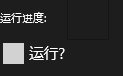
上文讲述是对象实例与数据源的绑定实例。Windows Store应用同时支持控件与控件间属性绑定,例如,实现CheckBox的IsChecked属性与ProgressRing的IsActive属性的绑定,代码如下:
    <Grid Background="{StaticResource ApplicationPageBackgroundThemeBrush}">
        <StackPanel>
            <StackPanel Orientation="Horizontal"
                        HorizontalAlignment="Left">
                <TextBlock Text="运行进度:"
                           VerticalAlignment="Center"
                           Margin="0,0,20,0" />
                <Border BorderThickness="1"
                        BorderBrush="#44000000"
                        Padding="10">
                    <ProgressRing x:Name="ProgressRing1"
                                  IsActive="{Binding IsChecked, ElementName=chkRun}" />
                </Border>
            </StackPanel>
            <CheckBox Name="chkRun"
                      Content="运行?" />
        </StackPanel>
    </Grid>
其中绑定代码中的绑定成员使用Element对象属性名,并且附加ElementName。
<ProgressRing x:Name="ProgressRing1" IsActive="{Binding IsChecked, ElementName=chkRun}" />
运行效果如下,选中运行CheckBox,运行进度开始:
数据绑定与数据转换(Data Converter)
在Windows 8 XAML实例教程中曾讲述过数据转换器的创建和使用,XAML实例教程系列 - 类型转换器(Type Converter)
当时代码是使用VS2012 RC和Windows 8 RP版本创建,所以,本篇代码进行转换到VS2012和Windows 8正式版。

Windows 8数据绑定控件
为了方便应用开发,微软为开发人员提供了许多数据绑定控件,通过以上绑定方式设置,可以快速的将数据成员集合绑定到对应控件。
ComboBox控件

前台代码:
<ComboBox SelectionChanged="cbUserList_SelectionChanged_1" DisplayMemberPath="FullName" />
后台代码:
public sealed partial class MainPage : Page
    {
        public List<Person> Users { get; set; }

        public MainPage()
        {
            this.InitializeComponent();
            LoadUsers();
        }

        /// <summary>
        /// Invoked when this page is about to be displayed in a Frame.
        /// </summary>
        /// <param name="e">Event data that describes how this page was reached.  The Parameter
        /// property is typically used to configure the page.</param>
        protected override void OnNavigatedTo(NavigationEventArgs e)
        {
        }

        private void cbUserList_SelectionChanged_1(object sender, SelectionChangedEventArgs e)
        {
            SelectionGrid.DataContext = (e.AddedItems[0] as Person);
        }

        private void LoadUsers()
        {
            Users = new List<Person>();

            Users.Add(new Person { FirstName = "Kevin", LastName = "Fan", Email = "qq34506@hotmail.com" });
            Users.Add(new Person { FirstName = "中国", LastName = "银光", Email = "Admin@silverlightchina.net" });
            Users.Add(new Person { FirstName = "Mike", LastName = "Li", Email = "zhangsn@gmail.com" });
            Users.Add(new Person { FirstName = "Sandy", LastName = "Yang", Email = "SandyY@yahoo.com" });

            cbUserList.ItemsSource = Users;
        }
    }
ListBox控件

前台代码:
<ListBox SelectionChanged="lbUserList_SelectionChanged_1" ItemsSource="{Binding Users}" DisplayMemberPath="FullName" />
后台代码:
public sealed partial class MainPage : Page
    {
        public List<Person> Users { get; set; }

        public MainPage()
        {
            this.InitializeComponent();
            LoadUsers();
        }

        /// <summary>
        /// Invoked when this page is about to be displayed in a Frame.
        /// </summary>
        /// <param name="e">Event data that describes how this page was reached.  The Parameter
        /// property is typically used to configure the page.</param>
        protected override void OnNavigatedTo(NavigationEventArgs e)
        {
        }

        private void lbUserList_SelectionChanged_1(object sender, SelectionChangedEventArgs e)
        {
            SelectionGrid.DataContext = (e.AddedItems[0] as Person);
        }

        private void LoadUsers()
        {
            Users = new List<Person>();

            Users.Add(new Person { FirstName = "Kevin", LastName = "Fan", Email = "qq34506@hotmail.com" });
            Users.Add(new Person { FirstName = "中国", LastName = "银光", Email = "Admin@silverlightchina.net" });
            Users.Add(new Person { FirstName = "Mike", LastName = "Li", Email = "zhangsn@gmail.com" });
            Users.Add(new Person { FirstName = "Sandy", LastName = "Yang", Email = "SandyY@yahoo.com" });

            lbUserList.ItemsSource = Users;
        }
    }

欢迎留言交流学习,加入QQ群交流学习:
22308706(一群) 超级群500人
37891947(二群) 超级群500人
100844510(三群) 高级群200人
32679922(四群) 超级群500人
23413513(五群) 高级群200人
32679955(六群) 超级群500人
88585140(八群) 超级群500人
128043302(九群 企业应用开发推荐群) 高级群200人
101364438(十群) 超级群500人
68435160(十一群 企业应用开发推荐群)超级群500人
此内容由惯性聚合(RSS阅读器)自动聚合整理,仅供阅读参考。 原文来自 — 版权归原作者所有。