









2013-03-06 03:31 jv9 阅读(2027) 评论() 收藏 举报

在Windows Store中下载了一个有意思的应用,叫做Flipflop(http://apps.microsoft.com/windows/app/flipflop/99c01512-fe4f-4d1a-872e-eb9fd6638ff4),该应用允许用户创建翻页式动画效果(Flipbook Animation), 并且可以导出动画为GIF文件。在MSDN看到一篇介绍该项目的技术文章,分享给大家。

Flipflop项目中,作者使用Windows Imaging Component(WIC)实现创建图片(MSDN查看Windows 8 WIC新特性),
在项目中引用Windows.Graphics命名空间,在该空间中包含BitmapEncoder类(MSDN),通过该类可以创建特定的图片编码,例如GifEncoder。
通过代码查看工具,可以看到作者创建一个共享类"GifMaker"实现动画帧的定义,
using System;
using System.Collections.Generic;
using System.Runtime.InteropServices.WindowsRuntime;
using Windows.Foundation;
using Windows.Graphics.Imaging;
using Windows.Storage;

namespace Utilities
{
    public sealed class GifMaker
    {
        readonly List<byte[]> frames = new List<byte[]>();
        private readonly uint frameWidth;
        private readonly uint frameHeight;

        public GifMaker(uint width, uint height)
        {
            frameWidth = width;
            frameHeight = height;
        }

        public void AppendNewFrame([ReadOnlyArray]byte[] frame)
        {
            frames.Add(frame);
        }

实现翻页式动画效果的关键是将多个单帧图片连接在一起,然后通过延时设置播放各个帧实现动画效果。
在BitmapEncoder类(MSDN)中,GoToNextFrameAsync()方法可实现在当前帧的基础上异步动态添加新的空白帧,而通过代码实现浏览各个单一图片,动态放入不同的空白帧中实现翻页动画效果。
public IAsyncInfo GenerateAsync(StorageFile file)
{
    return AsyncInfo.Run(async ctx =>
        {
            var outStream = await file.OpenAsync(FileAccessMode.ReadWrite);

            var encoder = await BitmapEncoder.CreateAsync(BitmapEncoder.GifEncoderId, outStream);

            for (int i = 0; i < frames.Count; i++)
            {
                var pixels = frames[i];
                encoder.SetPixelData(BitmapPixelFormat.Rgba8, BitmapAlphaMode.Ignore,
                                     frameWidth, frameHeight,
                                     92.0, 92.0,
                                     pixels);

                if (i < frames.Count - 1)
                    await encoder.GoToNextFrameAsync();
            }

            await encoder.FlushAsync();
            outStream.Dispose();
        });
}
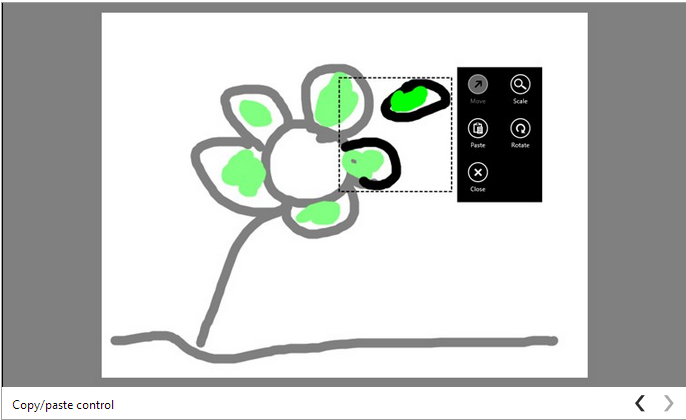
最后,需要设置播放帧延迟时间,以达到翻页动画效果。控制帧延迟的属性是encoder.BitmapProperties和“/grctlext/Delay”,代码如下:
public IAsyncInfo GenerateAsync(StorageFile file, int delay)
{
    return AsyncInfo.Run(async ctx =>
        {
            var outStream = await file.OpenAsync(FileAccessMode.ReadWrite);

            var encoder = await BitmapEncoder.CreateAsync(BitmapEncoder.GifEncoderId, outStream);

            for (int i = 0; i < frames.Count; i++)
            {
                var pixels = frames[i];
                encoder.SetPixelData(BitmapPixelFormat.Rgba8, BitmapAlphaMode.Ignore,
                                     frameWidth, frameHeight,
                                     92.0, 92.0,
                                     pixels);

                if (i == 0)
                {
                    var properties = new BitmapPropertySet
                        {
                            {
                                "/grctlext/Delay",
                                new BitmapTypedValue(delay / 10, PropertyType.UInt16)
                            }
                        };

                    await encoder.BitmapProperties.SetPropertiesAsync(properties);
                }

                if (i < frames.Count - 1)
                    await encoder.GoToNextFrameAsync();
            }

            await encoder.FlushAsync();
            outStream.Dispose();
        });
}
如果你是使用JavaScript作为Windows store应用开发语言,可以使用以下代码实现以上相同的效果,
var picker = new Windows.Storage.Pickers.FileSavePicker();
picker.fileTypeChoices.insert("Gif files", [".gif"]);

picker.pickSaveFileAsync().then(function(file) {
    if (!file) {
        return;
    }
    var gifMaker = new Utilities.GifMaker(800, 600);

    for (var commandsIndex = 0; commandsIndex < currentFlipflop.pages.length; commandsIndex++) {
        // This code is used to retrieve canvases bytes
        var bytes = Flipflop.Tools.GetBytesfromFlipflop(currentFlipflop.pages[commandsIndex],
            800, 600);

        gifMaker.appendNewFrame(bytes);
    }

    gifMaker.generateAsync(file, 200).done();
});
Flipflop产生GIF动画效果演示:


欢迎大家留言讨论学习Windows 8应用开发,希望能够看到更多优秀的Windows store应用。
欢迎大家加入QQ技术群,一起学习讨论Windows 8&Silverlight&WPF&Widnows Phone开发技术。
22308706(一群) 超级群500人
37891947(二群) 超级群500人
100844510(三群) 高级群200人
32679922(四群) 超级群500人
23413513(五群) 高级群200人
32679955(六群) 超级群500人
88585140(八群) 超级群500人
128043302(九群 企业应用开发推荐群) 高级群200人
101364438(十群) 超级群500人
此内容由惯性聚合(RSS阅读器)自动聚合整理,仅供阅读参考。 原文来自 — 版权归原作者所有。