




惯性聚合 高效追踪和阅读你感兴趣的博客、新闻、科技资讯
阅读原文 在惯性聚合中打开

推荐订阅源

cs.CV updates on arXiv.org
博客园_首页
M
MIT News - Artificial intelligence
月光博客
月光博客
WordPress大学
WordPress大学
Google DeepMind News
Y
Y Combinator Blog
The Cloudflare Blog
D
Docker
阮一峰的网络日志
阮一峰的网络日志
L
LangChain Blog
Engineering at Meta
Engineering at Meta
Last Week in AI
Last Week in AI
Vercel News
Vercel News
MyScale Blog
MyScale Blog
奇客Solidot–传递最新科技情报
奇客Solidot–传递最新科技情报
Cyber Security Advisories - MS-ISAC
Martin Fowler
Martin Fowler
U
Unit 42
Stack Overflow Blog
Stack Overflow Blog
A
About on SuperTechFans
The Register - Security
B
Blog
Recorded Future
Recorded Future
J
Java Code Geeks
Recent Announcements
Microsoft Security Blog
H
Help Net Security
F
Fortinet All Blogs
B
Blog RSS Feed
Project Zero
Project Zero
The Hacker News
The Hacker News
T
Threatpost
D
Darknet – Hacking Tools, Hacker News & Cyber Security
L
LINUX DO - 热门话题
Jina AI
Jina AI
宝玉的分享
宝玉的分享
云风的 BLOG
云风的 BLOG
AWS News Blog
AWS News Blog
G
Google Developers Blog
GbyAI
GbyAI
S
Securelist
T
Tenable Blog
博客园 - 【当耐特】
Security Latest
Security Latest
人人都是产品经理
人人都是产品经理
T
Tor Project blog
Latest news
Latest news
P
Proofpoint News Feed
T
The Blog of Author Tim Ferriss

博客园 - jv9

SharePoint 2013技巧分享系列 - 同步Exchange显示高清用户照片 SharePoint 2013常用开发工具分享 SharePoint 2013技巧分享系列 - Active Directory同步显示用户照片 常用Git代码托管服务分享 Microsoft Client Development MVP 2013 - 2014 车祸 Windows 8实例教程系列 - 数据绑定高级实例 Windows 8实例教程系列 - 数据绑定基础实例 Windows 8应用实例解析 - WinRT下创建GIF动画(Flipflop) Windows 8实例教程系列 - 布局控制 Windows 8实例教程系列 - 自定义应用风格 轻松搭建Windows8云平台开发环境 对比Windows 8模拟器(Simulator)和Windows Phone仿真器(Emulator) Windows8/Silverlight/WPF/WP7/HTML5周学习导读(1月28日-2月3日) Windows 8应用开发书籍汇总 Silverlight动态设置WCF服务Endpoint 心境 Windows8/Silverlight/WPF/WP7/HTML5周学习导读(1月7日-1月14日) Windows8/Silverlight/WPF/WP7/HTML5周学习导读(1月1日-1月6日)
SharePoint 2013技巧分享系列 - 隐藏Blog和Apps左侧导航菜单
jv9 · 2013-12-25 · via 博客园 - jv9

2013-12-25 01:09  jv9  阅读(2123)  评论()    收藏  举报
企业内部网中,不需要员工创建Blog或者创建,安装SharePoint应用,因此需要在员工个人Web页面需要隐藏Blog或者Apps导航菜单, 其步骤设置如下:

该技巧适合SharePoint 2013 和Office 365。

技巧一:隐藏Blog和Apps导航链接

1. 使用具有Administrator权限的用户登录SharePoint
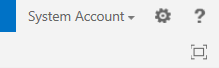
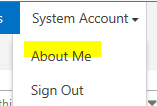
2. 点击“About Me”
3. 点击“Setting”,然后点击“Site Settings”

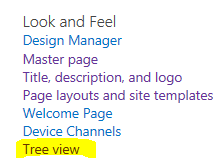
4. 点击“Tree View”
5. 取消选择“Quick Launch”,然后点击Ok
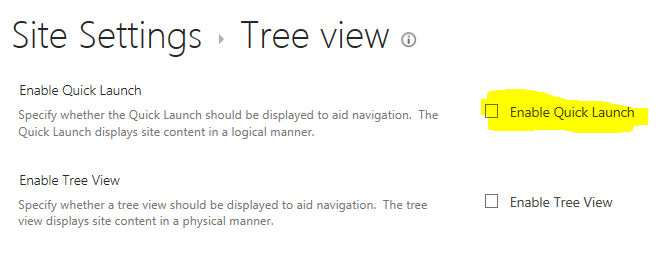
完成设置后,进入个人页面后,左边导航菜单即被隐藏。
技巧二:隐藏Newsfeed导航链接

1. 使用具有Administrator权限的用户登录SharePoint

2. 点击“About Me”

3. 点击“Setting”,然后点击“Site Settings”

4. 在设置页面中,点击“Navigation”
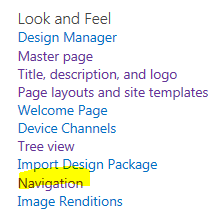
5. 在导航设置页面中,Global Navigation是设置头部页面导航,Current Navigation是设置页面左侧菜单导航,

如果需要删除Newsfeed链接,只需要在“Structural Navigation: Editing and Sorting”中删除Newsfeed即可。

欢迎留言分享你的SharePoint 2013开发和设置技巧。