




惯性聚合 高效追踪和阅读你感兴趣的博客、新闻、科技资讯
阅读原文 在惯性聚合中打开

推荐订阅源

博客园 - 聂微东
S
Schneier on Security
cs.CL updates on arXiv.org
Latest news
Latest news
Cyberwarzone
Cyberwarzone
Cisco Talos Blog
Cisco Talos Blog
T
The Exploit Database - CXSecurity.com
T
Tenable Blog
I
Intezer
T
Threat Research - Cisco Blogs
Threat Intelligence Blog | Flashpoint
C
Cybersecurity and Infrastructure Security Agency CISA
P
Privacy International News Feed
P
Palo Alto Networks Blog
The Register - Security
IT之家
IT之家
Google DeepMind News
C
Cyber Attacks, Cyber Crime and Cyber Security
L
LINUX DO - 最新话题
S
Securelist
WordPress大学
WordPress大学
Exploit-DB.com RSS Feed
Hugging Face - Blog
Hugging Face - Blog
N
News and Events Feed by Topic
H
Help Net Security
Project Zero
Project Zero
K
Kaspersky official blog
博客园 - 三生石上(FineUI控件)
L
LINUX DO - 热门话题
大猫的无限游戏
大猫的无限游戏
G
GRAHAM CLULEY
F
Full Disclosure
博客园 - 叶小钗
OSCHINA 社区最新新闻
OSCHINA 社区最新新闻
TaoSecurity Blog
TaoSecurity Blog
N
News | PayPal Newsroom
Forbes - Security
Forbes - Security
博客园 - 司徒正美
I
InfoQ
Recent Announcements
Attack and Defense Labs
P
Privacy & Cybersecurity Law Blog
S
Security @ Cisco Blogs
人人都是产品经理
人人都是产品经理
The GitHub Blog
The GitHub Blog
Simon Willison's Weblog
G
Google Developers Blog
N
Netflix TechBlog - Medium
U
Unit 42
阮一峰的网络日志
阮一峰的网络日志

博客园 - Kevin-moon

如何避免JQuery Dialog的内存泄露 JQuery另类视角-动态执行脚本的BUG JQuery另类视角-动态扩展对象 - Kevin-moon - 博客园 如何重构代码-简单、灵活的实现对象复制 如何重构代码-重构计划 如何重构代码-思路和方法 谈谈多线程的思维方式 简单的数据移动算法(C#) [ASP.NET MVC]-理解Routing 笑死人的十项大奖 深入APM,实现自己的APM [Windbg基础]-了解Symbols 深入线程,实现自定义的SynchronizationContext 重温ASP.NET的配置信息(简单、常用) 奇妙的SynchronizationContext 线程之间的通讯---SynchronizationContext "对象"到"山寨对象"的完整转换 我真的就只能在远方看你吗?!!! "测试驱动开发(TDD)" 动态进行"自定义公式"计算
在IE中本地浏览与服务器浏览同一Html后,出现了奇异的结果
Kevin-moon · 2011-08-04 · via 博客园 - Kevin-moon

      今天在写html的时候,发现了一个郁闷的事情,相同一个Html页面都是通过ie浏览器来浏览,不同的只是在浏览方式上:本地浏览和服务器浏览,可是却出现了不同的效果。

1、本地浏览

     将test.html文件放置在本地,然后直接双击打开后,界面如下:
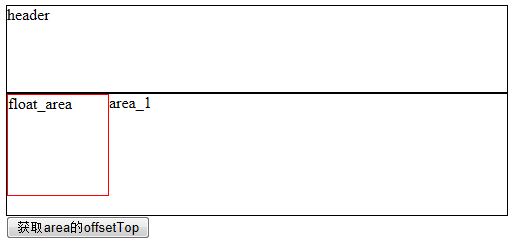
点击按钮后,弹出提示框“97”(就是document.getElementById("float_area").offsetTop)

2、服务器浏览
    将test.html文件放置在服务器上或通过VS2010中右键的“View In Browser”进行浏览,界面如下:
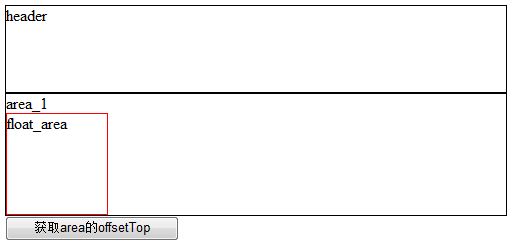
点击按钮后,弹出提示框“19”(就是document.getElementById("float_area").offsetTop)

test.html全部代码如下:

<!DOCTYPE html PUBLIC "-//W3C//DTD XHTML 1.0 Transitional//EN" "http://www.w3.org/TR/xhtml1/DTD/xhtml1-transitional.dtd">
<html xmlns="http://www.w3.org/1999/xhtml">
<head>
    
<title></title>
    
<script type="text/javascript">
        
function getTop() {

            alert(document.getElementById(

"float_area").offsetTop);    
        }
    
</script>
</head>
<body>
    
<div style="border: 1px solid #000000; height: 86px; width: 500px;">
        header
    
</div>
    
<div id="area_1" style="border: 1px solid #000000; height: 121px; width: 500px;">
        area_1
        
<div id="float_area" style="border: 1px solid #FF0000; width: 100px; height: 100px; float: left">float_area</div>
    
</div>
    
<input id="Button1" type="button" value="获取area的offsetTop" onclick="getTop();" />
</body>
</html>

       现在我百思不得其解,不知大家有无碰到该类试情况的,该问题到底是ie的问题,还是程序本身的问题?!不同浏览器之间对于获取offsetTop的确存在不同,不过都在ie下面,为什么还会不一致呢。。。。。