JScript .NET is a computer programming language developed by Microsoft based on early or previous standards of the JavaScript, then JScript language. The primary and strongest difference, what sets JScript .NET apart is that it is not a simple or regular scripting language. JScript .NET is actually at the same level of, and enjoys the same respect of popular languages like Java, C/C++, or C#. While the previous version of JScript and JavaScript were scripting languages that needed a browser to show their results, JScript .NET is a fully functional and independent language that can be used to create regular executables that can be run on client computers.
JScript .NET can be as loose as JavaScript, that is, it can let you write code that don't rely on known data types. At the same time, you can take advantage of techniques used in strongly typed languages like C/C++, Pascal, C#, etc, making the language "less forgiving". This makes the code easier to read, maintain, and faster to compile.
The acronym .NET suggests that JScript .NET uses the .NET Framework to take full advantage of the operating system on which it is run. This means that you can create as much a complete and fully functional application using JScript .NET the same way you would with Visual Basic or Visual C#. This also means that, using JScript .NET, you can use the same libraries, the same classes, and the same functions of Visual Basic, Visual C#, and other languages of the .NET Framework family.
With JScript .NET, you can create console applications, graphical (GUI) Windows application, web-based applications (ASP.NET), and many more. This is because well written code in a JScript .NET has direct access to the .NET Framework. A JScript .NET application also enjoys support of the Common Language Specification (CLS), the bottom language standard that other .NET Framework languages follow. This specification provides the use of data types and the interoperability that languages need in order to "exchange" code. This means that code written in JScript .NET can use classes, libraries, and other objects including the contents of namespaces, created from the other CLS compliant languages even if the JScript .NET programmer doesn't know those languages.
|
Applications Fundamentals |
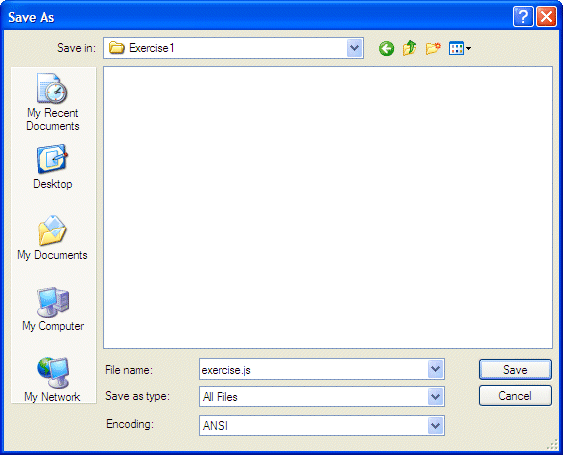
To create a JScript .NET application, you start by writing the necessary code. Code for a JScript .NET application is create as normal text in a regular computer file. After writing the necessary code, you save the file in a directory of your choice. The file must have the extension .js.
Code of a JScript .NET application is written in plain English with some words you are familiar with and some other words you will encounter as you move. If you write a regular JScript script, you can open it in a browser or a dialog box (for a Windows Script Host application). If you are creating a console or a graphical user interface (GUI) application that would result in an execute that can be used on other languages without caring for the browser, then you must "translate" your code in a language the computer can understand. As mentioned already, your code is written in English. Unfortunately, the computer doesn't understand it.
To perform this "translation", you must use another program that understands both languages. This program is called a compiler. Fortunately, Microsoft provides a free compiler you can use. The compiler provided by Microsoft for JScript .NET applications is called jsc.exe. To get it, you must download the Microsoft .NET Framework from the Microsoft web site. If you are using Microsoft Windows XP or 2003, the library should be installed already on your computer. If you are using earlier versions of Microsoft Windows, you make need to check or download it, free, from Microsoft. After downloading and installing the library, you are ready to use it.
After installing the .NET Framework, you can create an application in the same directory where the jsc application is installed. If you create a JScript .NET file and save it in another directory, when you attempt to compile your application, you may receive an error. If you want to be able to create a JScript .NET application from any folder of your choice, you can modify the Autoexec.bat or the Environment Path of your application.
To create a JScript .NET application, you start with a text file and write your code in it. One of the types of applications you can create is called a console application. A console application is one that displays its result(s) in a DOS window, which is a window with a black background.
In our lessons, we will mostly use the free jsc compiler provided by Microsoft. To write our code, we will use Notepad. To compile our applications, we will use the command prompt.
There are two main operations you will regularly perform as a programmer vis-à-vis your application. The primary operation consists of displaying something on the screen. This task is taken care of by using print(). Based on this, to display a word or sentence on the DOS window, include it in the parentheses of print. If it is a word or a group of words, include it between double-quotes.
|
|
After creating a file that holds the code of a JScript .NET application, you can prepare it for distribution. A regular script is a simple text-base file that can be interpreted by a browser. If you create such a script, you can save it to display and make it available to other people who would simply open it in their browser.
If you have created a JScript .NET application and want to distribute but you are not concerned whether your clients have a browser or not, you must create an executable. To do this, you must compile your application. The only way you can create an executable from a JScript .NET application is through the command prompt. The steps used to open the command prompt depend on your operating system. In Windows XP and Windows Server 2003, to open a command prompt, on the Taskbar, you can click Start -> All Programs -> Accessories -> Command Prompt.
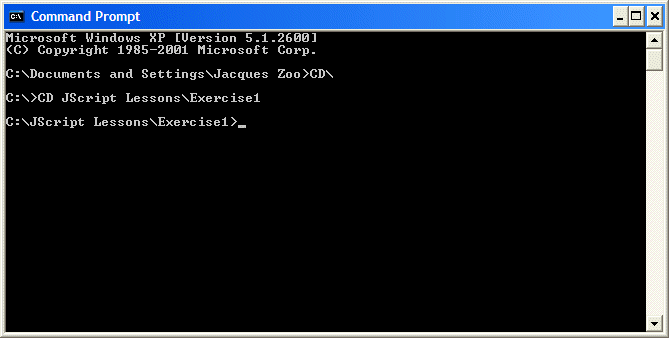
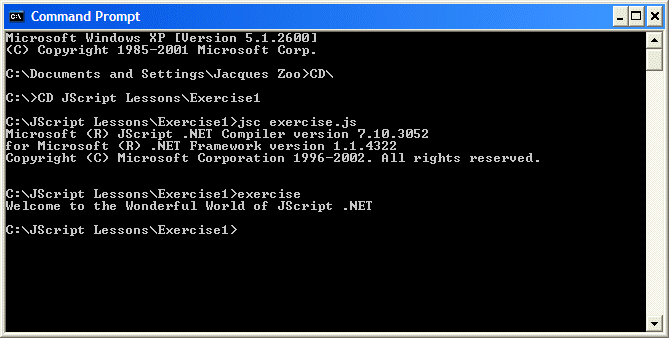
To compile a program on the Command Prompt, first change to the directory that contains your script file. To proceed, invoke the name of your compiler, in this case jsc, followed by the name of the script file wit its extension, and press Enter. If there are errors, the compiler will let you know. You can then return to the file, fix the problem, and compile again, until all problems have been corrected.
After compiling the program, an executable application, that has the same name as the script that was compiled, would be created.
|
|
After creating an executable application, you can distribute it to other people. An executable of a JScript .NET application is a fairly small application. You can save it to disc and then, either place if where people can first download it or send it in a disk or other portable medium (never email an executable).
Executing your application is equivalent to using it. To execute an application that you have just created, at the Command Prompt where you compiled it, you can type the name of the executable (your clients can double click the executable to open the application.
|
|
|
A Custom Name for an Executable |
As mentioned above, if you compile your application by simply invoking the name of the script file that contains the code, an executable with the same name as the file would be created. Fortunately, when compiling the file, you can specify the name you want for the executable. The formula to follow is:
jsc /out:ApplicationName File.js
In this formula, you must first call the compiler as done previously. It must be followed by /out: which indicates that you are going to specify the name of the executable. After the /out: factor, type the desired name that will hold the name of the new application instead of the name of the file. Lastly, type the name of the file that contains the script and make sure you append its extension.
A library is a program that contains additional information that other programs can use. The information in the library can be almost anything. Experience will guide you as to what you can put in it.
A library is created with the same approach as the programs we have used so far. This means that you start from a script file that has the .js extension and that contains the code you decided to put in it. To actually create the library, you compile it using the following formula:
jsc /target:library file.js
In this case, the only thing different in the formula is the file.js, which is the name of the file that contains the necessary code. After compiling the code, a new application (yes, it is an application) is created but it has the .dll extension instead of .exe as do the regular applications we have created so far.
A comment is a line or paragraph of text that the compiler would not consider when examining the code of a program. There are two types of comments recognized by C#.
To display a comment on a line of text, start the line with two forward slashes //. Anything on the right side of // would be ignored. Here is an example:
// This line will be ignored. I can write in it anything I want
The above type of comment is used on only one line. You can also start a comment with /*. This type of comment ends with */. Anything between this combination of /* and */ would not be read by the compiler. Therefore, you can use this technique to span a comment on more than one line.
An escape sequence is a special character that displays non-visibly. For example, you can use this type of character to indicate the end of line, that is, to ask the program to continue on the next line. An escape sequence is represented by a backslash character, \, followed by another character or symbol. For example, the escape sequence that moves to the next line is \n.
An escape can be included in single-quotes as in '\n'. It can also be provided in double-quotes as "\n".
JScript.NET recognizes other escape sequences.
A typical program uses various and different values. Some are used for display to the user. Some are requested from the user. To manage these various values, the compiler reserves some sections of the computer memory to store them. Because the compiler cannot predict the types of values that a program would need, it leaves it up to the programmer to decide.
One of the instructions you will give to the compiler when creating a program is to specify how much memory space a certain value would need. This type of instruction is formulated as a declaration.
To declare a variable, type var, followed by a name for the variable, followed by a colon, and followed by a word that defines the type of value that would be stored in this memory space. The formula used is:
var VariableName : DataType;
This means that, to declare a variable, you must provide a name and specify the type of information the variable will carry.
An identifier is a word that is used to identify an entity in a program. There are rules you must follow when naming your variables. They are:
JScript is case-sensitive. This means that case, CASE, and Case are three different words. Based on these rules, avoid using the following reserved words to name your variables:
| abstract | boolean | break | byte | case | catch |
| char | class | const | continue | debugger | decimal |
| default | delete | do | double | else | enum |
| export | extends | false | final | finally | float |
| for | function | get | if | implements | import |
| in | instanceof | int | interface | internal | long |
| new | null | package | private | protected | public |
| return | sbyte | set | short | static | |
| super | switch | this | throw | true | try |
| typeof | uint | ulong | ushort | var | void |
| while | with |
Besides these official keywords, avoid the following keywords when naming your variable because these words would make your code difficult to read or troubleshoot:
| Array | Boolean | Double | Number | Object | String |
A data type is a word that indicates the amount of memory needed to store the value of a variable. As there are various types of values used in a program, there are also different data types. Some data types are meant to hold numbers. Some others are form particular values such as one being true or false. There are other data types designed to handle almost any type of data, also called an object. One of the rules you should make for yourself is to always use the right data type for a variable. This makes your code easier to read and maintain.
After declaring a variable, the compiler reserves an area of the computer memory for it. In a JScript .NET application, each declared variable receives a value, also called a default value. When a variable is declared receives a value, the variable is said to having been initialized. You also, when declaring a value, can give it an initial value of your choice. The value that a variable receives depends on its data type.
A character can be one of the following symbols: a, b, c, d, e, f, g, h, i, j, k, l, m, n, o, p, q, r, s, t, u, v, w, x, y, z, A, B, C, D, E, F, G, H, I, J, K, L, M, N, O, P, Q, R, S, T, U, V, W, X, Y, and Z. Besides these readable characters, the following symbols are called digits and they are used to represent numbers: 0, 1, 2, 3, 4, 5, 6, 7, 8, 9. In addition, some symbols on the (US QWERTY) keyboard are also called characters or symbols. They are ` ~ ! @ # $ % ^ & * ( ) - _ = + [ { ] } \ | ; : ' < ? . / , > "
Besides the English language, other languages use other or additional characters that represent verbal or written expressions.
To declare a variable whose value would be a character, use the char keyword. Here is an example:
char Gender;
To initialize a character variable, include its value in single quotes. Here is an example:
var Gender : char = 'M';
An integer is a natural number defined as follows:
Examples of natural numbers are 25, -4284, or 64485663. The .NET Framework provides various types of natural numbers.
An integer can be initialized with a decimal or a hexadecimal value. A hexadecimal is a number that starts with 0x or 0X and includes an combination of digits (0, 1, 2, 3, 4, 5, 6, 7, 8, or 9) and a, b, c, d, e, f, A, B, C, D, E, or F.
Byte: A byte is a small natural positive number that ranges from 0 to 255. To declare a variable for a small number, use the byte keyword.
Signed Byte: To declare a variable that can carry small numbers from -128 to 127, use the sbyte data type.
Short: A short integer is a natural number larger than the byte. To declare a variable that can hold natural numbers in the range of -32768 to 32767, you can use the short data type. Alternative, the .NET Framework provides the Int16 data type used for the same purpose.
Unsigned Short: To declare a variable that would carry positive natural numbers that range from 0 to 65535, you can use the ushort data type.
Integer: To declare a variable that can hold natural numbers, you can use the int data type. Here is an example:
var Natural: int;
Such a variable is initialized with a 0 value. This variable can hold values that range from -2147483648 to 2147483647.
Unsigned Integer: If you want a variable that can handle positive number from 0 to 4294967295, declare it using the uint data type.
Long: A natural number is referred to as long when its range is very large, from -1019 to 1019. To declare a variable for such a range of numbers, use the long data type.
Unsigned Long: To declare a positive long integer that can handle numbers from 0 to 1020, use the ulong data type.
A number is referred to as floating when it can include a decimal portion, specified by a special character that depends on the language. In US English, this character is the period. Examples of floating numbers are 24.33 or 2684.6862
A floating number can also be represented in a scientific format. In this case, it uses the letter e or E followed by a sign as - or +, followed by a natural number called an exponent.
Single: A floating number is referred to as Single if it is meant to handle small numbers.
double: A double-precision number is one that can handle very large values from -10308 to 10308 with an accuracy of 15 digits. To declare a variable that can hold numbers in that range, you can use the Number or double data types.
decimal: To declare a decimal variable that can perform more precision than the double or number data type would allow, use the decimal data type.
A variable is referred to as Boolean if it can hold only one of two values: true or false. To declare a Boolean variable, use the boolean or the Boolean data type. Here is an example:
var IsReady : Boolean;
Once the variable has been declared, you can use it as you see fit. For example, you can pass it to print() to display its value to the user. Here is an example:
var IsReady : Boolean;
            print(IsReady);
When you declare a Boolean variable, the compiler initializes it with a false value. At any time, you can either initialize it with, or change its value to, true or false.
A string is an empty space, a character, a word, or a group of words that you want the compiler to consider "as is".
Primarily, the value of a string starts with a double quote and ends with a double-quote. An example of a string is "Welcome to the World of JScript .NET Programming!". You can include such a string in print method to display it on the console. Here is an example:
print("Welcome to the World of JScript .NET Programming!");
This would produce:
Welcome to the World of JScript .NET Programming!
Sometimes, you will need to use a string whose value is not known in advance. Therefore, you can first declare a string variable. To do this, use the String keyword (in fact, it is a class) followed by a name for the variable. The name will follow the rules we defined above. An example of a string declaration is:
var Welcome : String;
After declaring a string, you can give it a primary value by assigning it an empty space, a character, a symbol, a word, or a group of words. The value given to a string must be included in double-quotes. After initializing a string variable, you can use its name in any valid operation or expression. For example, you can display its value on the console using print. Here is an example:
var Welcome : String;
            Welcome = "Welcome to the World of JScript .NET Programming!";
            print(Welcome);
The division program above will give you a result of a number with decimal values if you type an odd number (like 147), which is fine in some circumstances. Sometimes you will want to get the value remaining after a division renders a natural result. Imagine you have 26 kids at a football (soccer) stadium and they are about to start. You know that you need 11 kids for each team to start. If the game starts with the right amount of players, how many will seat and wait?
The remainder operation is performed with the percent sign (%) which is gotten from pressing Shift + 5.
Here is an example:
var Players : int = 26;
            // When the game starts, how many players will wait?.
            print("Out of " + Players + " players, " + (26 % 11) + " players will have to wait
            when the game starts.\n");
This would produce:
Out of 26 players, 4 players will have to wait when the game starts.
|
JScript.NET Language Operators |
We are used to counting numbers such as 1, 2, 3, 4, etc. In reality, when counting such numbers, we are simply adding 1 to a number in order to get the next number in the range. The simplest technique of incrementing a value consists of adding 1 to it. After adding 1, the value or the variable is (permanently) modified and the variable would hold the new value. This is illustrated in the following example:
var value : int = 12;
            print("Techniques of incrementing a value");
            print("Value = " + value);
            value = value + 1;
            print("Value = " + value);
Techniques of incrementing a value
                        Value = 12
                        Value = 13
JScript.NET provides a special operator that takes care of this operation. The operator is called the increment operator and is represented by ++. Instead of writing Value = Value + 1, you can write Value++ and you would get the same result. The above program can be re-written as follows:
var value : int = 12;
            print("Techniques of incrementing a value");
            print("Value = " + value);
            value++;
            print("Value = " + value);
The ++ is a unary operator because it operates on only one variable. It is used to modify the value of the variable by adding 1 to it. Every time the Value++ is executed, the compiler takes the previous value of the variable, adds 1 to it, and the variable holds the incremented value:
var value : int = 12;
            print("Techniques of incrementing a value");
            value++;
            print("Value = " + value);
            value++;
            print("Value = " + value);
            value++;
            print("Value = " + value);
This would produce:
Techniques of incrementing a value
                        Value = 13
                        Value = 14
                        Value = 15
When using the ++ operator, the position of the operator with regard to the variable it is modifying can be significant. To increment the value of the variable before re-using it, you should position the operator on the left of the variable:
var value : int = 12;
            print("Techniques of incrementing a value");
            print("Value = " + value);
            print("Value = " + ++value);
            print("Value = " + value);
This would produce:
Techniques of incrementing a value
                        Value = 12
                        Value = 13
                        Value = 13
When writing ++Value, the value of the variable is incremented before being called. On the other hand, if you want to first use a variable, then increment it, in other words, if you want to increment the variable after calling it, position the increment operator on the right side of the variable:
var value : int = 12;
            print("Techniques of incrementing a value");
            print("Value = " + value);
            print("Value = " + ++value);
            print("Value = " + value);
This would produce:
Techniques of incrementing a value
            Value = 12
            Value = 12
            Value = 13
When counting numbers backward, such as 8, 7, 6, 5, etc, we are in fact subtracting 1 from a value in order to get the lesser value. This operation is referred to as decrementing a value. This operation works as if a value is decremented by 1, as in Value = Value – 1:
var value : int = 12;
            print("Techniques of decrementing a value");
            print("Value = " + value);
            value = value - 1;
            print("Value = " + value);
This would produce:
Techniques of decrementing a value
            Value = 12
            Value = 11
As done to increment, C# provides a quicker way of subtracting 1 from a value. This is done using the decrement operator, that is --. To use the decrement operator, type –- on the left or the right side of the variable when this operation is desired. Using the decrement operator, the above program could be written:
var value : int = 12;
            print("Techniques of decrementing a value");
            print("Value = " + value);
            value--;
            print("Value = " + value);
Once again, the position of the operator can be important. If you want to decrement the variable before calling it, position the decrement operator on the left side of the operand. This is illustrated in the following program:
var value : int = 12;
            print("Techniques of decrementing a value");
            print("Value = " + value);
            print("Value = " + --value);
            print("Value = " + value);
This would produce:
Techniques of decrementing a value
            Value = 12
            Value = 11
            Value = 11
If you plan to decrement a variable only after it has been accessed, position the operator on the right side of the variable. Here is an example:
var value : int = 12;
            print("Techniques of decrementing a value");
            print("Value = " + value);
            print("Value = " + value--);
            print("Value = " + value);
This would produce:
Techniques of decrementing a value
            Value = 12
            Value = 12
            Value = 11
|
Techniques of Incrementing and Decrementing a Variable |
It is not unusual to add or subtract a constant value to or from a variable. All you have to do is to declare another variable that would hold the new value. Here is an example:
var value : double = 12.75;
            var newValue : double;
            print("Techniques of incrementing and decrementing a value");
            print("Value = " + value);
            newValue = value + 2.42;
            print("Value = " + newValue);
This would produce:
Techniques of incrementing and decrementing a value
            Value = 12.75
            Value = 15.17
The above technique requires that you use an extra variable in your application. The advantage is that each value can hold its own value although the value of the second variable depends on whatever would happen to the original or source variable.
Sometimes in your program you will not need to keep the original value of the source variable. You may want to permanently modify the value that a variable is holding. In this case you can perform the addition operation directly on the variable by adding the desired value to the variable. This operation modifies whatever value a variable is holding and does not need an additional variable.
To add a value to a variable and change the value that the variable is holding, you can combine the assignment “=” and the addition “+” operators to produce a new operator as +=
Here is an example:
var value : double = 12.75;
            print("Techniques of incrementing and decrementing a value");
            print("Value = " + value);
            value += 2.42;
            print("Value = " + value);
This program produces the same result as the previous. To decrement the value of a variable, instead of the addition, use the subtraction and apply the same technique. In the above program, the variable can have its value decremented by combining the assignment and the subtraction operations on the variable. This is done with the -= operator. Here is an example:
var value : double = 12.75;
            print("Techniques of incrementing and decrementing a value");
            print("Value = " + value);
            value -= 2.42;
            print("Value = " + value);
This would produce:
Techniques of incrementing and decrementing a value
            Value = 12.75
            Value = 10.33
|
Operator Precedence and Direction |
When combining operations in C#, there are two aspects involved: an operator's precedence and its direction. If you ask the compiler to add two numbers, for example 240 + 65, it will execute the operation by adding 240 to 65. In other words, it would read 240, then +, then 65, and evaluate the result. This is considered as operating from left to right: 240 -> + -> 65. This process is referred to as the direction of the operation.
As you will regularly combine operators on your various calculations, each operation is known for how much it "weighs" as compared to other operators. This is known as its precedence. This means that when a certain operator is combined with another, such as a + b * c, or x / y - z, some operators would execute before others, almost regardless of how you write the operation. That's why an operator could be categorized by its level of precedence.
One way you can avoid being concerned by the level of precedence of operator is by using parentheses to tell the compiler how to proceed with the operations, that is, what operation should (must) be performed first. Consider the following algebraic operation:
154 - 12 + 8
The question here is to know whether you want to subtract the addition of 12 and 8 from 154 or you want to add the difference between 154 and 12 to 8. Using parentheses, you can communicate your intentions to the compiler. This is illustrated in the following program:
var Operation1 : int;
            var Operation2 : int;
            Operation1 = (154 - 12) + 8;
            Operation2 = 154 - (12 + 8);
            print("Examining the effect of the parentheses in an operation");
            print("(154 - 12) + 8  = " + Operation1);
            print(" 154 - (12 + 8) = " + Operation2);
This would produce:
Examining the effect of the parentheses in an operation
            (154 - 12) + 8 = 150
            154 - (12 + 8) = 134
As you can see, using the parentheses controls how the whole operation would proceed. This difference can be even more accentuated if your operation includes 3 or more operators and 4 or more operands.
A function is task that must be performed to complete the flow of an application. JScript .NET considers a function on three fronts. In JScript, you can use a function to create a tradition task known as function in two categories. A function can also be used to create an object.
In traditional programming, there are two types of functions: those that return a value and those that don't. Regardless of the type, in JScript, to create a function, you start with the function keyword followed by a name. To specify that this is a function and not a normal variable, the name of the function is followed by parentheses. Because a function is a task, its job is described between an opening and a curly brackets ( "{" and "}") typed after the parentheses of the function. Here is an example:
function Welcome()
            {
            }
The section between the curly brackets is referred to as the body of the function. In this section, you type what the function is supposed to do.
The most basic type of function you can create is meant to perform a task but doesn't produce a value. In C/C++, C#, and related languages, such a function is referred to as void. When creating this type of function, simply describe the desired behavior of the function in its body. For example, you can use the function to display a message. Here is an example:
function Welcome()
            {
            print("Welcome to the Wonderful World of JScript .NET");
            }
There are two categories of functions you will use in your programs: the functions that were supplied to you through the JScript .NET compiler and those you create. Regardless of how you get a function, to use it, you must know the function and what it does. Using a function is also referred to as calling it.
The most basic way to call a function consists of writing its name, followed by its parentheses, followed by a semi-colon. Here is an example:
function Welcome()
{
print("Welcome to the Wonderful World of JScript .NET");
}
Welcome();
![Lessons Home]()
Introduction to Classes
Programmer-Defined Objects
Consider an object such a book. It is made of different characteristics such as its title, the name of the author, the number of pages, the type of cover, etc. To create a program that treats such an object, you can declare a variable for each of these characteristics. Here is an example:
var Title : String;
var Author : String;
var Pages : int;
var CoverType : char;
Title = "JScript .NET Application Programming";
Author = "Jeffry Ndoma";
Pages = 944;
CoverType = 'P';
print("Book Characteristics");
print("Title: ", Title);
print("Author: ", Author);
print("Pages: ", Pages);
print("Cover: ", CoverType);
This would produce:
Book Characteristics
Title: JScript .NET Application Programming
Author: Jeffry Ndoma
Pages: 944
Cover: P
So far, we have used such variables to group variables that otherwise belong to the same entity. A better solution is to group such variable into a new variable.
To create a class, use the class keyword followed by a name for the object. The name of a class follows the rules we have applied so far for variable and function names. As a name that represents a group of items, a class has a body that would be used to define the items that compose it. The body of a class starts with an opening curly bracket "{" and ends with a closing one "}".
Since a class is built from combining variables, you will list each variable inside of the body of the class. Each item that composes the class is represented as a complete variable declared with a data type and a name. As a variable, each declaration must end with a semi-colon.
Continuing with our book class, you could create it using the class keyword as follows:
class Book
{
var Title : String;
var Author : String;
var Pages : int;
var CoverType : char;
}
The items that compose a class are called members of the class.
To use a class in your program, you can first declare a variable from it, using the same syntax we have been using so far. Here is an example:
class Book
{
var Title : String;
var Author : String;
var Pages : int;
var CoverType : char;
}
var BrandNew : Book;
Unlike regular data types, a variable of a class must be explicitly allocated a memory space, big enough to contain its data. This is done using the new operator. Here is an example:
class Book
{
var Title : String;
var Author : String;
var Pages : int;
var CoverType : char;
}
var BrandNew : Book;
BrandNew = new Book;
You can also allocate memory when declaring the variable, that is, on the same line. Here is an example:
class Book
{
var Title : String;
var Author : String;
var Pages : int;
var CoverType : char;
}
var BrandNew : Book = new Book;
After declaring a variable of the class, you can access any of its members using the period operator ".". First, type the name of the variable, followed by a period, followed by the name of the member you want to access. For example, to access the member Title of the above class, you would write:
BandNew.Title
Using this syntax, you can display the value of a class member using print().
Class Variable Initialization
To initialize a class, you can access each member and assign it an appropriate value. Here is an example:
class Book
{
var Title : String;
var Author : String;
var Pages : int;
var CoverType : char;
}
var BrandNew : Book;
BrandNew = new Book;
BrandNew.Title = "Webber Databases With JScript .NET";
BrandNew.Author = "Catherine Mamfourh";
BrandNew.Pages = 1225;
BrandNew.CoverType = 'H';
print("Book Characteristics");
print("Title: ", BrandNew.Title);
print("Author: ", BrandNew.Author);
print("Pages: ", BrandNew.Pages);
print("Cover: ", BrandNew.CoverType);
Classes and Member Functions
The primary motivation of using classes in a program is to create objects as complete as possible. An object must be able to handle its own business so that the other objects of the program or of another program would only need to know which object can take care of a particular need they have.
A regular variable, as a member of an object, cannot handle assignments; this job is handled by particular functions declared as members of a class. A function as a member of a class is also called a Method. In our lessons, the words “method” and “function”, when associated with a class, will refer to the same thing: a member function of the class.
Creating Member Functions
To create a member function of a class, type the function keyword followed by a name, the necessary parentheses, and the curly brackets that delimit the body of a function. Here is an example:
class FRectangle
{
var Length : double;
var Height : double;
function Perimeter()
{
}
}
To implement a method, use the same techniques we used to define regular functions. When a method is a class' member, it has access to the member variables of the same class; this means that you don't need to pass the variables as arguments. You can just use any of them as if it were supplied. Here is an example:
class FRectangle
{
var Length : double;
var Height : double;
function Perimeter() : double
{
return (Length + Height) * 2;
}
function Area() : double
{
return Length * Height;
}
}
Class Members Interactions
Regardless of how the member methods of a class are implemented, any method can call another without using an access operator. This allows a class' methods to exchange information among themselves easily. Furthermore, unlike regular functions where a function must be declared prior to another function calling it, the method members of a class don't abide by that rule: one method can call another method before or after the other has been implemented, as long as it is defined somewhere. Here is an example:
class FRectangle
{
var Length : double;
var Height : double;
function Perimeter() : double
{
return (Length + Height) * 2;
}
function Area() : double
{
return Length * Height;
}
function ShowCharacteristics()
{
print("Rectangle Characteristics");
print("Length: ", Length);
print("Height: ", Height);
print("Perimeter: ", Perimeter());
print("Area: ", Area());
}
}
var Recto : FRectangle = new FRectangle;
Recto.Length = 24.55;
Recto.Height = 20.75;
Recto.ShowCharacteristics();
Once an object is defined and behaves as complete as possible, the other function or objects of the program can make the appropriate calls trusting that the called object can handle its assignments efficiently. This ability allows you to (tremendously) reduce the work overload of the other components of a program.
此内容由惯性聚合(RSS阅读器)自动聚合整理,仅供阅读参考。 原文来自 — 版权归原作者所有。
 Practical Learning: Introducing JScript .NET Code