








原文地址:https://geekplux.com/2015/07/04/communicating-between-views-in-backbone
掌握一个 MVC 框架,最关键的一节就是掌握如何在各个 View 之间通信。之前用 Angular 时,觉得基于事件的通信方式 (on,on, emit, $boardcast) 或者 基于 service 的方式都非常好用。转战 Backbone 之后,由于对 Backbone 的事件机制理解不够且使用非常灵活,一直没找到一个好的通信方式。直到看见这篇文章,作者通过一个简单的例子,层层深入,把 Backbone View 之间通信的三种方式讲的清晰明了。译文如下(已拿到授权):
我正在开发的这个网页主要有两部分,分别是 document 和 sidebar。
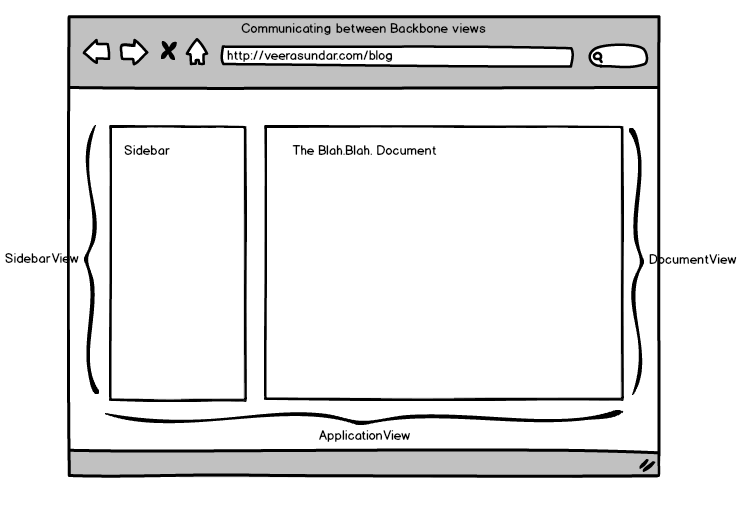
如上图所示,我设立了三个视图 (view) :
ApplicationView - 作为最外层视图来包含下级视图
DocumentView - 展示正在编辑或浏览的内容
SidebarView - 展示一些和 document 相关的信息
DocumentView 和 SidebarView 作为 ApplicationView 的子视图,所以整体的视图结构如下图所示:
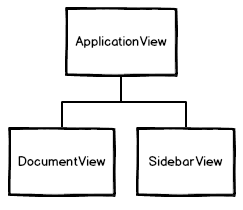
用户在任意一个子视图进行操作,另一个子视图都需要随之变化。但由于两个子视图之间并不能直接通知对方(也就是说,它们的作用域没有直接联系,不像父视图,可以包含它所有子视图的作用域),所以,我需要一个事件机制。
在我谷歌和参考其他人的方法之后,我总结出了如下三种不同的通信方式。
我通过父视图 (ApplicationView) 来为它的两个子视图传递事件。因为父视图包含它所有子视图的作用域,因此用它作为事件传递的媒介最好不过。
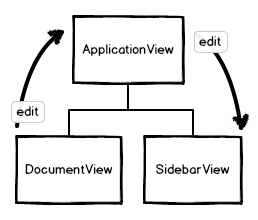
JavaScript 代码如下:
var ApplicationView = Backbone.View.extend({
  initialize: function() {
    this.documentView = new DocumentView({ parent: this });
    this.sidebarView = new SidebarView({ parent: this });

    this.documentView.on("edit", this.documentEdited, this);
  },

  documentEdited: function() {
    // do some stuff
    this.sidebarView.trigger("documentEdit");
  }
});

var DocumentView = Backbone.View.extend({
  onEdit: function() {
    this.trigger("edit");
  }
});

var SidebarView = Backbone.View.extend({
  initialize: function() {
    this.on("documentEdit", this.onDocumentEdit, this);
  },

  onDocumentEdit: function() {
    // react to document edit.
  }
});
但是,这种方法并不高效。因为我需要在 ApplicationView 中添加一个额外的事件处理函数 documentEdited() 。如果子视图有一堆事件传过来,则在父视图中会不断触发事件处理函数,导致它不堪重负。
那么来看看第二种方法。
我通过继承 Backbone.Events 来创建一个全局对象 EventBus。把它注入到各个子视图中,用来广播事件。
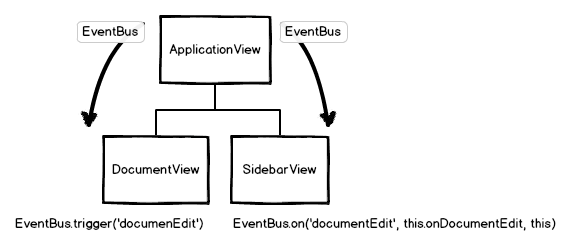
JavaScript 代码如下:
var ApplicationView = Backbone.View.extend({
  initialize: function() {
    this.eventBus = _.extend({}, Backbone.Events);

    this.documentView = new DocumentView({
      eventBus: this.eventBus
    });
    this.sidebarView = new SidebarView({
      eventBus: this.eventBus
    });
  }
});

var DocumentView = Backbone.View.extend({
  initialize: function(options) {
    this.eventBus = options.eventBus;
  },

  onEdit: function() {
    this.eventBus.trigger("documentEdit");
  }
});

var SidebarView = Backbone.View.extend({
  initialize: function(options) {
    this.eventBus = options.eventBus;
    this.eventBus.on("documentEdit", this.onDocumentEdit, this);
  },

  onDocumentEdit: function() {
    // react to document edit.
  }
});
在这个方法中,我把 EventBus 作为一个全局对象用来注册事件。如果我想在各个视图之间通信,只需要在视图中注入 EventBus,就可以通过它方便地触发或监听事件了。
注意:如果你不想要创建全局对象,你仍然可以创建模块 (module) 或视图 (view) 级别的 EventBus 用来通信。
这个方法已经明显优于第一种方法了。但是需要我们手动的在子视图中引入 EventBus,说明还有可以改进的空间,那么,来看看第三种方法。
在第二种方法中,我创建了一个单独的 EventBus,继承自 Backbone.Events。但最近我悟到 Backbone 对象本身就是一个混合了 Events 的对象,所以我直接用 Backbone 广播事件,就无需单另创建的 EventBus 了。
而且 Backbone 对象可以直接调用,这样我就不必在每个子视图中手动注入它了。
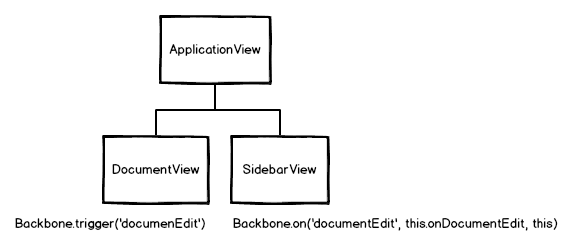
JavaScript 代码如下:
var ApplicationView = Backbone.View.extend({
  initialize: function() {
    this.documentView = new DocumentView();
    this.sidebarView = new SidebarView();
  }
});

var DocumentView = Backbone.View.extend({
  onEdit: function() {
    Backbone.trigger("documentEdit");
  }
});

var SidebarView = Backbone.View.extend({
  initialize: function(options) {
    Backbone.on("documentEdit", this.onDocumentEdit, this);
  },

  onDocumentEdit: function() {
    // react to document edit.
  }
});
我最终在我的项目中使用了第三种方法。而且在我看来,虽然它直接依赖了全局的 Backbone 对象,但是用起来却异常简洁。
如果有比这更好的方法,欢迎分享交流。
(译文完)
原文地址:Communicating between views in Backbone 译文地址:Backbone View 之间通信的三种方式
此内容由惯性聚合(RSS阅读器)自动聚合整理,仅供阅读参考。 原文来自 — 版权归原作者所有。