



惯性聚合 高效追踪和阅读你感兴趣的博客、新闻、科技资讯
阅读原文 在惯性聚合中打开

推荐订阅源

酷 壳 – CoolShell
酷 壳 – CoolShell
H
Hacker News: Front Page
P
Palo Alto Networks Blog
T
ThreatConnect
Apple Machine Learning Research
博客园_首页
T
True Tiger Recordings
P
Privacy & Cybersecurity Law Blog
B
Blog
IT之家
IT之家
Last Week in AI
Last Week in AI
F
Full Disclosure
Hacker News: Ask HN
Hacker News: Ask HN
C
Comments on: Blog
Microsoft Azure Blog
C
Cybersecurity and Infrastructure Security Agency CISA
Microsoft Security Blog
博客园 - 【当耐特】
N
News and Events Feed by Topic
NISL@THU
NISL@THU
腾讯CDC
雷峰网
雷峰网
Security Latest
Security Latest
李成银的技术随笔
M
Microsoft Research Blog - Microsoft Research
L
LangChain Blog
L
Lohrmann on Cybersecurity
cs.CL updates on arXiv.org
C
Check Point Blog
Y
Y Combinator Blog
Recent Announcements
博客园 - Franky
N
News | PayPal Newsroom
V
V2EX
A
About on SuperTechFans
The Register - Security
月光博客
月光博客
奇客Solidot–传递最新科技情报
奇客Solidot–传递最新科技情报
Google Online Security Blog
MyScale Blog
MyScale Blog
Cisco Talos Blog
Cisco Talos Blog
Vercel News
Vercel News
WordPress大学
WordPress大学
C
Cyber Attacks, Cyber Crime and Cyber Security
The Hacker News
The Hacker News
IntelliJ IDEA : IntelliJ IDEA – the Leading IDE for Professional Development in Java and Kotlin | The JetBrains Blog
爱范儿
爱范儿
A
Arctic Wolf
L
LINUX DO - 最新话题
freeCodeCamp Programming Tutorials: Python, JavaScript, Git & More

GeekPlux

一代人的博客,一代人的青春注脚 那些年我打过的日结工 来美国的两年后 2023 一蓑烟雨 在美国拥有一辆 Tesla 的成本 我的 Workspaces 十年进化史 How to Sync Logseq Plugins, Themes and Settings Across Multiple Devices 迁移豆瓣读书记录到 goodreads Enhance Your Internet Privacy in 2023 Refactor your blog comments system with Webmention.io 来美国之后,如何快速安顿下来 Three Levels of Information Perception 疫情三年 与人聊天的美好 我获取信息的方法 2022 版 我是如何学会编程的 Legacy code best practice: how to take over an existing project smoothly 2020 恍如隔世 接外包的一些坑和小技巧 论交友 往返香港隔离指南 即将失明,还能继续做程序员吗 小谈我对新技术的态度 How to use tailwindcss with AMP in a Next.js project 远程工作如何提高效率 复式记账、财报、量化与图论 我为什么从阿里巴巴离职 2019 柳暗花明 YouTube 观看历史数据分析 投资被动型指数基金正在造成下一次金融泡沫? 三种主流的网赚套利,躺着赚钱? 色盲的世界 我是如何管理 21 张信用卡的 薅羊毛的最大意义:保持对规则的敏感度 来香港的两个月 数据可视化技术实现的关键点 不需要扫描仪,数字化归档自己的文件 如何找到时薪 80 美元的远程工作(二) 如何找到时薪 80 美元的远程工作(一) 如何打造真正的简历 浅思图数据可视化 舍本逐末的学习方式 给想转行作程序员的人泼一盆冷水 算法优化人生之 —— 调度算法 杭州最适合闲来溜达的几条路线 2018 平淡无奇 突闻金庸先生逝世有感 十年博客折腾历史 数据可视化之 Sankey 桑基图的实现 研究生生涯总结 如何在不规则多边形内均匀撒点的算法 Web 前端中的增强现实(AR)开发技术 参加 Google Summer of Code 的体验 netjsongraph.js – Google Summer of Code (GSoC) 2017 summary 如何在 GitHub 上获得数百 stars Markvis - 在 markdown 中生成可视化图表 D3 force layout and WebGL integration 文本数据可视化(下)——一图胜千言 文本数据可视化(上)——从 Wordle 谈起 我获取信息的渠道 数据可视化基础——视觉编码 数据可视化基础——数据模型 数据可视化基础——可视化流程 为什么要用 Emacs Vega-Lite: A Grammar of Interactive Graphics 如何搭建一个私人网盘 如何阅读一篇学术论文 超过十个人的微信群根本没有价值 毕业后的两年 建立索引式的学习方法 为什么我喜欢写代码 写文章的小技巧 为什么文章写得好的人都很厉害 人总要有点盲目的自信 如何管理好自己的密码 Backbone View 之间通信的三种方式 Vim - 适合自己的,才是最好的 轻松玩转 Ukulele 告别社交网络有多难 双拼学习记 CoffeeScript 编码风格指南(译) CoffeeScript 笔记 CSS 最核心的几个概念 响应式设计简易指南(译) 初识 TDD Collapsing margins——合并的外边距 菜鸟级 Mac 配置(二) 菜鸟级 Mac 配置(一) CSS 编写原则 Goodbye,我的大学 如何新建一个 Cocos2d-x 项目 Windows8.1 下 Cocos2d-x 环境搭建 Android 开发如何入门 如何绑定独立域名 写博客就用 FarBox 尝试改变微信公众账号消息的推送方式 情似流水 操作系统总结——存储器管理 操作系统总结——处理机管理 操作系统总结——引论
Setting Up Umami as Your Google Analytics Alternative: A Step-by-Step Guide
GeekPlux · 2023-07-08 · via GeekPlux

Umami offers a user-friendly and privacy-focused alternative to the ubiquitous Google Analytics. As an open-source web analytics tool, it provides you with necessary insights about your website's traffic without compromising the privacy of your visitors. In this guide, we will walk you through the process of setting up Umami for your blog using PlanetScale, GitHub, and Vercel.

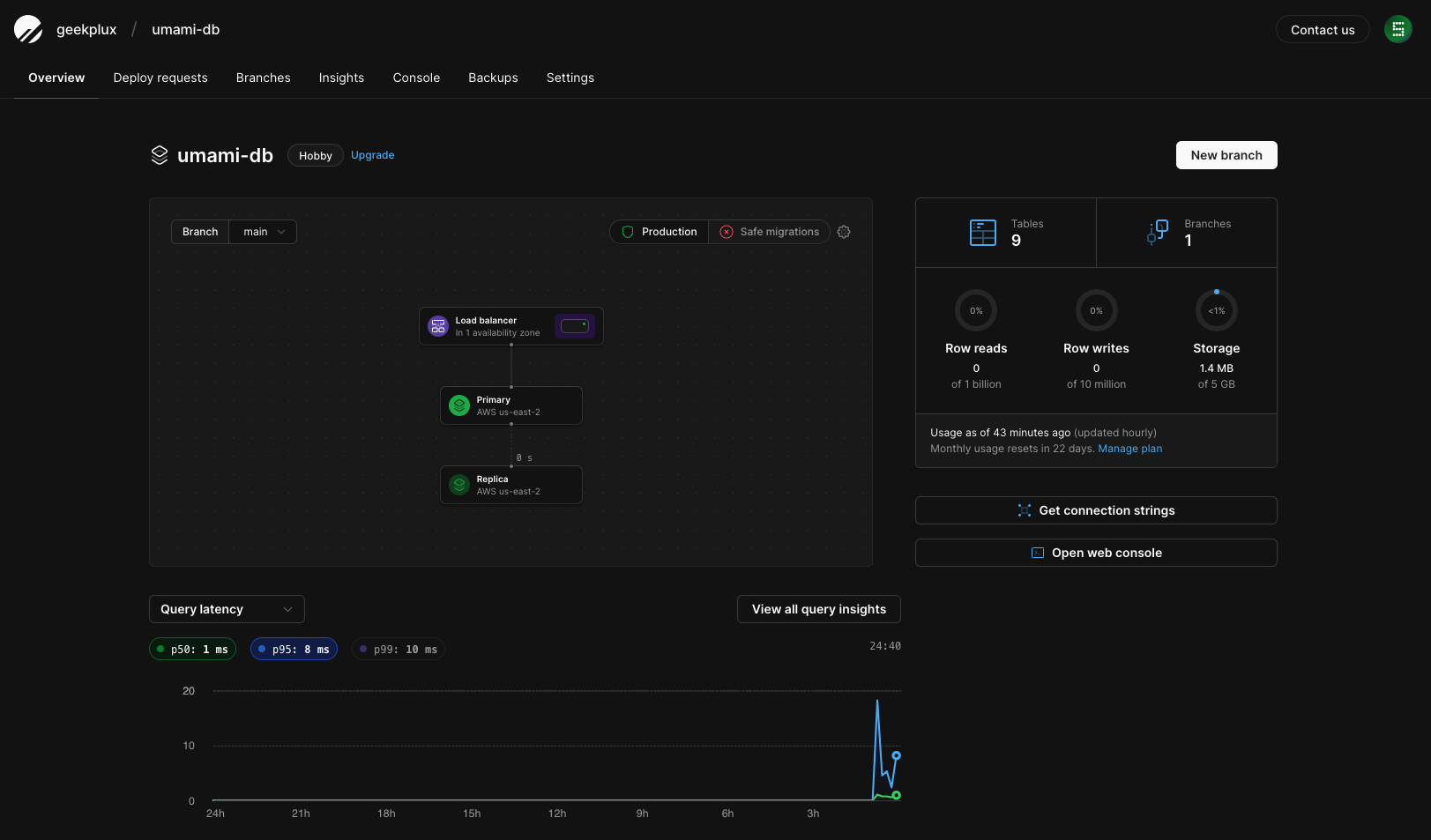
Step 1: Create an Umami Database on PlanetScale

Before you start, you need to create an Umami database on PlanetScale. This will store your site's analytics data that Umami will collect.

  • Navigate to the PlanetScale dashboard.
  • Click on the 'Create Database' button and name it 'umami-db'.

The creation process may take a few moments. Upon completion, you will be able to see your new 'umami-db' listed on your PlanetScale dashboard.
Step 2: Fork the Umami Project on GitHub

Next, we will clone the Umami project to our own GitHub account.

The Umami project will now be copied into your GitHub account.

Step 3: Import Your Umami Project on Vercel

Vercel will be used to deploy our Umami analytics.

  • Head over to your Vercel dashboard.
  • Choose 'Import Project' and select the Umami project from your GitHub repositories.

Vercel will automatically start deploying the project.

Step 4: Configure PlanetScale Integration to Vercel

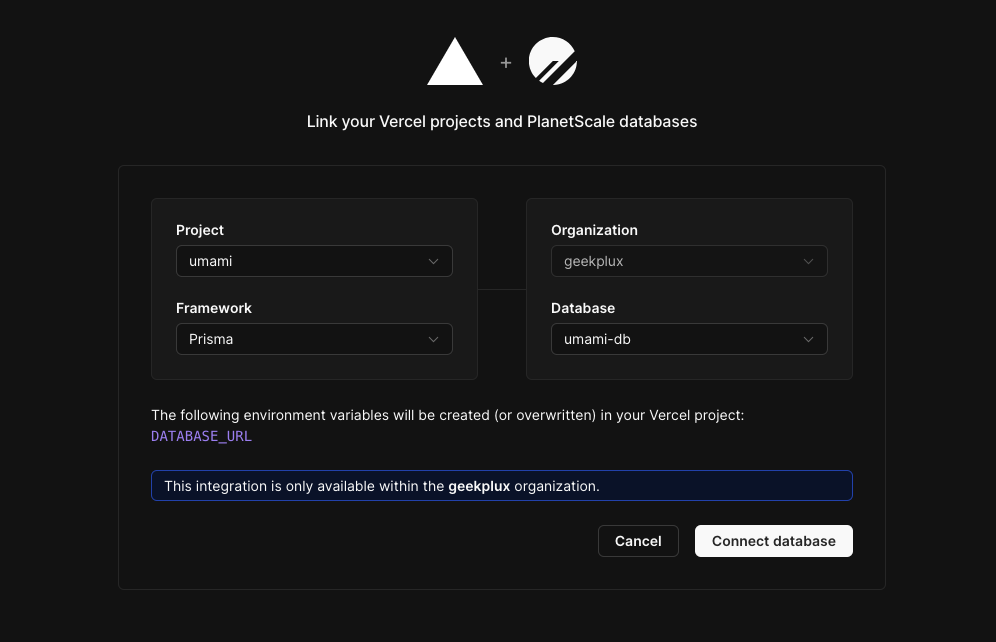
We will now integrate the 'umami-db' database with our Umami project on Vercel.

  • Return to your PlanetScale dashboard.
  • Navigate to the 'Integrations' section and select 'Vercel' as your choice.
  • Connect your 'umami' project with your 'umami-db' database.
  • Choose 'Prisma' as the connection method.

This process will automatically fill in the 'DATABASE_URL' environment variable in your Vercel project.
Step 5: Redeploy Umami on Vercel

With the database connected, we now need to redeploy our Umami project on Vercel.

  • Go back to your Vercel dashboard.
  • Navigate to your Umami project and click 'Redeploy'.

The deployment process will begin. After completion, you will be able to see the new deployment in your Vercel project dashboard.

Step 6: Configure Umami to Track Your Website

Finally, we will add our blog to Umami to start tracking.
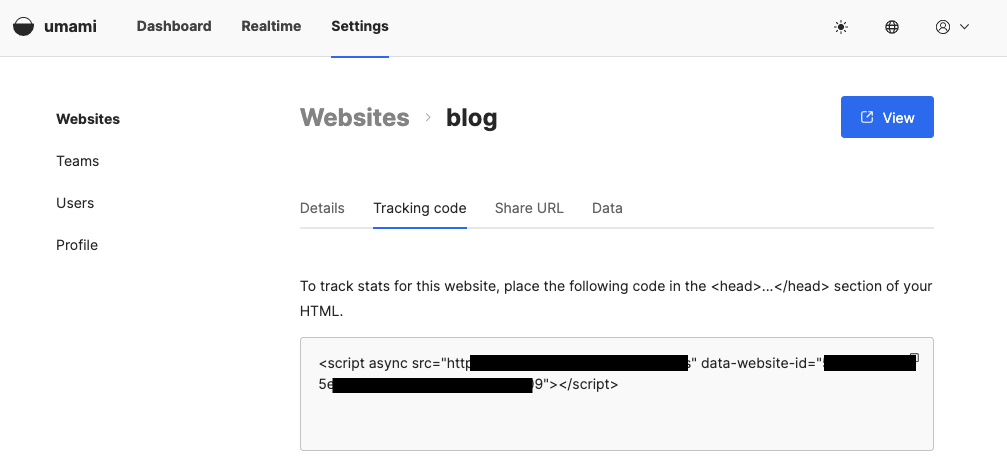
  • Head over to your deployed Umami dashboard.
  • Click 'Add Website' and fill in the details of your blog.
  • Copy the generated tracking code.
  • Paste this tracking code into the HTML of your blog.

Congratulations, you've successfully set up Umami for your blog! Now, your website's performance and visitor behavior can be monitored right from your Umami dashboard.

However, if you'd rather not host this service yourself, consider purchasing services from alternatives such as Plausible or Fathom. These options offer excellent analytics capabilities without the need for self-hosting.

This whole process is surprisingly simple and only requires a few clicks of your mouse. Enjoy your newfound analytical power with Umami or its excellent alternatives!