


后台代码:
public partial class MainPage : PhoneApplicationPage
    {
        private long siz;
        private long speed;
        private Stopwatch sw;
        private Stopwatch sw1;

        public MainPage()
        {
            InitializeComponent();
        }

        private void button1_Click(object sender, RoutedEventArgs e)
        {
            testspeed();
        }

        public void testspeed()
        {
            WebClient client = new WebClient();
            progressBar1.Value = 0.0;
            textBox2.Text = "0 %";
            client.DownloadStringCompleted += new DownloadStringCompletedEventHandler(this.webClient_DownloadStringCompleted);
            client.DownloadProgressChanged += new DownloadProgressChangedEventHandler(this.webClient_DownloadProgressChanged);
            sw = Stopwatch.StartNew();//用来记录总的下载时间
            sw1 = Stopwatch.StartNew();//用来记录下载过程中的时间片,用于计算临时速度
            client.DownloadStringAsync(new Uri("http://dl_dir.qq.com/qqfile/qq/QQ2011/QQ2011.exe"));
        }
        //下载过程事件
        public void webClient_DownloadProgressChanged(object s, DownloadProgressChangedEventArgs e)
        {
            textBox2.Text = e.ProgressPercentage.ToString() + " %";
            sw1.Stop();
            long num = e.BytesReceived / 1024;
            if (sw1.Elapsed.Seconds != 0)
            {
                speed = num / ((long)sw1.Elapsed.Seconds);
            }
            textBlock4.Text = this.speed + " KB/s";
            progressBar1.Value = e.ProgressPercentage;
            siz = e.TotalBytesToReceive;
            textBlock3.Text = siz/1024/1024 + "MB";
            sw1.Start();
        }
        //下载完成事件
        public void webClient_DownloadStringCompleted(object s, DownloadStringCompletedEventArgs e)
        {
            sw.Stop();
            siz = siz / 1024;
            long num = siz / ((long)sw.Elapsed.Seconds);
            sw.Reset();
            textBox1.Text = "下载完成!";
            textBlock1.Text = num + " KB/s";
        }
    }
}
XAML 设计代码:
<phone:PhoneApplicationPage
    x:Class="DownLoad.MainPage"
    xmlns="http://schemas.microsoft.com/winfx/2006/xaml/presentation"
    xmlns:x="http://schemas.microsoft.com/winfx/2006/xaml"
    xmlns:phone="clr-namespace:Microsoft.Phone.Controls;assembly=Microsoft.Phone"
    xmlns:shell="clr-namespace:Microsoft.Phone.Shell;assembly=Microsoft.Phone"
    xmlns:d="http://schemas.microsoft.com/expression/blend/2008"
    xmlns:mc="http://schemas.openxmlformats.org/markup-compatibility/2006"
    mc:Ignorable="d" d:DesignWidth="480" d:DesignHeight="768"
    FontFamily="{StaticResource PhoneFontFamilyNormal}"
    FontSize="{StaticResource PhoneFontSizeNormal}"
    Foreground="{StaticResource PhoneForegroundBrush}"
    SupportedOrientations="Portrait" Orientation="Portrait"
    shell:SystemTray.IsVisible="True">
    <Grid x:Name="LayoutRoot" Background="Transparent">
        <Grid.RowDefinitions>
            <RowDefinition Height="Auto"/>
            <RowDefinition Height="*"/>
        </Grid.RowDefinitions>

        <StackPanel x:Name="TitlePanel" Grid.Row="0" Margin="12,17,0,28">
            <TextBlock x:Name="ApplicationTitle" Text="WP7开发者" Style="{StaticResource PhoneTextNormalStyle}"/>
            <TextBlock x:Name="PageTitle" Text="下载进度" Margin="9,-7,0,0" Style="{StaticResource PhoneTextTitle1Style}"/>
        </StackPanel>

        <Grid x:Name="ContentPanel" Grid.Row="1" Margin="12,0,12,0">
            <Grid.RowDefinitions>
                <RowDefinition Height="114*"/>
                <RowDefinition Height="493*"/>
            </Grid.RowDefinitions>
            <ProgressBar Foreground="Green" Height="30" HorizontalAlignment="Left" Margin="9,79,0,0" Name="progressBar1" VerticalAlignment="Top" Width="377" Value="0" Maximum="100" FontSize="72" BorderThickness="0"/>
            <TextBlock Height="53" Margin="12,20,-16,0" Name="textBox1" Text="正在下载文件 . . ." VerticalAlignment="Top" Width="460"/>
            <TextBlock Margin="6,24,287,427" Name="result" Text="下载的速度" Grid.Row="1"/>
            <TextBlock  Foreground="White" Height="59" HorizontalAlignment="Left" Margin="203,13,0,0" Name="textBox2" Text=""  VerticalAlignment="Top" Width="123"/>
            <Button Content="开始下载" Height="72" HorizontalAlignment="Left" Margin="96,244,0,0" Name="button1" VerticalAlignment="Top" Width="199" Click="button1_Click" Grid.Row="1"/>
            <TextBlock Height="47"  Margin="6,101,254,0" Name="finalresult" Text="平均的速度" VerticalAlignment="Top" Grid.Row="1"/>
            <TextBlock Height="47" HorizontalAlignment="Left" Margin="132,89,0,0" Name="textBlock1" Text="" VerticalAlignment="Top" Width="156" Grid.Row="1"/>
            <TextBlock Height="47" HorizontalAlignment="Left" Margin="6,166,0,0" Name="textBlock2" Text="文件的大小" VerticalAlignment="Top" Width="127" Grid.Row="1"/>
            <TextBlock Height="47" HorizontalAlignment="Right" Margin="0,166,168,0" Name="textBlock3" Text="" VerticalAlignment="Top" Grid.Row="1" Width="156"/>
            <TextBlock Height="47" HorizontalAlignment="Right" Margin="0,19,168,0" Name="textBlock4" Text="" VerticalAlignment="Top" Grid.Row="1" Width="156"/>
        </Grid>
    </Grid>
</phone:PhoneApplicationPage>
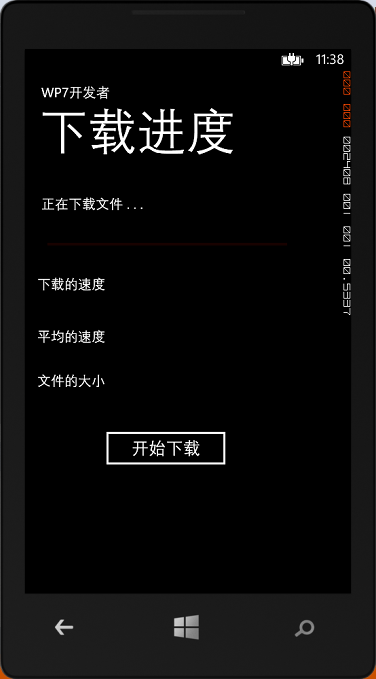
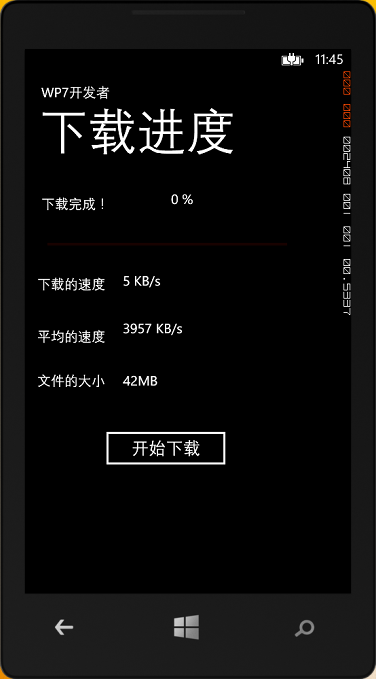
运行结果图:
此内容由惯性聚合(RSS阅读器)自动聚合整理,仅供阅读参考。 原文来自 — 版权归原作者所有。